What Does DiskAid Do?
DiskAid is a cross-platform file management utility designed to facilitate data transfer between iOS devices and computers. Compatible with both Windows and macOS, the software establishes a connection via USB or Wi-Fi to provide access to the iOS file system. It allows users to move music, videos, and entire playlists from an iPhone, iPad, or iPod back to an iTunes library or a local drive, preserving metadata such as ratings and play counts.
The application extends its functionality to personal data management. Users can export SMS, iMessages, contacts, notes, voicemail, and call history to a computer for archival or professional use. Additionally, DiskAid enables the use of an iOS device as an external mass storage device, allowing for the direct transfer of documents and files between a computer and specific mobile applications.
For visual media, the software provides tools to browse and transfer the Camera Roll, Photo Albums, and Photo Stream. It also offers a pathway to manage files stored in iCloud. Advanced users and developers can utilize multi-threaded transfers and direct root folder access on jailbroken devices, offering a secure alternative to SSH for testing and development workflows. DiskAid supports ten languages and handles simultaneous connections to multiple devices without requiring a specific sync relationship with the host computer.
Top 5 Reasons To Download DiskAid
- Seamless Media Recovery and iTunes Library Rebuilding: Effortlessly transfer music, videos, and playlists from your device back to your computer with all metadata intact.
- Total Control Over Personal Data: Export SMS, iMessages, contacts, call history, and voicemails directly to your desktop for archival or legal use.
- Unrestricted File System Access and Mass Storage: Use your iPhone or iPad as an external hard drive with both high-speed USB and convenient Wi-Fi connectivity.
- Comprehensive Photo and Cloud Management: Direct access to your Camera Roll, Photo Stream, and iCloud documents without the limitations of traditional syncing.
- Professional Grade Tools for Power Users and Developers: Multi-threaded transfers, root access for jailbroken devices, and a secure alternative to SSH.
If you have ever felt like your iPhone was a "walled garden" that kept your own data just out of reach, you are not alone. For years, iOS users have struggled with the rigid limitations of standard synchronization software. We have all been there: you have a library of music on your iPod that isn't on your new laptop, or you have a series of text messages that you desperately need to save for legal or sentimental reasons, but there is no "export" button in sight. This is exactly why DiskAid is a game-changer. As a tech reviewer, I see a lot of utilities that claim to "manage" your phone, but DiskAid is one of the few that actually gives you the keys to the kingdom. It is a robust, multi-purpose file transfer tool that works on both PC and Mac, supporting 10 different languages and offering a level of transparency into the iOS file system that is usually reserved for hackers. Here is a deep dive into why this giveaway is an absolute must-download for any serious iPhone, iPad, or iPod owner.
1. Seamless Media Recovery and iTunes Library Rebuilding
The most common nightmare for any Apple user is the "lost library" scenario. Maybe your computer’s hard drive crashed, maybe you bought a new machine and forgot to migrate your data, or maybe you accidentally deleted your primary music folder. Whatever the reason, you are left with a situation where all your music exists on your iPhone or iPod, but you have no way to get it back onto your computer because the standard sync process is strictly one-way. DiskAid solves this problem with an elegance that is rare in the software world. It features an intuitive music and video transfer wizard that allows you to copy a specific selection of tracks or your entire library back into iTunes or any folder on your computer.
What makes DiskAid stand out from inferior competitors is its attention to detail. It doesn’t just move the raw audio files; it preserves the soul of your library. We are talking about metadata. When you use DiskAid to rebuild your library, it brings over your ratings, your play counts, and your carefully curated playlists. It even handles iTunes U content, podcasts, and audiobooks. If you are moving music between different devices—say, from an old iPod to a new iPhone—DiskAid will merge the tracks into your existing iTunes library while automatically detecting and skipping duplicates. This level of intelligence ensures that your music collection remains organized and clean, saving you hours of manual cleanup. It effectively turns your mobile device into a portable backup of your media life.
2. Total Control Over Personal Data
Our smartphones are more than just communication tools; they are the primary archives of our personal and professional lives. Within your iPhone lies a treasure trove of data: years of text messages, critical voicemails from loved ones or clients, detailed call histories, and important notes. Normally, this data is trapped. If you want to save a text message thread, you are often reduced to taking dozens of screenshots. DiskAid changes the narrative by providing a direct pipeline for your personal data. It allows you to transfer SMS, iMessages, contacts, notes, and even voice memos directly to your Mac or PC with simple drag-and-drop functionality.
The practical applications for this are endless. Emphasizing the professional utility, think about call history. If you are a freelancer or a consultant who needs to track billable hours or maintain a log for timesheeting, having a searchable record of your calls on your computer is invaluable. For those in legal situations, DiskAid can export text messages into formats like PDF, which are essential for providing proof in court. It also acts as a safety net for your voicemail. Instead of worrying about your carrier deleting old messages or losing them during a device upgrade, you can back up those precious voice recordings to your hard drive forever. With DiskAid, your data is no longer "stuck" in the device; it belongs to you, to be used and stored however you see fit.
3. Unrestricted File System Access and Mass Storage
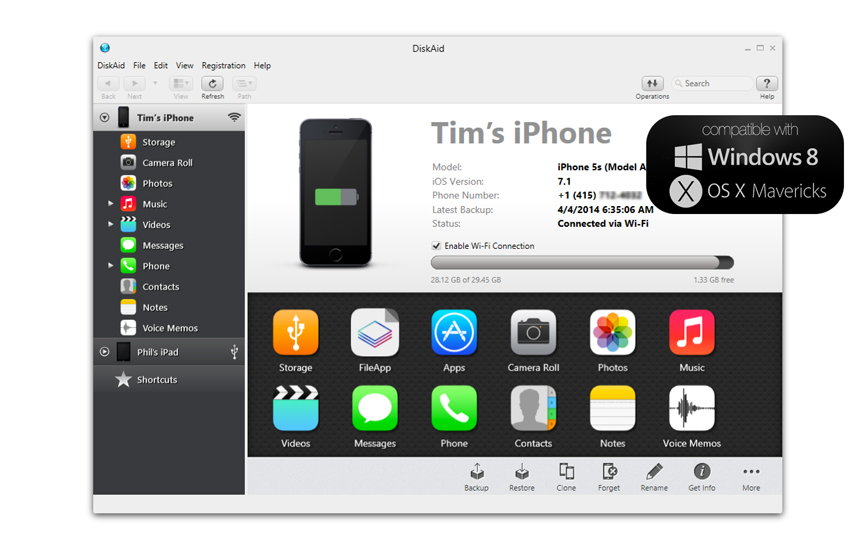
One of the biggest advantages of DiskAid is its ability to treat your iOS device like a standard external mass storage device. For those of us who grew up using USB thumb drives, the "sandboxed" nature of iOS can be incredibly frustrating. DiskAid breaks those barriers down. By using either a lightning-fast USB connection or the convenience of Wi-Fi, you can browse the file system of your iPhone, iPad, or iPod Touch just like you would a folder on your desktop. This means you can carry large files, documents, and presentations in your pocket and access them on any computer running the software.
The integration goes even deeper when you pair DiskAid with an app like FileApp on your iPhone. This combination allows you to not only store files on your device but actually view and interact with them while on the go. Furthermore, DiskAid provides direct access to every installed application on your device. You can browse the internal folders of your apps, allowing you to move documents, saved games, or media files back and forth between your computer and the specific app that uses them. This "two-way" file transfer capability turns your iPhone into a versatile productivity tool rather than just a consumption device. Whether you are transferring a PDF to read on the train or pulling a specialized data file from an app to edit on your PC, DiskAid makes the process instantaneous and reliable.
4. Comprehensive Photo and Cloud Management
Photos are arguably the most irreplaceable data on any device. While cloud syncing has improved, many users still find it difficult to manage large volumes of photos or recover albums that were synced from computers they no longer own. DiskAid provides a dedicated browser window specifically for your visual media. You can access your Camera Roll, your various Photo Albums, and even your videos with ease. The interface allows you to select exactly what you want and drag it to your desktop, making it the perfect tool for performing manual backups of your most precious memories.
Furthermore, DiskAid 6 for Mac takes this a step further by offering unique access to iCloud and Photo Stream. In the modern Apple ecosystem, files are often scattered across the cloud, making them difficult to "touch" and move. DiskAid acts as a bridge, allowing you to browse and transfer files stored in iCloud documents’ storage directly from your Mac. You can upload documents to the cloud to make them available to matching apps or download them to keep a local copy for offline editing. It also gives you a window into your Photo Stream, letting you copy not only your own uploaded photos but also the shared streams from friends and family. This level of transparency ensures that you are never guessing where your files are actually stored; they are always right there in the DiskAid interface, ready to be managed.
5. Professional Grade Tools for Power Users and Developers
While DiskAid is incredibly user-friendly for the average person, it also hides a massive amount of power under the hood for developers and iOS "power users." In the tech world, efficiency is king, and DiskAid delivers this through a multi-threaded file transfer process. This allows for rapid data movement across multiple devices simultaneously, which is a godsend for developers who need to test apps or configurations across various hardware versions. The software is designed to be a solid and secure alternative to SSH, providing a more stable and faster way to interact with the device’s internal structure without the overhead or security risks often associated with wireless terminal connections.
For the jailbreak community and those who need deep system access, DiskAid is an essential tool. It allows you to access the Root folder of any installed application, regardless of the app’s internal "file sharing" settings. If you are working with a jailbroken device, DiskAid goes even further, granting you access to the actual system Root folder. The advanced browser technology includes features like multi-quickview and remote save, which can significantly accelerate the workflow of anyone developing for iOS or troubleshooting system-level issues. It is rare to find a tool that is simple enough for a grandmother to use to save her photos, yet powerful enough for a software engineer to use for app deployment. DiskAid manages to bridge that gap perfectly, making it a versatile addition to any digital toolkit.
Conclusion: Why You Should Act Now
In the world of tech utilities, there are "nice-to-have" apps and there are "must-have" apps. DiskAid firmly falls into the latter category. It is a liberation tool for your data, a safety net for your memories, and a powerful engine for your productivity. Whether you are looking to rescue a lost music library, secure your personal messages for a rainy day, or simply gain the freedom to use your iPhone as the powerful computer it actually is, DiskAid provides the solution. The ability to switch between USB for speed and Wi-Fi for convenience, combined with the deep integration into the iOS file system and iCloud, makes it an unmatched value. Don't let your data remain locked away in a proprietary ecosystem where you don't have full control. Download this giveaway, take charge of your device, and experience the true potential of your iPhone or iPad. This is the level of control that every user deserves, and with DiskAid, it is finally just a click away.

Reviews for DiskAid
Click Here to Read Reviews for DiskAid >> Click Here to Submit Reviews for DiskAid >>