What Does TranscriptSnagger Do?
TranscriptSnagger is a utility designed to extract closed caption tracks and text transcripts directly from YouTube videos. The software identifies all available subtitle files associated with a specific URL, allowing users to download localized data for archival, accessibility, or content production purposes.
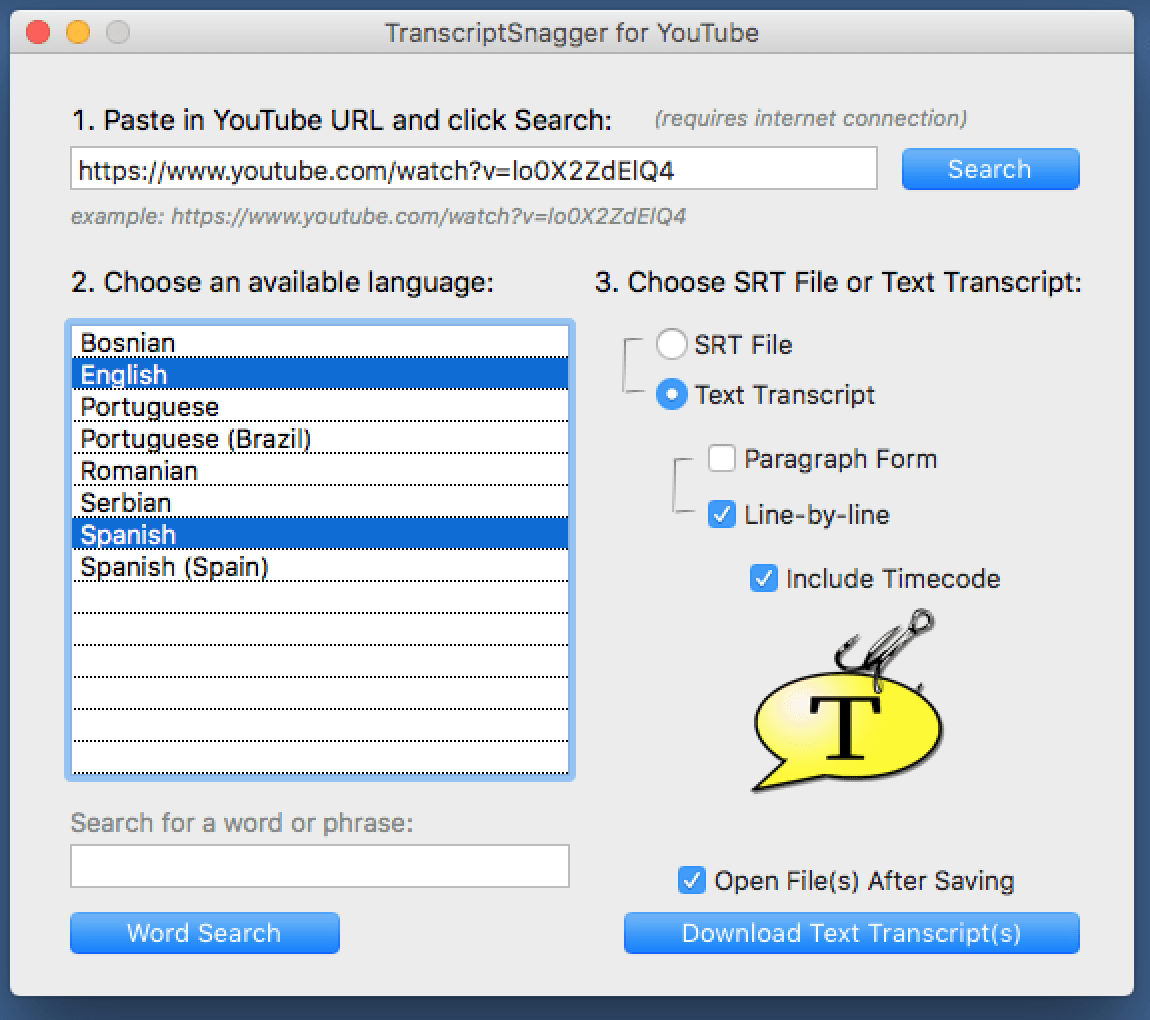
The application follows a streamlined three-step workflow:
- Users paste a YouTube URL into the interface to retrieve a list of all detected caption tracks.
- The software allows for the selection of one or multiple languages from the provided list.
- Users specify the desired output format, choosing between SRT files or plain text transcripts.
For text exports, the tool provides several configuration options. Transcripts can be formatted as continuous paragraphs or line-by-line entries, and users may choose to include or omit timecodes. Once the parameters are set, the software saves each selected language as an independent file to the local drive.
Beyond extraction, TranscriptSnagger includes a keyword search function. This feature scans the video’s dialogue for specific words or phrases. When a match is found, the software provides a direct link that opens the video at the exact timestamp where the term is mentioned, facilitating precise navigation through long-form video content.
Top 5 Reasons To Download TranscriptSnagger
- Unprecedented Efficiency in Content Repurposing
- Laser-Focused Keyword Navigation and Search Functionality
- Complete Control Over Formatting and File Exporting
- Global Accessibility with Multi-Language Support
- A Frictionless, No-Learning-Curve User Experience
If you are a content creator, a researcher, a student, or even just a casual YouTube power user, you have likely run into the same recurring frustration: the "walled garden" of video content. We live in an era where the world’s knowledge is being uploaded to YouTube at a rate of five hundred hours of video every single minute. Yet, despite this massive influx of data, the ability to actually use that data—to search it, to archive it, to read it, or to repurpose it—has remained stubbornly difficult. How many times have you watched a two-hour podcast just to find one thirty-second quote? How many times have you wished you could just grab the text of a tutorial so you could follow along at your own pace without constantly hitting the pause button?
This is where TranscriptSnagger enters the frame, and frankly, it is a game-changer for anyone who values their time. This isn't just another flimsy browser extension or a sketchy website filled with pop-up ads. This is a robust, dedicated tool designed to bridge the gap between video and text. In the world of productivity software, we often talk about "workflow optimization," but TranscriptSnagger represents something more fundamental: it represents data liberation. It takes the spoken word locked within the YouTube ecosystem and hands it back to you in a format you can actually use. Here is a deep dive into why this software is a mandatory addition to your digital toolkit.
1. Unprecedented Efficiency in Content Repurposing
We are currently living in the "Golden Age" of content repurposing. If you are a marketer or a digital creator, you know that you can’t just post a video and walk away. You need to turn that video into a blog post, a series of social media captions, a newsletter, and perhaps even an e-book. Traditionally, this required either an expensive subscription to an AI transcription service or hours of grueling manual typing. TranscriptSnagger completely eliminates that bottleneck.
By allowing you to "snag" the text transcript of any YouTube video in seconds, the software transforms a visual medium into a written one instantly. Because it pulls the official closed caption tracks, you are getting the most accurate data available for that video. Imagine being able to take a thirty-minute interview and instantly having a clean, text-based draft ready for your blog. You can remove the "ums" and "ahs," polish the grammar, and have a high-quality article ready in a fraction of the time it would take to start from scratch. This level of efficiency is why professionals are flocking to tools like this. It’s not just about saving time; it’s about increasing your output without increasing your effort.
Furthermore, for those who work in SEO (Search Engine Optimization), having the text version of a video is vital. You can analyze the keywords used in successful videos within your niche, study the structure of viral scripts, and ensure that your own content strategy is backed by hard data. When you download this giveaway, you aren't just getting a utility; you are getting a competitive advantage in the digital economy.
2. Laser-Focused Keyword Navigation and Search Functionality
Perhaps the most "magical" feature of TranscriptSnagger is its internal word search capability. We have all been in a situation where we remember a specific phrase or a specific piece of advice from a video, but we can't remember exactly when it was said. Usually, this results in a frustrated user clicking randomly on the YouTube progress bar, hoping to land on the right spot. It is a massive waste of time and an exercise in futility.
TranscriptSnagger solves this with surgical precision. The software allows you to perform a word search through the transcript and then—this is the brilliant part—it provides a direct link to the exact moment that word or phrase is uttered in the video. This transforms YouTube from a passive viewing platform into an active, searchable database. For researchers and students, this is nothing short of revolutionary. If you are studying a lecture on quantum physics and you need to find every mention of the "double-slit experiment," you don't have to watch the whole series. You just type it in, find the instances, and jump straight to the source.
This "direct-to-video" linking turns long-form content into manageable snippets of information. It changes the way you consume media. You stop being a spectator and start being a researcher. This feature alone justifies the download, as it effectively turns every YouTube video into a fully indexed textbook where the "Find" command actually works across the video timeline.
3. Complete Control Over Formatting and File Exporting
One of the biggest issues with generic "YouTube-to-text" tools is the lack of formatting options. Most of them give you a giant "wall of text" that is nearly impossible to read or edit. TranscriptSnagger understands that different users have different needs, and it provides a suite of formatting options that cater to everyone from professional video editors to casual readers.
If you are a video editor, you likely need SRT files. These SubRip Subtitle files are the industry standard for closed captioning. By downloading the SRT directly, you can take the captions from a YouTube video and easily import them into professional editing software like Adobe Premiere or Final Cut Pro. This is an essential workflow for those who need to move content across platforms—for example, taking a YouTube video and preparing it for a high-quality upload on LinkedIn or Instagram with burned-in captions.
On the other hand, if you are a writer, you might prefer a Text Transcript. TranscriptSnagger gives you the choice between paragraph form (perfect for reading like an article) or line-by-line form (perfect for script analysis). You even have the option to include or exclude timecodes. For someone who needs to cite a video in a legal or academic setting, having those timecodes is a requirement. For someone who just wants to read the transcript on their Kindle during a commute, the clean paragraph form is a godsend. This level of granular control ensures that the file you download is exactly the file you need, with no extra conversion steps required.
4. Global Accessibility with Multi-Language Support
We live in a globalized world, and YouTube is a global platform. Many of the most popular videos on the site feature dozens of different language tracks, provided either by the creator or through community contributions. TranscriptSnagger doesn't just look for the default English track; it searches for all available closed caption tracks uploaded to a video.
The software allows you to choose one or more languages from the provided list. This is a massive boon for language learners. Imagine downloading the Spanish and English transcripts of a video simultaneously. You can compare the translations line-by-line, study the colloquialisms, and improve your fluency by engaging with real-world content. Because the software saves each language as a separate file, your organization remains pristine.
For businesses operating in international markets, this feature is indispensable. If you need to see how a competitor is messaging their product in different regions, you can snag the transcripts for multiple languages and run them through your internal analysis tools. The ability to bulk-download these languages in a single session, rather than hunting for them one by one, is a testament to the software’s focus on professional-grade efficiency. It’s not just a tool for the English-speaking world; it’s a tool for the entire planet.
5. A Frictionless, No-Learning-Curve User Experience
In the tech world, we often see powerful tools that are ruined by "feature creep" or overly complicated interfaces. You shouldn't need a PhD to download a text file. TranscriptSnagger wins points for its elegant, "1-2-3" workflow. The developers have stripped away the nonsense and focused on a user interface that is intuitive from the very first click. You paste the URL, you choose your languages, and you choose your format. That’s it.
This simplicity is actually a sophisticated design choice. By making the process so easy, TranscriptSnagger encourages you to use it more often. It becomes a natural part of your browsing habit. When you see a video that looks interesting but you don't have time to watch it, you "snag" the transcript and read it later. When you hear a quote you like, you "snag" it and save it to your notes. The software doesn't get in your way; it simply facilitates your goals.
Furthermore, because the software is a dedicated application rather than a web-based "wrapper," it feels snappier and more reliable. You aren't at the mercy of a website's server load or a browser's memory-hogging extensions. It is a lightweight, purposeful tool that does one thing—extracting and searching transcripts—better than anything else on the market. In an era of bloated "everything-apps," there is something deeply refreshing about a piece of software that knows exactly what it is and performs its job with flawless consistency.
The bottom line is this: TranscriptSnagger is one of those rare tools that you didn't know you needed until you used it for the first time. Once it is in your arsenal, you will wonder how you ever managed your digital life without it. It turns the ephemeral nature of video into the permanent, searchable, and editable nature of text. Whether you are using it for professional content creation, academic research, or just to save time during your daily YouTube binge, this giveaway is an absolute must-download. It is fast, it is powerful, and it is incredibly easy to use. Don't let this opportunity pass you by—get your hands on TranscriptSnagger and start unlocking the full potential of the world's largest video library today.
From the perspective of a tech reviewer who has seen countless utilities come and go, I can confidently say that TranscriptSnagger stands out because it solves a real problem with an elegant solution. It respects the user's time, it provides high-quality data, and it offers the kind of flexibility that modern digital workflows demand. It is more than just a downloader; it is a productivity powerhouse that belongs on every desktop. Make sure you grab this while you can!

Reviews for TranscriptSnagger
Click Here to Read Reviews for TranscriptSnagger >> Click Here to Submit Reviews for TranscriptSnagger >>