What Does SoftOrbits Remove Logo Now From Video Do?
Remove Logo Now From Video is a utility designed to eliminate static overlays, watermarks, and non-removable subtitles from video streams. Utilizing an Inpainting algorithm, the software analyzes the video to replace detected objects with surrounding data, aiming to leave minimal visual artifacts even in complex scenes.
The software offers several specific tools for video restoration:
- Static Logo Removal: Automatically identifies and clears transparent or solid channel logos in full auto mode.
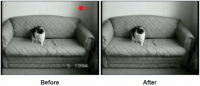
- Timestamp Clearing: Allows users to manually select imprinted dates, running timers, or frame counters common in legacy camcorder footage for automated removal across the entire file.
- Batch Processing: Enables the application of the same removal parameters to multiple video files simultaneously, which is useful for cleaning collections featuring identical watermarks.
Beyond restoration, the application provides native support for a variety of formats, including AVI, MOV, MP4, FLV, and MKV, eliminating the need for external codec installation. It also functions as a video converter, allowing users to save processed files in different formats while adjusting technical specifications such as bitrate, encoder, and frame rate on-the-fly.
Top 5 Reasons To Download SoftOrbits Remove Logo Now From Video
- Advanced Automated Inpainting Technology: Seamlessly removes logos and watermarks with professional-grade reconstruction that leaves virtually no trace.
- Legacy Footage Restoration: Effortlessly strips away dated time stamps, "REC" indicators, and frame counts from old camcorder recordings.
- High-Efficiency Batch Processing: Save hours of manual labor by applying removal settings across entire folders of video files simultaneously.
- Extensive Native Format Support: Works out of the box with AVI, MP4, MKV, MOV, and many more without the need for external codec packs.
- Built-in Video Conversion and Customization: Not just a removal tool, but a full-featured converter that lets you control bitrates, frame rates, and file types.
We have all been there. You have spent hours hunting for the perfect piece of video footage for a project, or perhaps you have finally unearthed a digital copy of a long-lost family memory, only to find it obscured by a giant, distracting channel logo or an ugly, bright yellow date stamp from 1998. It is frustrating, it is unsightly, and until recently, it was incredibly difficult to fix without expensive professional software and hours of frame-by-frame editing. But today, I am looking at a tool that changes the game entirely. Remove Logo Now From Video is a sophisticated utility designed to reclaim your visual real estate, and it does so with a level of automation that feels almost like magic.
In the world of tech, we often see "one-click" solutions that fail to deliver on their promises. However, after putting this software through its paces, I can confidently say that this is the tool you have been waiting for. Whether you are a content creator looking to clean up stock footage, a digital archivist preserving old television broadcasts, or a hobbyist wanting to polish your home movies, this giveaway is an absolute must-download. Let’s dive deep into the five primary reasons why you need to add this to your digital toolkit right now.
1. Advanced Automated Inpainting Technology
The centerpiece of Remove Logo Now From Video is its remarkable Inpainting algorithm. For those who aren't familiar with the term, inpainting is a sophisticated process where the software analyzes the pixels surrounding an object and "guesses" what should be behind it. This isn't just a simple blur or a crude patch; it is a mathematical reconstruction of the video stream. When you activate the full auto mode, the software scans the video, identifies static overlays like channel bugs or watermarks, and begins the delicate process of removing them.
What makes this specific implementation so impressive is how it handles semi-transparent logos. Many modern broadcasters use "ghost" logos that are partially see-through. These are notoriously difficult to remove because they involve complex alpha-channel transparency. Remove Logo Now From Video excels here, gracefully lifting the logo away and leaving zero or close to zero visible traces. Even in complicated scenes with high motion or varying textures, the algorithm works to maintain the integrity of the original footage. This "set it and forget it" approach to logo removal is a massive win for anyone who values their time.
The beauty of the full auto mode is that you don't need to be a video engineer to get professional results. The software does the heavy lifting of locating the static overlays, meaning you don't have to spend your afternoon squinting at the screen trying to perfectly mask out a tiny watermark. It is intelligent, it is efficient, and it produces a clean output that looks as if the logo was never there in the first place. For anyone who has ever been annoyed by a watermark, this feature alone makes the software worth its weight in gold.
2. Legacy Footage Restoration
If you grew up in the era of VHS-C, Hi8, or MiniDV camcorders, you know the struggle of the "permanent timestamp." Back in the day, manufacturers thought it was a great feature to hard-code the date, time, and even the "REC" blinking dot directly onto the video signal. While it was useful for organizing tapes in 1995, it is a huge eyesore when you are trying to watch those videos on a modern 4K television. These imprints are often bright white or yellow, making them incredibly distracting.
Remove Logo Now From Video offers a specialized approach to these artifacts. By using your mouse to select the area where the camcorder imprinted the numbers, you tell the software exactly where to focus its power. It then processes the entire file, removing those glowing digits and filling in the gaps with the surrounding video data. This is a lifesaver for family historians. Imagine being able to watch your first birthday party or your graduation without a giant "MAR 12 1994" blocking the bottom right corner of the screen.
This functionality extends beyond just dates and times. It is equally effective at removing frame counts, running timers, or those annoying blinking red dots that signify a recording in progress. By cleaning up these "analogue" artifacts, you are essentially remastering your personal history. The software brings a modern, clean look to old footage, allowing the content of the video to shine without the clutter of 20-year-old camera interfaces.
3. High-Efficiency Batch Processing
Efficiency is the hallmark of great software, and this is where the Batch Operation mode truly shines. Let’s say you have an entire season of a classic TV show that you’ve digitized from old tapes, or a series of corporate training videos that all feature an outdated company logo in the top corner. Processing these one by one would be a soul-crushing task that would take days of manual input.
With Remove Logo Now From Video, you can simply drag and drop your entire collection of files into the interface. Because channel logos and watermarks are usually in the exact same position across a series of videos, you only need to set your removal parameters once. The software then goes to work, churning through the queue and applying the same high-quality correction to every single file. This is a feature designed for the power user who deals with high volumes of content.
This batch capability isn't just a time-saver; it’s a workflow revolution. It allows you to set up a massive project before you go to bed and wake up to a folder full of clean, professional-looking videos. For content creators who might be dealing with hundreds of clips, this level of automation is the difference between meeting a deadline and falling behind. It turns a complex editing chore into a simple background task.
4. Extensive Native Video Support
One of the biggest headaches in video editing is the dreaded "missing codec" error. You download a tool, try to open an MKV or an FLV file, and the software crashes or tells you that you need to install a third-party codec pack that probably contains malware. Remove Logo Now From Video avoids this entirely by offering Native Video Support for a massive range of formats. This means the codecs are built directly into the software, ensuring stability and ease of use.
The list of supported formats is genuinely impressive: AVI, MOV, M1V, MP2, SVCD, FLV, MP4, M2V, DVD, SWF, 3GP, MKV, WMV, and RM10. Whether you are working with a modern MP4 from a smartphone or an obscure RM10 file from the early days of the internet, this software can handle it. You don't have to worry about your system becoming bloated with unnecessary external drivers, and you don't have to waste time converting files into a "compatible" format before you can even start removing logos.
This native support also means that the processing is faster and more reliable. Because the software "speaks the language" of these formats natively, the data stream is handled more efficiently during the Inpainting process. For a tech reviewer, there is nothing more refreshing than a piece of software that "just works" regardless of what file type you throw at it. It provides a level of versatility that is rare in specialized video utilities.
5. Built-in Video Conversion and Customization
While the primary goal of this software is logo removal, it doubles as a powerful on-the-fly video converter. Many users find themselves in a situation where they have a video in an "exotic" or outdated format that won't play on their smart TV or tablet. Instead of using one tool to remove the logo and another tool to convert the file, Remove Logo Now From Video allows you to do both in a single pass.
The level of control provided here is top-notch. You aren't just limited to choosing a new file extension; you can actually specify the encoder, bitrate, and frame rate. This is crucial for maintaining quality. If you want to keep the file size small for web sharing, you can lower the bitrate. If you are working on a high-definition project where every pixel counts, you can crank up the settings to ensure zero quality loss during the re-encoding process. This makes the software a two-in-one utility that earns a permanent spot on your hard drive.
The ability to customize the output format means that you can tailor your videos for any device—be it an iPhone, an Android tablet, or a home media server. It streamlines your entire video preparation process. You start with a cluttered, incorrectly formatted video and end with a clean, high-quality file in the exact format you need. In the world of digital media management, having this much power in a single, easy-to-use interface is a massive advantage.
In conclusion, Remove Logo Now From Video is a powerhouse of a utility that tackles one of the most annoying problems in digital media with elegance and technical sophistication. It combines the "magic" of AI-driven inpainting with the practical necessity of batch processing and format conversion. It is a tool that respects your time and empowers you to clean up your video library with minimal effort.
If you have ever looked at a video and wished that a logo, a timestamp, or a watermark would just disappear, this is your chance to make it happen. The automated features make it accessible for beginners, while the custom encoding options provide the depth that more advanced users crave. This giveaway represents a significant value for anyone who works with video, and I highly recommend downloading it today to see the results for yourself. Your video collection deserves to be seen in its best light—clear, clean, and free of distractions.


Reviews for SoftOrbits Remove Logo Now From Video
Click Here to Read Reviews for SoftOrbits Remove Logo Now From Video >> Click Here to Submit Reviews for SoftOrbits Remove Logo Now From Video >>