What Does A-PDF Quizzer Do?
A-PDF Quizzer is a flash-based assessment tool designed for creating interactive quizzes, surveys, and exercises. The software utilizes a wizard-driven interface that requires no technical or programming expertise, allowing users to compile professional tests in under ten minutes.
The application supports a wide range of question formats, including:
- True/False and Multiple Choice
- Fill in the Blank and Word Bank
- Matching and Sequence Drag and Drop
- Hot Spot and Multiple Response
For enhanced instructional value, designers can embed multimedia elements like video, audio, images, and mathematical equations into each question. Customization options extend to visual templates, watermarking, and specific passing rate parameters. Users can also configure the tool to provide instant feedback or show tips during the evaluation process.
Publishing options are flexible, with support for web-ready HTML, ZIP archives, and standalone EXE files for local distribution. A-PDF Quizzer simplifies result tracking by offering instant on-screen reports, printable test summaries, and the ability to send completion data directly to a designated email address. Projects can be saved for future editing, ensuring long-term utility for educators and business professionals alike.
Top 5 Reasons To Download A-PDF Quizzer
1. Massive Variety of Question Types: From standard Multiple Choice to advanced Hot Spot and Sequence Drag and Drop, you are never limited in how you test knowledge.
2. Full Multimedia Integration: You can transform boring text assessments into immersive experiences by embedding video, audio, complex equations, and high-resolution images.
3. Professional Customization and Branding: Maintain your brand integrity with custom logos, watermarks, and fully adjustable visual templates that make your quizzes look like high-end software.
4. Rapid "No-Code" Creation Workflow: The wizard-like interface allows anyone to build and publish a fully functional interactive quiz in under ten minutes without any programming knowledge.
5. Versatile Publishing and Result Tracking: Whether you need a web-ready HTML file, a standalone EXE for offline use, or instant email results, this tool handles the distribution and data collection seamlessly.
The Ultimate Powerhouse for Digital Assessment
In the modern digital landscape, the way we share information and test comprehension has evolved. Whether you are an educator trying to keep students engaged in a remote learning environment, a corporate trainer looking to certify employees, or a digital marketer wanting to capture leads through interactive content, the tools you use define your success. Today, I am looking at a piece of software that has consistently flown under the radar but offers a punch that rivals expensive enterprise-level suites. I am talking about A-PDF Quizzer.
We have all used those clunky, outdated quiz builders that look like they were designed in the late nineties. They are frustrating, limited, and often require a degree in computer science just to change a background color. A-PDF Quizzer breaks that mold. It is designed for the creator who wants professional results without the professional price tag or the steep learning curve. This is not just a "quiz maker"; it is a comprehensive flash-based assessment engine. Let’s dive deep into why this specific giveaway is the one you need to grab right now before it’s gone.
1. Massive Variety of Question Types
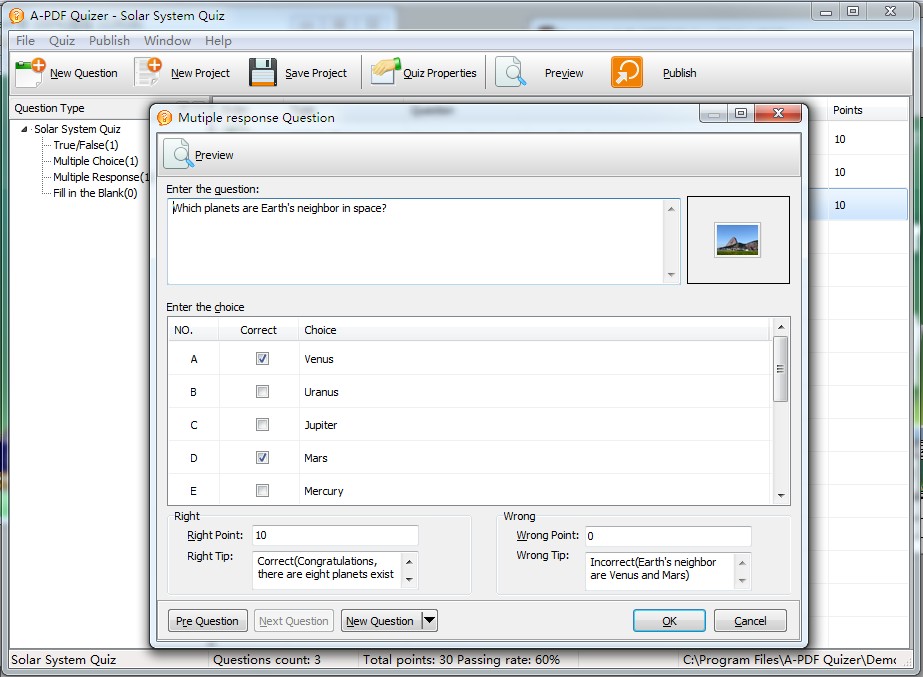
The first thing that strikes me about A-PDF Quizzer is that it doesn’t just stick to the basics. Most free or low-cost tools give you True/False and maybe a Multiple Choice option if you’re lucky. This software, however, treats every question as an opportunity for engagement. You have access to a suite of types: True/False, Multiple Choice, Multiple Response, Fill in the Blank, Word Bank, Matching, Hot Spot, Matching Drop Down, and Sequence Drag and Drop.
Why does this matter? Because pedagogy—the method of teaching—relies on variety. If a student is just clicking "A" or "B" for twenty minutes, they check out. But when you ask them to drag and drop items into a specific sequence, or click a "Hot Spot" on a map or an anatomical diagram, you are engaging different parts of their brain. The Sequence Drag and Drop feature is particularly impressive; it’s perfect for history teachers asking students to order events or for HR managers testing a staff member's knowledge of a specific company workflow. This variety ensures that your quizzes are not just tests, but interactive learning exercises that actually stick.
2. Full Multimedia Integration
We live in a visual and auditory world. A wall of text is the fastest way to lose an audience. A-PDF Quizzer understands this by allowing for deep multimedia integration. For every single question you create, you have the ability to embed images, video clips, sound bites, and even complex mathematical equations. This takes the software from being a simple "text-based" tool to a high-end media producer.
Imagine you are a music teacher. You can embed an MP3 of a chord and ask the student to identify it using the Multiple Choice tool. Or perhaps you are a physics professor; the ability to insert clean, properly formatted equations directly into the question stem is a godsend. No more trying to "fake it" with weird keyboard symbols or blurry screenshots of formulas. You can also use video to set the stage for a question—show a thirty-second clip of a chemical reaction and then ask the user to fill in the blank regarding the outcome. This level of media support makes your quizzes feel like premium software applications rather than simple web forms.
3. Professional Customization and Branding
If you are using a quiz for business purposes, branding is everything. You don’t want your customers or clients seeing a generic tool. You want them to see your brand. A-PDF Quizzer provides an incredible amount of flexibility in how the final product looks. You can apply your own logo, customize the visual appearance of the player, and even apply customized text or image watermarks to your quizzes. This is essential for protecting your intellectual property if you are selling these quizzes as part of a course.
Beyond just the logo, you have control over the entire "shell" of the quiz. You can define the fonts, the background colors, and the toolbar information. If you want a sleek, minimalist look for a corporate environment, you can have it. If you want a bright, high-energy look for a primary school quiz, you can build that too. The software even offers built-in templates and "flashes" to get you started, but the real power lies in the high-level customization that allows you to create a unique style that matches your existing website or corporate identity.
4. Rapid "No-Code" Creation Workflow
As a reviewer, I see a lot of software that claims to be "easy to use," but A-PDF Quizzer actually delivers on this promise. It utilizes a wizard-like interface that guides you through the process step-by-step. You don't need to know how to code in Flash, you don't need to know HTML5, and you certainly don't need to be a graphic designer. All you need to do is present your questions and answers directly into the prompts.
The developer claims you can create and compile a quiz as a .html file in less than 10 minutes, and in my testing, that is actually a conservative estimate. Once you have your content ready, the assembly is incredibly fast. You can shuffle questions with a single click to prevent cheating, set a passing rate, and define specific "tips" or feedback for right and wrong answers. This "no-code" approach democratizes the creation of interactive content. It moves the power from the hands of the IT department and puts it directly into the hands of the subject matter experts—the teachers, the managers, and the content creators.
5. Versatile Publishing and Result Tracking
What good is a quiz if you can't get it to your users or see how they performed? This is where A-PDF Quizzer truly shines compared to its competitors. The publishing options are incredibly flexible. You can output your project as a Web-ready file (HTML), a Zip archive for easy uploading, or—most impressively—as a standalone Executable (.exe) file. The EXE option is a game-changer for those who need to distribute quizzes via USB drives or in environments where a stable internet connection might not be available. It allows the quiz to run as a "free-standing" program on any Windows machine.
But the real "pro" feature is the result tracking. Once a user finishes a quiz, they can view their results instantly. But more importantly for the creator, the software can send results via email directly to you or your designated administrator. This eliminates the need for a complex backend database or an expensive Learning Management System (LMS). You get the data you need, delivered right to your inbox, the moment the test is completed. You can also enable print-out options, allowing students to keep a physical copy of their results, and include a link to a specific webpage after the quiz is finished to funnel users toward a "thank you" page or a subsequent lesson.
Why You Need This Right Now
The digital world moves fast, and the "giveaway" nature of this software makes it a must-download. We are seeing a massive shift toward interactive content. Static PDFs and text documents are being ignored in favor of things users can click, drag, and interact with. A-PDF Quizzer is the bridge that gets you from static content to interactive engagement without requiring a massive budget.
Think about the versatility here. If you are a parent, you can create custom "homework" quizzes for your children to make study time more like a game. If you are a business owner, you can create "knowledge checks" for your customers to help them decide which product is right for them. If you are a blogger, you can create viral-style quizzes to increase the "time on page" for your website, which is a massive boost for SEO. The use cases are limited only by your imagination.
One of the most underrated features included in this package is the ability to save projects for later. You aren't just making a one-off file; you are building a library of content. You can create a quiz today, save the project, and then six months from now, simply open it up, update a few questions, change the logo, and republish it. This level of project management within the software ensures that your investment of time today continues to pay off for years to come.
The "Tech Reviewer" Verdict
If you've been looking for a way to create professional-grade assessments, surveys, or interactive exercises, the search ends here. A-PDF Quizzer is a robust, reliable, and remarkably deep tool that hides its power behind an incredibly friendly interface. It manages to be both sophisticated enough for a professional developer and simple enough for a first-time user.
The ability to include video, audio, and equations is what sets this apart from the sea of mediocre quiz apps available on the web. When you add the fact that you can publish as a standalone EXE or a web-ready file with built-in email tracking, you have a complete ecosystem for digital testing. This isn't just a utility; it's a productivity powerhouse. Don't wait on this one. Tools that offer this much flexibility and power are rare, especially in such an accessible package. Download it, explore the templates, and start turning your questions into an interactive experience that people will actually want to complete.
Whether you're looking to certify, educate, or just entertain, A-PDF Quizzer provides the ultimate flexibility. It is fast, it is affordable, and most importantly, it produces results that look like they cost a fortune to develop. In less than ten minutes, you could have your first professional quiz live and ready for your students or customers. That is the kind of efficiency every tech-savvy professional needs in their toolkit.
Final Recommendation: This is a mandatory download for anyone in the education, HR, or digital marketing space. The "Hot Spot" and "Sequence" question types alone make it worth the disk space, but the seamless publishing and result tracking make it an absolute essential. Grab it now and start creating.

Reviews for A-PDF Quizzer
Click Here to Read Reviews for A-PDF Quizzer >> Click Here to Submit Reviews for A-PDF Quizzer >>