What Does AlomWare Actions Do?
AlomWare Actions is a productivity utility designed to automate repetitive Windows tasks through a "no-code" interface. Unlike traditional scripting tools, it utilizes a plain-English step-building system. Users can assemble custom actions by selecting predefined steps from a library, allowing for the automation of application launches, document opening, and email notifications without manual programming.
The software includes an Action Wizard for generating common workflows, such as clipboard modifications and DOS command execution. For more complex sequences, a built-in macro recorder captures keystrokes and mouse movements. This feature is useful for automating login processes or assisting users with restricted mobility by replaying recorded mouse clicks and keyboard inputs.
Beyond simple macros, the tool functions as a multi-purpose utility suite. It features window management capabilities—such as adjusting transparency and window properties—and can generate file lists, potentially replacing several standalone background applications. By consolidating these functions into a single interface, users can manage their desktop environment more efficiently. Actions can be assigned to specific hotkeys, enabling immediate execution of multi-step processes. The software aims to reduce manual input and streamline the digital workspace for power users and those focused on task efficiency.
Top 5 Reasons To Download AlomWare Actions
- Zero Coding Required: You can create complex automated workflows using plain-English steps without ever writing a single line of code.
- The Intuitive Action Wizard: Quickly generate common tasks like opening apps, modifying clipboard text, or running commands in under a minute.
- Powerful Macro Recording: Effortlessly record and play back keyboard and mouse movements to handle repetitive data entry or login sequences.
- All-in-One Utility Replacement: Replace multiple bulky apps for window management, file listing, and clipboard monitoring with one streamlined tool.
- Enhanced System Efficiency: Improve your PC's performance by reducing background processes and consolidating your toolkit into one lightweight application.
In the modern digital landscape, our productivity is often hampered by the very tools meant to assist us. We find ourselves jumping between dozens of applications, repeating the same mundane keystrokes, and manually managing windows just to get through a standard workday. If you have ever felt that your computer should be working for you rather than the other way around, then you are the exact person who needs to pay attention to this review. Today, we are looking at a software solution that promises to redefine how you interact with your PC: AlomWare Actions.
As a tech reviewer, I see hundreds of "productivity" apps every year. Most of them are either too simple to be useful or so complex that you need a computer science degree just to set up a basic shortcut. AlomWare Actions strikes the perfect balance. It is a powerhouse of automation that remains accessible to the average user. Whether you are a power user looking to shave seconds off your workflow or someone who just wants to make their daily digital life a bit easier, this is the giveaway you cannot afford to miss. Let’s dive deep into the top five reasons why AlomWare Actions deserves a permanent spot on your hard drive.
1. Zero Coding Required: Automation for the Rest of Us
The biggest barrier to entry for PC automation has always been the complexity of scripting. Tools that have dominated the market for years often require users to learn proprietary languages, manage syntax errors, and spend hours debugging scripts just to automate a simple task. AlomWare Actions completely dismantles this barrier. The philosophy here is simple: if you can read, you can automate.
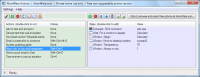
When you open the software to create a new action, you aren't greeted by a blinking cursor on a black screen. Instead, you are given a comprehensive, searchable list of steps written in plain English. Want to open a document? Find the step. Want to wait for a specific window to appear? There is a step for that. You simply double-click the steps you want, and they are added to your action list. You can build a sequence of fifty steps without ever touching your keyboard to type a command. This "no-code" approach is a total game-changer because it empowers every user, regardless of their technical background, to build custom tools tailored to their specific needs.
Furthermore, because the steps are in plain English, coming back to an action you created months ago is a breeze. You don't have to decipher cryptic code to remember what a script does. You can see, in plain language, exactly what the workflow entails. This transparency makes AlomWare Actions the most user-friendly automation tool I have ever tested.
2. The Intuitive Action Wizard: From Idea to Execution in Seconds
Sometimes, even picking steps from a list can feel like too much work when you are in a rush. This is where the Action Wizard shines. Imagine you want to create a hotkey that opens your three most-used work apps, centers them on the screen, and types out your morning "status update" template. In most programs, that's a project. In AlomWare Actions, it’s a one-minute conversation with a wizard.
The Action Wizard is designed for the most common tasks that users perform daily. It guides you through a series of easy and intuitive prompts. You tell the wizard what you want to do—be it opening a specific folder, running a DOS command, or modifying the text currently held in your clipboard—and it builds the action for you. It is the ultimate "shortcut for creating shortcuts."
For those who are new to automation, the Wizard serves as an excellent teaching tool. By seeing how the Wizard assembles steps to complete a task, you begin to understand the logic of the software. But even for seasoned pros, the speed of the Wizard is addictive. When you realize you can automate a recurring annoyance in less time than it takes to brew a cup of coffee, you start finding ways to optimize every part of your day. This tool doesn't just save you time; it changes your mindset toward getting things done.
3. Powerful Macro Recording: Your Personal Digital Assistant
While structured steps are great for logic-based tasks, some things are just easier to "show" the computer. AlomWare Actions includes a robust macro recorder that captures your keystrokes and mouse clicks in real-time. This is particularly useful for those "dumb" tasks that require clicking through menus that don't have keyboard shortcuts, or for filling out repetitive web forms.
The macro recorder is a lifesaver for data entry professionals. If you find yourself typing your email address, physical address, or common responses hundreds of times a week, you can record those actions once and assign them to a hotkey. Imagine hitting Ctrl+Shift+E and watching your computer instantly type out your entire signature or login credentials. It feels like magic, and it saves an incredible amount of physical strain over time.
Speaking of strain, I must highlight the accessibility benefits of this feature. For users with restricted mobility, performing complex mouse movements or holding down multiple keys simultaneously can be difficult or painful. AlomWare Actions allows these users to record those movements once—perhaps with the help of a friend or assistant—and then play them back with a single button press. This promotes digital independence and makes the PC a much more welcoming environment for everyone. It’s a thoughtful inclusion that elevates the software from a mere utility to a truly essential tool.
4. All-in-One Utility Replacement: Declutter Your Digital Workspace
We are all guilty of "app creep." We download one app to make windows transparent, another to manage our clipboard, a third to list files in a folder, and a fourth to automate our mouse. Before you know it, your system tray is overflowing with icons, each one eating up a little bit of RAM and a little bit of your attention. AlomWare Actions is the cure for this digital clutter.
One of the most impressive aspects of this software is its versatility. It can handle window management with ease—changing transparencies, keeping windows "always on top," or resizing them to specific dimensions automatically. It can act as a file lister, generating reports of what's in your folders without needing a separate, dedicated program. It can even handle clipboard manipulation, allowing you to transform text (like changing all caps to lowercase) with a single command.
By downloading this giveaway, you aren't just getting an automation tool; you are getting a Swiss Army Knife for Windows. You can finally uninstall those single-purpose utilities that are slowing down your boot time and replace them with one efficient, centralized hub. This consolidation makes your workflow more cohesive because all your "power user" features are managed through the same interface and the same logic. It’s a cleaner, faster, and more logical way to work.
5. Enhanced System Efficiency: Speed Up Your Entire Experience
Following the previous point, the impact on system performance cannot be overstated. Every standalone app you run in the background consumes system resources. They have their own update checkers, their own telemetry, and their own memory footprints. When you consolidate these functions into AlomWare Actions, you are significantly reducing the overhead on your CPU and RAM.
AlomWare Actions is built to be "efficient and all-in-one." It doesn't bloat your system. Instead, it acts as a lightweight layer that sits on top of your OS, ready to strike when you hit a hotkey, but otherwise staying out of your way. For users with older hardware, this can provide a noticeable boost in responsiveness. For users with high-end rigs, it ensures that every bit of power is being directed toward the tasks that matter, rather than being wasted on a dozen background utilities.
Furthermore, the speed of operation is increased. Because AlomWare Actions handles the "heavy lifting" of navigating menus and typing, you find that your PC feels faster because you are moving through your tasks faster. The reduction in "toggle tax"—the time and mental energy lost when switching between different tools and methods—is a hidden benefit that you will feel within the first hour of use. It streamlines the interaction between the user and the machine, creating a seamless experience where your intent is translated into action almost instantly.
Final Thoughts: Why You Need This Now
Efficiency is not just about doing things faster; it is about removing the friction from your life so you can focus on the creative and meaningful parts of your work. AlomWare Actions is designed specifically to remove that friction. It takes the "boring" parts of computing—the clicking, the typing, the window dragging, the app searching—and turns them into background tasks that happen automatically.
We live in an era where our time is our most precious commodity. Why spend it doing things that a smart piece of software can do for you? With its plain-English interface, intelligent Wizard, versatile macro recorder, and ability to replace multiple apps, AlomWare Actions stands out as a premier solution for anyone looking to reclaim their day. It is simple enough for a novice to use within minutes, yet deep enough for a power user to spend months exploring its possibilities.
This giveaway is a rare opportunity to get your hands on a tool that will legitimately change how you use your computer every single day. Stop fighting with your PC and start commanding it. Whether you want to never type your email address again, or you want to launch a complex environment of apps and documents with one keypress, AlomWare Actions is the answer. Do not let this opportunity pass you by—download it, explore the Wizard, and start automating your way to a more productive, less stressful digital life. You’ll wonder how you ever managed without it.
The hallmark of great software is that it becomes invisible as it works. You stop thinking about the tool and start focusing on the result. That is exactly what happens with AlomWare Actions. Once you have set up your favorite actions and hotkeys, they become second nature. You become a faster, more efficient version of yourself. In the world of tech, that is the ultimate goal. Take the leap, download the software, and see for yourself why this is the must-have automation tool of the year.


Reviews for AlomWare Actions
Click Here to Read Reviews for AlomWare Actions >> Click Here to Submit Reviews for AlomWare Actions >>