What Does BlindScanner Do?
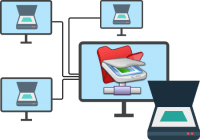
BlindScanner is a networking utility designed to facilitate remote scanning capabilities across a local area network (LAN). The software allows a single scanner, physically tethered to one workstation, to be shared among multiple users on the same network. This functionality eliminates the requirement for redundant hardware purchases in professional office environments or multi-user home setups.
The application functions as a virtual bridge between the remote hardware and the local computer. Users access the shared scanner through their preferred third-party image or text editing software. By selecting BlindScanner from the list of available devices, users can remotely configure specific scan parameters, including color depth, resolution, and image dimensions, before capturing the document.
Technical specifications and features include:
- Support for all flatbed scanners utilizing the TWAIN standard.
- Compatibility with hardware featuring automatic document feeders (ADF) for multi-page batch processing.
- Full functionality across both wired and wireless (WLAN) home networks.
- Streamlined integration that allows for document capture without distracting colleagues or requiring physical proximity to the scanner.
By centralizing scanning resources, the software reduces equipment costs and optimizes workflow for laptops and workstations that lack a direct hardware connection.
Top 5 Reasons To Download BlindScanner
- Unprecedented Cost Savings: Eliminate the need to purchase multiple scanners for every workstation or family member.
- Seamless Software Integration: Full TWAIN support ensures compatibility with your favorite image and text editors.
- Enhanced Workplace Productivity: Scan documents remotely without interrupting your colleagues or moving from your desk.
- Wireless Flexibility: Effortlessly scan from laptops and mobile devices across a wireless home or office network.
- Advanced Hardware Support: Works flawlessly with both standard flatbed scanners and high-capacity Automatic Document Feeders (ADF).
In the modern digital landscape, efficiency is the name of the game. We are constantly looking for ways to streamline our workflows, declutter our physical spaces, and save a bit of hard-earned money along the way. Yet, hardware limitations often stand in our way. If you have ever found yourself getting up from your desk, walking across the office with a stack of papers, and waiting for a colleague to finish their work just so you can use the scanner attached to their machine, you know exactly what I am talking about. It is a relic of an older era of computing—one that feels increasingly out of place in our world of cloud storage and instant connectivity. This is exactly where BlindScanner steps in to revolutionize your document management. As a tech reviewer who has seen countless utility apps come and go, I can tell you that this software is a game-changer for anyone operating in a multi-user environment. Here is a deep dive into why you need to download this giveaway today.
1. Unprecedented Cost Savings
Let’s talk about the bottom line first. In any business environment, whether it is a small startup or a large corporate office, budget management is critical. Hardware is expensive. A high-quality scanner, especially one that handles high resolutions or features an automatic document feeder, can cost several hundred dollars. If you have ten employees who all need scanning capabilities, the traditional logic suggests you either buy ten scanners or force everyone to share one central machine, which leads to time-loss and bottlenecking. Neither option is ideal.
By downloading BlindScanner, you are essentially "multiplying" your existing hardware. Instead of spending thousands of dollars on a fleet of scanners, you invest in a single, high-quality piece of hardware and use this software to distribute its functionality across your entire Local Area Network (LAN). This isn't just about the initial purchase price, either. Think about the long-term maintenance costs. More hardware means more points of failure, more cables to manage, more power strips cluttering up the floor, and more IT support tickets when a driver decides to stop working. By centralizing your scanning hardware through BlindScanner, you slash your overhead costs immediately. You are getting the utility of a dozen scanners for the price of one, which is an absolute win for any budget-conscious professional.
Furthermore, this applies to the home environment as well. Many of us have a family printer-scanner combo in the "computer room," but we prefer to work from our laptops on the couch or at the dining table. Rather than buying a second scanner for your home office, you can simply bridge the gap with software. It is the smartest financial move you can make for your digital setup.
2. Seamless Software Integration
One of the biggest frustrations with third-party hardware utilities is the fear that they won't play nice with the software you already use and love. We all have our preferred tools—perhaps you are a graphic designer who lives in Photoshop, a lawyer who relies on Acrobat, or a student who uses specialized OCR (Optical Character Recognition) software to digitize notes. The last thing you want is a scanning utility that forces you to use its own clunky, proprietary interface and then export files manually.
This is where BlindScanner truly shines. It is built on the TWAIN standard. For those who aren't tech-obsessed, TWAIN is the universal language that scanners and software use to talk to each other. Because BlindScanner presents itself as a standard TWAIN-compatible device on your system, it shows up in the "Select Source" list of almost every professional image and text editor on the market. When you go to import a scan, you simply select the app from your list, and it functions as if the scanner were plugged directly into your USB port. You can specify the color depth, resolution, and image size directly from the interface you are already comfortable with. There is no learning curve and no disruption to your established creative or administrative workflow. It is "set it and forget it" technology at its finest.
3. Enhanced Workplace Productivity
Productivity is often killed by "micro-interruptions." In a typical office, if you need a scan, you have to save your work, get up, walk to the computer where the scanner is attached, and often ask a coworker to move aside so you can access the device. This doesn't just waste your time; it breaks the focus of your colleague, potentially costing the company twenty minutes of "deep work" time as they try to get back into their flow. It is an inefficient, antiquated way to work.
With BlindScanner, that friction disappears entirely. You can trigger a scan from the comfort of your own desk. The software handles the communication over the local network, pulls the data from the remote scanner, and delivers it straight to your screen. The person whose computer is physically connected to the scanner barely even notices—they can keep typing their email or crunching their spreadsheets while the scanner hums away in the background. It turns a collaborative office into a more fluid, autonomous environment. By removing the physical barriers to hardware access, you empower your team to work faster and with fewer distractions. In the world of tech, we call this "removing friction," and BlindScanner is one of the best tools I have seen for doing exactly that.
4. Wireless Flexibility
We are no longer tethered to desks. The rise of the laptop as the primary workstation for both students and professionals has changed what we expect from our peripherals. If you have a wireless home network, you expect to be able to print from anywhere—so why shouldn't you be able to scan from anywhere? Traditionally, scanning has been the "last mile" of wireless networking, often requiring complex server setups or expensive "Network Attached Storage" scanners that are difficult for the average user to configure.
BlindScanner simplifies this process for the modern mobile user. If your laptop is connected to your home Wi-Fi, and your main desktop (with the scanner attached) is on that same network, you are good to go. You can be in the kitchen, the bedroom, or even the backyard, and as long as you have a signal, you can pull a scan. This is particularly useful for students who might be scanning textbook pages or for freelancers who move around the house throughout the day. It brings the convenience of the "wireless office" to the scanning process, ensuring that your hardware is always accessible, regardless of where your feet happen to be. It effectively turns any old USB scanner into a high-end wireless network scanner, instantly modernizing your existing equipment.
5. Advanced Hardware Support
Finally, let’s talk about versatility. A lot of "lite" scanning apps only support basic flatbed functions. They are fine for a single photo, but the moment you try to use professional features, they fall apart. BlindScanner was designed with professional needs in mind, which is why its support for Automatic Document Feeders (ADF) is such a critical feature. If you have a stack of twenty pages that need to be digitized, you don't want to scan them one by one. You want to drop them in the tray and let the machine do the work.
This software supports the full capabilities of your hardware. If your scanner has an ADF, BlindScanner can utilize it over the network. It handles the multi-page feeds just as easily as it handles a single flatbed scan. This makes it a viable solution for heavy-duty administrative tasks, legal document archiving, and medical record digitization. It doesn't matter if you are using a basic consumer-grade scanner or a high-end office workstation; BlindScanner bridges the gap between the hardware’s physical location and your digital workspace without sacrificing features. It supports various color modes and resolutions, ensuring that whether you need a high-detail photo scan or a low-bandwidth black-and-white document scan, the output is exactly what you need.
In conclusion, the BlindScanner giveaway is an opportunity you simply should not pass up. It is a rare example of a utility that provides immediate, tangible value from the moment you install it. It saves you money, boosts your productivity, respects your existing software choices, and brings a level of wireless freedom to your hardware that you probably didn't think was possible without buying new equipment. We live in a world where we are constantly told we need to upgrade our devices to get the latest features. BlindScanner proves that sometimes, the best upgrade isn't new hardware—it is smarter software. Do yourself, your wallet, and your coworkers a favor: download this tool and start experiencing the benefits of remote scanning today. It is efficient, it is professional, and quite frankly, it is the way scanning was always meant to work in a networked world.
Whether you are managing a bustling office or just trying to make your home network more functional, this software provides a robust solution to a common problem. The ability to share resources is the foundation of modern networking, and BlindScanner brings that philosophy to the humble scanner. Don't let your hardware be a "lonely island" connected to only one PC. Give it the power to serve everyone on your network. Your workflow will thank you, your desk will be cleaner, and you will finally be able to leave those annoying "can I just use your scanner for a second?" interruptions in the past. This is a must-have download for any serious tech user.


Reviews for BlindScanner
Click Here to Read Reviews for BlindScanner >> Click Here to Submit Reviews for BlindScanner >>