What Does CopyConfusion Do?
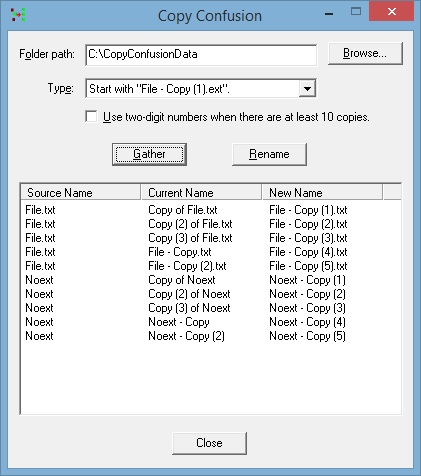
CopyConfusion is a specialized file management utility designed to standardize the naming conventions used by Windows when creating file duplicates. The software addresses the historical inconsistency between legacy Windows versions, which prefix copies with Copy of, and contemporary iterations that append - Copy to the original filename. By identifying these patterns, the tool allows users to reformat file strings into a unified naming structure.
Beyond simple renaming, the application provides specific configuration options to enhance organization within File Explorer. One primary feature allows users to apply parenthetical numbers to the initial copy of a file, rather than beginning the numbering sequence with the second instance. This ensures a uniform appearance across all duplicated versions of a document from the start of the process.
Additionally, CopyConfusion can implement two-digit numbering (e.g., 01, 02) when a directory contains ten or more copies of the same file. This numerical padding is intended to resolve standard sorting issues in Windows Explorer, where default alphabetical sorting might otherwise misplace double-digit numbers within the sequence. By normalizing these file strings and enforcing consistent numerical formatting, the utility ensures that multiple versions of a single document remain logically grouped and correctly ordered during high-volume file operations.
Top 5 Reasons To Download CopyConfusion
Before we dive into the nitty-gritty details of why every power user needs this tool in their utility belt, let’s look at the highlights. If you have ever felt the frustration of a cluttered "Downloads" folder or a "Documents" directory filled with inconsistent file names, these are the five pillars of why CopyConfusion is the solution you have been waiting for:
- Unification of Legacy and Modern Naming Conventions: It bridges the gap between the old "Copy of File" and the new "File - Copy" formats, ensuring your folder looks uniform.
- Superior Numerical Sorting Logic: By introducing two-digit numbering (e.g., 01, 02) for large batches, it prevents the classic Windows Explorer sorting nightmare.
- Immediate Consistency for First Copies: It allows you to add parentheses and numbers to the very first duplicate, ensuring every file in a series follows the same visual pattern.
- Drastic Reduction in Manual File Management: It automates the tedious process of renaming duplicates, saving hours of manual labor over the lifetime of a project.
- Lightweight, Zero-Bloat Performance: Unlike heavy file management suites, it focuses on doing one thing perfectly without slowing down your system.
If you have spent any significant amount of time working on a Windows machine, you know the specific brand of chaos that comes with duplicating files. Whether you are a graphic designer creating iterations of a logo, a developer backing up scripts, or just someone trying to keep their digital life in order, the way Windows handles copies is, frankly, a mess. Enter CopyConfusion. This isn’t just another file utility; it is a surgical tool designed to fix a problem that Microsoft has ignored for decades. Let’s break down exactly why this giveaway is a must-download for anyone who values an organized digital workspace.
1. Bridging the Gap Between Naming Eras
We live in a world of digital transition. Over the years, Windows has changed its mind about how it likes to name things. In the older versions of the operating system, when you hit Ctrl+C and Ctrl+V, you would end up with a file called "Copy of Report.docx." Fast forward to the modern era, and Windows decided that "Report - Copy.docx" was a better way to go. While the change might seem minor to the casual observer, for a power user, it is a recipe for disaster.
Imagine you are looking for a specific version of a document. You search for "Report," and half of your files are grouped under "C" for "Copy of," while the other half are scattered under "R" for "Report - Copy." It creates a fragmented file system that breaks your mental flow. CopyConfusion steps in as the ultimate mediator. It can take those old legacy names and those modern iterations and bring them into a single, cohesive format. You get to decide how your files are presented, rather than letting a twenty-year-old software legacy dictate your organization. By unifying these formats, you reclaim the ability to scan your folders quickly and find exactly what you need without your eyes jumping all over the screen.
This level of unification is more than just "tidying up." It is about data integrity and accessibility. When your naming conventions are fragmented, the risk of deleting the wrong version of a file increases exponentially. By using CopyConfusion to standardize your naming, you are essentially building a safety net for your digital assets.
2. Eliminating the "1, 10, 2" Sorting Nightmare
If there is one thing that drives tech reviewers and data managers crazy, it is the way basic file explorers handle numerical sorting. We have all seen it: you have fifteen copies of a file, and when you sort them by name, the list goes 1, 10, 11, 12, 13, 14, 15, 2, 3, 4... and so on. This happens because the system often reads the first digit rather than the value of the number as a whole. It is a logical flaw that has plagued users for years.
CopyConfusion provides a brilliant, elegant fix for this by offering a "two-digit" numbering option. When you are dealing with ten or more copies of a file, the software automatically applies a leading zero to the single digits. Suddenly, your list reads 01, 02, 03, through 10 and 11. This ensures that Windows Explorer—or any other file manager you might use—sorts them in the actual chronological or numerical order you intended.
For photographers who might be creating multiple edits of a single RAW file, or for video editors working through dozens of "final" renders, this feature alone is worth the download. It transforms a jumbled mess into a streamlined, logical sequence. It respects the way the human brain expects to see information, rather than forcing you to adapt to the limitations of computer logic. This is the kind of "quality of life" improvement that you didn't know you needed until you experienced it, and once you have it, you can never go back to the old way.
3. Consistency From the Very First Copy
Standard Windows behavior is to leave the original file name alone and then start adding numbers to the subsequent copies. The first copy is "File - Copy," the second is "File - Copy (2)," and so on. From a visual standpoint, this is incredibly inconsistent. If you are looking at a folder of assets, you want every file to look like it belongs to the same set. The lack of a number on that first copy makes it an outlier in its own sequence.
One of the standout features of CopyConfusion is the ability to force that first copy to include a number in parentheses immediately. Instead of having "File - Copy" and "File - Copy (2)," you get "File - Copy (1)" and "File - Copy (2)." This might seem like a small tweak, but for anyone who uses automated scripts, batch processing software, or even just prefers a clean visual aesthetic, it is a game-changer.
When every file in a series follows the exact same syntax, it makes bulk renaming and organizational tasks much easier in the future. It removes the "special case" of the first duplicate. In the world of tech, consistency is king. By ensuring that your numbering starts at one and stays consistent throughout the entire chain, CopyConfusion helps you maintain a professional, organized file structure that looks as though it was curated by an expert archivist.
4. Reclaiming Your Most Valuable Asset: Time
Let’s talk about productivity. Most people underestimate how much time they spend on "micro-tasks"—those three-second actions like renaming a file, moving a window, or searching for a misplaced document. Individually, they are nothing. Collectively, over the course of a year, they represent hours, if not days, of lost productivity.
Every time you manually go into a folder to rename a "Copy of..." file to match your current naming scheme, you are wasting cognitive energy. You are breaking your focus on your actual work to perform a menial task that a computer should be doing for you. CopyConfusion is designed to automate this frustration away. By setting your preferences once, you ensure that every copy you make from that point forward is already exactly where it needs to be in terms of naming.
In a professional environment, this efficiency scales. If you are managing a team or working on high-volume projects, having a tool that enforces naming standards automatically is like having a digital assistant who never sleeps. It allows you to stay in the "flow state" longer. You focus on the creation, the coding, or the writing, and you let CopyConfusion handle the janitorial work of file management. This giveaway is an investment in your own efficiency.
5. The Beauty of Minimalist Utility
In the modern software market, we are constantly bombarded with "bloatware." Every simple app seems to want to be a platform. You download a calculator, and suddenly it wants you to create an account, subscribe to a newsletter, and sync your data to the cloud. It’s exhausting.
That is why a tool like CopyConfusion is so refreshing to a tech reviewer. It is a "set and forget" utility. It doesn't try to reinvent the wheel; it just fixes a flat tire. It has a small footprint, it doesn't hog your system resources, and it stays out of your way until you need it. This is the hallmark of great software design: solving a specific problem with precision and then getting out of the user's face.
Downloading this giveaway means adding a permanent fix to your OS environment. It’s the kind of tool that makes you wonder why the operating system didn't just work this way in the first place. By focusing on the nuances of file renaming—handling parentheses, managing two-digit sequences, and unifying old and new formats—it provides a level of control that is usually reserved for complex command-line tools, but with the ease of a simple interface. It is sophisticated in its logic but simple in its execution.
In conclusion, CopyConfusion is a masterclass in addressing the small frustrations that aggregate into big headaches. It addresses the legacy issues of Windows, fixes the inherent flaws in file sorting, and provides a level of naming consistency that is vital for both aesthetic and functional organization. If you care about your workflow, if you are tired of messy folders, and if you want your computer to work for you rather than against you, then this is one download you cannot afford to skip. It is time to end the confusion and take control of your file system once and for all. Download it, set your preferences, and enjoy a cleaner, more logical digital life.

Reviews for CopyConfusion
Click Here to Read Reviews for CopyConfusion >> Click Here to Submit Reviews for CopyConfusion >>