What Does DicRecorder for Mac Do?
DicRecorder is an audio capture utility for macOS designed to record sound from any system source, hardware input, or software application. The tool enables users to grab audio from web browsers such as Safari and Chrome, VoIP services like Skype and FaceTime, and media players including VLC and Apple Music. It also supports direct extraction from streaming platforms like YouTube, Vimeo, and various online radio services.
The software records at a high-fidelity specification of 44kHz/stereo/32bit, aiming for output identical to the original source. Users can export recordings into several industry-standard formats, including MP3, AAC, M4A, WAV, OGG, and AC3, ensuring compatibility with mobile devices, tablets, and standalone media players. There is no limit on recording length, allowing for long-form capture from system speakers, line-in hardware, or external microphones.
Functional features of DicRecorder include:
- Comprehensive recording controls to save, pause, resume, and cancel sessions.
- A built-in editing function for trimming audio clips directly within the application to remove unwanted segments.
- Native support for both 32-bit and 64-bit Mac operating systems.
- Simultaneous capture from multiple sources, including system audio and peripheral devices.
The application facilitates the preservation of digital content and the management of voice calls or system sounds through a streamlined workflow. It provides a technical solution for users requiring precise audio backups of web-based media and internal communications.
Top 5 Reasons To Download DicRecorder for Mac
If you have ever tried to record audio on a Mac, you know the struggle is real. Apple’s ecosystem is fantastic for many things, but it is notoriously locked down when it comes to internal audio routing. Whether you are trying to grab a snippet of a song from a video, record a professional interview over FaceTime, or archive a streaming radio broadcast, the "standard" way of doing things often leads to frustration and a messy web of virtual cables. Enter DicRecorder, a powerhouse utility that simplifies the entire process. This isn't just another voice memo app; it is a full-scale audio capture suite designed specifically for the Mac power user. Here are the top five reasons why you need to download this giveaway today.
- Universal Audio Capture from Any Application: DicRecorder bypasses the usual system limitations to record high-quality audio from any software running on your Mac, including browsers, media players, and chat apps.
- Studio-Grade Recording Quality: With support for 44kHz stereo and 32-bit depth, you can capture lossless audio that sounds exactly like the original source.
- Comprehensive Output Format Support: You are never locked into a single file type, as the app supports MP3, AAC, WAV, OGG, and more for seamless playback on any device.
- Built-in Trimming and Editing Tools: You can refine your recordings immediately within the app, removing silence or unwanted segments without needing external editing software.
- Dual-Source Recording Capabilities: It effortlessly handles both system audio and external inputs like microphones, making it the perfect tool for podcasters and content creators.
1. Universal Audio Capture from Any Application
The primary reason you need to get your hands on DicRecorder is its sheer versatility. Most recording apps are limited to what they can "hear" through your microphone. If you want to record the audio coming out of your speakers, you usually have to jump through hoops or deal with degraded quality from an external loop. This app changes the game by hooking directly into the audio output of specific applications.
Think about your daily workflow. How many times have you watched a video on YouTube or Vimeo and wished you could save just the audio track for a project or for offline listening? With this tool, you can target your browser—whether it is Safari, Chrome, or Firefox—and record the stream directly. It doesn't matter if it's a live concert on Facebook, a documentary on VEVO, or a lecture on an obscure educational site; if your browser can play it, DicRecorder can capture it.
This functionality extends far beyond the web browser. It works seamlessly with system applications like iTunes (Apple Music), QuickTime, and VLC. If you are a fan of internet radio, you can finally archive those rare sets from Pandora, Lastfm, or GrooveShark. For professionals, the ability to record Skype, iChat, and FaceTime calls is a lifesaver. Instead of worrying about whether your guest's audio will be picked up, you can record the conversation with a single click, ensuring every word is preserved for later review or transcription.
The tech reviewer's take: Most people don't realize how much they need internal audio recording until they actually have the tool. Once you have the power to "rip" audio from any running process, your Mac feels like a much more capable workstation. This isn't just about downloading music; it's about digital sovereignty over the sounds your computer produces.
2. Studio-Grade Recording Quality
In the world of digital audio, quality is everything. There is nothing worse than recording an important meeting or a beautiful piece of music only to find that the resulting file is tinny, compressed, or filled with digital artifacts. DicRecorder eliminates this concern by offering configurable, high-fidelity recording settings that satisfy even the most demanding audiophiles.
The software supports recording at 44kHz in stereo with a 32-bit depth. To put that into perspective, this is the standard for professional audio production. When you record at these settings, the software captures a massive amount of data, ensuring that the dynamic range and frequency response of the original source are preserved. Whether it is the deep bass of a cinematic soundtrack or the subtle nuances of a human voice, the recording will sound precisely like the original.
Furthermore, because the app records the digital signal internally rather than re-recording through your speakers and microphone, there is zero background noise introduced. You won't hear your computer's fan whirring, your chair creaking, or the neighbor's dog barking. It is a pure, clean digital capture. For those who want to save space, the quality is fully configurable, allowing you to strike the perfect balance between file size and audio fidelity depending on your specific needs.
The tech reviewer's take: "Good enough" isn't good enough when it comes to your archives. If you are recording a once-in-a-lifetime interview or a rare live stream, you want to know that you are getting every single bit of data. DicRecorder's 32-bit support gives you the "headroom" you need to ensure your audio never clips or distorts, providing a professional safety net for every session.
3. Comprehensive Output Format Support
Recording the audio is only half the battle; the other half is making sure you can actually use it. Many recording tools force you into proprietary formats or antiquated file types that don't play well with modern mobile devices. DicRecorder avoids this pitfall by supporting a massive array of popular audio formats out of the box.
When you finish a recording, you can save it as an MP3, AAC, M4A, WAV, OGG, or AC3. This means that your files are ready for any ecosystem. If you are an iPhone or iPad user, you can opt for AAC or M4A for the best integration with the Apple Music app. If you use Android devices or dedicated media players, the universal MP3 format ensures you will never have a compatibility issue. For those who need to do further post-production in professional DAWs (Digital Audio Workstations), the WAV format provides an uncompressed, lossless foundation to work from.
This versatility makes it incredibly easy to move your content from your Mac to your pocket. You can record a podcast from a website, save it as an MP3, and drop it onto your phone for your morning commute in seconds. There is no need for secondary conversion software, which saves you time and prevents the quality loss that often occurs when you re-encode files multiple times. It is a "one-stop shop" for capturing and preparing your audio for the real world.
The tech reviewer's take: In a world where we are constantly switching between devices, format flexibility is a must-have feature, not a luxury. DicRecorder understands that your audio needs to live beyond your desktop. The inclusion of OGG and AC3 support shows that the developers were thinking about the power users who need more than just the basics.
4. Built-in Trimming and Editing Tools
Most of us aren't perfect at timing. When you record a live stream or a call, there is almost always some "dead air" at the beginning or end. Usually, this means you have to open up a heavy-duty editor like Audacity or GarageBand just to trim off a few seconds of silence. DicRecorder saves you the hassle by including a built-in editing suite designed for quick, precise trims.
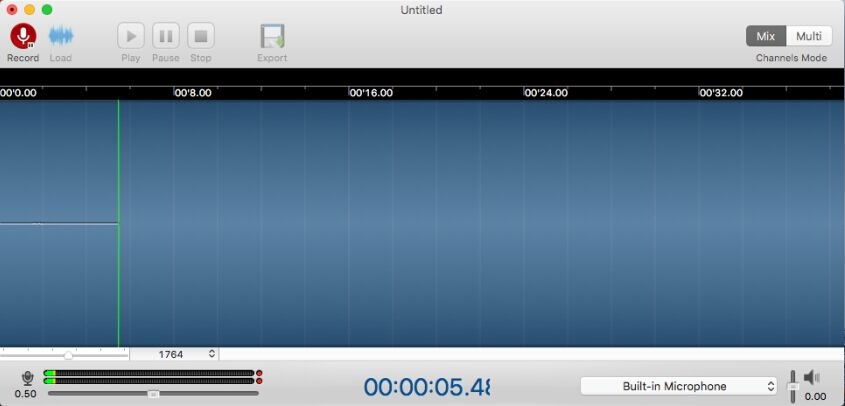
The integrated editing function allows you to visualize the waveform of your recorded audio. You can easily scrub through the track, identify the exact moment the content starts, and trim away the excess. This is particularly useful when recording from websites like YouTube or Facebook, where there might be intros, ads, or long pauses before the actual audio begins. You can leave exactly what you want on your Mac and discard the rest.
The interface for these controls—save, pause, resume, and cancel—is intuitive and responsive. If you are recording a long broadcast and an ad break comes on, you can simply hit pause and then resume when the content returns. This creates a single, clean file without the need for complex stitching later. It turns a potentially tedious task into a streamlined, one-click process that keeps your hard drive organized and free of bloated, unedited files.
The tech reviewer's take: Convenience is king. Having the ability to trim your audio right after the recording finishes is a massive productivity boost. It’s the difference between "I'll do that later" (and never doing it) and having a library of perfectly curated audio clips ready to go.
5. Total Control Over System and External Audio
One of the most powerful aspects of DicRecorder is how it handles different audio sources. While its ability to capture application audio is impressive, it is also a fully-fledged recorder for your physical inputs. It can easily record audio from your microphone or line-in ports. This makes it an essential tool for multi-purpose content creation.
For example, if you are a budding podcaster, you can use the app to record your own voice via a high-quality external microphone while simultaneously capturing the audio from a guest on a FaceTime or Skype call. If you are a musician, you can record a backing track playing in VLC while you practice a melody through your line-in interface. The software acts as a central hub for all the sound passing through your Mac, whether it originates from a piece of hardware or a piece of software.
The app is also fully compatible with both 32-bit and 64-bit operating systems, ensuring that even if you are running an older Mac or the latest macOS version, the performance remains stable. The ability to manage these various inputs with such a lightweight and user-friendly interface is rare. You don't need to be a sound engineer to figure out how to route your audio; the app handles the heavy lifting under the hood, letting you focus on the creative side of things.
The tech reviewer's take: The "Swiss Army Knife" of audio apps is a cliché, but DicRecorder earns the title. By combining system audio capture with external input recording, it replaces three or four other utilities. For anyone who does more than just browse the web—whether that's gaming, teaching, or creating—this level of control is absolutely indispensable.
Conclusion: If you are looking for a way to unlock the full potential of your Mac’s audio capabilities, DicRecorder is the solution. It is robust, high-quality, and incredibly easy to use. Given that this is a giveaway, there is absolutely no reason not to add this to your digital toolkit. From capturing the latest hits on online radio to recording crucial business calls, it is a tool that you will find yourself using day after day. Don't miss out on the chance to download this essential Mac utility—your ears (and your workflow) will thank you.

Reviews for DicRecorder for Mac
Click Here to Read Reviews for DicRecorder for Mac >> Click Here to Submit Reviews for DicRecorder for Mac >>