What Does Text Statistics Analyzer Do?
Text Statistics Analyzer is a lightweight utility designed to provide quantitative data on text structure and frequency. The tool serves as a functional asset for linguistic studies or content auditing by calculating specific metrics for characters, words, and lines.
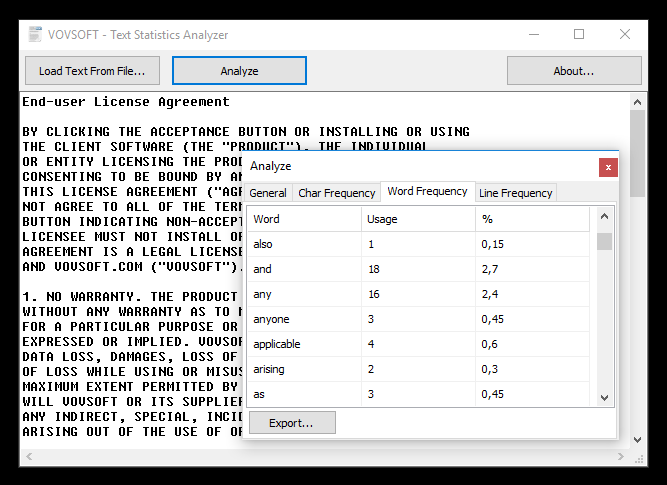
The software features a dual-input method, allowing users to load text directly from files or paste content into the primary interface. Once the text is present, users can make manual modifications before initiating the analysis. The resulting data is organized into several distinct tabs for clarity.
Key analytical features include:
- General Statistics: Total counts for characters, words, and lines, alongside a tally of unique elements used throughout the text.
- Frequency Analysis: Detailed breakdowns of how often specific characters, words, or lines appear, displayed as both raw counts and percentage points.
- Real-Time Processing: The application calculates results immediately without noticeable lag, ensuring efficient performance during active editing.
For those needing to archive their findings or perform further data manipulation, the utility includes a dedicated export function. All generated statistics can be saved directly to a CSV file, facilitating compatibility with spreadsheet applications and other external research tools.
Top 5 Reasons To Download Text Statistics Analyzer
- Unparalleled Granularity in Frequency Mapping: Beyond simple word counts, this tool provides a microscopic look at character, word, and line frequency, allowing you to identify linguistic patterns and repetitive habits with surgical precision.
- High-Performance, Real-Time Processing: Built with a lightweight architecture, the software processes massive amounts of text instantly without the lag or system bloat associated with heavy-duty word processors.
- Professional Data Portability via CSV Export: The ability to export your linguistic analysis into a CSV format transforms raw text into actionable data, perfect for advanced analysis in spreadsheets or integration into larger reports.
- Minimalist and Intuitive User Experience: With a clean, distraction-free interface, the software removes the learning curve entirely, allowing users to move from raw text to deep insights in just two clicks.
- Vocabulary and Structural Optimization: By tracking unique elements and percentage-based frequency, the tool serves as a powerful mirror for your writing, helping to eliminate "crutch words" and improve the richness of your prose.
In the modern digital landscape, content is not just king; it is the very foundation of how we communicate, sell, and express ourselves. Whether you are a professional copywriter, a linguistics student, a software developer, or a casual blogger, the quality of your output is often determined by the precision of your language. However, most of us write blindly. We rely on "feel" and "intuition" rather than hard data. This is where the Text Statistics Analyzer comes into play. This isn't just another word counter—it is a specialized laboratory for your text. If you have ever wondered why your writing feels repetitive, or if you need to adhere to strict character constraints for a project, this giveaway is the ultimate solution. Let’s dive deep into the five core reasons why this utility belongs in your digital toolkit.
1. Unparalleled Granularity in Frequency Mapping
Most standard writing applications, like Microsoft Word or Google Docs, offer a rudimentary word count feature. Some might even give you a character count if you dig through the menus. But for anyone serious about the mechanics of language, those basic metrics are woefully inadequate. The Text Statistics Analyzer takes a different approach by offering an exhaustive breakdown of frequency across three distinct categories: characters, words, and lines.
Why does this matter? Imagine you are a search engine optimization (SEO) specialist. You know that overusing certain keywords can lead to "keyword stuffing" penalties, while underusing them can make your content invisible to search engines. By using the word frequency tab, you can see exactly how many times a term appears and, more importantly, its percentage relative to the rest of the text. This allows for a level of optimization that is simply impossible with manual counting.
Furthermore, the character frequency analysis is a godsend for coders and data analysts. When working with specific file formats or strings of code, understanding the distribution of symbols and characters can help identify syntax errors or structural inconsistencies. For the creative writer, line frequency analysis can reveal repetitive sentence starters or structural ruts that make prose feel stagnant. By seeing your text broken down into its constituent parts, you gain a level of control over your craft that feels like having a superpower. This tool doesn't just count; it reveals the DNA of your writing.
2. High-Performance, Real-Time Processing
We live in an era of "bloatware." Many modern applications require gigabytes of RAM just to perform basic tasks. When you are trying to analyze a massive text file—perhaps a 500-page manuscript or a massive log file from a server—opening a heavy word processor can lead to system freezes, "not responding" messages, and general frustration. The Text Statistics Analyzer is the antithesis of this trend. It is a lightweight software utility designed for one thing: speed.
During my testing, the most impressive aspect was the total lack of lag. You can paste a massive block of text into the main window, and the analysis happens in real-time. There is no loading bar, no "processing" spinner, and no delay. This efficiency is critical for professionals who need to iterate quickly. If you make a modification to the text within the app's GUI, the statistics update with instantaneous precision.
The beauty of a lightweight tool like this is that it stays out of your way. It doesn’t hog your CPU or drain your laptop battery. It sits on your desktop ready to work the moment you need it. For those of us who juggle multiple applications simultaneously—browsers, image editors, and communication tools—having a utility that performs its function without taxing the system is a breath of fresh air. It is a testament to the idea that a tool should be as sharp and as fast as the mind using it.
3. Professional Data Portability via CSV Export
While the internal display of the Text Statistics Analyzer is excellent, the real power for power users lies in the "Export to CSV" button. In the world of tech and data science, portability is everything. Being able to take your linguistic analysis out of the software and into a program like Excel or a specialized data visualization tool opens up a world of possibilities.
Once your text stats are in a CSV (Comma Separated Values) file, you can perform advanced operations that go far beyond simple viewing. You can create charts to visualize your word usage over time, build pivot tables to compare different chapters of a book, or even use the data to train basic machine learning models for style detection. For academic researchers in linguistics, this feature is indispensable. It allows for the easy aggregation of data across multiple different text samples, facilitating the kind of large-scale analysis required for formal studies.
Even for the average user, the CSV export is incredibly handy. If you are working for a client who demands a report on the composition of the content you’ve provided, you can simply export the stats and attach them as a professional addendum. It shows a level of meticulousness and professional rigor that sets you apart from the competition. You aren't just giving them a document; you are giving them a data-backed analysis of the work.
4. Intuitive User Experience and Versatility
Tech reviewers often talk about "friction." Friction is anything that stands between the user and their goal. Many "pro" tools are buried under layers of complex menus, requiring hours of tutorials just to understand the basics. This software eliminates friction entirely. The GUI (Graphical User Interface) is built around a "don't make me think" philosophy that I find incredibly refreshing.
You have two main paths to get started:
- Load from File: Perfect for when you have a pre-existing document or a massive log file that you don't want to copy and paste manually.
- Paste Directly: Ideal for quick snippets of text, social media posts, or emails that you want to check before hitting send.
The fact that you can also
modify the text directly within the application is a subtle but brilliant touch. You don't have to switch back and forth between your editor and the analyzer. You can see a stat you don't like—perhaps you’ve used the word "very" too many times—find it in the text window, delete it, and watch the stats update immediately.
This versatility makes it a "Swiss Army Knife" for anyone who works with words. It doesn’t matter if you are checking a 280-character tweet for character limits or analyzing a 100,000-word novel for unique element distribution; the workflow remains the same. It is simple, effective, and elegant. In a world of over-complicated software, there is a certain industrial beauty in a tool that does exactly what it says it will do, with no unnecessary flourishes.
5. Deep Linguistic Insights and Pattern Detection
The final reason to download this giveaway is perhaps the most profound: it helps you understand your own mind. Every writer has habits—patterns of speech and "unique elements" that define their voice. Sometimes, those habits are strengths, but often, they are crutches. The General section of the analyzer provides a crucial metric: the number of unique elements employed in your text.
This is a direct measure of your vocabulary richness. If you write a 2,000-word article but only use 400 unique words, your writing might come across as repetitive and unengaging. By tracking this number, you can challenge yourself to expand your linguistic range. You can actively see your "linguistic habits" expressed in percentage points, which provides an objective reality check that a human editor might miss.
Furthermore, the Line Frequency tab is an underrated gem. In technical writing or poetry, the way lines are structured is just as important as the words themselves. If you are analyzing a series of error logs, the line frequency can help you identify the most common recurring issues in seconds. If you are a poet, it can help you see the rhythmic repetition of your stanzas. This software bridges the gap between the art of writing and the science of data. It provides a mirror for your linguistic soul, allowing you to refine your communication until it is as efficient and impactful as possible.
Final Thoughts: Why You Need To Act Now
As a tech reviewer, I see hundreds of apps every year. Most are forgotten within a week. But every so often, a utility comes along that is so focused and so useful that it becomes a permanent resident on my hard drive. The Text Statistics Analyzer is one of those tools. It doesn't try to be a word processor, an editor, and a social media manager all at once. It focuses on being the best text analysis tool on the market, and it succeeds.
Whether you want to improve your writing, optimize your SEO, analyze technical logs, or simply satisfy your curiosity about your own linguistic habits, this software provides the data you need in an interface that anyone can use. The real-time, lag-free performance combined with the professional CSV export makes it a heavy hitter in a lightweight package.
Don't miss out on this giveaway. Opportunities to snag a high-quality, specialized utility like this for free are rare. It is an investment in your productivity and your craft. Download it, run your latest project through it, and I promise you will be surprised by what the data reveals. Your text is telling a story through its statistics—it's time you started listening.


Reviews for Text Statistics Analyzer
Click Here to Read Reviews for Text Statistics Analyzer >> Click Here to Submit Reviews for Text Statistics Analyzer >>