What Does FlipPageMaker Photo to FlipBook Do?
FlipPageMaker Photo to FlipBook is a specialized conversion utility designed to transform static digital image collections into interactive, flash-based page-flipping albums. The software targets users who wish to create professional-looking online galleries without requiring advanced Flash programming skills or manual coding expertise.
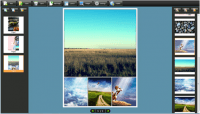
The application simplifies the creation process into a three-step workflow. Users begin by importing their desired photo files directly into the interface. From there, the software provides a library of preset theme templates that dictate the visual aesthetics of the final product. These templates allow for the customization of the album's background and navigation interface to match specific branding or personal preferences.
The primary technical features of the software include:
- Rapid Assembly: The software is engineered to generate a complete digital album in under ten minutes, depending on the volume of images.
- Realistic Interactivity: The final output incorporates a realistic page-turning effect, simulating the physical experience of browsing a printed photo book.
- Royalty-Free Usage: The tool permits unlimited conversions, allowing users to produce multiple projects without incurring additional per-project fees.
- Template Variety: A range of pre-designed skins and backgrounds are included to facilitate quick deployment.
By automating the conversion of standard image formats into interactive modules, FlipPageMaker Photo to FlipBook serves as an efficient tool for photographers and digital content creators looking to enhance their online presentation capabilities.
Top 5 Reasons To Download FlipPageMaker Photo to FlipBook
- Professional Realistic Page-Turning Aesthetics: Transform flat, boring images into a tactile, interactive digital experience that mimics the feel of a high-end physical coffee table book.
- Zero Learning Curve for High-End Results: You do not need to be a graphic designer or a Flash programmer to create stunning results; the software does the heavy lifting for you.
- Rapid Deployment in Under Five Minutes: Move from a folder full of raw images to a fully functioning, interactive flipbook in less time than it takes to brew a pot of coffee.
- Expansive Library of Custom Themes: Access a wide variety of preset templates that allow you to customize the look and feel to match your personal brand or specific project needs.
- Lifetime Royalty-Free Content Creation: Create an unlimited number of albums for personal or commercial use without ever worrying about recurring fees or royalty payments.
The Digital Evolution of the Photo Album
In the modern age of digital photography, we are all guilty of the same thing: hoarding thousands of photos on our hard drives, smartphones, and cloud storage services, only for them to sit there and gather digital dust. We take photos to remember moments, to tell stories, and to share experiences. However, scrolling through a grid of thumbnails or a static slideshow often fails to capture the magic of the moment. There is something inherently nostalgic and engaging about the act of turning a page. This is where FlipPageMaker Photo to FlipBook steps in to revolutionize your digital library. As a reviewer who has tested hundreds of media utilities, I can tell you that finding a tool that balances professional output with absolute simplicity is a rare find. This giveaway isn't just another piece of "shelfware"—it is a gateway to presenting your memories in a way that actually demands attention.
When we talk about digital presentations, the "wow factor" is usually reserved for those with deep pockets or advanced coding skills. We have all seen those high-end online catalogs and luxury digital brochures that feel smooth, responsive, and expensive. Usually, those are created by design agencies charging thousands of dollars. With FlipPageMaker Photo to FlipBook, you are essentially getting that same level of polish for free through this giveaway. Let’s dive deep into the five core reasons why you need to stop what you are doing and get this software onto your machine right now.
1. Professional Realistic Page-Turning Aesthetics
The first thing you will notice—and the first thing your audience will notice—is the realism. We live in a tactile world, and our brains are wired to respond to physical cues. When you view a photo on a standard gallery app, it is a flat, two-dimensional experience. FlipPageMaker Photo to FlipBook utilizes a sophisticated engine to simulate the physics of paper. When you click the corner of a page, it doesn't just "swap" to the next image; it peels, curves, and flips just like a real book. This realistic page-turning effect adds a layer of sophistication that static images simply cannot match.
Think about the psychological impact of this. Whether you are creating a wedding album, a portfolio for your freelance work, or a digital catalog for a small business, the presentation dictates the perceived value of the content. By using a flipbook format, you are telling your viewers that this content is curated and important. It transforms a collection of JPEGs into a cohesive "publication." The shadows, the thickness of the virtual paper, and the fluid motion work together to create an immersive environment. In a world of "swipe-left, swipe-right" fatigue, the classic flip provides a refreshing and high-end feel that keeps people engaged for longer.
2. Zero Learning Curve for High-End Results
One of the biggest barriers to entry for creative software is the "skill wall." Many powerful design tools require weeks of tutorials just to understand the interface. As a tech reviewer, I see a lot of people give up on great ideas because the software was too intimidating. FlipPageMaker Photo to FlipBook completely removes this barrier. The developers have designed this with the non-technical user in mind. You do not need to know a single line of code. You do not need to understand Flash architecture. You don't even need to know about image aspect ratios or resolution scaling.
The process is as simple as Import, Customize, and Build. If you can drag and drop files from a folder, you have all the technical skill required to master this app. This "democratization of design" is a major reason why this giveaway is so valuable. It empowers the grandmother who wants to share photos of her grandkids, the student who wants to turn a school project into a digital magazine, and the business owner who needs a quick way to showcase products. By removing the technical hurdles, the software allows you to focus entirely on the creative aspect of your project. It is embarrassingly easy to use, yet the output looks like it was handled by a pro.
3. Rapid Deployment in Under Five Minutes
We are all busy. Whether you are working a 9-to-5 or managing a household, nobody has three hours to spend formatting a single photo album. This is where FlipPageMaker really shines. The "5-minute promise" is not just marketing fluff; it is a reality. Because the software is optimized for speed, the conversion process is incredibly streamlined. Once you select your photos, the engine processes them simultaneously, applying the flipbook framework in the background while you choose your aesthetic preferences.
Imagine you just got home from a vacation. Normally, you might upload 50 photos to a social media album, which looks the same as everyone else's. Instead, you could spend five minutes with this software and send your friends and family a link to a beautiful, interactive digital book. The time-to-value ratio here is off the charts. For professionals, this speed means you can provide "draft" versions of portfolios or catalogs to clients almost instantly. In a fast-paced digital economy, being able to produce high-quality assets in minutes rather than hours is a competitive advantage you shouldn't pass up.
4. Expansive Library of Custom Themes
A "one size fits all" approach rarely works in design. A wedding album should look different than a corporate report, and a child’s birthday book should look different than a photography portfolio. FlipPageMaker Photo to FlipBook includes a variety of preset templates and themes that allow you to change the "look and feel" of your album with a single click. These themes control the background, the toolbar style, the colors, and even the navigation buttons.
You can go with a minimalist, clean look for a modern art gallery feel, or choose something more ornate and textured for a classic scrapbooking vibe. These templates are not just static backgrounds; they are comprehensive "skins" that wrap around your content. Having these presets available means you don't have to spend time agonizing over color palettes or button placement. You can experiment with different themes in real-time, seeing how your photos look in various settings before you finalize the build. This level of customization ensures that your flipbook feels unique and tailored to the specific story you are trying to tell.
5. Lifetime Royalty-Free Content Creation
This is perhaps the most compelling reason for the savvy user to download this giveaway. Most "free" tools online come with a massive catch: they either water-mark your images, limit the number of pages, or require you to pay a royalty if you use the output for anything other than personal viewing. FlipPageMaker Photo to FlipBook offers unlimited conversions without paying royalties. This means once you have the software, you own the creative output. You can create one album or one thousand.
For small business owners, freelancers, and marketers, this is a goldmine. You can create digital brochures for every product in your inventory without ever seeing a recurring bill. You can create "bonus" digital lookbooks for your customers as part of a marketing campaign. For personal users, it means you can archive your entire life’s history—year by year—into a digital library that you can share freely without worrying about a subscription expiring or your files being locked behind a paywall. The freedom to create and distribute your work without financial strings attached is the ultimate "pro" feature, and getting it as a giveaway is an opportunity you simply cannot ignore.
Final Thoughts: Why You Should Act Now
Software giveaways like this don't come around often, especially for tools that produce this level of professional quality. We are currently in an era where "content is king," but presentation is the kingmaker. You can have the best photos in the world, but if they are presented in a clunky, boring way, people will scroll right past them. FlipPageMaker Photo to FlipBook gives you the power to stop the scroll. It gives your photos weight, movement, and a sense of "prestige."
Whether you are looking to preserve family memories in a more engaging format, or you want to elevate your professional presentation game, this tool is an essential addition to your digital toolkit. It is fast, it is powerful, and most importantly, it produces results that will genuinely impress anyone who views them. Don't let your photos sit in a forgotten folder on your desktop. Give them the life they deserve. Download this giveaway, spend five minutes experimenting with your favorite photo collection, and I guarantee you will be hooked on the results. This is the simplest way to turn "just some pictures" into a masterpiece.
Remember, the digital landscape is moving toward more interactive and immersive experiences. By using a flipbook format, you are staying ahead of the curve and providing your audience with an experience that feels modern yet classic. It is the perfect blend of old-school book charm and new-school digital technology. Grab this while you can, and start flipping your photos into something extraordinary today.


Reviews for FlipPageMaker Photo to FlipBook
Click Here to Read Reviews for FlipPageMaker Photo to FlipBook >> Click Here to Submit Reviews for FlipPageMaker Photo to FlipBook >>