What Does Ashampoo Easy Paint Do?
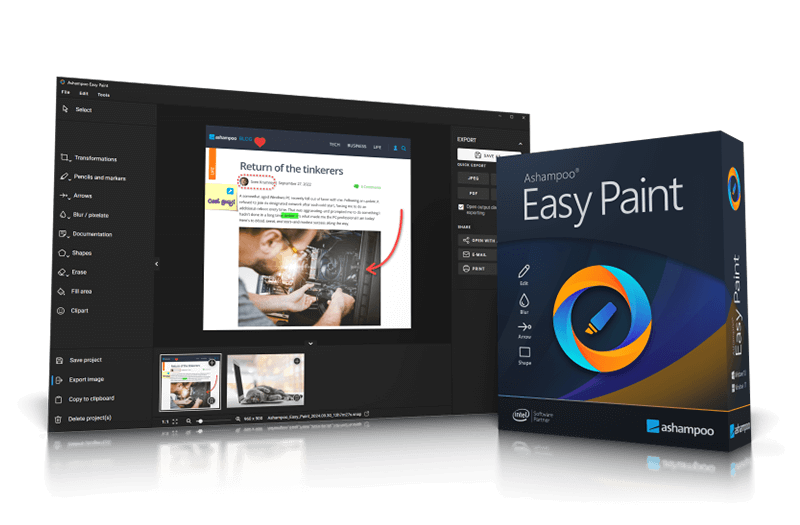
Ashampoo Easy Paint is a streamlined image editing application tailored specifically for general office environments. Unlike comprehensive creative suites, this software focuses on utility, offering a simplified interface that allows users to perform standard adjustments such as cropping, rotating, and resizing without a significant learning curve. The primary goal is to facilitate quick documentation and presentation enhancement for users who require functional rather than artistic edits.
The software includes a suite of annotation tools designed for labeling and commenting. Users can integrate text, notes, and specific callouts directly onto images. Specialized features provide tools for:
- Rapid marking and content highlighting.
- Sequential numbering for instructional steps.
- Obscuring or blurring sensitive information for data privacy.
Compatibility is managed through support for various industry formats, including the ability to export projects as PDF or PSD files. This ensures that edited assets are ready for professional distribution or further refinement in high-end editors if necessary. Ashampoo Easy Paint positions itself as a practical solution for office staff looking to optimize visual communication through efficient, straightforward marking and editing tools without the overhead of complex software suites.
Top 5 Reasons To Download Ashampoo Easy Paint
- An Intuitive Interface That Eliminates the Learning Curve: Designed for office professionals, not graphic designers, ensuring you can start working immediately.
- High-Efficiency Annotation and Technical Marking Tools: Features specialized tools for numbering, highlighting, and labeling that make documentation a breeze.
- Built-In Privacy and Redaction Capabilities: Easily obscure sensitive information, passwords, or personal data before sharing screenshots.
- Professional-Grade Export Options including PDF and PSD: Versatile saving options that ensure your work integrates perfectly into corporate workflows and design pipelines.
- The Ultimate Productivity Booster for Non-Designers: Replaces bloated, complex software with a lightweight tool focused entirely on speed and office-related tasks.
Let’s be honest for a second: we have all been there. You are in the middle of a high-stakes project, and you need to quickly edit an image for a presentation or a report. You open up one of those "industry-standard" photo editing suites, only to be met with a barrage of floating windows, three dozen toolbars you don’t understand, and a loading screen that takes longer than the actual edit should. For the average office worker, these heavy-duty programs are not just overkill; they are a workflow killer. This is exactly why Ashampoo Easy Paint is the giveaway you absolutely cannot afford to skip. It is a breath of fresh air in a market saturated with overly complicated software. It understands that in a professional environment, speed and clarity are the ultimate currencies. As a tech reviewer who has tested everything from enterprise-grade design suites to basic mobile filters, I can tell you that finding a tool that hits the "Goldilocks" zone of functionality and simplicity is rare. Ashampoo Easy Paint lives in that zone. Let’s dive deep into why this specific software needs to be on your workstation right now.
1. An Intuitive Interface That Eliminates the Learning Curve
The biggest barrier to entry for most software is the learning curve. In a fast-paced office environment, nobody has three hours to watch YouTube tutorials just to learn how to crop an image or add a text box. This is where Ashampoo Easy Paint shines the brightest. From the moment you launch the application, it becomes clear that the developers prioritized the user experience above all else. The interface is clean, minimalist, and, most importantly, logical. You aren’t hunting through nested menus to find basic functions like rotating or resizing. Everything you need is laid out in a way that feels natural to anyone who has ever used a basic word processor or a web browser.
When we talk about "user-friendly," we often mean "watered down," but that isn't the case here. Instead, it is focused. For the office user who needs to enhance documentation or prep an image for a slide deck, the clarity of the interface means you can achieve your goal in seconds rather than minutes. There is an inherent psychological benefit to using software that doesn't make you feel "dumb" or overwhelmed. By removing the friction of complex navigation, Ashampoo Easy Paint allows you to stay in your creative flow. You can grab an image, make your adjustments, and get back to your primary task without missing a beat. This is effortless image editing in its purest form, making it the perfect companion for administrators, project managers, and marketing assistants who need visual results without the visual headache.
2. High-Efficiency Annotation and Technical Marking Tools
If you have ever tried to explain a technical process using only words, you know how difficult it can be. "Click the button in the top right, no, not that one, the one next to the gear icon..." It's a nightmare. This is why annotations are the secret weapon of the modern office. Ashampoo Easy Paint takes this concept and turns it into a streamlined science. One of the standout features of this giveaway is the suite of specialized marking and numbering tools. Imagine you are creating a "How-To" guide for a new software rollout. Instead of manually drawing circles and typing numbers in separate text boxes, Easy Paint provides tools specifically designed for fast marking and numbering.
With just a few clicks, you can add sequential numbers to an image to show a step-by-step process. You can use the highlighting tool to draw the viewer’s eye exactly where it needs to be, whether that is a specific line of code, a budget figure in a spreadsheet screenshot, or a UI element. These tools are not just "shapes" you drag onto a canvas; they are intelligently designed assets that look professional and uniform. The ability to add notes and comments directly onto an image transforms a simple picture into a piece of communication. In an era where remote work is standard, being able to send a clearly labeled image instead of a three-paragraph email is a massive advantage. This software makes your documentation look like it was produced by a professional technical writer, even if you’re just trying to help a colleague figure out how to submit an expense report.
3. Built-In Privacy and Redaction Capabilities
In today's corporate world, data privacy is not just a "nice to have"—it is a legal and ethical requirement. Whether you are dealing with GDPR, HIPAA, or simply internal company secrets, sharing screenshots can be a risky business. Often, a screenshot of a webpage or a software interface contains sensitive information like usernames, email addresses, or proprietary data that should not be seen by everyone. Traditionally, users have tried to "hide" this data by drawing black boxes over it or using crude "spray paint" tools in basic programs. Not only does this look unprofessional, but it can also be ineffective if the software doesn't properly flatten the layers.
Ashampoo Easy Paint includes a dedicated function to obscure sensitive information. This allows you to blur or pixelate specific areas of an image with precision. It is an essential tool for anyone in HR, legal, or IT who needs to share visual information while maintaining strict confidentiality. This feature alone makes the software worth the download. It provides peace of mind, knowing that you can share a screenshot of a bug or a process without accidentally leaking a client's private details. The blurring effect is clean and professional, ensuring that while the data is hidden, the overall aesthetic of your document remains polished. It’s about being secure without sacrificing the quality of your presentation.
4. Professional-Grade Export Options including PDF and PSD
Compatibility is often the "silent killer" of productivity. You finish a great edit, but then you realize your colleague can’t open the file, or the formatting breaks when you drop it into another program. Ashampoo Easy Paint tackles this head-on by supporting high-level export options, most notably PDF and PSD formats. Most "simple" image editors limit you to basic formats like JPG or PNG. While those are great for web use, they lack the versatility required for serious office work. By allowing users to export as a PDF, the software ensures that your annotated images are ready for distribution in a format that every single person in the business world can open and view correctly, regardless of their device or operating system.
The support for PSD (Photoshop Document) is even more impressive. This shows that Ashampoo Easy Paint isn't just an "island" of software; it’s part of a larger ecosystem. If you create a layout or an annotated image and then realize it needs to be handed off to a professional design team for further polishing, you can export it as a PSD. This preserves the layers and allow designers to pick up exactly where you left off in professional tools like Photoshop or Affinity Photo. This bridge between "office-level" and "pro-level" work is a rare feature in software this accessible. It empowers the user to start a project with confidence, knowing that their work is portable and professional.
5. The Ultimate Productivity Booster for Non-Designers
The final reason to download this giveaway is the most important one: time. We live in a world where we are constantly expected to do more with less. Ashampoo Easy Paint is built for the "multi-hyphenate" employee who is a manager-marketer-writer-analyst all at once. When you aren't a full-time designer, you don't want a tool that demands your attention; you want a tool that serves your needs and then disappears. This software is incredibly lightweight, meaning it won't bog down your system resources. It opens instantly, performs its tasks without lag, and saves files quickly.
Think about the cumulative time saved over a month. Five minutes saved on a presentation today, ten minutes saved on a training manual tomorrow, and three minutes saved on a quick feedback image for a client. Those minutes add up to hours of regained productivity. Ashampoo Easy Paint is the definition of "right-sized" software. It doesn't try to be a video editor, a 3D renderer, or a digital painting suite. It tries to be the best possible tool for image editing for the office, and it succeeds brilliantly. For anyone who has ever felt frustrated by the complexity of modern software or the limitations of basic system tools, this giveaway is the solution you have been waiting for. It’s an investment in your own efficiency, and because it's a giveaway, the return on investment is infinite.
In conclusion, Ashampoo Easy Paint is more than just a simple utility; it is a specialized tool that addresses the specific pain points of the modern professional. By focusing on quick annotations, user-friendly navigation, and essential privacy features, it fills a gap in the software market that many developers ignore. Whether you are a veteran office worker looking to spice up your reports or a newcomer who wants to make a great impression with clear, professional documentation, this software is a must-have. Don’t let the simplicity fool you; there is a sophisticated engine under the hood that is fine-tuned for the way we work today. Download this giveaway, install it, and watch how quickly it becomes the most-used tool in your digital arsenal. Your workflow—and your sanity—will thank you.
In a world where software often tries to be everything to everyone, Ashampoo Easy Paint succeeds by being exactly what you need, exactly when you need it. From the crispness of its marking tools to the reliability of its export functions, every element is designed to make your work life easier. This isn't just another app to clutter your desktop; it’s a productivity powerhouse that turns "editing" from a chore into a quick, satisfying task. Make sure to grab this giveaway while it's available—this is one of those rare instances where the software actually lives up to the promise of its name. It truly is Easy Paint for a harder work world.

Reviews for Ashampoo Easy Paint
Click Here to Read Reviews for Ashampoo Easy Paint >> Click Here to Submit Reviews for Ashampoo Easy Paint >>