What Does Ashampoo WinOptimizer 2025 Do?
Ashampoo WinOptimizer 2025 is a comprehensive system utility suite designed to maintain, clean, and optimize the Windows operating system. Built on the foundation of the WinOptimizer 27 flagship version, this software provides 20 specialized modules aimed at addressing performance degradation caused by leftover browsing data, invalid shortcuts, and unnecessary background processes.
The application offers detailed system analysis and hardware benchmarking to evaluate component speed. Users can manage privacy settings beyond default Windows configurations, specifically controlling what data is shared with Microsoft. Key functional updates in this version include:
- Internet Cleaner: Now features a robust deletion history for tracking cleared data.
- Icon Saver: Includes a new function to clear the Windows icon cache.
- DiskSpace Explorer: Enhanced for more detailed storage distribution analysis.
- Context Menu Manager: Updated with new filters for easier navigation and customization.
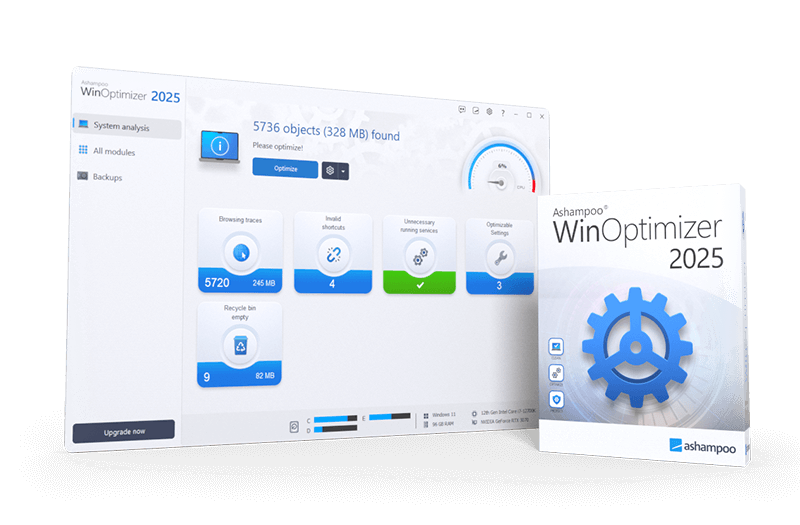
Beyond basic maintenance, Ashampoo WinOptimizer 2025 allows for the encryption or restoration of data, management of user rights, and the configuration of energy-saving plans. The interface has been redesigned with a modern dashboard style for statistics and updated program dialogs. By centralizing these maintenance tasks, the suite provides a factual overview of system health while offering tools to streamline the operating environment for both power users and casual consumers.
Top 5 Reasons To Download Ashampoo WinOptimizer 2025
- Comprehensive System Cleaning and Performance Boosts – Ashampoo WinOptimizer 2025 targets the hidden "junk" that slows down your PC, providing a cleaner, faster experience.
- Granular Privacy and Telemetry Control – Take back control of your data by managing what Windows shares with Microsoft, moving beyond restrictive default settings.
- A Massive Suite of 20 Optimization Modules – From managing user rights to tweaking energy-saving plans, you get a full toolbox to customize every inch of your operating system.
- Advanced System Analysis and Benchmarking – Use high-end tools like DiskSpace Explorer and hardware benchmarks to understand exactly how your computer is performing.
- Modernized Interface Built on Flagship Tech – Enjoy the stability and features of the latest WinOptimizer 27 engine with a sleek, dashboard-style UI and improved context menu management.
If you have been using a Windows PC for more than a few months, you already know the sinking feeling of a slowing system. It starts subtly. Maybe a window takes an extra second to open, or the boot time begins to creep upward. Before you know it, your high-end machine feels like a relic from a decade ago. We often blame the hardware, but more often than not, the culprit is the operating system itself. Windows is a complex beast, and as you use it, it accumulates digital "rust"—leftover files, broken shortcuts, bloated registries, and background processes that eat up your RAM. This is exactly why Ashampoo WinOptimizer 2025 is a mandatory download for anyone who values their time and their hardware.
As a tech reviewer, I see a lot of "tune-up" utilities. Some are snake oil, promising the world and delivering nothing but more bloat. Ashampoo, however, has a long-standing reputation for building tools that actually get under the hood and do the heavy lifting. This latest 2025 version isn't just a minor update; it is built on the robust architecture of their flagship WinOptimizer 27, meaning you are getting cutting-edge optimization technology. Let’s dive deep into the five primary reasons why this giveaway is something you cannot afford to pass up.
1. Comprehensive System Cleaning and Performance Boosts
The core philosophy of Ashampoo WinOptimizer 2025 is to make Windows "lean and clean" again. Over time, your browser accumulates thousands of tiny files—trackers, cache data, and cookies—that not only compromise your privacy but also slow down your web experience. The Internet Cleaner module in this version has been significantly enhanced. It doesn't just delete your history; it now features a robust deletion history and advanced scanning to ensure that your browsing remains snappy and your footprint is minimized.
But it doesn't stop at the browser. Windows itself is notorious for creating temporary files that it never bothers to delete. From failed update remnants to temporary installation files, these can take up gigabytes of space. WinOptimizer 2025 goes through your system with a fine-toothed comb. One of the standout new features is the ability to delete the Windows icon cache via the Icon Saver. If you have ever noticed your desktop icons turning into white boxes or generic symbols, you know how annoying a corrupted cache can be. This tool fixes that instantly, restoring the visual integrity of your workspace.
When you run the cleaning modules, you aren't just gaining disk space; you are reducing the workload on your hard drive or SSD. By removing invalid shortcuts and cleaning the registry, the OS doesn't have to "hunt" through broken paths to find what it needs. The result is a system that feels responsive, as if you just performed a fresh install of Windows, but without the hassle of actually reinstalling your apps.
2. Granular Privacy and Telemetry Control
We live in an era where data is the most valuable commodity, and unfortunately, Microsoft is very hungry for it. By default, Windows 10 and 11 are configured to share a significant amount of "telemetry" data. While Microsoft claims this is for system improvement, many power users find it invasive. The problem is that the settings to disable these features are buried deep within menus, or sometimes require registry hacks that the average user isn't comfortable performing.
This is where Ashampoo WinOptimizer 2025 shines. It acts as a powerful shield for your privacy. It brings all those hidden "phone home" settings into one easy-to-manage interface. You can decide exactly what data you are willing to share and what you want to keep private. Do you want your location tracked? Do you want your typing habits sent to a server for "dictionary improvements"? Most people would say "no," and WinOptimizer makes that "no" a reality with a few simple clicks.
Privacy isn't just about what Microsoft sees, though. It’s also about what other users on your PC can see. The program includes modules to encrypt data and securely delete sensitive files so they can never be recovered by forensic software. In an age of increasing digital threats, having these pro-level privacy tools at your fingertips is an absolute game-changer.
3. A Massive Suite of 20 Optimization Modules
One of the biggest mistakes people make is thinking that an optimizer is just a "delete button." With Ashampoo WinOptimizer 2025, you are getting a virtual Swiss Army knife for your computer. There are 20 different modules available, each designed to tackle a specific aspect of the Windows experience. This level of customization is what separates a "power user" from a standard user.
Consider the Context Menu Manager. We’ve all seen it: you right-click a file, and the menu that pops up is two feet long because every program you’ve ever installed added an entry there. It’s cluttered and slow. WinOptimizer 2025 includes an updated Context Menu Manager with new filters, allowing you to strip away the junk and keep only the commands you actually use. This might sound like a small tweak, but it significantly improves your daily workflow.
Beyond that, the suite allows you to manage user rights and energy-saving plans with much more precision than the standard Windows Control Panel. Whether you want to squeeze every ounce of power out of your CPU for gaming or extend the battery life of your laptop for a long flight, these modules give you the control you need. You can even manage startup processes to ensure that only the essential programs load when you turn on your PC, drastically reducing boot times.
4. Advanced System Analysis and Benchmarking
You cannot fix what you do not understand. A key reason to download this giveaway is the suite's analytical capabilities. Ashampoo WinOptimizer 2025 doesn't just guess what's wrong; it performs a comprehensive analysis of both your hardware and your software. It provides two distinct benchmarks that offer meaningful speed tests for your computer’s components. If you’ve ever wondered if your RAM is performing up to spec or if your hard drive is starting to fail, these tests provide the data you need.
The DiskSpace Explorer is another highlight that has seen significant enhancements in this version. Rather than just telling you that your drive is full, it provides a visual breakdown of what is actually taking up space. Is it a hidden folder of old video projects? Is it a massive log file from a buggy application? DiskSpace Explorer helps you find the "space hogs" that standard Windows File Explorer hides from view.
By combining this hardware analysis with the software optimization, you get a holistic view of your machine. If the benchmarks show your hardware is fine but your system is sluggish, you know you need to lean harder on the cleaning modules. If the hardware is struggling, WinOptimizer helps you mitigate the load until you can afford an upgrade. It’s like having a professional IT consultant living inside your computer.
5. Modernized Interface Built on Flagship Tech
User experience (UX) matters. A tool can be incredibly powerful, but if it looks like it was designed for Windows 95, nobody is going to want to use it. Ashampoo understands this, which is why WinOptimizer 2025 has been given a unified look and a modern dashboard style. The interface is clean, intuitive, and designed to provide the most important information at a glance. You don't have to be a tech genius to navigate the 20 modules; the icons are clear, and the descriptions are helpful.
Because this version is built on the WinOptimizer 27 engine, it is fully up-to-date with the latest Windows updates. Many free optimization tools are outdated and can actually cause harm to a modern Windows 11 installation by messing with settings that have changed in recent builds. Ashampoo ensures that their dialogs and modules are compatible with the latest version of the OS, providing peace of mind alongside performance.
The dashboard style isn't just for looks, either. It provides real-time statistics on your system's health. You can see how many junk files have been found, the status of your registry, and the current level of your privacy settings the moment you open the app. This "command center" approach makes maintaining your PC a satisfying part of your routine rather than a chore. It’s about empowerment—giving you the tools to keep your machine running at peak performance without needing to spend hours in a command prompt.
Final Thoughts: Why You Need This Now
We often treat our computers like appliances—we expect them to work every time we hit the power button. But unlike a toaster, a computer is a dynamic environment that is constantly changing. Every webpage you visit, every app you install, and every Windows update that rolls out changes the state of your system. Without proper maintenance, even the fastest PC will eventually succumb to bloat and errors.
Ashampoo WinOptimizer 2025 is the solution to the "slow PC" epidemic. It addresses the three pillars of a great computing experience: speed, cleanliness, and privacy. By downloading this giveaway, you are equipping yourself with a professional-grade toolkit that simplifies complex tasks. Whether you are a gamer looking for every last frame per second, a professional who needs a reliable workstation, or a casual user who just wants their computer to stop lagging, this software is the answer.
The combination of the new deletion history in the Internet Cleaner, the sophisticated Context Menu Manager, the visual DiskSpace Explorer, and the sheer power of the 20 integrated modules makes this a "compelling well-rounded package." Don't settle for the default, sluggish Windows experience. You deserve a system that is as fast and efficient as the day you bought it. Ashampoo WinOptimizer 2025 is your ticket to a faster, leaner, and cleaner Windows experience. Download it today and see the difference for yourself!
Make sure to take advantage of this giveaway while it's available. Tools of this caliber, especially those built on the latest flagship versions like WinOptimizer 27, are rare to find for free. Your PC will thank you.

Reviews for Ashampoo WinOptimizer 2025
Click Here to Read Reviews for Ashampoo WinOptimizer 2025 >> Click Here to Submit Reviews for Ashampoo WinOptimizer 2025 >>