What Does Data Shredder 6 Professional Do?
ProtectStar Data Shredder 6 is a professional-grade Windows utility designed for the permanent erasure of digital information from internal hard drives and external storage media. Unlike standard operating system deletion commands, which merely remove file references, this software overwrites data to prevent forensic reconstruction.
The application provides users with 18 distinct security methods for data destruction. These protocols meet or exceed international military and government requirements, including US Army AR380-19, DoD 5220.22-M, and the German BSI-VS-2011. These standards are engineered to secure sensitive materials, such as personal banking information and passwords, against recovery efforts even by high-level security agencies.
Key features of the software include:
- Secure Deletion: Complete removal of specific files and directories beyond recovery.
- Free Space Wiping: A specialized tool that cleans previously "deleted" data still residing in unallocated disk space.
- Integrated Wizards: Step-by-step navigation designed to help users execute complex shredding tasks efficiently.
By utilizing these tools, users can ensure that discarded or repurposed hardware does not contain residual confidential data. This effectively mitigates the risk of identity theft or data breaches during device disposal or resale.
Top 5 Reasons To Download Data Shredder 6 Professional
If you have ever clicked the "delete" button on a sensitive file and felt a sense of relief, I have some uncomfortable news for you: that file is almost certainly still there. Most users operate under the dangerous assumption that emptying the Recycle Bin is the digital equivalent of tossing a document into an incinerator. In reality, it is more like moving a folder from the top of a desk to an unlocked drawer. The data remains, waiting for anyone with a basic recovery tool to find it. This is exactly why ProtectStar Data Shredder 6 is not just a "nice-to-have" utility—it is an essential pillar of your digital privacy strategy.
In the world of cybersecurity, we often talk about firewalls and antivirus software, but we rarely discuss "data hygiene." How you get rid of data is just as important as how you protect it while you are using it. ProtectStar has long been a leader in this space, and version 6 of their Data Shredder is a masterclass in secure deletion. It is a professional-grade tool that has been simplified for the everyday user, ensuring that your "top-secret" personal information stays that way.
Before we dive into the deep technical details of why this software is a game-changer, let’s look at the highlights. If you are looking for a reason to grab this giveaway immediately, here are the top five reasons why ProtectStar Data Shredder 6 needs to be on your machine right now:
- Military-Grade Security Standards: It utilizes erasure methods that meet and exceed government and military requirements, including the US Department of Defense and the German BSI standards.
- Advanced Free Space Wiping: It can "scrub" the empty space on your drive to destroy the "ghosts" of files you deleted months or even years ago.
- 18 Certified Deletion Methods: Whether you need a quick pass or a 35-pass Gutmann erasure, you have 18 different ways to ensure your data is gone forever.
- Intuitive Navigation and Wizards: You don’t need a degree in computer science to use it; the software guides you through the process with professional ease.
- Complete Hardware Versatility: It works flawlessly across internal hard drives, SSDs, USB sticks, SD cards, and other external storage devices.
1. Military-Grade Security Standards
When we talk about "secure" deletion, we are often talking about a spectrum. On one end, you have the standard Windows "Delete" command, which is essentially useless for security. In the middle, you have basic formatting. At the far end of the spectrum—the end where ProtectStar Data Shredder 6 lives—you have military-grade sanitization. This isn't just marketing fluff; the software is engineered to comply with the most stringent data destruction protocols in the world.
Specifically, Data Shredder 6 incorporates standards such as the US Army AR380-19, DoD 5220.22-M E., and the German BSI-VS-2011. Why does this matter to you, a civilian user? Because these standards were designed to prevent state-level actors and forensic experts from recovering classified intelligence. If the software is good enough to protect national security secrets, it is more than capable of ensuring your bank statements, private photos, and saved passwords are unrecoverable by any identity thief or curious buyer of your old hardware.
The science behind this involves overwriting the physical location of the data on the disk multiple times with specific patterns of random data. While a single pass might thwart a casual snooper, a multi-pass approach following these government standards ensures that even sophisticated laboratory equipment cannot detect the magnetic "residue" of the original files. Using Data Shredder 6 gives you the confidence that your data isn't just hidden; it has been digitally pulverized.
2. Advanced Free Space Wiping
This is perhaps the most underrated feature of the software and the biggest reason why every Windows user needs it. Think about all the files you have deleted over the last two or three years. Tax returns? Scans of your ID? Private messages? Work contracts? If you didn't use a shredder to delete them, they are still sitting in your "free space."
As the developer correctly points out, when you delete a file, the operating system simply removes the "index" or the reference to that file. It tells the computer, "You can write over this space whenever you need to." However, if you have a large hard drive, it might take months or years before the system actually gets around to writing new data over those specific blocks. Until that happens, that "deleted" file is perfectly intact and easily recoverable with free software available on the internet.
The freespace erase option in Data Shredder 6 acts like a vacuum cleaner for your hard drive's "empty" areas. It identifies every sector that is marked as free and fills it with random data, effectively wiping out the ghosts of your past files. This is a critical step for maintaining a clean and secure system, especially if you have never used a data shredder before. It allows you to retroactively secure your privacy without having to wipe your entire drive and start from scratch.
3. 18 Certified Deletion Methods
In the world of data destruction, there is no "one size fits all" solution. Different storage technologies and different levels of sensitivity require different approaches. ProtectStar Data Shredder 6 provides an incredible library of 18 different deletion methods, making it one of the most versatile tools on the market. This variety ensures that you can balance speed and security based on your specific needs.
For example, if you are just clearing out some non-sensitive temporary files and want to be thorough, you might choose a one-pass or three-pass method. It’s fast and significantly more secure than the standard Windows delete. However, if you are handling truly confidential information, you can opt for the 35-pass Gutmann method, which is widely considered the gold standard for magnetic media destruction.
Furthermore, version 6 is optimized for modern hardware. Traditional shredding methods were designed for spinning hard drives (HDDs), but Solid State Drives (SSDs) and Flash memory work differently. ProtectStar understands these nuances. By offering 18 different methods, the software ensures that whether you are wiping an old mechanical drive or a brand-new NVMe SSD, the process is handled in a way that is both effective for security and safe for the longevity of your hardware. This level of customization is what separates a professional tool from a basic utility.
4. Incredible Ease of Use for Pro-Level Tech
One of the biggest hurdles to high-level security software is often the "user interface tax." Many powerful tools are built by engineers for engineers, resulting in a confusing mess of command lines and cryptic settings. This is where Data Shredder 6 truly shines as a consumer product. ProtectStar has managed to wrap "top-secret" level technology in a user interface that is clean, intuitive, and genuinely helpful.
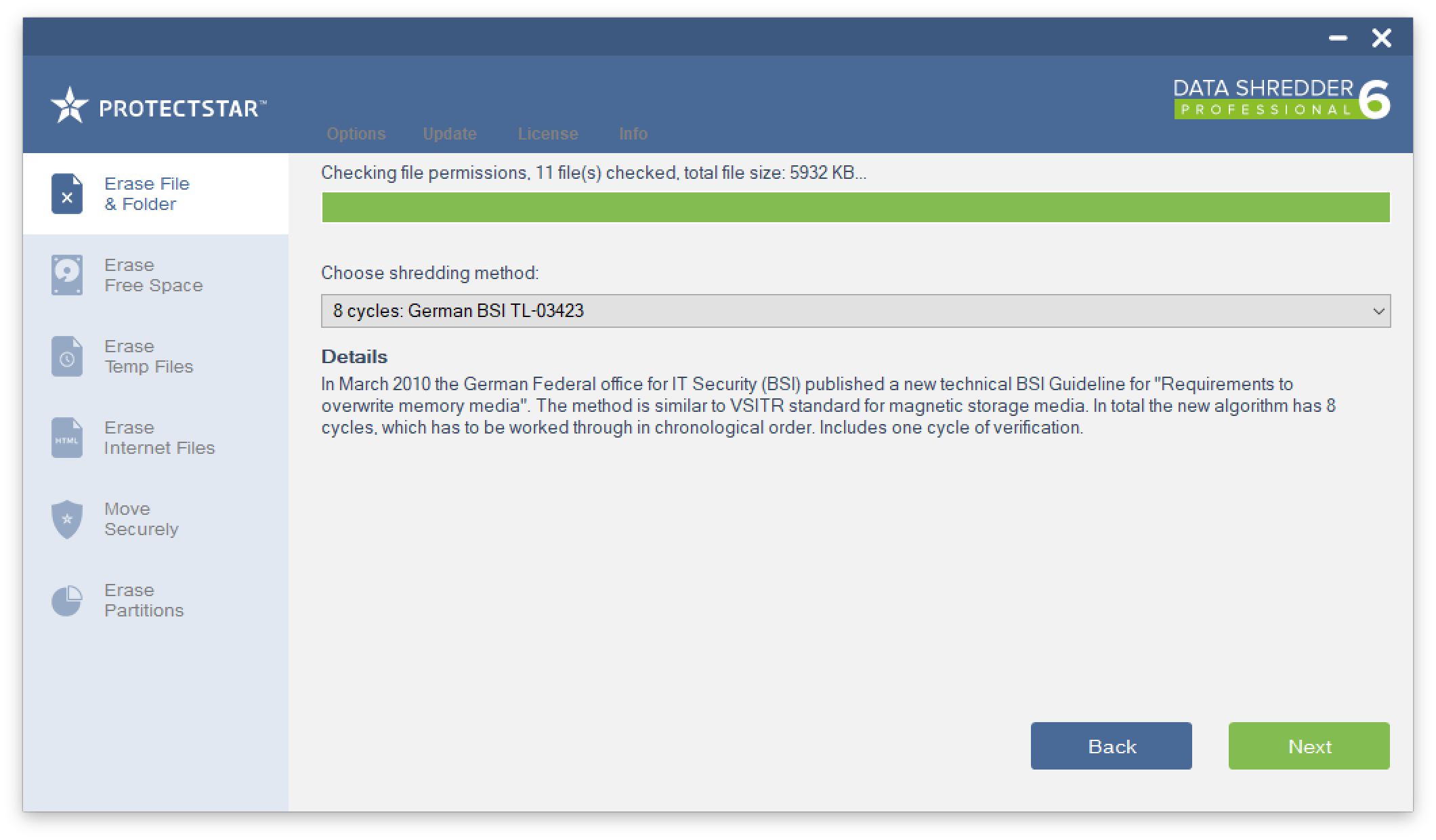
The software features helpful wizards that guide you through every step of the process. If you want to delete a specific folder, you don't have to navigate through complex menus; you just follow the prompts. The navigation is logical, and the feedback is clear. You are never left wondering if the data was actually deleted or if you selected the right drive.
This "democratization" of security is vital. Privacy shouldn't be a privilege reserved for the tech-savvy. By making the software user-friendly, ProtectStar ensures that anyone—from a college student protecting their thesis to a grandparent protecting their tax records—can achieve the same level of data security as a government agency. It takes the guesswork out of a very technical process, providing a "set it and forget it" experience that gives you immediate results without the headache.
5. Total Peace of Mind When Disposing of Hardware
We live in a world of constant hardware cycles. We upgrade our laptops every few years, we swap out external hard drives as they fill up, and we go through USB sticks like they are candy. But what happens to your old devices? Many people sell them on secondary markets, donate them to schools, or simply recycle them. If you haven't used a tool like Data Shredder 6, you are essentially handing a stranger the keys to your entire digital life.
Think about what is stored on your hard drive right now. Even if you think you’ve "cleaned it off," the bits and pieces of your identity remain. From browser cookies and cached passwords to your "Documents" folder, a discarded hard drive is a goldmine for identity thieves. This software provides the ultimate peace of mind for hardware disposal. Before you sell that laptop or give away that thumb drive, you can run a full disk wipe using one of the 18 secure methods.
Once Data Shredder 6 is finished, you can be 100% certain that no amount of forensic software can bring your files back. You aren't just deleting data; you are protecting your future self from the catastrophic consequences of identity theft or data breaches. In an era where data is the most valuable commodity, being able to permanently destroy it is a superpower. This giveaway provides you with that power at no cost, making it an absolute "must-download" for any responsible computer user.
Final Thoughts from the Reviewer
As a reviewer, I see hundreds of "security" apps every year. Most of them are redundant, but ProtectStar Data Shredder 6 is different. It addresses a fundamental flaw in how our operating systems handle data. We are taught to save everything, but we are rarely taught how to truly destroy it. ProtectStar has filled that gap with a product that is fast, reliable, and backed by international security certifications.
Whether you are a professional handling client data or just someone who values their personal privacy, this software is a vital tool for your arsenal. It’s not just about what you are deleting today; it’s about cleaning up the digital footprint you’ve been leaving behind for years. Don't leave your security to chance. Use a tool that the professionals trust. With the intuitive wizards and the massive array of deletion methods, there is simply no excuse to let "ghost data" haunt your hard drive any longer.
Make sure to take advantage of this giveaway while it lasts. In the digital age, the only way to be 100% sure your data is gone is to shred it. ProtectStar Data Shredder 6 is the best tool for the job.

Reviews for Data Shredder 6 Professional
Click Here to Read Reviews for Data Shredder 6 Professional >> Click Here to Submit Reviews for Data Shredder 6 Professional >>