What Does Link Analyzer Do?
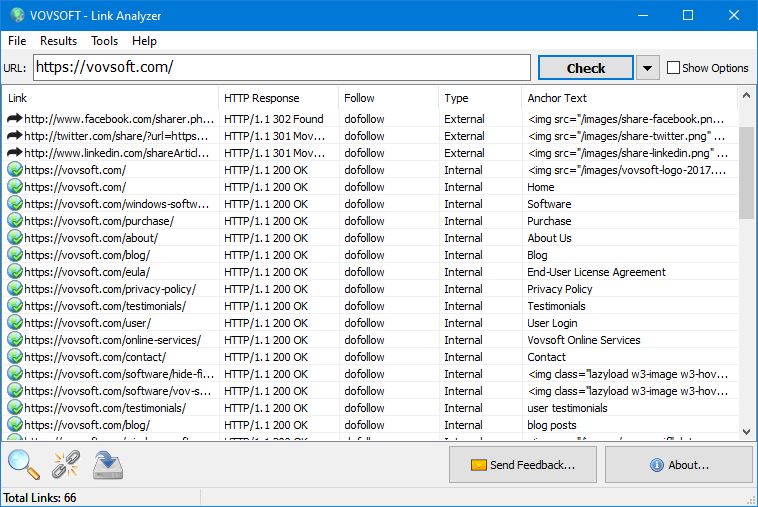
Link Analyzer is a Windows-based utility designed to dissect the link architecture of any given URL or local HTML file. Aimed at web developers and SEO professionals, the tool provides a comprehensive list of all hyperlinks embedded within a page, facilitating structured site audits. It functions as a standalone application for desktop environments, streamlining the process of link discovery and categorization.
The software offers several specific analytical features to evaluate webpage health:
- Link Classification: It distinguishes between internal and external links to help users map out a site's connectivity and navigation structure.
- Attribute Tracking: The tool identifies the follow status of each link, labeling them as either dofollow or nofollow to monitor search engine authority distribution.
- Anchor Text Extraction: Users can view the specific text used for hyperlinks to evaluate keyword context and search engine relevancy.
- Integrity Checks: The program automatically scans for broken links, allowing users to verify that all redirects and destinations remain functional.
In addition to live web analysis, the software supports local HTML files through a drag-and-drop interface. This allows for the auditing of offline files or personal bookmark lists. Once the analysis is complete, all results can be exported into CSV or TXT formats for use in external reporting or data processing applications. The tool provides a factual overview of a webpage’s link profile without requiring manual inspection of source code.
Top 5 Reasons To Download Link Analyzer
- Total Structural Transparency: Effortlessly distinguish between internal and external links to understand any website's architecture.
- SEO Dominance: Instantly identify Dofollow and Nofollow attributes to master your link equity and search engine rankings.
- Content Contextualization: Analyze anchor text to ensure your keywords and link relevance are perfectly aligned with your content strategy.
- Health and Maintenance: Detect and eliminate broken links on live sites or local HTML files, protecting your user experience and site authority.
- Professional-Grade Reporting: Export comprehensive data to CSV or TXT formats for deep-dive analysis and professional client reporting.
In the fast-paced world of digital marketing, web development, and search engine optimization, information is the most valuable currency you can hold. Whether you are building a site from the ground up or trying to dismantle a competitor’s strategy, you need a tool that doesn't just skim the surface but dives deep into the digital DNA of a webpage. Enter the Link Analyzer. This isn't just another utility; it is a surgical instrument for the web. If you have been looking for a way to streamline your workflow, improve your site’s health, and gain an edge in the search engine results pages, then this giveaway is exactly what you need. As a reviewer who has seen countless SEO tools come and go, I can tell you that the simplicity and power of this specific software make it a "must-have" for your desktop toolkit.
Let’s take a look at why you need to grab this giveaway right now. We are going to break down the five most compelling reasons why the Link Analyzer deserves a permanent spot on your Windows machine.
1. Total Structural Transparency
When you look at a webpage, you are seeing the finished product—the paint on the walls. But as a professional, you need to see the framing, the wiring, and the plumbing. The Link Analyzer provides exactly that by classifying every single link it finds as either internal or external. At first glance, this might seem like a simple feature, but its implications for web strategy are massive.
Internal links are the roadmap of a website. They tell search engine crawlers which pages are the most important and how the content is categorized. If your internal linking structure is a mess, your "crawl budget" is wasted, and your best content might never be indexed. By using this software, you can see at a glance how a site connects to itself. Are you over-linking to the home page? Are your deep-layered blog posts getting the love they deserve? You can answer these questions in seconds.
On the flip side, understanding external links is just as vital. External links are the bridges you build to the rest of the internet. If you are a developer, you need to know exactly where you are sending your users. Are you linking to high-authority, trusted sources, or are there "leaky" links pointing to questionable domains that could hurt your reputation? This software strips away the mystery, giving you a clean, organized list that separates the "inside" from the "outside," allowing you to curate a perfect web of connectivity.
2. SEO Dominance
If you care about SEO—and let’s be honest, if you have a website, you must care about SEO—then the "Follow Attribute" feature of this software is going to be your best friend. In the world of search engines, not all links are created equal. Some links pass "link juice" (authority) from one page to another, while others are essentially dead ends for search bots.
The Link Analyzer tells you exactly which links are dofollow and which are nofollow. This is a game-changer. Imagine you are performing a competitor analysis. You find a page that is outranking you, and you want to know why. You run it through this tool and discover they have a perfectly balanced ratio of dofollow links from high-authority sources. Or, perhaps you are auditing your own site and realize that your most important outbound links are accidentally set to nofollow, meaning you aren't getting the SEO credit you deserve for your associations.
Having this information at your fingertips allows you to make data-driven decisions. You can ensure that your site is "telling" search engines exactly what it should. You can protect your site's authority by nofollowing paid links or user-generated content, and you can boost your rankings by ensuring your internal dofollow structure is optimized. This is the kind of insight that usually requires expensive, monthly subscription-based tools, but you are getting it right here in a lightweight, efficient package.
3. Content Contextualization
A link is more than just a destination; it is a promise. The anchor text—the clickable words in a hyperlink—tells the user and the search engine what to expect on the other side. If your anchor text says "best organic coffee" but the link leads to a page about "bicycle repairs," you have a relevancy problem that will eventually result in a ranking penalty and a high bounce rate.
The Link Analyzer displays the anchor text used for every single hyperlink on a page. This allows you to perform a comprehensive "context audit." For web developers and content creators, this is an invaluable way to ensure consistency. You can scan an entire page to make sure your calls-to-action are clear and that your keywords are being utilized effectively within your links. Context is king in the modern web era, and this tool ensures your crown never slips.
Furthermore, analyzing anchor text is a brilliant way to spot "over-optimization." If every single link on your page uses the exact same keyword as anchor text, search engines might flag you for manipulative practices. This software lets you see the diversity of your link labels, helping you maintain a natural, user-friendly profile that keeps both humans and bots happy. It’s about more than just finding links; it’s about understanding the narrative your website is telling.
4. Health and Maintenance
There is nothing that kills a user's trust faster than a 404 error. When a user clicks a link and hits a dead end, it sends a signal that your website is neglected or unprofessional. Even worse, search engines view a high number of broken links as a sign of a "low-quality" site, which can cause your rankings to tank. Maintaining a "healthy" site requires constant vigilance, and the Link Analyzer's Broken Link Check feature is the ultimate preventative medicine.
One of the standout features of this giveaway is its ability to analyze not just live URLs, but also local HTML files. This is a massive win for developers. Before you even upload a new page to your server, you can drag and drop the file into the Link Analyzer to ensure every link is functional. It’s also a lifesaver for those of us with thousands of bookmarks. You can export your bookmarks to an HTML file, run them through this software, and finally clean out those dead links that have been sitting there for years.
The "drag and drop" functionality makes this process incredibly smooth. You don’t have to navigate through complex menus; just grab your file, drop it in, and let the software do the heavy lifting. Whether you are a system administrator maintaining a massive corporate portal or a blogger checking your latest post, the ability to verify the integrity of your links in seconds is worth the download alone. It’s about pride in your work and ensuring that every click your user makes leads exactly where it should.
5. Professional-Grade Reporting
Data is only useful if you can manipulate it, share it, and present it. The Link Analyzer understands that you aren't just looking at links for fun; you are likely doing it as part of a larger project. This is where the File Export feature becomes your most powerful asset. The software allows you to save your results into CSV or TXT formats, which is music to the ears of any data analyst or SEO professional.
Why is CSV so important? Because it allows you to bring your data into Excel, Google Sheets, or any other data visualization tool. Once you have your link list in a spreadsheet, the possibilities are endless. You can filter by link type, sort by anchor text, or use formulas to identify patterns. If you are working for a client, you can generate a professional report in minutes, showing them exactly which links need attention or demonstrating the progress you’ve made on their site's structure.
This export feature transforms the Link Analyzer from a simple viewing tool into a powerhouse for "big picture" strategy. It allows you to archive the state of a website at a specific point in time, which is essential for "before and after" comparisons during a site migration or an SEO overhaul. Instead of taking manual notes or screenshots, you get a clean, structured data file that is ready for any professional environment. It’s the finishing touch that makes this software a truly complete solution.
Final Thoughts from the Reviewer:
We live in an age of "bloatware." Many modern applications are heavy, slow, and packed with features you will never use. What I love about this Link Analyzer giveaway is that it is a "lean and mean" machine. It is specifically designed for the Windows operating system, meaning it runs natively and efficiently on your PC or laptop. It doesn't hog your RAM, and it doesn't require a steep learning curve. The interface is user-friendly, the results are instantaneous, and the utility is undeniable.
Whether you are a seasoned SEO veteran who needs to quickly audit a backlink profile, a developer who wants to ensure a site launch goes off without a hitch, or even a casual user who wants to manage their local HTML files and bookmarks, this tool delivers. It solves real-world problems with a simple, elegant approach. You get internal/external classification, follow/nofollow detection, anchor text extraction, broken link verification, and full data export capabilities—all in one package.
Opportunities to get high-quality, functional software like this for free don't come around every day. This giveaway is your chance to upgrade your digital toolkit without spending a dime. Don't let your website's health be a mystery. Don't let your SEO strategy be a guessing game. Take control of your links, understand your data, and provide a better experience for your users. Download the Link Analyzer today and see your corner of the web with perfect clarity. You’ll wonder how you ever managed your digital projects without it.
In summary, this software is a robust, reliable, and essential tool for anyone who interacts with the web on a professional or technical level. Its ability to dissect a page and present the "skeleton" of its link structure is invaluable. From the convenience of the drag-and-drop interface to the professional power of CSV exporting, it hits all the right notes for a high-utility tech tool. Make sure you don't miss out on this giveaway—your browser, your users, and your search engine rankings will thank you.

Reviews for Link Analyzer
Click Here to Read Reviews for Link Analyzer >> Click Here to Submit Reviews for Link Analyzer >>