What Does ModusDoc Do?
ModusDoc is a universal data cataloging application designed to systematize diverse digital assets including documents, media files, hyperlinks, and software applications. The tool organizes information into customizable databases, allowing users to store files directly within the system or link to external locations through hyperlinks.
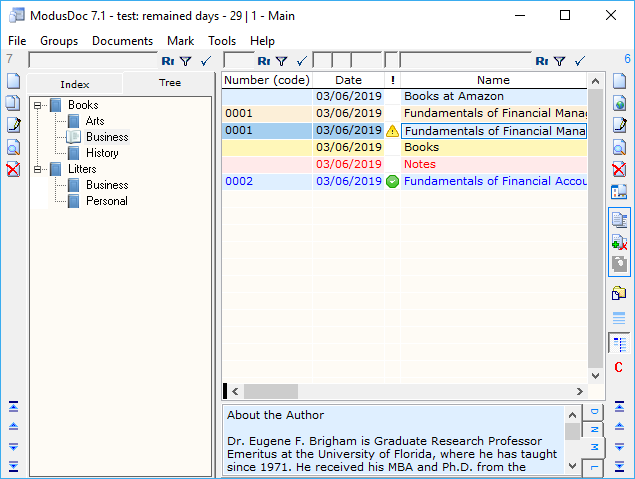
Each database utilizes a dual-table structure consisting of GROUPS and RECORDS. Users can navigate data through a linear index or a hierarchical tree view, which the software generates automatically. To refine results, integrated filtering tools are positioned above group tabs and record fields for rapid data retrieval.
The software supports an unlimited number of databases, each with configurable columns of varying data types, such as symbolic, numeric, and date-time formats. Users can populate these databases via drag-and-drop for single files, selected text, or email messages. Bulk importing is also supported by selecting entire folders through the program interface.
A key feature is the ability to place a single hyperlink or shortcut into multiple groups simultaneously. This facilitates the organization of notes, internet resources, and local folders without duplicating the underlying data. ModusDoc serves as a centralized hub for managing disparate files and information snippets in a structured environment.
Top 5 Reasons To Download ModusDoc
1. True Universal Data Centralization: ModusDoc allows you to catalog everything from documents and e-books to movies and hyperlinks in one unified interface.
2. Automated Hierarchical Organization: The software automatically generates a tree structure for your data, saving you hours of manual sorting and folder management.
3. Unlimited Custom Databases: You can create as many separate databases as you need, each with its own custom columns, data types, and unique configurations.
4. Frictionless Drag-and-Drop Ingestion: Adding data is as simple as dragging files, folders, email messages, or selected web text directly into the cataloger.
5. Advanced Retrieval and Multi-Group Linking: Powerful filtering tools and the ability to link the same object to multiple groups ensure you never lose a file again.
Introduction: Solving the Digital Chaos
We have all been there. Your desktop is a minefield of icons, your "Documents" folder is a labyrinth of nested subfolders that make no sense, and you have bookmarks scattered across three different browsers. As a tech reviewer, I see this "digital clutter" more often than I’d like to admit. We live in an era of data abundance, but our tools for managing that data haven't always kept pace. Most of us rely on the basic file explorer provided by our operating system, which is fine for basic tasks but falls apart the moment you need to manage a serious collection of diverse information. This is exactly why ModusDoc is the software you didn’t know you needed, but won't be able to live without once you try it. This giveaway is a golden opportunity to take control of your digital life using a professional-grade universal data cataloger.
ModusDoc isn't just another file manager; it is a sophisticated database engine wrapped in a user-friendly interface designed specifically for systematization. Whether you are a researcher managing thousands of PDFs, a cinephile cataloging a massive movie collection, or a business professional trying to keep project notes, hyperlinks, and spreadsheets in one place, this tool offers a level of flexibility that standard operating systems simply cannot match. Let’s dive deep into the five primary reasons why you should hit that download button immediately.
1. True Universal Data Centralization
The biggest challenge in modern computing is that our data is "siloed." You have your e-books in one app, your movies in another, your professional documents in a series of folders, and your web research buried in browser bookmarks. ModusDoc shatters these silos. It acts as a universal cataloger, meaning it treats all forms of data with equal importance. You can store and catalog documents, e-books, audiobooks, movies, photos, programs, folders, and even plain text notes within the same database.
One of the most impressive features of ModusDoc is the choice it gives the user: embedding vs. linking. For your most critical documents, you can choose to store them directly within the ModusDoc database. This makes your data portable and protected. On the other hand, if you have massive video files or a library of programs that you don’t want to move, you can store hyperlinks (shortcuts) to those files instead. This dual-approach means you can create a single, cohesive "control center" for your entire digital existence without having to duplicate gigabytes of data. Imagine opening one program and having instant access to your project’s budget spreadsheet, the reference website you used to build it, the instructional video you watched, and the notes you took during the process. That is the power of centralization.
2. Automated Hierarchical Organization
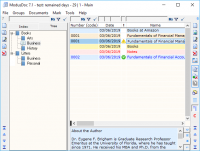
Manual organization is the enemy of productivity. We’ve all spent hours creating folders and subfolders, only to forget where we put a specific file a week later. ModusDoc solves this by utilizing a "GROUPS and RECORDS" structure that is both intuitive and highly automated. When you enter data into the system, it is organized into groups. These groups are then presented in two distinct ways: the Index tab and the Tree tab.
The Index tab provides a clean, linear structure for quick browsing, but the Tree tab is where the magic happens. ModusDoc automatically generates the hierarchical tree structure based on your groups. This means you get the visual clarity of a nested folder system without the manual labor of building it yourself. As a reviewer, I appreciate software that does the heavy lifting for the user. This automated tree generation ensures that as your database grows from fifty items to five thousand, the interface remains organized and navigable. You can see the big picture of your data categories at a glance, allowing you to drill down into specific sub-categories in seconds. It’s a level of structural integrity that is nearly impossible to maintain using standard Windows folders.
3. Unlimited Custom Databases
Most cataloging software forces you into a "one size fits all" box. You are given a set number of fields (like Name, Date, Size) and you have to make your data fit those constraints. ModusDoc takes the opposite approach by allowing you to create an unlimited number of databases, each with its own individual configuration. This is a dream for power users who need to catalog different types of information with different metadata requirements.
For example, you could have one database for your "Home Media Library" where you add custom columns for Genre, Rating, and Runtime. Simultaneously, you could have a "Work Projects" database with columns for Client Name, Project Status (using logical true/false checkmarks), and Deadline (using the date/time field type). ModusDoc supports various field types, including symbolic, textual, numeric, logical, and chronological. You can hide columns you don't need, rearrange them to suit your workflow, and add new ones as your project evolves. This level of customization means that ModusDoc isn't just a program you use; it's a platform you build upon. It adapts to your specific needs, whether you're managing a simple list or a complex professional archive.
4. Frictionless Data Entry
The number one reason people stop using organization software is that it’s too much work to get the data into the system. If you have to manually type in every entry, you’re eventually going to give up. ModusDoc addresses this "entry friction" with its incredibly robust drag-and-drop capabilities. This is where the software really shines in terms of daily usability.
You can grab a handful of files from your desktop and simply drag them into the ModusDoc window. But it goes much further than that. You can drag an entire folder, and ModusDoc will catalog all the objects within it automatically. Are you doing research on the web? You can select a block of text or a hyperlink from your browser and drag it into the interface; ModusDoc will automatically create a new record or note based on that selection. You can even drag email messages directly into the catalog. This "set it and forget it" style of data ingestion means that building your database happens in the flow of your work, rather than being a separate, tedious chore. By lowering the barrier to entry, ModusDoc ensures that you actually use the tool, leading to a more organized and productive lifestyle.
5. Advanced Retrieval and Multi-Group Linking
The ultimate goal of any cataloger is to help you find your data when you need it. ModusDoc excels here with two key features: sophisticated filtering and multi-group linking. Let’s talk about filtering first. Located immediately above the group tabs and every field in the records table are dedicated "selection tools." These allow you to perform instant searches and filter your data based on any criteria. If you need to find all "PDF" files created in "January" that contain the word "Invoice," you can do so in seconds. The responsiveness of the database engine means that even with massive datasets, your results appear almost instantly.
Furthermore, ModusDoc understands that data doesn't always fit into just one category. In a traditional folder system, if a document belongs to both "Taxes" and "Work," you either have to pick one or make a duplicate. In ModusDoc, a single hyperlink or shortcut to an object can be presented in multiple groups simultaneously. This cross-referencing capability is essential for complex projects. It allows you to view your data through different lenses without cluttering your hard drive with duplicate files. When you combine this flexible linking with the powerful filtering tools, you get a system where no piece of information is ever more than a few clicks away. For any tech enthusiast or professional, that kind of efficiency is the "holy grail" of data management.
Conclusion: Why You Need To Act Now
We often talk about "productivity hacks," but the most effective hack is simply having the right tools for the job. ModusDoc is that tool. It is a robust, flexible, and intelligent solution to the problem of digital fragmentation. By allowing you to centralize your files, automate your organization, customize your databases, and find anything in an instant, it returns the most valuable commodity of all: your time.
As a reviewer, I’ve seen many cataloging apps come and go. Many are too simple to be useful for professionals, while others are so complex they require a computer science degree to operate. ModusDoc hits the "sweet spot." It offers the power of a professional database with the ease of use of a modern app. The ability to drag-and-drop everything from emails to entire folders makes it incredibly accessible, while the custom column types and unlimited database creation satisfy the most demanding power users. This giveaway is the perfect chance to move away from the chaos of standard file management and embrace a system that actually works for you.
Stop wasting time digging through folders. Stop losing track of important web links. Stop the digital clutter from slowing you down. Download this giveaway of ModusDoc today and experience what it feels like to have your entire digital world organized, cataloged, and right at your fingertips. It is a game-changer for anyone who spends their day in front of a computer, and I cannot recommend it highly enough. Don't let your data manage you; take charge and manage your data with ModusDoc.
In closing, remember that the value of your data is only as good as your ability to access it. Whether you are archiving years of family photos, organizing a digital library of e-books, or maintaining a complex database of professional assets, ModusDoc provides the structure you need to succeed. The automated tree generation, the flexible field types, and the sheer speed of the interface make it a top-tier choice. This is one download you will not regret.

Reviews for ModusDoc
Click Here to Read Reviews for ModusDoc >> Click Here to Submit Reviews for ModusDoc >>