What Does Nero AI Image Upscaler Do?
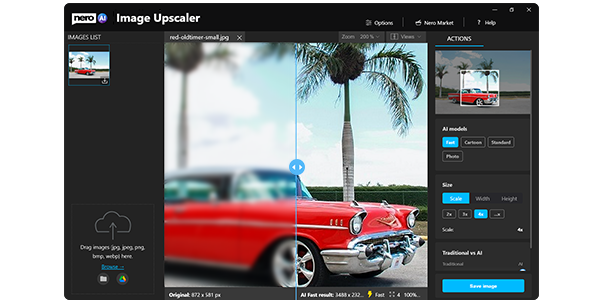
Nero AI Image Upscaler is a dedicated utility for Windows 10 and 11 designed to enhance and enlarge digital photographs using artificial intelligence. The software addresses the common issue of pixelation when increasing image sizes, allowing users to scale up photos captured on mobile devices—such as smartphones and iPads—while maintaining high-fidelity results.
The application is built to provide professional-grade sharpening and enlargement through a simplified interface. Key functional capabilities of the software include:
- Print Preparation: Convert low-resolution mobile snapshots into high-quality files suitable for large-format printing, such as posters and physical photo books.
- Detail Magnification: Perform detail enlargements on specific sections of a photo without the blurring or artifacts typically seen in standard scaling.
- Content Optimization: Create sharp imagery for digital platforms, including blogs, social networks, and professional online galleries.
- Lossless Scaling: Increase dimensions by several factors through AI-driven reconstruction, ensuring the final output remains razor-sharp.
Operating as a streamlined tool for both Windows 10 and 11, the software focuses on ease of use, enabling users to achieve high-resolution results with only a few clicks. By utilizing advanced algorithms to re-sharpen and reconstruct pixels, Nero AI Image Upscaler transforms standard digital assets into professional-quality images for both print and web applications.
Top 5 Reasons To Download Nero AI Image Upscaler
Before we dive into the nitty-gritty details of why this software is a game-changer for your digital toolkit, let’s look at the core benefits. Here are the top 5 reasons you need to download the Nero AI Image Upscaler right now:
- Lossless Enlargement with AI Precision: Scale your images to massive sizes without the typical "blocky" pixelation or blurriness associated with traditional resizing.
- Professional-Grade Print Readiness: Transform low-resolution smartphone snaps into high-definition masterpieces suitable for large-format posters and high-quality photo books.
- Social Media Content Optimization: Ensure your photos stand out on Instagram, blogs, and online galleries by giving them a crisp, professional edge that attracts eyes.
- Macro-Level Detail Recovery: Use the power of deep learning to "re-sharpen" photos, bringing out textures and details that you thought were lost forever in the original shot.
- Streamlined Windows Workflow: Experience a friction-free interface designed specifically for Windows 10 and 11, making professional image processing as easy as a few simple clicks.
In the world of digital photography, we have all been there. You capture a once-in-a-lifetime moment on your smartphone, or you find an old digital photo from a decade ago that holds immense sentimental value. You want to print it, share it, or use it as a centerpiece for a project, but there is one glaring problem: the resolution is terrible. It is grainy, it is small, and if you try to make it larger, it looks like a collection of colored bricks. This is where the Nero AI Image Upscaler steps in, and frankly, it is a tool that every modern PC user should have in their arsenal.
As a tech reviewer, I see a lot of "one-click" solutions that promise the moon but deliver a blurry mess. However, Nero has leveraged actual artificial intelligence to solve one of the oldest problems in digital imaging: how do you add information that isn't there? Let’s break down exactly why this specific giveaway is something you cannot afford to miss.
1. Lossless Enlargement with AI Precision
For years, if you wanted to make a small photo larger, you had to rely on "interpolation." This is a fancy way of saying the computer would look at two pixels and try to guess what color should go between them. The result was almost always a soft, muddy image. Nero AI Image Upscaler changes the game by using deep learning neural networks. Instead of guessing, the AI has been trained on millions of images to understand what textures—like skin, hair, fabric, or bricks—are supposed to look like.
When you use this software to enlarge a photo, it isn't just stretching the pixels; it is intelligently reconstructing them. This means you can take a small image and scale it up 200%, 400%, or even more, while maintaining a level of sharpness that feels natural. The "lossless" aspect is crucial here. While there is technically a mathematical change to the file, the perceived quality remains intact or, in many cases, actually improves. It is the closest thing we have to the "enhance" button we see in science fiction movies.
Imagine taking a photo from an older mobile phone—perhaps an old iPhone 4 or a budget Android device from five years ago. Normally, those photos are stuck in the "digital graveyard" because they look terrible on modern 4K monitors. With Nero's AI, those photos get a second lease on life. You can scale them up to fit modern screens perfectly, making them look as though they were shot on much more expensive equipment.
2. Professional-Grade Print Readiness
One of the biggest disappointments for photography enthusiasts is the "low resolution" warning on printing websites. You spend hours designing a beautiful photo book or a custom poster, only to find that your favorite shot doesn't have enough "DPI" (dots per inch) to look good on paper. If you ignore the warning and print anyway, you end up with a blurry, unprofessional mess that ruins the physical product.
The Nero AI Image Upscaler is the ultimate bridge between the digital world and the physical world. By upscaling your images before you upload them to a printing service, you ensure that the "source" file has enough data to be printed at 300 DPI. This is the difference between a poster that looks like a cheap photocopy and one that looks like it belongs in an art gallery.
Whether you are creating a gift for a family member or professional marketing materials for your business, the ability to turn a standard smartphone photo into a high-resolution print file is invaluable. It saves you the cost of hiring a professional retoucher and gives you the creative freedom to use any photo you love, regardless of its original technical limitations.
3. Social Media Content Optimization
We live in a visual economy. Whether you are a lifestyle blogger, an aspiring influencer, or a small business owner, the quality of your images directly impacts your credibility. Low-quality, blurry photos scream "amateur," and in a feed full of high-definition content, users will simply scroll past anything that doesn't look sharp. First impressions are everything.
The Nero AI Image Upscaler allows you to take your social media game to the next level. Social platforms like Instagram and Facebook often compress your images when you upload them, which can further degrade their quality. By starting with an upscaled, ultra-sharp version of your photo, you provide more "data" for these platforms to work with. This results in your photos looking significantly better than the competition even after the platform's compression kicks in.
Furthermore, if you are a blogger or manage an online gallery, you know that large, crisp hero images are essential for a modern web design. This tool allows you to take smaller, faster-loading images and upscale them for the specific areas of your site where you need that "wow" factor. It is about presenting the best version of your vision to the world, and Nero makes that process effortless.
4. Macro-Level Detail Recovery
One of the coolest features of this software is its ability to handle detail enlargements. Have you ever taken a wide-angle shot of a landscape and realized later that there was something interesting happening in the far corner? Perhaps there was a rare bird, a beautiful architectural detail, or a funny expression on a friend's face in the background. Normally, if you crop that section out, the resulting image is too small to be useful.
With Nero AI Image Upscaler, you can perform "digital zooms" with incredible results. You can crop into a tiny portion of a photo and then use the AI to upscale that crop back to a full-sized image. The software’s ability to re-sharpen these specific areas in professional quality is staggering. It identifies edges, reduces noise, and enhances textures that the human eye might have missed in the original, unedited file.
This "re-sharpening" isn't just for enlargements, either. Even if you don't want to make the photo bigger, running it through the AI can help clean up "soft" focus issues or minor motion blur. It breathes life back into photos that were almost perfect but just needed a bit more clarity. For anyone who enjoys "pixel peeping" or getting the most out of every shot, this feature alone makes the download worth it.
5. Streamlined Windows Workflow
Let’s talk about the user experience. There are other AI tools out there, but many of them are either prohibitively expensive, require a monthly subscription, or are incredibly difficult to use. Some even require you to run complex command-line prompts. Nero has built its reputation on making powerful technology accessible to everyone, and the Nero AI Image Upscaler is no exception.
Designed specifically for Windows 11 and Windows 10, the application features an "easy operation" philosophy. You don't need a degree in graphic design or computer science to get professional results. The interface is intuitive: you drag and drop your image, select your desired settings, and let the AI do the heavy lifting. Within a few clicks, you have a high-resolution file ready for use.
This simplicity is vital for productivity. If you have a folder of fifty photos that all need upscaling, you don't want to spend all day on it. The software is optimized to take advantage of modern hardware, ensuring that the upscaling process is as fast as possible. It integrates perfectly into your existing Windows environment, making it a natural extension of your photo-management routine.
The Verdict: Why You Should Act Now
In the digital age, our photos are our memories, our resumes, and our art. We are constantly surrounded by screens that get higher and higher in resolution, which unfortunately makes our older or lower-quality photos look worse and worse as time goes on. The Nero AI Image Upscaler is a proactive solution to this "resolution gap." It is a tool that allows you to future-proof your digital library.
Whether you are trying to rescue a blurry photo of a loved one, preparing a presentation for work, or trying to make your Instagram feed look like a professional portfolio, this software provides the technical "muscle" you need. It takes the complex, cutting-edge world of artificial intelligence and puts it into a simple, user-friendly package that anyone can master in minutes.
Think about the photos currently sitting on your hard drive. Think about the ones you've never shared because they were "too small" or "too grainy." This giveaway is your chance to fix those issues once and for all. You are getting a premium tool from a legendary name in the software industry—Nero—for absolutely nothing. This isn't just a utility; it's a way to reclaim the hidden quality in your digital life.
The combination of razor-sharp results, lossless enlargement, and dead-simple operation makes this one of the most practical downloads you'll make this year. Don't let your images stay trapped in the low-res past. Download the Nero AI Image Upscaler today and see your photos in a whole new light—literally. Your eyes (and your followers) will thank you.
In conclusion, the value proposition here is simple. You have nothing to lose and a world of visual clarity to gain. From printing posters to perfecting your blog, the Nero AI Image Upscaler is the bridge between "good enough" and "absolutely perfect." Make sure you take advantage of this giveaway before it’s gone, and start upscaling your digital world today.

Reviews for Nero AI Image Upscaler
Click Here to Read Reviews for Nero AI Image Upscaler >> Click Here to Submit Reviews for Nero AI Image Upscaler >>