What Does Pazu Video Cutter Do?
Pazu Video Cutter is a specialized utility designed for the lossless trimming and splitting of video files. By processing footage without re-encoding, the software ensures that the output retains 100% of the original quality, resolution, and bit rate. This approach is particularly effective for users managing high-definition files from drones, action cameras, or professional video equipment where maintaining source integrity is paramount.
The software supports a wide array of common formats, including MP4, AVI, MKV, MOV, and WMV. Its primary function is to allow users to segment large files into smaller, more manageable clips using three distinct methods:
- Split by Time or Length: Users can automatically divide a video into multiple segments based on a specific duration or interval.
- Keyframe Accuracy: The tool offers precision editing by identifying specific frames to ensure clean breaks without artifacts.
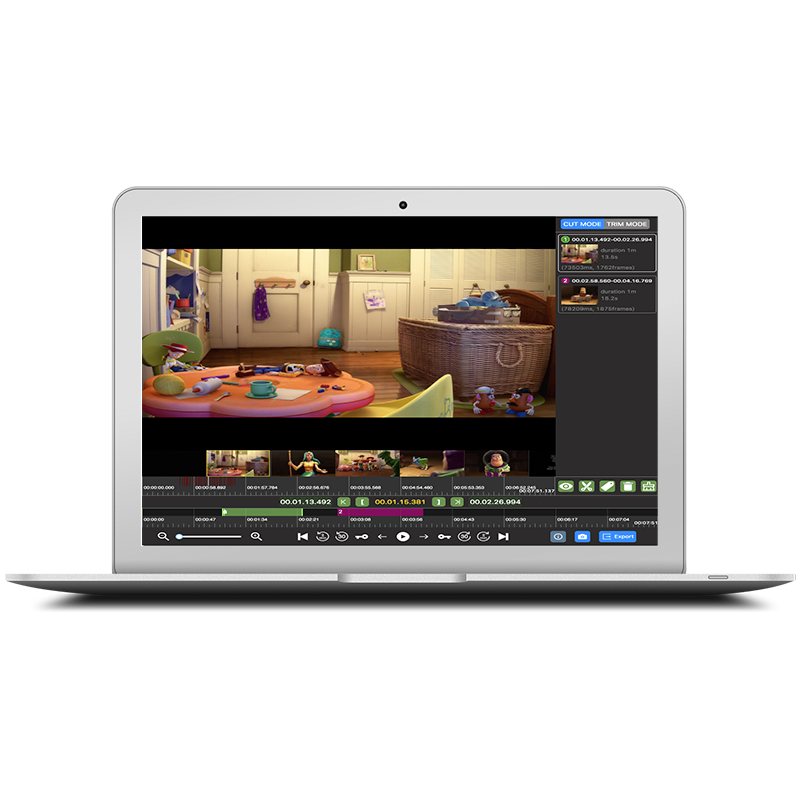
- Trim and Cut Modes: This feature allows for the isolation of specific highlights to save or the identification of unwanted segments for immediate removal.
Because Pazu Video Cutter avoids the rendering process, export speeds are significantly faster than traditional non-linear video editing suites. It serves as an efficient tool for cleaning up footage libraries, saving storage space, and preparing specific clips for further production. The streamlined interface focuses on technical accuracy and speed, providing a factual, no-frills solution for basic video manipulation.
Top 5 Reasons To Download Pazu Video Cutter
As a tech reviewer, I get pitched dozens of utility apps every single week. Most of them are bloated, overpriced, or simply do not live up to their lofty promises. But every once in a while, a tool comes along that does exactly what it says on the tin, without any unnecessary fluff. Today, we are looking at a utility that deserves a permanent spot on your hard drive, especially since you can grab it right now as a giveaway. That tool is Pazu Video Cutter.
If you have ever tried to trim down a massive video file, you already know the pain. Standard video editors make you import the file, set your markers, and then wait for an eternity while your computer hot-runs its fans to re-encode the entire video. Worse yet, the output file often looks noticeably worse than the original. Pazu Video Cutter solves all of these headaches by offering a lossless, lightning-fast way to slice, dice, and clean up your footage. It is the ultimate video-triaging tool for creators, hobbyists, and anyone looking to free up precious hard drive space.
Before we dive deep into the nitty-gritty details of how this software works and why it is a game-changer, let us lay out the core facts. Here are the top five reasons why you need to stop what you are doing and download this incredible giveaway immediately.
The Top 5 Reasons to Download Pazu Video Cutter
- True Lossless Editing with Zero Quality Loss: It cuts video directly along keyframes without re-encoding, preserving 100% of your original source quality.
- Blazing-Fast Processing Speed: Because it skips the rendering and re-encoding process, videos are trimmed and saved in a matter of seconds, not hours.
- Flexible Splitting and Trimming Modes: You can segment your footage by exact time, target length, keyframes, or use dedicated Cut and Trim modes to isolate what matters.
- Universal Format Compatibility: It supports virtually every major video format under the sun, including MP4, MKV, AVI, MOV, FLV, and many more.
- Lightweight and Intuitive Workflow: You do not need a degree in video production to use it. It is designed to be lightweight, easy to navigate, and incredibly efficient.
Now that you have seen the highlights, let us break down each of these points to show you exactly why Pazu Video Cutter belongs in your digital toolkit.
1. True Lossless Editing with Zero Quality Loss
If you are a content creator, a drone pilot, or someone who loves capturing family moments on a high-end GoPro, you know how crucial video quality is. You shoot in high bitrates and crisp resolutions because you want every detail to shine. Unfortunately, almost every standard video editor out there forces your footage through a process called re-encoding when you export a clip. This means the software decompresses the video, applies your edits, and then compresses it all over again. Every single time you do this, you lose data, resulting in artifacting, muddy colors, and a loss of overall clarity.
This is where Pazu Video Cutter changes the game entirely. It utilizes a state-of-the-art lossless cutting engine. Instead of re-encoding your video file, Pazu simply slices the container along the video's existing keyframes. Think of it like using a pair of scissors to cut a strip of film rather than scanning, editing, and printing a whole new copy. Because the video stream itself is never altered, decoded, or re-compressed, the output file is an exact, pixel-perfect copy of the original footage. If you start with a pristine 4K H.264 file, you end up with a pristine 4K H.264 file. For anyone who refuses to compromise on video fidelity, this feature alone makes the software worth downloading.
2. Blazing-Fast Processing Speed
We have all been there: you have a simple two-hour video, and you only want to save a quick ten-minute highlight. You drag it into a heavyweight video editor, select your clip, hit export, and the software tells you it is going to take forty-five minutes to render. It is an absolute waste of time, and it bogs down your entire system's CPU and GPU, making it impossible to do anything else while you wait.
Because Pazu Video Cutter does not re-encode your footage, it does not need to perform complex mathematical calculations to rebuild the video frame by frame. It is essentially performing a high-speed "file copy" operation that only targets the specific segment you selected. The result? Processing that used to take visual rendering hours now takes literal seconds. You can slice a multi-gigabyte video file into multiple parts almost instantly. Whether you are working on a high-end workstation or a modest laptop, you will be amazed at how quickly Pazu handles large files. It completely removes the bottleneck from your workflow, letting you spend less time watching progress bars and more time being productive.
3. Flexible Splitting and Trimming Modes
No two video projects are exactly alike. Sometimes you need to cut a long continuous stream into equal chunks for social media, and other times you need to carefully trim out a few seconds of dead space from the beginning and end of a presentation. Pazu Video Cutter is built with this versatility in mind, offering multiple cutting and segmenting modes to fit your specific needs.
First, you have the ability to split videos precisely by time, length, or keyframe. If you have a long tutorial and want to split it into clean five-minute segments, Pazu can automate this in seconds. Second, the dedicated Cut Mode allows you to easily select the absolute best parts of your video and discard the rest. Finally, the Trim Mode lets you target the exact opposite: you can quickly identify and remove unwanted segments—like awkward pauses, dead air, or mistakes—while seamlessly keeping the core footage intact. This level of granular control ensures that no matter what your editing goal is, you can achieve it with minimal clicks.
4. Universal Format Compatibility
There is nothing more frustrating than downloading a media tool only to find out it cannot open the specific file type you need to edit. The world of digital video is a chaotic landscape of different containers, extensions, and codecs. If you are gathering footage from multiple sources—like an iPhone, a digital camera, an online download, or an old home video DVD—you are bound to run into compatibility issues.
Pazu Video Cutter eliminates "codec hell" by offering robust, universal format support. Out of the box, it handles popular modern containers like MP4, MKV, MOV, and M4V with ease. But it does not stop there. It also supports older legacy formats and specialized extensions, including AVI, MPEG, MPG, FLV, WMV, DAT, and even VOB files from DVD rips. You do not need to waste time running your files through a third-party transcoder before you can start cutting. Just drag your file directly into Pazu, make your cuts, and save. It acts as a one-stop-shop for all your video trimming needs, regardless of where your media files originated.
5. Lightweight and Intuitive Workflow
Professional video editing suites like Adobe Premiere or DaVinci Resolve are fantastic tools, but they are also bloated, resource-heavy, and come with a steep learning curve that can take months to master. If all you want to do is clean up your personal video library, trim down a Zoom meeting, or prep some clips for social media, opening a massive professional NLE is like using a sledgehammer to crack a nut.
Pazu Video Cutter is designed with a laser focus on user experience. Its interface is clean, uncluttered, and immediately understandable from the moment you launch it. There are no confusing multi-track timelines, no hidden menus, and no complicated rendering settings to configure. You simply import your video, use the intuitive sliders or time markers to select your cuts, choose your splitting mode, and export. It is so lightweight that it runs beautifully on older hardware, and it takes up minimal space on your drive. It is the perfect "get in, get the job done, and get out" utility that streamlines your digital housekeeping.
Why You Should Grab This Giveaway Right Now
Digital storage is expensive, and raw video files are getting larger by the day. If you are hoarding gigabytes of uncut footage from your phone, action camera, or screen recordings, you are wasting valuable disk space on footage you will likely never look at again. By using Pazu Video Cutter, you can easily trim away the fluff, keep only the golden moments, and save massive amounts of storage space—all while retaining the pristine original quality of your files.
High-quality utility software that performs lossless video manipulation without a catch is rare. Getting it as a free giveaway is even rarer. Whether you are a casual user who wants to clean up their family video archives, a gamer wanting to clip their best match highlights, or a professional creator looking to optimize their pre-editing workflow, Pazu Video Cutter is an absolute must-have app. Do not miss out on this opportunity to upgrade your video editing toolkit with a fast, lossless, and incredibly user-friendly tool. Download this giveaway today and take complete control over your video files!

Reviews for Pazu Video Cutter
Click Here to Read Reviews for Pazu Video Cutter >> Click Here to Submit Reviews for Pazu Video Cutter >>