What Does PresentationTube Recorder Pro Do?
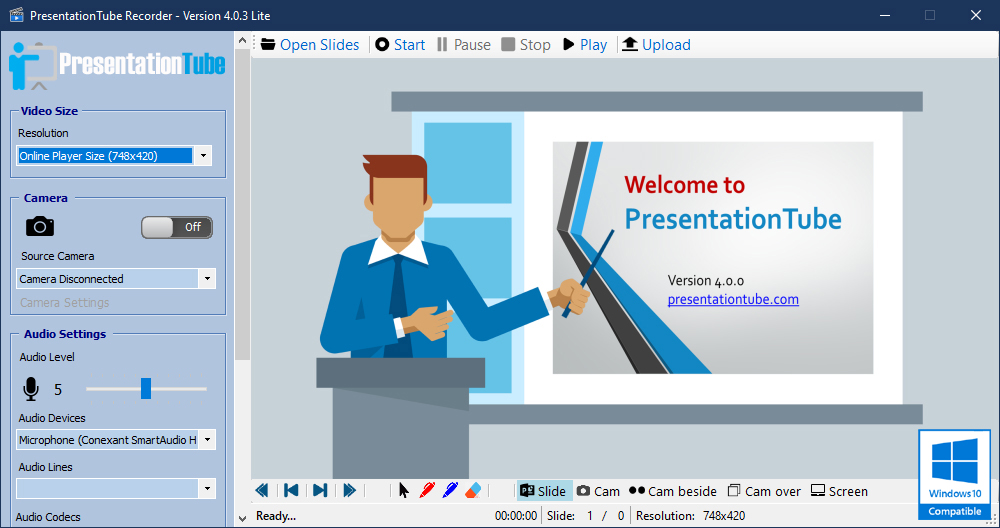
PT Recorder for Windows 10 is a dedicated tool designed to streamline the creation of synchronized video presentations. The application allows users to capture PowerPoint slides while simultaneously recording camera footage and computer screen activity. By integrating these multiple inputs into a single interface, the software eliminates the need for complex post-production editing or manual synchronization of audio and video tracks.
The software includes several functional features designed for instructional and corporate environments:
- Presentation Capture: Record PowerPoint slide transitions and animations in real-time.
- Visual Synchronization: Automatically align webcam feeds with on-screen content and slide progress.
- Annotation Tools: Draw, highlight, or mark up slides during the recording process to emphasize specific data points.
- Screen Recording: Capture external applications or web browsers alongside the primary presentation materials.
PT Recorder focuses on accessibility for users with limited technical backgrounds. Its automated recording workflow handles the technical aspects of video encoding and file management, allowing the presenter to focus on content delivery. Because the system synchronizes all media elements during the live session, the final output is ready for distribution immediately after the recording ends. This approach significantly reduces the total production time required to create professional-grade educational video materials.
Top 5 Reasons To Download PresentationTube Recorder Pro
- Total Automation of the Production Workflow: PT Recorder eliminates the need for tedious post-production editing by automating the synchronization of your slides, camera, and screen in real-time.
- Seamless PowerPoint Integration: Unlike generic screen recorders, this software is built specifically to handle PowerPoint presentations, ensuring your transitions and animations are captured perfectly every time.
- Synchronized Multi-Media Capture: You can record your webcam, your desktop screen, and your presentation slides simultaneously, creating a professional picture-in-picture effect without any extra effort.
- Intuitive Real-Time Annotation Tools: Engage your audience by drawing, highlighting, and marking up your slides while you speak, turning a static presentation into an interactive masterclass.
- Zero Technical Learning Curve: Designed for educators, professionals, and students, the software removes all technical barriers, allowing you to create high-quality video content with literally one click.
In the modern digital landscape, the ability to communicate ideas effectively through video has moved from a "nice-to-have" skill to an absolute necessity. Whether you are an educator trying to reach students in a remote learning environment, a corporate trainer looking to onboard new hires, or a content creator trying to build an audience, the barrier has always been the same: the technical headache of video production. We have all been there. You have a great PowerPoint deck, but the moment you try to record it, you are faced with a dozen different settings, mismatched audio and video, and the looming nightmare of spending six hours in an editing suite just to fix a simple mistake. This is exactly why the PT Recorder for Windows 10 is such a breath of fresh air, and why this giveaway is something you absolutely cannot afford to skip.
As a tech reviewer, I see hundreds of "productivity" apps every year. Most of them add more complexity than they solve. However, every once in a while, a tool comes along that understands the primary pain point of the user: time. PT Recorder isn't just another screen recorder; it is a specialized engine designed to turn your existing knowledge into professional video assets instantly. Let’s dive deep into the five reasons why this software should be the next addition to your Windows 10 or 11 toolkit.
1. Total Automation of the Production Workflow
The biggest bottleneck in video creation isn't the recording itself—it is the post-production. Most people spend one hour recording and four hours editing. You have to sync the audio, make sure the webcam feed doesn't cover important text on the slide, and ensure the transitions look smooth. PT Recorder changes the game by moving the "production" phase into the "recording" phase. It automates the entire process.
When you use PT Recorder, the software handles the layout and synchronization on the fly. It knows where your slides are, it knows where your camera feed should be, and it merges them into a single, cohesive video file as you speak. This means that the moment you hit the "Stop" button, your video is essentially finished. There is no need to drag clips into a timeline or struggle with "rendering" for three hours. For the busy professional, this feature alone is worth the download. It allows you to produce five times the amount of content in the same amount of time. In an era where "content is king," speed and efficiency are your greatest competitive advantages.
Furthermore, this automation ensures consistency. If you are creating a series of lectures or training modules, you want them all to have the same look and feel. Because PT Recorder uses a standardized automated layout, every video you produce will have the same professional polish, giving your brand or your classroom a sense of cohesion and high-quality production value that usually requires a dedicated media team.
2. Seamless PowerPoint Integration
PowerPoint remains the gold standard for presentations, yet many screen recording tools treat it like just another window on your desktop. This often leads to issues where animations don't trigger correctly, or the recording software "drops" frames when you switch slides. PT Recorder for Windows 10 is built with a "PowerPoint-first" philosophy. It doesn't just record your screen; it integrates with the presentation engine itself.
This deep integration means that the software is aware of your slide deck's structure. When you move from slide three to slide four, the recorder notes that transition. This creates a much smoother visual experience for the viewer. There is no flickering, no "taskbar" showing up in the recording, and no awkward mouse movements as you try to find the "next" button. It makes your presentation look like a broadcast-quality production rather than a "screen grab."
For those who rely heavily on PowerPoint's advanced features—like embedded videos, complex animations, or slide transitions—this software ensures that what you see during your presentation is exactly what your audience sees in the final video. You don't have to worry about the recording software "lagging" or failing to capture a specific animation. It is a robust, reliable bridge between your static slides and a dynamic video format.
3. Synchronized Multi-Media Capture
Static slides are boring. In the world of online learning and digital communication, the "human element" is what keeps an audience engaged. People want to see the presenter's face; they want to see the eye contact and the gestures that emphasize a point. PT Recorder allows you to synchronize your camera, your computer screen, and your slides into one unified stream. This "multi-media" approach is essential for modern pedagogy and corporate communication.
The software allows you to toggle between views or use a picture-in-picture (PiP) format. This is incredibly powerful because it allows you to show your face while you explain a complex chart on the slide. If you need to jump out of the PowerPoint to show a live demonstration on a website or a piece of software, PT Recorder handles that transition smoothly. It captures the computer screen with high fidelity, ensuring that even small text is legible for your viewers.
This level of synchronization used to require expensive hardware switchers or complex software like OBS, which has a notoriously steep learning curve. PT Recorder brings this "pro-studio" capability to the average user. You don't need to be a video engineer to have a multi-camera-style setup. You just need to click record, and the software manages the different media inputs, ensuring they stay perfectly in sync from the first second to the last.
4. Intuitive Real-Time Annotation Tools
Have you ever watched a presentation and wished the speaker would just circle the specific number they are talking about on a graph? Or underline the key takeaway? Humans are visual learners, and real-time annotation is one of the most effective ways to maintain audience attention and improve information retention. PT Recorder includes a suite of annotation tools that are designed to be used while you are recording.
This isn't like the clunky drawing tools you find in some meeting software. These tools are responsive and intuitive. You can use a digital pen to write notes, a highlighter to emphasize text, or shapes to box in important data. This turns your PowerPoint into a digital whiteboard. If you are a teacher explaining a math problem or a manager explaining a workflow, being able to draw the connections in real-time is a massive advantage.
The beauty of these tools is that they are captured as part of the video stream. They aren't "extra" layers that you have to add later. They happen naturally as you speak, making the video feel more like a live, interactive session rather than a canned, pre-recorded lecture. It adds a level of dynamism and energy to your presentations that is very difficult to achieve through slides alone. It makes your content feel alive.
5. Zero Technical Learning Curve
We save the best for last. The number one reason most people fail to create video content is intimidation. Most professional recording and editing software looks like the cockpit of a fighter jet. There are too many buttons, too many menus, and too many things that can go wrong. PT Recorder for Windows 10 was clearly designed with the "non-techie" in mind. Its greatest strength is its simplicity.
The developers have stripped away the unnecessary fluff to focus on the essential features that presenters actually need. The interface is clean, the buttons are clearly labeled, and the workflow is linear. You open your PowerPoint, you open PT Recorder, and you hit record. It is that simple. This software is built for the professor who wants to record a lecture before their next class, the salesperson who needs to send a quick video pitch, or the student who needs to submit a video project.
By lowering the technical barrier to entry, PT Recorder empowers everyone to be a video creator. You don't need to spend weeks watching tutorials on YouTube just to figure out how to export a file in the right format. PT Recorder takes care of the technical "mumbo-jumbo" behind the scenes, leaving you free to focus on what actually matters: your message. In a world where we are all constantly overwhelmed by new technology, a tool that "just works" is the ultimate luxury.
Final Thoughts: If you have been looking for a way to upgrade your digital presentations without spending thousands of dollars on equipment or hundreds of hours on training, this giveaway is your golden ticket. PT Recorder for Windows 10 is a specialized, surgical tool that solves the specific problems of the modern presenter. It captures, it syncs, it annotates, and it automates. It turns your Windows 10 machine into a portable production studio. Don't let this opportunity pass you by—download it, try it out, and see how much time and energy you save on your very next project. Your audience (and your schedule) will thank you.
Whether you are recording a five-minute update or a two-hour deep-dive seminar, PT Recorder provides the stability and ease of use that professionals demand. It’s time to stop struggling with generic tools and start using a solution that was built for exactly what you do. Download this giveaway today and take the first step toward effortless, professional video production.
The software is optimized for the Windows environment, ensuring low CPU usage and high-quality output. This means even if you are using a standard laptop rather than a high-powered gaming rig, you can still produce high-definition video content without the system crashing or lagging. It is the definition of efficiency. Get it now and revolutionize the way you share your ideas with the world.

Reviews for PresentationTube Recorder Pro
Click Here to Read Reviews for PresentationTube Recorder Pro >> Click Here to Submit Reviews for PresentationTube Recorder Pro >>