What Does SCC Caption Decoder Do?
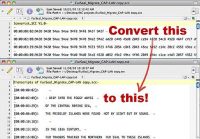
This closed captioning decoder is a utility designed to convert Sonic Scenarist Line 21 (SCC) files into human-readable text transcripts. Built as a companion for MovieCaptioner, the tool allows users to import SCC files and export them as text transcripts with integrated timecoding. This process assists in identifying errors within the caption data that may otherwise be difficult to read in its raw format.
The application offers flexibility regarding timecode management. Users can retain the original SCC timecode for troubleshooting or choose to remove the built-in buffer time to align the transcript more closely with actual display times. Additionally, the software can output transcripts as plain paragraph text without any timecode. This functionality supports web accessibility and search engine optimization by providing searchable text content for video assets.
For high-volume workflows, the software includes several automation features:
- Batch Processing: Decodes entire folders of SCC files in a single operation.
- Hot Folder Monitoring: Scans specific directories at user-defined intervals to auto-process incoming files.
- File Archiving: Automatically moves original SCC files to a destination folder alongside the decoded transcripts.
By simplifying the translation of technical caption files into standard text, this tool streamlines metadata management for video production and distribution.
Top 5 Reasons To Download SCC Caption Decoder
- Effortless Translation of Cryptic SCC Data into Human-Readable Text
- Precision Timecode Management with Buffer Removal Options
- Enhanced Troubleshooting for Rapid Error Identification and Correction
- Significant SEO and Accessibility Boosts for Web Content
- Professional-Grade Workflow Automation through Batch Processing and Hot Folders
In the world of high-end video production, there is perhaps nothing more frustrating and opaque than the SCC file. If you have ever opened a Sonic Scenarist Line 21 file in a standard text editor, you know exactly what I am talking about. It looks like a digital nightmare—a chaotic jumble of hexadecimal code, weird characters, and timing data that makes absolutely no sense to the human eye. Yet, these files are the backbone of broadcast television and high-quality digital video captioning. For years, professionals have struggled to bridge the gap between these essential data files and the actual words they represent. That is why I am telling you right now: if you work with video, you need to download this SCC Caption Decoder today. This is not just a utility; it is a sanity-saver for editors, content creators, and accessibility officers alike.
As someone who has spent far too many hours squinting at lines of code trying to figure out why a caption is popping up three seconds late, I can tell you that a dedicated decoder is the tool you didn't know you were missing. This software takes the technical heavy lifting out of the equation, allowing you to focus on the content rather than the container. Whether you are a solo YouTuber looking to boost your reach or a broadcast engineer managing hundreds of hours of footage, this tool provides a level of clarity and efficiency that is hard to find elsewhere. Let’s dive deep into why this specific giveaway is a mandatory addition to your digital toolkit.
1. Effortless Translation of Cryptic SCC Data into Human-Readable Text
The primary reason you need this tool is its core function: transparency. SCC files are notoriously difficult to read because they were designed for machines, not people. Originally developed for the Sonic Scenarist authoring system, these files contain EIA-608 caption data. When you look at an SCC file, you aren't seeing words; you are seeing commands. You see hex codes that tell a decoder when to start a row, what color the text should be, and exactly which characters to display. If you need to know what is actually being said in a video and all you have is the SCC file, you are essentially locked out of your own content.
This decoder acts as the universal translator you’ve always wanted. By selecting your SCC file, the software instantly parses that hexadecimal junk and outputs a clean, legible text transcript. Imagine being able to hand a script to a client or a legal team that they can actually read, rather than explaining that "94ae 94ae" means something important. It turns a technical barrier into an open door. This is particularly vital for archiving purposes. As digital formats change and evolve, having a "future-proof" plain text version of your captions ensures that your work remains accessible and understandable for decades to come, regardless of what happens to specific proprietary software formats.
Furthermore, the ability to output as paragraph text without any timecode at all is a hidden gem of a feature. Sometimes you don't need the "when"; you just need the "what." This makes it incredibly easy to repurpose video dialogue into blog posts, articles, or social media snippets. It effectively turns your captioning work into a content-generating machine, saving you from having to manually transcribe or pay for a secondary transcription service for content you’ve already captioned.
2. Precision Timecode Management with Buffer Removal Options
If you have ever worked with SCC files, you know about the "pre-roll" or "buffer" issue. Because SCC files represent data being sent over a limited bandwidth (Line 21 of the vertical blanking interval), the data has to be sent to the decoder before it is actually meant to appear on screen. This results in the timecodes in an SCC file being slightly earlier than the actual visual appearance of the captions. For most transcriptions, this "buffer time" is a massive headache. If you use the raw SCC timecodes for a text transcript, the timing will feel "off" to anyone reading along.
This software solves this problem with an elegant toggle. You have the choice: keep the timecode exactly as it exists in the SCC file, or remove the buffer time. Why is this a big deal? If you are a technician trying to fix a sync issue, you want the original timecode to see exactly when the data is hitting the stream. But if you are creating a transcript for a user to read while watching the video, you want that buffer removed so the text lines up perfectly with the spoken word. This level of control is something usually reserved for incredibly expensive enterprise software, and having it in a streamlined, downloadable tool is a massive win for the end user.
This flexibility ensures that your transcripts are not just accurate in terms of words, but accurate in terms of experience. It allows you to produce high-fidelity time-stamped logs that can be used for sophisticated post-production workflows. If you’re moving a project from one NLE (Non-Linear Editor) to another, having a clean, time-accurate transcript can be the difference between a smooth transition and a weekend spent re-syncing captions by hand.
3. Enhanced Troubleshooting for Rapid Error Identification and Correction
Every editor has been there: the export is finished, the file is uploaded, and then you see it—a typo in the captions, or a line that lingers too long on the screen. Finding that specific error inside a raw SCC file is like finding a needle in a haystack made of needles. Because the data is compressed and encoded, you can’t just "search" for a word in a standard text editor to find where the error is occurring.
This decoder is the ultimate troubleshooting companion. By converting the SCC file into a readable text format with matching timecodes, it allows you to pinpoint exactly where things went wrong. You can search the text transcript for the typo, find the associated timecode, and then go back to your captioning software (like MovieCaptioner) to make the surgical fix. It eliminates the guesswork and the "blind" editing that often accompanies working with broadcast-standard files.
I cannot emphasize enough how much time this saves in a professional environment. When a client sends back a list of "fixes" for a closed-captioned video, they usually provide the timecode and the word that needs changing. Without a decoder, you are stuck cross-referencing between your video player and your captioning software, hoping the sync is the same. With this tool, you have a direct map. It turns a stressful, high-pressure correction phase into a simple, methodical process. It gives you the confidence that when you send that file back, it is truly perfect.
4. Significant SEO and Accessibility Boosts for Web Content
We often think of captions as something only for the deaf or hard of hearing, but the reality of the modern web is that captions are for everyone—and for search engines. Search engines like Google and Bing are incredibly smart, but they still cannot "watch" a video and understand every spoken word with 100% accuracy. They rely on metadata, titles, and, most importantly, text transcripts to understand what your video is about. By downloading this tool and using it to generate transcripts for your website, you are essentially feeding the search engine spiders a feast of keywords and context.
When you provide a full, readable text transcript on the same page as your video, you are dramatically increasing your SEO (Search Engine Optimization) footprint. Every word spoken in your video becomes searchable. This means people searching for specific phrases or niche topics covered in your video are far more likely to find your site. It is one of the most underutilized strategies in digital marketing, and this SCC decoder makes it incredibly easy to implement. You aren't just making your video accessible; you are making it discoverable.
From an accessibility standpoint, providing a transcript alongside your video is a hallmark of WCAG (Web Content Accessibility Guidelines) compliance. It provides an alternative for users who may be in a noisy environment, users who prefer reading over watching, and those with various cognitive disabilities who benefit from seeing the text in a static format. This tool allows you to fulfill these accessibility requirements without adding hours of extra labor to your workflow. You’ve already done the hard work of creating the captions; this tool just helps you unlock their full value for the web.
5. Professional-Grade Workflow Automation through Batch Processing and Hot Folders
If you are a professional, you don't have time to manually convert files one by one. Time is money, and repetitive tasks are the enemy of creativity. This is where the SCC decoder really separates itself from the pack. The software includes powerful automation features that you would expect to find in high-cost server-side applications. The batch-processing capability allows you to point the software at an entire folder full of SCC files and let it run. It will churn through them, decoding each one and saving the transcripts in seconds. This is a life-changer for anyone finishing a series or a large-scale corporate training project.
But the real "pro" feature is the Hot Folder functionality. This is the kind of stuff that makes a tech reviewer's heart beat faster. You can set the software to monitor a specific folder on your drive. Every time you export an SCC file from your editor and drop it into that folder, the decoder detects it, processes it automatically, and saves the transcript to a destination folder of your choice. It even archives the original file for you! This means you can build a completely "hands-off" workflow. You just keep working in your video editor, and in the background, your transcripts are being created, organized, and archived without you ever having to click a single button.
This level of automation transforms the tool from a simple utility into a core piece of infrastructure. It’s about building a system that works for you. Whether you are a solo creator or part of a larger production team, the efficiency gains from the batch and hot folder features will pay for the "cost" of the download (which is free!) ten times over in the first week alone. It removes the friction from the final stages of production, ensuring that your deliverables are ready for the web, for the client, and for the archives as soon as the edit is done.
In conclusion, the "Decode SCC Into Readable Text Transcripts" tool is an essential piece of software for anyone serious about video production. It takes the "dark art" of SCC file management and makes it transparent, manageable, and highly productive. By providing human-readable text, flexible timecode options, vital troubleshooting help, massive SEO benefits, and top-tier automation, it solves multiple problems with one simple interface. If you have been struggling with captioning workflows or simply want to get more value out of the captions you are already creating, do not hesitate. This is one giveaway that belongs on your workstation immediately. It’s efficient, it’s powerful, and it’s the bridge between raw data and meaningful content.
Download it, set up your hot folders, and stop worrying about the "hex code headache" forever. Your workflow, your clients, and your search engine rankings will thank you.


Reviews for SCC Caption Decoder
Click Here to Read Reviews for SCC Caption Decoder >> Click Here to Submit Reviews for SCC Caption Decoder >>