What Does iReparo for Android Do?
iReparo for Android is a professional data recovery tool developed to retrieve lost information from Android smartphones and tablets. The software targets common data loss scenarios, including accidental deletion, factory resets, ROM flashing, and rooting failures. It is engineered to function with a broad spectrum of hardware from manufacturers such as Samsung, HTC, Sony, LG, Motorola, Huawei, and OnePlus.
The utility supports the recovery of multiple file formats and data types. Users can restore deleted contacts, text messages, and call logs, alongside third-party application data like WhatsApp chat histories. For multimedia, the tool scans for lost photos, videos, and music files. The interface is designed to be intuitive, walking users through the scanning and recovery process without requiring advanced technical knowledge.
Key functional capabilities include:
- Comprehensive Data Support: Restoration of contacts, SMS, call history, WhatsApp messages, and media files.
- Extensive Device Compatibility: Support for flagship and legacy models across all major Android brands.
- Preview Functionality: A built-in viewer allows for the inspection of files and communication logs prior to performing the final recovery.
- Flexible Recovery Modes: Various scanning options are available to locate data quickly and efficiently depending on the specific loss situation.
By providing a full preview of recoverable items, iReparo for Android ensures that users can verify the integrity of their data before committing to the restoration process. The software provides a structured approach to mobile data management for those needing to recover essential digital assets.
Top 5 Reasons To Download iReparo for Android
Before we dive into the nitty-gritty details of why iReparo for Android is the tool you never knew you needed until it was almost too late, let’s look at the highlights. In the world of tech, we often talk about "must-have" apps, but when it comes to data recovery, we are talking about a digital lifeline. Here are the top five reasons why you should take advantage of this giveaway right now:
- Unrivaled Versatility in Data Types: From WhatsApp chats to deleted call logs and precious photos, it covers every base.
- Universal Android Compatibility: Whether you are rocking the latest Samsung flagship or a budget-friendly Motorola, this tool has you covered.
- Recovery for Every Disaster Scenario: Accidental deletions, ROM flashes gone wrong, or the dreaded factory reset are no match for this software.
- Effortless User Experience: You do not need a degree in computer science to navigate its intuitive, wizard-driven interface.
- Precision Restoration with Full Previews: You can see exactly what you are recovering before you commit, ensuring a clean and organized restoration.
Now, let’s get into the heart of the matter. As a tech reviewer, I have seen countless users lose their minds because they lost their data. We live our lives through our smartphones. Our memories, our business connections, and our daily schedules are all tucked away in those silicon chips. When that data disappears, it feels like a piece of your history has been erased. That is where iReparo for Android steps in. It isn't just a utility; it is a specialized tool designed to perform digital archaeology on your device. Let’s break down exactly why this software deserves a spot on your desktop.
1. Unrivaled Versatility in Data Types
One of the biggest frustrations with entry-level recovery tools is their limited scope. Most free tools might find a few deleted JPEGs, but they completely ignore the structural data that actually runs our lives. iReparo for Android is different. It understands that "data" isn't just a folder of images; it is the web of communications we build every day.
Think about your WhatsApp chat history. For many of us, WhatsApp is more than just a messaging app; it’s a record of family milestones, work instructions, and sentimental conversations. If you accidentally delete a thread, most recovery tools won't even see those database files. iReparo is specifically engineered to identify and reconstruct these chat histories, bringing back the text and the attachments that matter most. Beyond social messaging, it handles the core basics with professional precision: contacts, text messages (SMS), and call logs. If you’ve ever lost a phone number that wasn't backed up to the cloud, you know the sinking feeling of losing a professional lead or an old friend’s contact info. This software retrieves that metadata from the internal storage, often finding information you thought was overwritten weeks ago.
Furthermore, the support for media and audio files is comprehensive. It doesn't just look for common formats; it scans for various file extensions to ensure that your music library and your high-definition videos are restored in their original quality. When we talk about versatility, we mean a one-stop-shop for everything stored on your Android device. You won't need three different apps to get your life back together; you just need this one.
2. Universal Android Compatibility
The Android ecosystem is famously fragmented. Unlike other operating systems where one size fits all, Android lives on thousands of different hardware configurations. As a reviewer, I often see software that works perfectly on a Samsung Galaxy but fails miserably on an LG or a Sony device. This is where iReparo for Android truly shines and stands out from the competition.
The developers have put in the work to ensure compatibility with all major Android brands. We are talking about the giants like Samsung, HTC, Sony, LG, Motorola, and Huawei, but it doesn't stop there. It also supports the "enthusiast" brands like OnePlus and Nexus (and by extension, the newer Pixel line). Whether you are using a device that is five years old or the latest model that just hit the shelves, the scanning algorithms are tuned to communicate with the specific file systems used by these manufacturers.
This universal compatibility is vital because data recovery is a highly technical process that involves interacting with the device’s kernel and storage partitions. If the software doesn't recognize the specific "flavor" of Android your manufacturer uses, it can't do its job. iReparo has been tested across hundreds of models, ensuring that regardless of whether you’re on a tablet or a smartphone, the recovery process remains stable and effective. For a user, this means peace of mind. You don’t have to worry if your specific hardware is supported; chances are, it is.
3. Effortless User Experience
Let’s be honest: most data recovery software looks like it was designed in 1995. They are often cluttered with technical jargon, confusing check-boxes, and cryptic error messages. For the average user who is already stressed out because they just lost their wedding photos, a complicated interface is the last thing they need. iReparo for Android breaks this trend by offering an intuitive interface that is genuinely refreshing.
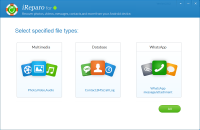
The software uses a step-by-step wizard format. From the moment you launch the application, it guides you through the process: connect your device, enable USB debugging (with clear instructions on how to do so), select the types of files you want to scan for, and let the software do the heavy lifting. It removes the guesswork. You don't need to know what a "root directory" or a "partition table" is to get your files back. The UI is clean, modern, and focused on the task at hand.
This focus on user-centric design is what makes it a "download now" recommendation. I have recommended tools in the past that required users to type lines of code into a terminal, and predictably, it led to more frustration. iReparo is designed for everyone—from the tech-savvy power user who wants a quick fix to the grandmother who just wants her pictures of the grandkids back. It bridges the gap between high-end professional data forensics and consumer-grade ease of use.
4. Recovery for Every Disaster Scenario
Data loss is rarely a simple "oops, I hit delete" moment. It often happens during more complex scenarios that would leave other software scratching its head. One of the strongest selling points of this giveaway is iReparo’s ability to handle various recovery situations that are common in the Android world.
Consider the ROM flash or Root failure. For the Android enthusiasts who love to customize their phones with custom firmware, things can go south very quickly. A "soft brick" or a failed flash can result in a wiped data partition. While the phone might still boot, your data appears to be gone. iReparo is designed to dig deep into the storage to find the remnants of that data before it’s permanently overwritten. Then there is the Factory Reset. Many people believe that a factory reset is the end of the line—that once the "wipe" happens, the data is gone forever. While it is true that factory resets make recovery harder, iReparo's advanced scanning can often find fragments of files that haven't been fully purged from the physical flash memory chips.
Of course, it also handles the "daily" disasters: accidental deletion of a single folder, system crashes that corrupt the gallery database, or even physical damage where the screen is broken but the internal storage is still functional. By covering such a wide range of "how it happened," iReparo acts as a comprehensive insurance policy for your digital life. It doesn't matter how you lost it; what matters is that you have a tool capable of finding it.
5. Precision Restoration with Full Previews
There is nothing worse than waiting three hours for a data recovery scan to finish, only to find a list of 5,000 files named "FILE001.JPG," "FILE002.JPG," and so on. You end up recovering everything, including years of junk cache files, just to find the three photos you actually wanted. iReparo for Android solves this by providing a complete preview before recovery.
This is a game-changer for efficiency. Once the scan is complete, the software organizes the found data into clear categories. You can click on the "Contacts" tab and see the names and numbers. You can click on "Messages" and actually read the texts. Most importantly, for photos and videos, it generates thumbnails and full previews. You can scroll through the results and check-mark only the specific items you want to save to your computer. This saves time, disk space, and a lot of headaches.
This transparency in the recovery process also builds trust. You can see the health of the file before you try to restore it. If a photo is corrupted and only half-visible, the preview will show you that, so you aren't surprised later. This level of detail is usually reserved for very expensive enterprise-grade software, but iReparo brings it to the average consumer. It puts the control back in your hands, allowing for a surgical recovery rather than a messy, bulk restoration.
Conclusion: Why You Need to Act Now
In the world of technology, we often operate on the "it won't happen to me" principle. We assume our phones are invincible and our data is eternal. But as anyone who has ever dropped their phone in water or hit "Format" by mistake can tell you, that sense of security is an illusion. Data loss is a matter of when, not if.
Downloading iReparo for Android during this giveaway is about being proactive. It is about having the "fire extinguisher" in your digital kitchen before the fire starts. This is a professional-grade tool that combines a deep understanding of the Android file system with a user interface that anyone can master. It supports the devices you own today and the ones you will likely buy tomorrow. It covers the apps you use daily, like WhatsApp, and the core functions like your contact list.
As a reviewer, my job is to filter through the noise and tell you what is actually worth your time. There are hundreds of recovery apps out there, but many are "bloatware" or, worse, "scareware." iReparo stands out because it delivers on its promises. It is a robust, reliable, and highly effective assistant for any Android user. The ability to preview your lost data before recovery, combined with its wide compatibility across brands like Samsung and HTC, makes it a top-tier choice.
Don't wait until you are staring at an empty gallery or a wiped contact list. The best time to secure a recovery tool is while your phone is still working perfectly. Take advantage of this opportunity to add a powerful piece of software to your toolkit. Whether you are a power user who constantly tweaks your system or a casual user who just wants to protect their memories, iReparo for Android is the solution you’ve been looking for. Download it, keep it ready, and give yourself the ultimate peace of mind. You’ll thank yourself the next time a "digital disaster" strikes.
In summary, iReparo for Android is the safety net every smartphone owner deserves. With its intuitive design, comprehensive file support, and powerful scanning engine, it turns a potential catastrophe into a minor hiccup. It is fast, it is effective, and it is built for the modern Android landscape. This is one download you definitely do not want to skip.


Reviews for iReparo for Android
Click Here to Read Reviews for iReparo for Android >> Click Here to Submit Reviews for iReparo for Android >>