What Does PresentationTube Recorder Pro Do?
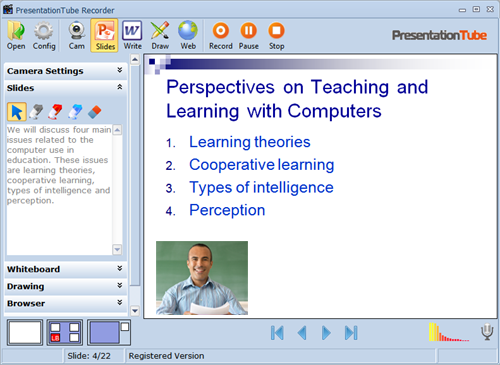
PresentationTube Recorder Pro is a desktop application designed for instructors, students, and business professionals to capture PowerPoint presentations locally. The software functions entirely offline, synchronizing the presenter’s webcam feed with existing slide decks, audio, and real-time screen annotations.
The tool integrates several visual aids to enhance delivery. A built-in drawing board allows for the creation of lines, curves, and shapes, while a text-based whiteboard facilitates the entry of complex equations and detailed notes via keyboard. Presenters can also utilize an integrated web browser with zoom functionality to reference external data during the recording process.
Technical capabilities include:
- Automatic extraction of slide notes for narration assistance.
- Support for multiple USB or integrated webcams with full-screen or picture-in-picture modes.
- Flexible presentation layouts, including single, mixed, and side-by-side views.
- Customizable output settings for WMV and AVI formats, including bitrate, video size, and frame rate control.
The interface provides standard navigation controls, allowing users to pause and resume sessions. Once completed, the software generates a formatted video file ready for distribution or uploading to the PresentationTube network.
Top 5 Reasons To Download PresentationTube Recorder Pro
In the world of digital communication, the ability to deliver a clear, professional, and engaging presentation is a superpower. Whether you are an educator trying to reach students across the globe, a student looking to ace a final project, or a business professional aiming to close a deal from your home office, the tools you use dictate your success. Today, we are looking at PresentationTube Recorder Pro, a robust yet incredibly simple tool that transforms your static PowerPoint slides into dynamic video experiences. If you have been looking for a way to elevate your digital presence without spending hundreds of dollars on complex video editing software, this is the giveaway you cannot afford to miss.
- Seamless PowerPoint Integration and Zero Learning Curve: You do not need to be a video editor to produce professional content because the software works directly with your existing MS PowerPoint slides.
- Advanced Visual Illustration Tools: The built-in Drawing Board and Whiteboard features allow you to annotate, sketch, and explain complex ideas in real-time, just like a physical classroom.
- Professional-Grade Production Layouts: Choose from various display modes—including side-by-side, mixed, and full-screen—to ensure your audience focuses on exactly what matters most at any given moment.
- Built-in Teleprompter Functionality: The software automatically extracts and displays your slide notes right next to your presentation window, allowing for flawless narration without the need for external scripts.
- Total Recording Independence: Unlike many modern cloud-based tools, this recorder works entirely offline, ensuring high-quality output without worrying about internet lag or bandwidth issues.
1. Seamless PowerPoint Integration and Zero Learning Curve
Let’s be honest: most of us have spent years perfecting our ability to use Microsoft PowerPoint. It is the industry standard for a reason. However, the struggle often begins when we try to turn those slides into a video. Many screen recording tools require you to fiddle with window captures, crop your screen, or deal with messy desktop icons appearing in the frame. PresentationTube Recorder Pro eliminates these headaches by opening and displaying your real PowerPoint slides directly within the recorder window.
Because the software uses your existing assets, there is absolutely no need to learn how to design new multimedia content. You don’t have to learn a new timeline-based editor or worry about importing assets into a complex library. You simply open your presentation, and you are ready to record. This "plug-and-play" approach is a massive time-saver for busy professionals and educators who need to produce content on a daily basis. The recorder acts as a bridge between your ideas and your audience, removing the technical barriers that often discourage people from creating video content in the first place.
Furthermore, the navigation is identical to what you are used to. You can move through slides just as you would in PowerPoint’s full-screen mode. Whether you prefer using a simple control panel with "next" and "previous" buttons or standard keyboard shortcuts, the software feels familiar from the very first click. This level of comfort allows you to focus 100% of your energy on your delivery rather than worrying about which button to press next. In the fast-paced world of tech, a tool that respects your existing workflow is worth its weight in gold.
2. Advanced Visual Illustration Tools
One of the biggest complaints about digital presentations is that they can feel static and "lifeless." When you are presenting in person, you can walk to a whiteboard or point to specific parts of a chart. In a digital environment, that personal touch is often lost. PresentationTube Recorder Pro solves this problem with its integrated Drawing Board and Whiteboard features. These are not just gimmicks; they are essential pedagogical and professional tools that change how you communicate information.
The Drawing Board acts as a transparent layer over your presentation. It allows you to draw lines, curves, graphs, and various shapes directly on the screen while you are speaking. Imagine you are a biology teacher explaining the structure of a cell or a financial analyst highlighting a specific trend on a bar chart. Instead of just talking about it, you can circle the data points in real-time. This visual emphasis helps the audience follow your logic and keeps them engaged. It turns a "lecture" into a "demonstration," which is significantly more effective for retention.
Then there is the Whiteboard. Sometimes, a PowerPoint slide simply doesn't have enough room for the extra details that emerge during a presentation. The Whiteboard allows you to switch to a clean space where you can type text using your keyboard. This is perfect for explaining complex equations, adding supplemental notes, or breaking down a concept into bullet points on the fly. By combining these visual aids with the integrated web browser—which allows you to zoom in and out of live websites during the recording—you have a complete multimedia studio at your fingertips. You are no longer limited by the boundaries of your slides; you have the freedom to illustrate your ideas however you see fit.
3. Professional-Grade Production Layouts
As a tech reviewer, I always look for how a piece of software handles "presentation." In the world of video, layout is everything. If your webcam is too small, your audience loses the human connection. If your webcam is too big, it obscures the data on your slides. PresentationTube Recorder Pro offers a level of layout flexibility that you usually only find in expensive streaming software like OBS, but without the steep learning curve.
The software supports multiple video presentation layouts, including single, mixed, and side-by-side views. This means you can decide exactly how you want to appear to your audience. Are you giving a heartfelt introduction? Switch your webcam to full-screen mode to build rapport. Are you diving into technical data? Use the side-by-side mode so the viewer can see both your facial expressions and the slide content simultaneously. This dynamic switching makes your video look like it was produced by a professional media team rather than someone sitting at a desk.
Beyond just the "where" of your video, the software gives you control over the "how." It supports an unlimited number of USB or integrated webcams, allowing you to choose the best hardware for the job. You can adjust the video size, bitrate, and frame rate to ensure that the final file is optimized for your specific needs—whether that is a high-definition upload to YouTube or a smaller, more compressed file for an internal company portal. By giving you these controls, the software ensures that your final output reflects your professional standards.
4. Built-in Teleprompter Functionality
Public speaking is nerve-wracking enough without having to worry about memorizing a 20-minute script. Even the most seasoned presenters often struggle with maintaining eye contact with the camera while trying to remember their key talking points. This is where PresentationTube Recorder Pro truly shines as a productivity tool. One of its most underrated features is the ability to extract and display slide notes in a dedicated text box right beside the slide.
This effectively turns your computer screen into a teleprompter. Because the notes are positioned near the top of the interface—close to where your webcam is likely located—you can read your narration naturally without looking away from your audience. This creates the illusion of effortless expertise. You aren't "reading from a script"; you are "speaking to your viewers." It’s a small detail that makes a massive difference in the perceived quality of the final video.
The interface further supports the presenter by displaying the current slide number, the slide title, and the total number of slides in the status bar. This keeps you grounded and helps you manage your time effectively during the recording. If you realize you are only on slide three of twenty and you've already been talking for ten minutes, you know you need to pick up the pace. These quality-of-life features are designed by people who clearly understand the stresses of modern presenting. It removes the "guesswork" and replaces it with a structured, supportive environment for recording.
5. Total Recording Independence
In our "always-on" world, we often take internet connectivity for granted—until it fails us. Most modern recording and presentation tools are cloud-based, which sounds great in theory but can be a nightmare in practice. If your Wi-Fi dips while you are recording a cloud-based video, you might experience frame drops, audio desync, or even a total loss of your work. PresentationTube Recorder Pro offers the security of offline recording.
You can record your entire presentation from the comfort of your home, office, or even a remote cabin without an internet connection. The software handles the heavy lifting locally on your machine, synchronizing your audio, video, slides, and drawings with frame-perfect precision. This ensures that the final video is smooth and professional, regardless of your signal strength. Once you are finished, the software generates files ready for uploading to the PresentationTube network or any other platform of your choice.
The software also respects your need for flexibility in the output. It supports different video formats, specifically WMV and AVI, and allows you to pause and resume your recording at any time. This "pause/resume" feature is a lifesaver. If you have a sudden coughing fit, if your dog starts barking, or if you just need a moment to collect your thoughts before a difficult slide, you can simply hit pause, take a breath, and continue exactly where you left off. This saves you from having to restart the entire recording or spend hours in a video editor trying to cut out mistakes. It is efficient, reliable, and built for the reality of working from home.
Final Thoughts: PresentationTube Recorder Pro is a specialized tool that does exactly what it promises without unnecessary bloat. It takes the most common presentation format in the world—PowerPoint—and gives you the tools to make it better, clearer, and more engaging. From the brilliant drawing tools to the ingenious slide-note extraction, every feature is designed to make you look and sound like a pro. Since this is available as a giveaway, there is absolutely no reason not to add this to your digital toolkit. Whether you're recording a one-off tutorial or building an entire online course, this software provides the stability and functionality you need to succeed. Don't wait—download it now and start creating presentations that actually leave an impact!

Reviews for PresentationTube Recorder Pro
Click Here to Read Reviews for PresentationTube Recorder Pro >> Click Here to Submit Reviews for PresentationTube Recorder Pro >>