What Does Gallery App Creator Do?
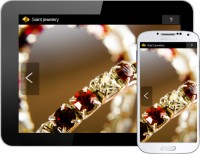
Gallery App Creator is a utility designed to transform image collections and photo galleries into native Android applications. The software automates the conversion process, allowing users to package visual assets into a standalone mobile format without manual coding. Each application can be customized with a specific app name and a custom brand icon, alongside unique package IDs and version numbers for future updates.
The tool includes several technical features to ensure visual consistency across hardware:
- Responsive Design: Exported apps adapt to various screen sizes and orientations.
- Image Scaling: Users can select between best fit, stretched, or proportional cover modes.
- Text Integration: Captions can be added to individual images to provide specific descriptions or context.
The software is intended for creating digital product showcases, professional portfolios, or personal albums, such as wedding galleries or design catalogs. Once the project is configured, the utility generates a native Android app file. These files are compatible with standard distribution channels, including the Google Play Store, enabling installation on Android-enabled devices. The interface focuses on a straightforward workflow, prioritizing functional efficiency for users needing to deploy gallery-based mobile apps quickly.
Top 5 Reasons To Download Gallery App Creator
If you have ever wanted to break into the mobile app market but felt intimidated by the steep learning curve of coding, Java, or Android Studio, then the Gallery App Creator giveaway is the exact opportunity you have been waiting for. This software is a game-changer for photographers, small business owners, and hobbyists alike. Here are the top five reasons why you need to download this tool today:
- Instant Conversion to Native Android Apps: Turn your static image folders into fully functional, high-performance .apk files without writing a single line of code.
- Full Professional Branding Control: You have the power to define your own app icon, package name, and versioning, allowing you to build a legitimate brand presence on the Google Play Store.
- Adaptive and Responsive Display Technology: Your apps will look stunning on every device, from budget smartphones to high-end tablets, thanks to intelligent scaling and orientation support.
- Deep Customization via Captions and Scale Modes: Beyond just displaying pictures, you can add context with text captions and control exactly how your images fill the screen using professional scale modes.
- Unmatched Simplicity and Efficiency: The software is designed with an intuitive workflow that allows you to move from a folder of images to a finished app in a matter of minutes, saving you thousands of dollars in development costs.
Now, let us dive deep into why these features make the Gallery App Creator an essential addition to your digital toolkit. As someone who has reviewed hundreds of "no-code" utilities, I can tell you that finding a tool that focuses on doing one thing perfectly is rare. This software does not try to be a Swiss Army knife; it focuses on the art of the gallery, and it does so with professional-grade results.
1. Instant Conversion to Native Android Apps
The biggest hurdle for most people when it comes to mobile development is the sheer complexity of the environment. Usually, to create a native app, you would need to understand the Android SDK, manage dependencies, and deal with complex file structures. The Gallery App Creator bypasses all of that. It takes your existing assets—your photos, your art, your product shots—and wraps them into a native Android application.
Why does "native" matter? Many budget app builders simply create "web-views," which are essentially just websites inside a container. These are often laggy, require a constant internet connection, and feel "cheap" to the end user. A native app created with this tool runs directly on the Android hardware. This means smoother transitions, faster loading times for your images, and a much more polished user experience. By downloading this giveaway, you are getting a professional compiler that handles the heavy lifting of app architecture for you. You provide the images; the software provides the engine.
This capability is particularly powerful for those who want to distribute their work offline. Imagine being at a trade show or a gallery opening where the Wi-Fi is spotty. Because your gallery is a native app, it resides on the device. You can hand a tablet to a potential client, and they can swipe through your high-resolution portfolio without a single stutter or "loading" icon. That level of reliability is priceless in a professional setting.
2. Full Professional Branding Control
In the digital age, branding is everything. If you share a link to a cloud folder, you are promoting the cloud service. If you share an app that has a generic icon, you look like an amateur. The Gallery App Creator understands this, which is why it gives you complete control over the identity of your application. When you use this software, you aren't just making "a gallery"; you are making your gallery.
You can upload your own custom icon, which is the first thing a user sees on their home screen. This is prime digital real estate. Every time a client unlocks their phone, they see your logo. Furthermore, you can choose your own app name. Instead of a generic file name, your app can be titled "Summer Collection 2024" or "Smith & Co. Real Estate Portfolio." This software also allows you to set your own App ID and version number. This is a critical technical detail because it allows for future upgrades. If you want to release a "Version 2.0" with new photos later on, you can do so seamlessly because you own the identity of the app.
Being able to brand your app also means you are ready for the Google Play Store. Because the software outputs a standard package, you can take your branded .apk and upload it to the world's largest app marketplace. This gives you instant credibility. Telling a customer, "You can find my catalog on the Play Store," sounds infinitely more professional than asking them to look at a PDF attachment.
3. Adaptive and Responsive Display Technology
One of the most frustrating aspects of mobile design is fragmentation. There are thousands of different Android devices, all with different screen sizes, aspect ratios, and resolutions. An image that looks great on a tall, skinny phone might look stretched or awkward on a square-ish tablet. The Gallery App Creator solves this through Responsive/Adaptive visibility.
When you export your app, the software includes logic that detects the screen size and orientation of the device it is running on. Whether the user is holding their phone in portrait mode to see a single vertical shot or flips it to landscape to view a sprawling panorama, the app adjusts instantly. This ensures that your work always looks its best, regardless of the hardware.
The software goes a step further by offering specific image scale modes. You can choose best fit, which ensures the entire image is visible without being cropped, leaving clean borders where necessary. You can choose stretched if you want the image to fill every pixel of the screen, or you can choose proportionally cover. The "cover" mode is a favorite among designers because it fills the entire viewing area while maintaining the aspect ratio, creating a modern, "full-bleed" look that feels immersive. Having this level of control over the visual presentation ensures that your photography or product images are never distorted.
4. Deep Customization via Captions and Scale Modes
A picture may be worth a thousand words, but sometimes a few well-chosen words make the picture worth a thousand dollars. The Gallery App Creator allows you to add text captions to each and every image in your gallery. This turns a simple slideshow into an informative tool. For a real estate agent, this means adding the price, square footage, and neighborhood details to a photo of a living room. For a wedding photographer, it might mean adding the names of the couple or the location of the shot.
This feature is what elevates the software from a simple viewer to a content delivery platform. You can use these captions to provide context, tell a story, or even include calls to action. Since the text is displayed alongside the image, it creates a cohesive experience where the user doesn't have to guess what they are looking at. It's an elegant way to provide descriptions without cluttering the visual interface.
Combined with the scaling modes mentioned earlier, you can create a highly curated experience. You might want your landscape photography app to use the "proportionally cover" mode for a dramatic effect, while a catalog for mechanical parts might use "best fit" to ensure no technical detail is cut off at the edges. The flexibility here is designed to cater to the specific needs of your content, rather than forcing your content into a one-size-fits-all template.
5. Unmatched Simplicity and Efficiency
We live in a fast-paced world, and few of us have the time to spend weeks learning a new software suite. The Gallery App Creator is intentionally "self-intuitive and straight forward." The user interface is clean, devoid of unnecessary bloat, and guides you through the process of app creation in a logical flow. You don't need a manual to understand how to use this; the buttons do exactly what they say they will do.
This efficiency is a massive advantage for businesses that need to produce apps frequently. Perhaps you are a fashion designer who wants to release a new app for every seasonal collection. With this tool, you can swap out your images, update the version number, and have a new app ready for distribution in less time than it takes to drink a cup of coffee. It eliminates the "friction" of technology.
Furthermore, by downloading this as a giveaway, you are essentially acquiring a high-value development asset for free. High-end app development agencies charge thousands for what this software allows you to do yourself. Even "subscription-based" app builders can cost hundreds of dollars a year. This software gives you the independence to create as many apps as you want, whenever you want, without ongoing fees or complex contracts. It is the ultimate tool for the "solopreneur" or the creative professional who wants to maintain total control over their digital output.
Final Thoughts: Why You Should Download It Now
As a reviewer, I always look for tools that empower the user. The Gallery App Creator is a powerful empowerment tool. It takes the "magic" of app development and puts it into the hands of the everyday user. It removes the gatekeepers of the app store and allows you to present your work in the most professional format possible: a native, branded, responsive Android application.
Whether you want to create a digital portfolio to show off your ornaments, stamps, or wedding photos, or you need a sleek way to showcase your company's product line to distributors, this software is the answer. It is simple enough for a beginner but produces results that are polished enough for a professional. The ability to customize the icon, the name, and the scaling ensures that your app will be a unique reflection of your brand.
Don't let this opportunity pass you by. Mobile is the future of content consumption, and having your own app is the gold standard of digital presence. Download the Gallery App Creator giveaway today and start converting your beautiful photo galleries into professional Android apps. It is fast, it is intuitive, and most importantly, it gives you the professional edge you need in an increasingly competitive digital landscape. You have the images; now give them the home they deserve on the home screens of users everywhere.
In conclusion, the Gallery App Creator represents the best of "utility" software. It is a focused, powerful, and easy-to-use application that solves a real problem: how to get your visual content onto mobile devices in a premium format. With its responsive design, branding options, and native output, it is a "must-have" for anyone who takes their visual presentation seriously. Grab this giveaway while you can and start building your mobile empire one gallery at a time.


Reviews for Gallery App Creator
Click Here to Read Reviews for Gallery App Creator >> Click Here to Submit Reviews for Gallery App Creator >>