What Does Start Menu X PRO SpaceX Edition Do?
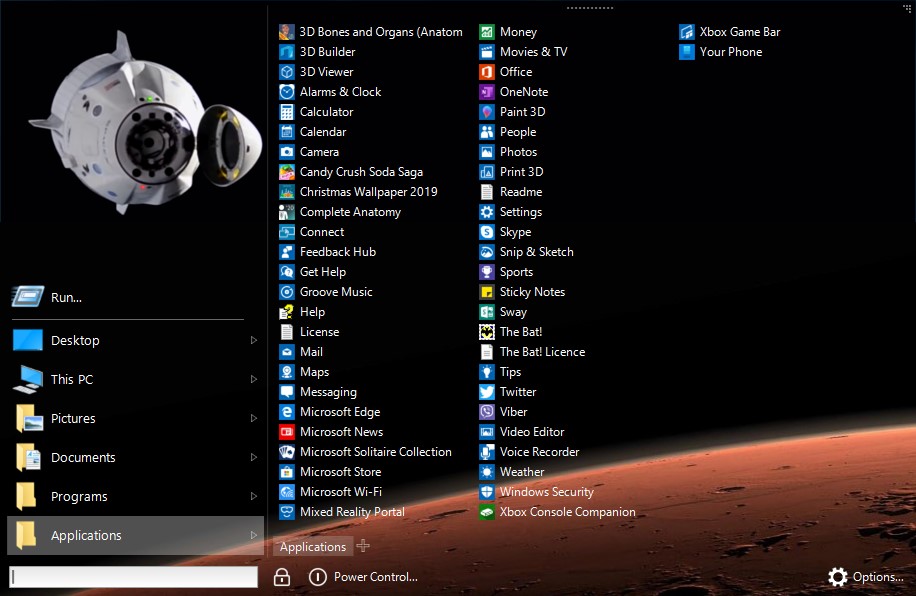
Start Menu X is a professional-grade replacement for the standard Windows system menu, specifically engineered for power users managing extensive software libraries. This special SpaceX edition features two exclusive visual themes: one animated and one static, allowing for a personalized desktop aesthetic inspired by aerospace design. Built on over a decade of development experience, the utility aims to eliminate the navigational friction common in default operating system menus.
The software focuses on streamlining program access through advanced organizational tools. Users can implement virtual groups, categorizing applications by purpose—such as office suites or graphics tools—without altering their physical directory locations on the hard drive. The interface supports a fully customizable structure, including the addition of tabs to reduce scrolling and redundant clicks. Functional features include:
- One-click launches: Users can assign a primary application to any folder, enabling the program to start immediately upon clicking the folder icon.
- Virtual groups: Organizes hundreds of programs into logical categories for faster retrieval without moving files.
- Power management: Includes integrated timers for automated system shutdowns.
- Flexible interface: Offers complete control over the menu layout, allowing for custom tabs and structure adjustments.
By providing a structured environment for program management, Start Menu X provides a solution for professionals who require rapid access to a high volume of tools. This edition combines the functional efficiency of the PRO version with unique SpaceX skins for a tailored user experience.
Top 5 Reasons To Download Start Menu X PRO SpaceX Edition
- Exclusive SpaceX Themed Aesthetics: Transform your desktop with two unique skins, featuring both high-energy animations and sleek static designs that celebrate the future of space exploration.
- Revolutionary Virtual Groups: Regain control over your cluttered app list by organizing software by purpose without ever moving a single file on your hard drive.
- The Efficiency of One-Click Launches: Save hours of cumulative time by assigning primary programs to folders, allowing you to launch your favorite tools with a single click.
- Professional-Grade Customization: Beyond just colors, you can overhaul the entire menu structure, add custom tabs, and resize the interface to fit your specific workflow.
- A Legacy of Stability and Power: Built on eleven years of professional development, this tool provides a level of reliability and deep system integration that the standard Windows menu simply cannot match.
If you are like me, you probably spend a significant portion of your day staring at your computer screen, navigating through a labyrinth of icons, folders, and sub-menus just to get your work done. For the average user who only opens a web browser and a word processor, the default Windows Start Menu is perfectly adequate. But you aren't the average user. You are a power user. You have hundreds of programs, specialized utilities, and various development environments that require quick access. For us, the standard menu isn't just an annoyance; it is a bottleneck. That is why the special SpaceX edition of Start Menu X is such a game-changer. This isn't just a cosmetic skin; it is a total overhaul of how you interact with your operating system, wrapped in a package that looks like it belongs on a mission control console.
In this article, I am going to dive deep into why you need to download this giveaway immediately. We are going to look at how it solves the "clutter crisis," why the SpaceX skins are more than just eye candy, and why the professional features included in this edition will make you wonder how you ever used Windows without it. This is about taking your productivity to the next level while giving your desktop a futuristic, high-tech makeover that reflects your passion for technology and exploration.
1. Exclusive SpaceX Themed Aesthetics
Let’s be honest: we spend a lot of time looking at our interface, so why shouldn't it look spectacular? The first and most striking reason to grab this giveaway is the inclusion of the SpaceX edition skins. This isn't a generic "space" theme you’d find on a wallpaper site. These are two unique, meticulously designed skins tailored specifically for fans of aerospace and cutting-edge tech. You get a static version for a clean, minimalist look and an animated version that brings a sense of kinetic energy to your desktop.
The animated skin is a particular standout. Imagine clicking your Start button and seeing a subtle, sophisticated animation that evokes the feeling of a rocket launch or a high-tech telemetry screen. It adds a layer of "wow factor" to your machine that sets it apart from every other vanilla Windows installation. The color palettes are chosen to be easy on the eyes during long night sessions while still looking crisp and modern. In a world of flat, boring UI designs, the SpaceX edition of Start Menu X dares to be bold and thematic. It turns a utility into a centerpiece.
Furthermore, these skins aren't just slapped on top of the old menu. They are integrated into the Start Menu X framework, meaning they scale perfectly with your resolution. Whether you are running a 1080p laptop or a massive 4K ultrawide monitor, the SpaceX graphics remain sharp and professional. It provides that "custom rig" feeling without requiring you to spend hours tinkering with registry files or unstable third-party theme engines. It is "install and enjoy" at its finest.
2. Revolutionary Virtual Groups
As a tech reviewer, the number one complaint I hear from professionals is that their program list has become unmanageable. When you have "hundreds of programs" instead of a "petty dozen," the standard alphabetical list becomes a nightmare of scrolling. This is where the Virtual Groups feature of Start Menu X truly shines. This feature allows you to group programs by their purpose—such as "Graphics," "Office," "Development," or "Gaming"—without actually moving the files on your hard drive.
Think about the freedom this gives you. Usually, if you want to organize your programs, you have to manually move shortcuts into folders, which can break installers or make it impossible to find things when you’re using the search bar. With Start Menu X, the organization is "virtual." You can categorize your Adobe suite, your 3D modeling tools, and your texture editors into one "Creative" group. When you click that group, everything you need is right there. No more hunting through the "A" section for After Effects and then scrolling all the way down to "P" for Photoshop.
This organizational logic is what separates a "toy" app from a "professional" tool. It acknowledges that the way we work is based on tasks, not on the first letter of the software manufacturer's name. By using virtual groups, you reduce the cognitive load required to start a task. You don't have to think about where a program is located; you just think about what you want to do. For a professional, those saved seconds add up to hours of reclaimed focus over the course of a month.
3. The Efficiency of One-Click Launches
One of the most powerful features found in this version of the software is the ability to assign a primary program to any folder. This is a PRO-level feature that fundamentally changes how you interact with your menu. In the traditional Windows menu, clicking a folder merely expands it, forcing you to then look through the contents and click again to launch the app. It’s a two-step process every single time.
With Start Menu X, you can set it so that clicking the folder icon itself immediately launches your most-used application in that category. For example, if you have a folder for "Office," you can set Word as the primary program. Clicking the folder launches Word instantly. If you actually need Excel or PowerPoint, you simply hover your mouse over the folder for a fraction of a second, and the full list of contents pops up. It is a brilliant bit of UI design that prioritizes your most frequent actions while keeping secondary options only a heartbeat away.
This "one-click" philosophy is addictive. Once you get used to launching your IDE, your browser, or your project management tool with a single, decisive click, the old way of "click, search, click" feels ancient and clunky. It streamlines the "Start" process into a series of rapid-fire actions. For power users who value ergonomics and speed, this feature alone is worth the download. It turns your Start Menu into a high-speed dashboard where your most essential tools are always on a hair-trigger.
4. Professional-Grade Customization
Most "menu replacements" give you a few toggle switches and call it a day. Start Menu X, however, is built for people who want to engineer their workspace. This software allows you to customize the very structure of the menu. You can add tabs to separate different workflows, change the size of the icons, and even adjust the width of the columns. If you want a wide, multi-column layout that shows you fifty programs at once without scrolling, you can have it. If you want a slim, minimalist strip that stays out of the way, you can have that too.
The ability to add tabs is a particular favorite for those of us who juggle multiple roles. You could have a "Work" tab, a "System Tools" tab, and a "Personal" tab. This keeps your professional environment clean and separated from your leisure activities, all within the same menu. It’s about creating a digital environment that fits your brain, rather than forcing your brain to adapt to the limitations of the OS designer's vision.
Furthermore, the SpaceX edition allows you to tweak the aesthetics to match your specific setup. Because it’s designed for professionals, the customization options are logical and deep. You can manage the "Turn Off" timer, which is a neat little utility for those of us who leave our computers running complex renders or large downloads and want the system to shut down automatically after a set period. Every inch of this software is designed to give you more control over your PC, which is exactly what a tech enthusiast craves.
5. A Legacy of Stability and Power
In the world of software, longevity is the ultimate proof of quality. Start Menu X is the culmination of 11 years of experience in developing alternative menu solutions. This isn't a "beta" project or a flash-in-the-pan app that will stop working after the next Windows update. The developers at xSecuritas have spent over a decade refining the engine that powers this menu, ensuring that it is fast, stable, and light on system resources.
As a reviewer, I am always wary of tools that hook into the system UI, as they can often cause crashes or slow down the boot process. However, Start Menu X is impressively optimized. It doesn't replace your system files; it runs as a sleek, efficient layer that enhances your experience without compromising the integrity of your OS. You get all the benefits of a customized environment with none of the "jank" associated with lesser-known mods.
This 11-year pedigree means that the software has been tested against thousands of different hardware configurations and software environments. It handles high-DPI scaling, multi-monitor setups, and various versions of Windows with ease. When you download this giveaway, you aren't just getting a skin; you are getting a piece of "pro-spec" software that has been polished over a decade. It’s the difference between buying a kit car and a precision-engineered spacecraft. One might look the part, but only the other has the engineering to actually take you where you want to go.
In conclusion, the Start Menu X SpaceX Edition is more than just a visual upgrade—it is a comprehensive productivity suite for anyone who takes their computing seriously. Between the stunning SpaceX animations, the genius of virtual groups, and the sheer speed of one-click launches, it transforms the most-used part of your operating system into a high-performance tool. If you are tired of the limitations of the standard Start Menu and want an interface that matches your ambitions, do not miss out on this giveaway. It is time to stop scrolling and start launching. Your desktop deserves an upgrade that is truly out of this world.
Download it now, configure your virtual groups, and experience what it feels like to have a PC that finally keeps up with your workflow.


Reviews for Start Menu X PRO SpaceX Edition
Click Here to Read Reviews for Start Menu X PRO SpaceX Edition >> Click Here to Submit Reviews for Start Menu X PRO SpaceX Edition >>