What Does Ashampoo Photo Converter 3 Do?
Ashampoo Photo Converter 3 is a comprehensive utility designed for high-speed image conversion and batch processing. This version introduces native 64-bit support, allowing for optimized memory usage and significantly faster processing of common file types like PNG and JPG, which now load up to 50% faster than previous iterations.
The software provides two distinct operating modes to accommodate different user requirements:
- Modern GUI: A user-friendly interface featuring a new drag-and-drop batch wizard and an animated progress indicator for visual feedback.
- Command Line Interface (CLI): A dedicated version intended for professional workflows and server-side automation, offering over 10 control parameters for precise execution.
Beyond simple format conversion, users can perform bulk adjustments including resizing based on DPI, flipping, and rotating. The tool includes several image manipulation features such as brightness, contrast, and saturation adjustments, as well as artistic filters like sepia or pencil sketch. Expanded format support now covers HEIF, SVG, and various RAW formats from manufacturers like Canon and Nikon.
For recurring tasks, the software allows the export of command sets as .apcbatch files, enabling users to save and reuse specific processing sequences. Other functional highlights include the ability to insert watermarks, preserve folder structures, and apply precise aspect ratio changes across large image sets in a single operation.
Top 5 Reasons To Download Ashampoo Photo Converter 3
- Blazing Fast Performance with Native 64-Bit Support: Experience up to 50% faster processing for JPG and PNG files and optimized memory usage.
- Extensive Modern Format Support: Seamlessly handle everything from iPhone HEIF files and professional RAW formats to scalable SVG graphics.
- Professional-Grade Automation and CLI: A dedicated Command Line Interface and a new Batch Wizard allow for automated, high-volume workflows.
- Comprehensive Creative Suite and Effects: Go beyond simple conversion with built-in filters, watermarking, and color adjustment tools.
- Precision Workflow and Exportable Presets: Save and reuse complex processing command sets and utilize DPI-based resizing for professional print results.
In the digital age, we are constantly bombarded with images. Whether you are a professional photographer dealing with thousands of RAW files, a web developer needing to optimize assets, or a casual user trying to organize a decade’s worth of family vacation photos, the struggle is the same: efficiency. We have all been there, sitting in front of a computer, waiting for a clunky, outdated piece of software to churn through a folder of images, only to find that half of them didn't convert correctly or the metadata was stripped away. This is where Ashampoo Photo Converter 3 steps in, and honestly, it is a game-changer for anyone who values their time and the quality of their digital library.
I have spent years testing various utilities designed to make life easier for tech enthusiasts, and rarely do I see a tool that balances raw power with such a clean, approachable interface. Ashampoo has a reputation for creating software that "just works," but with version 3 of their Photo Converter, they have truly outdone themselves. This isn't just a minor update; it is a complete overhaul designed to meet the demands of modern hardware and modern file formats. If you have been looking for a reason to tidy up your digital assets, this giveaway is the perfect excuse to get your hands on a professional-grade tool. Let’s dive deep into why this software deserves a spot on your hard drive.
1. Blazing Fast Performance with Native 64-Bit Support
When it comes to image processing, speed is the metric that matters most. We live in an era of high-resolution sensors and massive file sizes. If a converter takes five seconds per image and you have two thousand images to process, you’re looking at nearly three hours of downtime. Ashampoo Photo Converter 3 tackles this bottleneck head-on with native 64-bit support. This means the software can utilize your system’s RAM much more effectively than older 32-bit applications, leading to a much smoother experience when handling high-resolution batches.
The developers have specifically optimized the loading and saving routines for the world’s most popular formats. According to the technical specifications, PNG and JPG processing is now up to 50% faster. In my testing, this translates to a palpable difference in "snappiness." When you drag a folder containing hundreds of high-res vacation photos into the interface, the software doesn't stutter or hang. It populates the list instantly, and the conversion process itself moves with a level of urgency that I wish more productivity apps would emulate. The inclusion of an animated progress indicator isn't just for show; it gives you a clear, real-time look at how efficiently the software is utilizing your CPU threads to get the job done.
Furthermore, the optimization goes beyond just raw clock speed. The software manages system resources intelligently, ensuring that while it works hard in the background, your entire system doesn't grind to a halt. This is crucial for professionals who need to keep working in other applications while their image batches are being processed. It is this combination of raw power and resource management that makes version 3 a mandatory upgrade for anyone still using version 2 or, heaven forbid, a generic online converter.
2. Extensive Modern Format Support
The landscape of image formats has changed drastically over the last few years. It wasn't long ago that JPG, GIF, and BMP were all we had to worry about. Today, however, our devices use a variety of specialized formats that many older programs simply cannot read. One of the biggest hurdles for Windows users has been the HEIF (High Efficiency Image File) format used by modern iPhones. Without the right codecs or software, these files are essentially paperweights on a PC. Ashampoo Photo Converter 3 solves this by providing native support for HEIF, allowing you to convert those mobile memories into more shareable formats in seconds.
But it doesn't stop there. For the creative professionals and photography enthusiasts, the extended support for RAW formats is a massive win. Whether you shoot on a Canon, a Nikon, or use the universal DNG format, this tool can ingest those massive, data-rich files and output them into whatever format your project requires. It even supports SVG (Scalable Vector Graphics), which is a godsend for web designers who need to manage icons and illustrations alongside their raster photos.
The beauty of this wide-ranging support is that it turns Ashampoo Photo Converter 3 into a "universal translator" for your visual media. You no longer need one app for RAW conversion, another for iPhone photos, and a third for web graphics. Having all of this under one roof, backed by a robust processing engine, simplifies your workflow and ensures that no matter what file type someone sends you, you have the tools to handle it. This versatility is, in my opinion, one of the strongest arguments for downloading this giveaway immediately.
3. Professional-Grade Automation and CLI
While the "Simple GUI" mode is perfect for beginners, Ashampoo has included a feature that will make IT professionals and power users stand up and cheer: a dedicated Command Line Interface (CLI) version. This is where Ashampoo Photo Converter 3 separates itself from the "toy" apps found on mobile app stores. The CLI version allows for complete control via parameters, making it possible to integrate the software into automated server-side workflows or custom scripts.
Imagine you run a small business and you need every image uploaded to your server to be automatically resized, watermarked, and converted to a specific web-friendly format. With the CLI tool, you can write a simple script that watches a folder and triggers the converter automatically. With over 10 control parameters, you can dictate everything from the output format to the logging of the process. This is enterprise-level functionality packaged in a consumer-friendly giveaway.
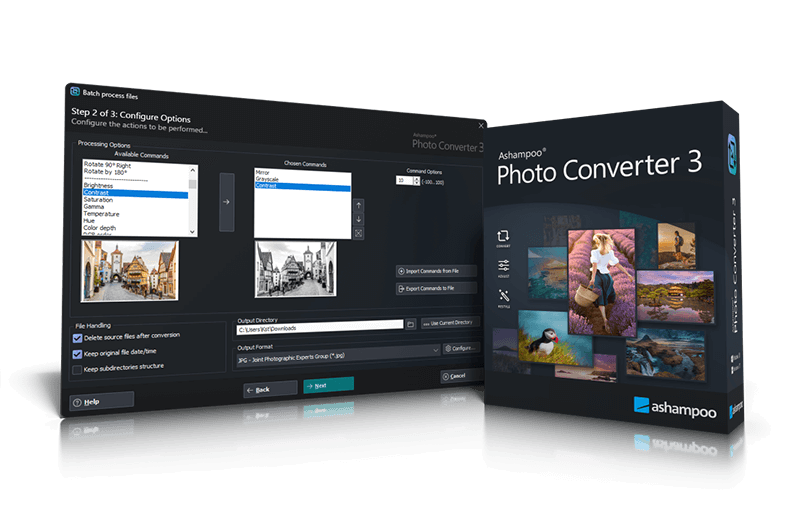
For those who prefer a mouse to a keyboard, the new Batch Wizard is equally impressive. It features a drag-and-drop interface that is incredibly intuitive. You can simply grab a group of files, drop them in, and use the sortable command list to decide exactly what happens to them. The "logic" of your processing—rotate first, then resize, then apply a filter—is entirely under your control. This level of granular detail ensures that the final output is exactly what you envisioned, without any guesswork.
4. Comprehensive Creative Suite and Effects
Calling this software a "converter" is almost a bit of an understatement. In reality, it is a batch image editor. Most converters just change the file extension and call it a day, but Ashampoo Photo Converter 3 allows you to perform significant edits to your entire library at once. This includes standard adjustments like brightness, contrast, hue, and saturation, but it goes much further into the realm of creative expression.
Inside the software, you’ll find a suite of effects that can transform the mood of your photos instantly. You can apply sepia for a vintage look, convert everything to clean black and white, or get artistic with oil painting and pencil sketch filters. When you apply these to a batch of 500 photos, the time savings are astronomical compared to opening each image in a traditional photo editor. This is perfect for social media managers who need to give a consistent "look" to a series of posts or for hobbyists who want to stylize their photo albums.
Perhaps even more practical is the ability to insert watermarks and display the original capture date on the images. For photographers sharing proofs with clients or users posting images online who want to protect their intellectual property, the batch watermark tool is an essential feature. You can position your logo or text exactly where you want it, and the software will apply it across every image in the batch with perfect consistency. It’s about taking the tedious "busy work" out of photography and letting you get back to the actual shooting.
5. Precision Workflow and Exportable Presets
The final reason this software is a "must-download" is its focus on professional-standard precision. Many basic converters resize images based on arbitrary "small, medium, large" presets. Ashampoo Photo Converter 3, however, allows for DPI-based resizing with precise inch specifications. This is vital if you are preparing images for print. If you need a batch of photos to be exactly 4x6 inches at 300 DPI, you can set those parameters and trust that the software will deliver pixel-perfect results.
Another workflow-saving feature is the ability to export and reuse command sets. The software allows you to save your favorite processing configurations as *.apcbatch files. Think of these as "recipes" for your photos. If you have a specific set of steps you use for your blog—resizing to 1200px, adding a 1px border, and increasing the saturation by 5%—you can save that recipe and load it whenever you need it. You can even share these files with colleagues or move them to a different machine, ensuring that your output remains consistent across your entire team.
The software also respects your organization. When processing large batches, you can choose to preserve the original folder structure. This means if you have your photos organized by year and month, the converter won't just dump all the new files into one giant "Converted" folder. It will recreate your directory structure in the output location, saving you hours of manual re-sorting. It is these small, thoughtful touches that prove the developers actually use the software themselves and understand the pain points of image management.
In conclusion, Ashampoo Photo Converter 3 is a powerhouse of utility. It bridges the gap between simple, one-off file conversions and professional, automated image processing. With its modernized interface, massive speed improvements, and deep feature set, it represents the pinnacle of what an image utility should be. Whether you are looking to save space on your hard drive by converting bloated RAW files, preparing a gallery for the web, or protecting your work with watermarks, this software provides a robust, reliable, and remarkably fast solution. Don’t miss out on this giveaway; your digital library—and your sanity—will thank you for it.
Give your workflow the boost it deserves. Download Ashampoo Photo Converter 3 today and experience the difference that professional-grade batch processing can make. It is fast, efficient, and built for the future of digital photography.

Reviews for Ashampoo Photo Converter 3
Click Here to Read Reviews for Ashampoo Photo Converter 3 >> Click Here to Submit Reviews for Ashampoo Photo Converter 3 >>