What Does BitSilo Do?
MollieSoft’s BitSilo is an automated backup and restoration utility designed specifically for Windows environments. The application streamlines data protection by creating timestamped archives of user-defined files and directories. Users can configure multiple backup sets, each tailored with unique file selections and independent scheduling options for daily, weekly, or monthly execution.
The software offers two primary backup methods: full backups, which capture all specified data, and incremental backups, which only record changes made since the previous session. To manage storage footprints, BitSilo includes exclusion filters that allow users to omit specific files based on directory paths or naming patterns. Additionally, the program features flexible disk space management, utilizing automated cleanup rules to remove older archives while retaining essential recent backups.
Restoration is handled through an integrated search interface. Users can locate specific files within any historical archive using a dedicated query language, facilitating precise recovery of lost or corrupted data. By combining scheduled automation with granular control over file selection and retention, the software provides a structured approach to local data redundancy and system recovery.
Top 5 Reasons To Download BitSilo
1. Comprehensive Point-in-Time Recovery: BitSilo creates precise, timestamped backups that allow you to revisit your file system at any specific moment in history, offering a digital safety net against accidental deletions or file corruption.
2. Smart Incremental Backup Technology: Save time and storage space by only backing up the files that have actually changed. BitSilo’s intelligent logic differentiates between full system captures and efficient incremental updates.
3. Granular Control via Multiple Backup Sets: You can create specialized backup profiles for different categories of data, each with its own unique schedule and exclusion rules, providing a level of organization that basic backup tools lack.
4. Advanced Query-Based File Restoration: Finding a lost file among thousands of backups is effortless thanks to a built-in query language, allowing you to search through archives with surgical precision rather than hunting through folders manually.
5. Automated Maintenance and Disk Space Management: Stop worrying about your backup drive filling up. BitSilo features sophisticated cleanup rules that automatically purge old archives while keeping your most recent and important data secure.
The Power of Precision: Understanding Point-in-Time Recovery
When we talk about data protection, most users think of simple file synchronization. However, as any seasoned tech professional will tell you, synchronization is not a true backup. If you accidentally delete a paragraph in a document and save it, or if a virus corrupts a folder, a sync service will dutifully copy those errors to your cloud storage. This is where BitSilo changes the game. By utilizing timestamped backups, BitSilo ensures that you aren't just saving the current state of your files, but creating a chronological library of your digital life.
Every time BitSilo runs, it creates a snapshot. Imagine being able to go back to Tuesday at 2:00 PM to retrieve a version of a spreadsheet before a colleague made a series of errors. This "time machine" capability is the cornerstone of professional-grade data integrity. For a Windows user, having this level of granularity means that "human error" is no longer a catastrophic event. It is merely a minor inconvenience that can be rectified with a few clicks. The peace of mind that comes with knowing every version of your work is preserved is, quite frankly, worth the download alone.
Efficiency Meets Performance: The Full and Incremental Logic
One of the biggest deterrents to regular backups is the "performance tax." We’ve all used software that bobs down the CPU, making the computer crawl while it tries to copy gigabytes of data. BitSilo addresses this through a sophisticated system of full and incremental backups. A full backup is exactly what it sounds like—a complete copy of every file you’ve selected. But the magic happens in the incremental phase. After the initial full backup, BitSilo only looks for what has changed.
If you have a 50GB folder of photos and you only add three new images, BitSilo doesn't waste time recopying the 50GB. It identifies the three new files and appends them to the archive. This drastically reduces the time it takes to complete a backup cycle, often bringing it down from hours to mere seconds. Because the process is so lightweight, you can have it running in the background without even noticing a dip in your system’s performance. This efficiency ensures that you actually use the software rather than disabling it because it’s "too slow."
Customization for the Power User: Multiple Backup Sets
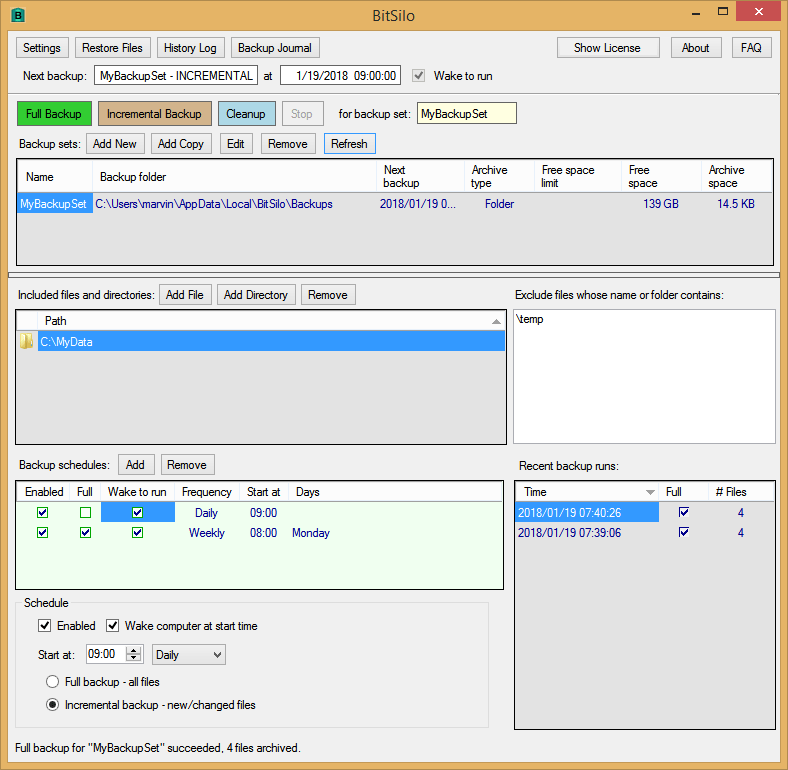
Not all data is created equal. Your mission-critical work documents likely need to be backed up every few hours, whereas your collection of saved webinars might only need a monthly check-in. BitSilo understands this hierarchy of importance by allowing users to create multiple "Backup Sets." This is a feature usually reserved for high-end enterprise software, but it is presented here with an intuitive interface that any Windows user can master.
For each set, you can define exactly what stays and what goes. You can even exclude specific files based on any part of the file name or folder path. Do you have a "Temp" folder inside your project directory that doesn't need to be saved? Simply add it to the exclusion list. This level of control ensures that your backup archives are lean, relevant, and perfectly tailored to your workflow. You can set your work files to back up daily, your system configurations to back up weekly, and your media archives to back up monthly—all handled automatically by BitSilo under one roof.
The Search for the Needle: Query-Based Restoration
The true test of any backup software isn't how it saves files, but how it restores them. We have all been in that panicked state where we realize a file is missing, but we can’t remember exactly where it was stored or what it was named. Most backup programs force you to browse through endless directory trees, which is a nightmare when you are dealing with months of timestamped archives. BitSilo solves this with a powerful, built-in query language.
This feature allows you to search your backups using specific parameters. Whether you remember a fragment of the filename or the specific date range it was created, BitSilo’s search engine cuts through the noise. It treats your backup archives like a searchable database. For the tech-savvy user, this is a revelation. Instead of a clumsy GUI-based hunt, you get a streamlined, logical way to pinpoint the exact file you need from any point in your backup history. It turns a potential multi-hour recovery task into a five-second search.
Set It and Forget It: Intelligent Disk Space Management
The "disk full" notification is the enemy of a consistent backup strategy. Many users start a backup routine with the best of intentions, only to find that their external drive has run out of space three months later because it’s bloated with old, redundant data. BitSilo eliminates this maintenance headache through its flexible management of disk space and automated cleanup rules. You don't have to be a system administrator to manage your storage; you just have to tell BitSilo your preferences.
You can set rules that govern exactly how long backups should be kept or how many versions of a file should remain on the disk. For example, you might decide to keep all daily backups for a week, but only keep one weekly backup for a month, and one monthly backup for a year. BitSilo handles the purging process in the background, ensuring that your storage is always optimized. This "hands-off" approach to maintenance is essential for long-term data protection. It ensures that the software continues to work reliably for years without requiring the user to manually delete old files to make room for new ones.
A Professional Tool for the Everyday User
In the world of Windows utilities, there is a lot of "bloatware" that promises the world but delivers very little. BitSilo by MollieSoft is a refreshing departure from that trend. It focuses on the core pillars of data security: reliability, efficiency, and accessibility. By offering a giveaway of this caliber, MollieSoft is giving users a chance to move away from the unreliable, manual "copy-paste" method of backing up data and toward a professional, automated system.
The interface is designed to stay out of your way while the engine under the hood does the heavy lifting. Whether you are a creative professional with terabytes of video footage, a student with years of research, or a home user who just wants to make sure their family photos are safe, this software scales to meet those needs. The ability to specify exactly what to include and exclude, combined with the powerful query language for restoration, puts BitSilo in a league of its own.
Why You Need to Act Now
Data loss isn't a matter of "if," it's a matter of "when." Hard drives fail, updates go wrong, and ransomware is an ever-present threat in the modern digital landscape. The best time to set up a robust backup system was yesterday; the second best time is right now. This giveaway provides a premium solution to a universal problem at no cost, making it an essential download for anyone running a Windows environment.
Consider the value of your data. Your documents, your projects, your personal memories—these are the things that cannot be replaced. While there are many backup options available, few offer the combination of incremental efficiency and query-based restoration found in BitSilo. It is a tool designed for people who take their digital lives seriously. By downloading this giveaway, you are installing a professional-grade insurance policy for your PC.
Conclusion: The Ultimate Safety Net
In conclusion, BitSilo is more than just a backup program; it is a comprehensive data management suite. It bridges the gap between simple consumer tools and complex enterprise solutions, offering the best of both worlds. You get the ease of use required for daily operation, combined with the powerful features like timestamped archives and query-based searching that professionals demand.
Don’t wait for a system crash to realize you needed a better backup strategy. Take advantage of this giveaway and give your Windows machine the protection it deserves. With its smart incremental technology, customizable backup sets, and automated cleanup rules, BitSilo ensures that your data is not just "saved," but actively managed and easily recoverable. It is a lightweight, powerful, and essential addition to any software library. Download it today and experience the peace of mind that comes with knowing your files are secure, organized, and always just a query away.
Ensure your digital future is protected. Grab BitSilo while this giveaway lasts and never worry about data loss again. Your files are worth the effort!

Reviews for BitSilo
Click Here to Read Reviews for BitSilo >> Click Here to Submit Reviews for BitSilo >>