What Does Kindlian Do?
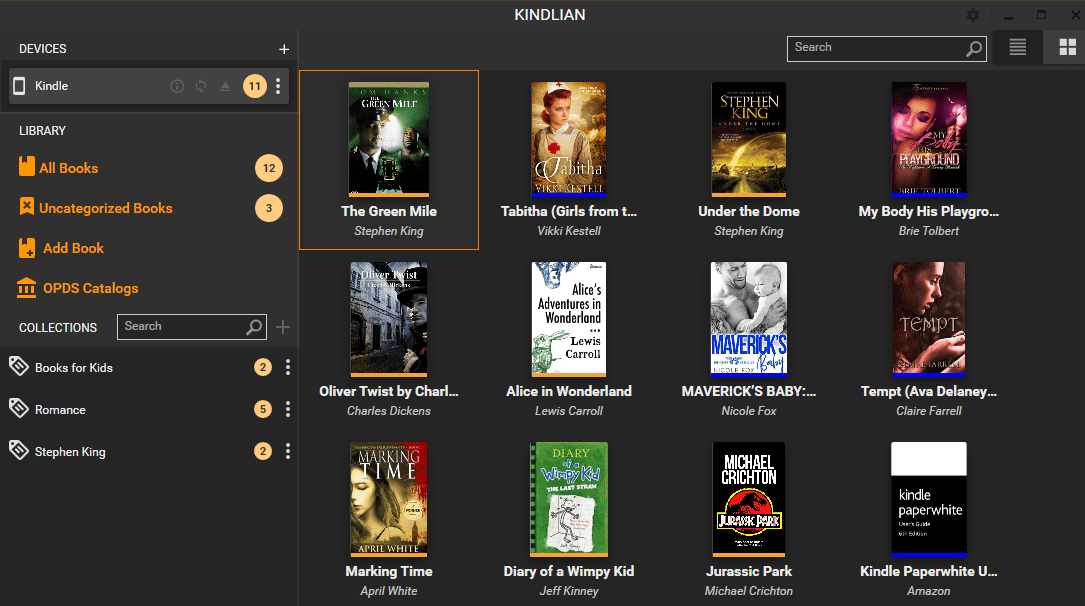
Kindlian is a dedicated Windows application designed for users seeking a centralized system to manage Kindle libraries. The software synchronizes with Kindle devices, copying books to a local PC to facilitate easier organization. Users can create custom collections, search their library, and sort volumes based on specific criteria. The interface is also customizable, offering various layouts and color schemes to suit individual preferences.
Metadata management is a primary function of the application. Users can view and edit book details, including titles, authors, covers, series names, and descriptions. This level of control ensures that library information remains accurate and standardized across the user's digital collection.
The application features an integrated ebook reader that supports non-DRM protected formats, including AZW, MOBI, PDF, and TXT. This built-in reader provides several e-reading templates and allows for the adjustment of font sizes and page zoom levels. It also includes an automatic bookmarking feature to track reading progress across different sessions.
For users with external ebook files, Kindlian includes a conversion utility. When non-Kindle formats such as EPUB, FB2, or HTML are added to the library, the program automatically converts them into the MOBI format. This automation simplifies the process of transferring external content to Kindle e-readers, ensuring device compatibility without the need for separate file-processing software.
Top 5 Reasons To Download Kindlian
If you are a Kindle power user, you already know the struggle of managing a massive library directly on the device. While Amazon’s e-readers are world-class for consumption, their organizational tools often leave much to be desired. That is where Kindlian comes in. This Windows application is designed to bridge the gap between your PC and your e-reader, offering a suite of tools that turn a cluttered digital pile into a curated gallery. Here are the top five reasons why you need to download Kindlian today:
- Streamlined Library Management and Collection Organization: Take control of your library with advanced sorting and collection tools that far surpass the native Kindle interface.
- Seamless Format Conversion (EPUB to MOBI): Break out of the Amazon ecosystem by automatically converting popular ebook formats like EPUB and FB2 into Kindle-compatible files.
- Comprehensive Metadata and Cover Editing: Fix broken titles, missing authors, and low-resolution covers to ensure your library looks professional and is easy to navigate.
- Built-In Multi-Format E-Reader: Preview and read your books directly on your Windows PC using a high-quality reader that supports bookmarks and custom font settings.
- Enhanced UI Customization: Personalize your digital bookshelf with multiple layouts and color schemes to match your aesthetic preferences.
1. Streamlined Library Management and Collection Organization
Anyone who has owned a Kindle for more than a year knows the "digital clutter" phenomenon. You buy a few books, download a few free classics, and suddenly you have a scrolling list of three hundred items that is nearly impossible to navigate. While Amazon has introduced "Collections," managing them on a six-inch e-ink screen with a refreshing display is, frankly, a chore. It is slow, the typing is laggy, and moving fifty books into a "Sci-Fi" category can take twenty minutes of frustrating tapping.
Kindlian changes the game by bringing the entire management process to your Windows desktop. By connecting your device to your PC, Kindlian syncs your library and allows you to use your mouse and keyboard to do the heavy lifting. You can create, rename, and delete collections in seconds. The ability to drag and drop books into specific categories makes organization feel like a breeze rather than a task. If you have ever wanted to organize your library by "Read," "To Read," or specific genres like "Historical Fiction" and "Tech Manuals," Kindlian provides the most intuitive interface available for the job.
Furthermore, the search and sort functions are significantly more powerful than the on-device options. You can sort by file size, file type, author, or series. This level of granularity is essential for users who have thousands of books. Instead of hunting through pages of thumbnails on your Kindle, you can find exactly what you are looking for on your monitor and ensure it is placed exactly where it belongs. It turns your Kindle from a simple playback device into a sophisticated, organized digital library.
2. Seamless Format Conversion (EPUB to MOBI)
One of the biggest frustrations for Kindle users is the "walled garden" effect. The internet is full of incredible, free, and legal ebooks in the EPUB format—the industry standard used by almost every other e-reader on the planet. However, Kindle devices famously do not support EPUB files natively. In the past, this meant using complex, bloated conversion software that required a degree in computer science just to get a book onto your device. Kindlian solves this problem with elegant simplicity.
When you add a non-Kindle book from your computer—whether it is an EPUB, FB2, or even an HTML file—Kindlian automatically handles the conversion process. It transforms these files into MOBI, which is the native language of the Kindle. This feature alone is worth the download. It opens up a world of content from sources like Project Gutenberg, Open Library, and various independent author sites that may not distribute through the Amazon store. You are no longer restricted to buying books from a single source.
The beauty of Kindlian's conversion engine is that it is automatic. You don’t have to worry about bitrates, encoding, or layout settings. You simply add the book to your Kindlian library, and the software ensures it is ready for your e-reader. This allows you to treat your Kindle as a universal reading device. Whether you are a student downloading research papers in PDF or TXT format, or a fiction lover finding gems in EPUB, Kindlian makes the transition to your Kindle seamless and headache-free.
3. Comprehensive Metadata and Cover Editing
There is nothing more annoying for a bibliophile than a digital library filled with "Author Unknown," "Untitled," or books missing their cover art. When you side-load books or download them from various sources, the metadata is often a mess. Your Kindle displays a generic grey placeholder instead of the beautiful cover art the author intended. Kindlian gives you the power to be your own digital librarian and fix these issues with ease.
With Kindlian, you can edit every piece of data associated with a book. You can correct the title, add the author’s name, and even fill in the "Series" information. This is particularly useful for those who read long-running series; by correctly labeling book numbers and series titles, you ensure that your Kindle sorts them in the correct chronological order. No more jumping from Book 1 to Book 4 because the device didn't recognize the sequence.
The cover editor is another standout feature. We all know the saying "don't judge a book by its cover," but in a digital library, the cover is how we find what we want to read. Kindlian allows you to upload high-resolution images to replace missing or ugly covers. When you look at your Kindle in "Grid View," it will look like a pristine, professional bookstore. You can even add descriptions and summaries to your books, making it easier to remember what a particular title is about before you open it. This level of detail makes your collection feel premium and personalized.
4. Built-In Multi-Format E-Reader
While the goal is usually to get books onto your Kindle, there are many times when you might want to preview a book on your computer. Perhaps you are at work and want to check a reference in a professional manual, or maybe you want to see if a book is worth the transfer space before you send it to your device. Kindlian includes a robust, built-in ebook reader that is surprisingly powerful for a management app.
This reader supports non-DRM protected AZW, MOBI, PDF, and TXT files. It is not just a simple previewer; it is a full-featured reading environment. You can select from multiple e-reading templates that adjust the background color and contrast to suit your environment—whether you prefer a sepia tone for a classic feel or a high-contrast mode for easy reading. You can also zoom into pages and adjust the font size to your liking, which is a massive benefit for those with visual impairments who find computer screens straining.
One of the most useful aspects of the built-in reader is that it automatically saves your bookmarks. If you start reading a book on your PC via Kindlian, you can pick up right where you left off. This makes Kindlian a dual-purpose tool: it is both your library manager and your secondary reading device. Having the ability to read your Kindle library on a large 24-inch or 27-inch monitor is a luxury that every Kindle user should experience, especially when dealing with complex PDFs or technical textbooks that require more screen real estate than a handheld device can provide.
5. Enhanced UI Customization and Aesthetics
Most ebook management software looks like it was designed in the late 1990s. They are functional, but they are often ugly, cluttered, and intimidating. Kindlian takes a different approach by prioritizing the user experience and visual appeal. The interface is clean, modern, and highly customizable, which makes the process of managing your library actually enjoyable rather than a chore.
Kindlian allows you to choose from various library layouts. If you prefer the visual density of a "Grid View" where you can see dozens of covers at once, you can have it. If you prefer a more detailed "List View" that shows authors and file types, that is also an option. Furthermore, the software offers different color schemes. If you are a fan of "Dark Mode" to save your eyes during late-night organization sessions, Kindlian has you covered. You can tailor the look and feel of the software to match your personal style or your Windows desktop theme.
This focus on aesthetics isn't just about "looking pretty." A well-designed UI makes you more efficient. Because the buttons are where you expect them to be and the layout is intuitive, you spend less time searching for features and more time perfecting your library. Kindlian feels like a modern app for a modern reader. It respects the fact that your digital library is a reflection of your personality and gives you the tools to make it look as good as possible. When you open Kindlian, you aren't just looking at a file manager; you are looking at a digital bookshelf that you have personally curated and styled.
Conclusion: Why You Should Not Miss This Giveaway
In the world of digital reading, the Kindle is king, but Kindlian is the power behind the throne. It takes the excellent reading experience provided by Amazon's hardware and adds the management, conversion, and organizational power that the ecosystem has always lacked. Whether you are a casual reader with fifty books or a hardcore collector with five thousand, Kindlian is an essential tool.
By downloading this giveaway, you are giving yourself the gift of time and organization. You are gaining the ability to read EPUBs without jumping through hoops, the power to fix messy metadata, and the convenience of a high-quality PC e-reader. The ability to customize the layout and color schemes ensures that the software will be a welcome addition to your desktop environment. Do not let your Kindle library remain a disorganized mess. Download Kindlian, sync your device, and start enjoying a truly managed, curated, and professional-grade reading experience. It is time to treat your digital books with the same respect you would show a physical library, and Kindlian is the only tool you need to make that happen.
Final Verdict: Kindlian is a must-have for any Windows-using Kindle owner. Its combination of file conversion, metadata editing, and intuitive organization makes it a "game-changer" in the niche of ebook management. Grab this giveaway while you can and transform the way you interact with your Kindle forever.

Reviews for Kindlian
Click Here to Read Reviews for Kindlian >> Click Here to Submit Reviews for Kindlian >>