What Does Ashampoo WinOptimizer 28 Do?
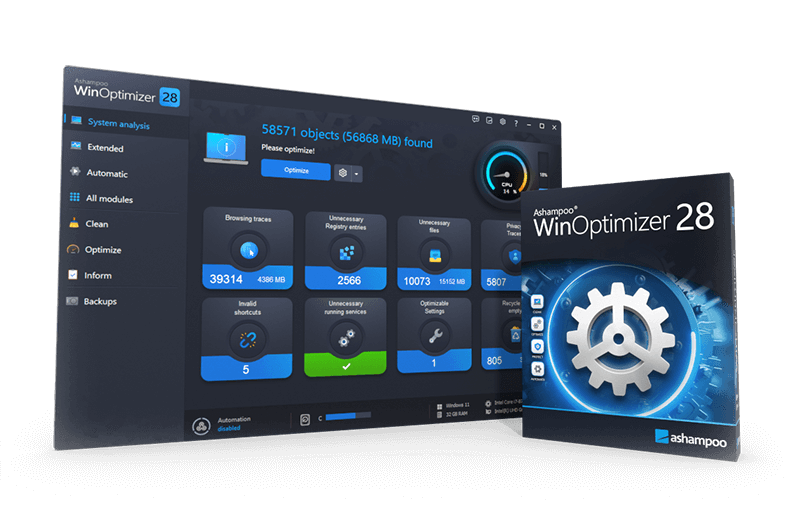
Ashampoo WinOptimizer 28 is a comprehensive system maintenance suite featuring 35 individual modules designed to enhance Windows performance, privacy, and stability. This version introduces significant speed improvements, with cleaner modules operating up to 50% faster and the Registry Optimizer functioning up to 100 times faster than previous iterations.
The software provides several core utilities for system management:
- System Maintenance: A four-in-one cleaner removes temporary files, installation leftovers, and web browsing traces. Deep cleaning features also target empty folders and redundant system data.
- Network Control: The new Firewall Manager monitors inbound and outbound traffic, allowing users to manage rules for specific applications and detect faulty configurations.
- Optimization Tools: Features like Live-Tuner and Profile Booster manage resource allocation to improve startup times and application performance in real-time.
- Diagnostics: System Information 2 provides detailed technical data on hardware components like the GPU, CPU, and RAM, while the Crash Analyzer decodes system error reports into plain text.
Privacy tweaks allow users to limit Windows data collection and customize operating system behavior. For added security, the suite includes a Super Safe Mode for registry modifications and a Tuning Assistant that uses guided dialogs to simplify the optimization process. Dashboards provide immediate access to key system data and all available modules from a single interface.
Top 5 Reasons To Download Ashampoo WinOptimizer 28
- Next-Level Drive Decluttering with the Four-in-One Cleaner and Deep Cleaning
- Turbocharged System Speed via 100x Faster Registry Optimization and Real-Time Boosters
- Comprehensive Privacy Safeguards and the All-New Firewall Manager
- Stress-Free Optimization Tailored to You with the Guided Tuning Assistant
- Actionable Diagnostic Intelligence with System Information 2 and Crash Analyzer
Every Windows user understands the gradual, frustrating slowdown that creeps into a personal computer over time. You unbox a lightning-fast rig, install your daily programs, browse the web, play games, and update your operating system. Yet, within a matter of months, that once-pristine machine begins to drag its feet. Boot times stretch out, random stutters interrupt your workflow, hard drives mysteriously fill to capacity, and cryptic background processes chew up your processor cycles. Windows tries its best to manage its own house, but the reality is that the operating system is notorious for accumulating digital clutter, retaining obsolete registry keys, and running unnecessary background services that rob you of genuine hardware performance.
When an opportunity comes along to grab a world-class, premium utility suite designed specifically to eradicate these issues, tech enthusiasts take notice. That is why this software giveaway is an absolute must-have. Ashampoo WinOptimizer 28 is not just another basic disk cleaner or rudimentary task switcher; it is an industrial-strength maintenance powerhouse packing 35 dedicated modules engineered to clean, accelerate, stabilize, and lock down your operating system. If you have been searching for a zero-risk way to restore your machine to its day-one glory, look no further. Here is a definitive, deep-dive review exploring the top five reasons why you need to download this giveaway immediately.
1. Next-Level Drive Decluttering with the Four-in-One Cleaner and Deep Cleaning
Over extended periods of computing, Windows machines become digital hoarders. Every web page you visit deposits cache items, tracking cookies, and script libraries onto your drive. Every application you install, run, and update leaves behind temporary working directories, outdated patch logs, orphan configuration profiles, and empty system folders. Over time, these files balloon into tens of gigabytes of wasted storage space. What makes this accumulation worse is that conventional default cleanup tools, such as the basic storage utilities built into Windows, often merely scratch the surface because they are programmed to avoid deep system caches.
Ashampoo WinOptimizer 28 approaches storage management with surgical precision. Leading the charge is the suite’s comprehensive Four-in-One cleaner engine, which consolidates web browsing traces, drive junk, application detritus, and temporary system data into a single, cohesive workflow. The scanning algorithms examine your storage drives with remarkable efficiency, identifying obsolete installation leftovers and orphaned setup routines that manual browsing would never uncover. Crucially, the cleaner modules in version 28 have received an extensive under-the-hood overhaul, running up to fifty percent faster than previous iterations. This means you do not have to sit around twiddling your thumbs while your storage drives are indexed; the software scours gigabytes of storage in seconds.
Beyond traditional file scrubbing, the enhanced deep cleaning functionality targets the most elusive system debris. Windows routinely dumps error reports, telemetry payloads, thumbnail caches, and memory dump files deep within nested app data directories. Ashampoo WinOptimizer 28 safely exposes these hidden pockets of bloat and gives you the power to vaporize them with confidence. It even flags empty folders that clutter file structures and slow down indexing services. If you run your operating system on a smaller, high-speed Solid-State Drive where every gigabyte of space commands a premium, this giveaway pays for itself on day one simply by recovering massive amounts of lost capacity.
The beauty of this cleaning engine lies in its intelligent balance between aggressive clutter elimination and system safety. Beginners can click a single button on launch to let the suite analyze and clean standard safe categories, while advanced power users can drill down into specific file exclusions, whitelisting essential cookies or targeted directories. By wiping away redundant caches and temporary scraps, you do not just recover storage space; you lighten the file system overhead, speeding up disk read and write operations across the board.
2. Turbocharged System Speed via 100x Faster Registry Optimization and Real-Time Boosters
The Windows Registry is the nervous system of your entire PC. Every device driver, software preference, file association, hardware state, and background task is logged inside this monumental database. Unfortunately, as you install software, play games, and apply monthly Windows updates, the registry becomes fractured. Uninstalled applications routinely abandon hundreds of dead registry keys, broken pointers, and invalid paths. When Windows attempts to perform everyday operations, it must parse through thousands of dead-end entries, resulting in sluggish responsiveness, explorer crashes, and delayed boot times.
With Ashampoo WinOptimizer 28, registry maintenance receives a revolutionary upgrade. The newly engineered Registry Optimizer is up to one hundred times faster than past versions, transforming what used to be a tedious chore into an instantaneous operation. It intelligently maps out your registry tree, identifying dead associations, orphaned COM/ActiveX objects, invalid startup references, and missing file linkages with pinpoint accuracy. Better yet, the suite includes an integrated Super Safe Mode. This feature acts as an impenetrable safety harness, ensuring that only certified, non-critical junk entries are removed, completely removing the fear of accidentally corrupting your Windows installation.
Speed, however, is not just about what you clean; it is also about active, intelligent resource allocation while you use your computer. WinOptimizer 28 comes packed with an elite trio of performance engines: Auto-Clean, Live-Tuner, and the Profile Booster. Auto-Clean monitors your active applications and immediately purges temporary data the moment a program closes, preventing junk from ever touching your permanent storage. Live-Tuner works dynamically in the background, intercepting process priorities to instantly grant the lion's share of your CPU and RAM resources to the application you are currently focusing on, whether that is an intensive video editing application, a massive spreadsheet, or a demanding video game.
For gamers and productivity enthusiasts, the Profile Booster takes performance optimization a step further. With a single click, it temporarily terminates non-essential Windows background services, scheduled tasks, and cosmetic eye candy, unlocking maximum clock cycles and graphics bandwidth for your primary applications. When you couple these real-time tools with the suite’s comprehensive startup manager—which neutralizes hidden auto-start programs that quietly hijack your boot sequence—your computer transforms from a sluggish, stuttering workstation into a lean, responsive speed machine.
3. Comprehensive Privacy Safeguards and the All-New Firewall Manager
In modern computing, performance and privacy are inextricably linked. Windows has steadily shifted into an operating system that gathers extensive data regarding user behavior, application usage, diagnostic statistics, and hardware metrics. While developers claim this telemetry serves to improve user experiences, it often occurs without clear user transparency, transmitting analytical packets over your internet connection and consuming background processing power. Furthermore, modern web browsers routinely track digital footprints, creating unique user profiles that follow your clicks across the internet.
Ashampoo WinOptimizer 28 puts you firmly back in control of your digital footprint with an expansive suite of privacy tweaks and networking utilities. The software consolidates dozens of obscure, buried Windows privacy settings into clear, toggleable switches. With zero technical acrobatics, you can disable invasive tracking telemetry, prevent voice assistants from gathering telemetry, turn off biometric data collection, disable location tracking, and block Windows from sharing your personal typing or handwriting diagnostics. It transforms the often dizzying task of privacy management into an accessible, empowering experience.
The crown jewel of version 28's defensive arsenal is the all-new Firewall Manager. While the native Windows Firewall is inherently capable, its default management interface is notoriously clunky, nested behind confusing administrative menus, and difficult for average users to interpret. WinOptimizer 28’s Firewall Manager completely reimagines this experience, providing transparent, real-time insight into every single inbound and outbound network connection on your PC. It meticulously scans your active firewall policies, instantly identifying broken rules, hazardous permissions, or disabled configurations that could leave your local ports exposed.
Through this streamlined manager, you can effortlessly regulate internet access down to the specific application level. If you have an offline photo editor or an older legacy utility that has no business communicating with remote servers, you can cut its networking access with a single click. By coupling strict application-level firewall rules with deep tracking trace eradication, Ashampoo WinOptimizer 28 ensures that your private data stays exactly where it belongs: locally on your machine, away from prying corporate servers and rogue network connections.
4. Stress-Free Optimization Tailored to You with the Guided Tuning Assistant
One of the most persistent problems in the system utility market is the sheer intimidation factor. Many tuning tools on the market fall into one of two extremes: they are either oversimplified "magic" buttons that offer no transparency into what they are changing, or they are impenetrable, hyper-technical command-line environments designed strictly for enterprise administrators. Beginners are often terrified of breaking their computers, while power users become frustrated by tools that offer no granular customization.
Ashampoo WinOptimizer 28 bridges this divide brilliantly through its revolutionary Tuning Assistant. Instead of dropping you into a bewildering maze of 35 separate modules, the Tuning Assistant guides you through an intuitive, interactive question-and-answer dialog. It asks you plain-English questions regarding how you actually use your personal computer. Do you use your machine primarily for high-octane gaming, professional video production, casual office tasks, or simple web browsing? Do you prioritize maximum visual effects and sleek desktop animations, or are you hunting for raw, uncompromising processing speed?
Based on your unique answers, the Tuning Assistant automatically develops an optimized, customized profile tailored specifically to your computing habits. It disables background services you do not need, adjusts memory paging structures, refines system caching algorithms, and alters graphical visual settings to match your performance priorities. You do not need a degree in computer science to extract elite performance from your hardware; the software acts as your personal digital technician, implementing best practices on your behalf.
At the same time, this accessibility does not come at the expense of professional-grade depth. If you are an experienced enthusiast who loves rolling up your sleeves, WinOptimizer 28 gives you unfettered manual access to all 35 modules. From tweaking hidden Windows behavior and customizing shell menus to managing file associations, wiping files using military-grade shredding standards, and fine-tuning network parameters, the power is entirely in your hands. The software meets you precisely at your skill level, making it the most versatile optimization suite available today.
5. Actionable Diagnostic Intelligence with System Information 2 and Crash Analyzer
You cannot properly fix or tune a machine if you do not understand what is happening beneath the hood. When your operating system experiences a sudden Blue Screen of Death (BSOD), an unprompted reboot, or an application freeze, Windows creates internal crash logs. The problem? These logs are notoriously incomprehensible, filled with cryptic hex error codes, cryptic memory addresses, and zero actionable guidance for the average user. Most people simply reboot their machine, cross their fingers, and hope the mysterious crash does not happen again.
Ashampoo WinOptimizer 28 completely demystifies troubleshooting through its brilliant Crash Analyzer module. In version 28, the Crash Analyzer has been upgraded to decode an even broader database of system error codes into clear, understandable plain text. Instead of staring blankly at a string of random characters, the software breaks down precisely what triggered the crash. It explains whether the culprit was a faulty device driver, a corrupted system module, an unstable hardware overclock, or a memory timing conflict. Armed with this knowledge, you can address the root cause of instability rather than perpetually treating the symptoms.
Complementing this troubleshooting prowess is the overhauled System Information 2 module. Many third-party diagnostic utilities are bloated, outdated, or ugly. System Information 2, by contrast, delivers an exquisite, modernized dashboard that offers unprecedented visibility into your machine's hardware and software landscape. With slick, redesigned navigation, it provides real-time, exhaustive readouts of your CPU core loads, memory allocation, graphics card capabilities, temperature limits, storage drive health metrics (including crucial S.M.A.R.T. status reports), and active driver packages.
This level of diagnostic depth allows you to detect hardware failures before they result in catastrophic data loss. If a hard drive starts accumulating bad sectors or a device driver enters a degraded state, System Information 2 highlights the danger, giving you ample time to back up vital data and replace failing components. Between the diagnostic clarity of System Information 2 and the plain-language detective work of Crash Analyzer, you obtain complete transparency over your computer's health, ensuring your system remains as stable as a rock.
Conclusion: A Must-Have Download for Every Windows User
Reliable, all-in-one system suites that genuinely respect the integrity of your operating system are rare. Ashampoo WinOptimizer 28 represents the pinnacle of PC maintenance software, successfully uniting speed, deep-cleaning precision, privacy protection, and crystal-clear diagnostics into an intuitive, visually stunning package. Whether you are aiming to reclaim lost hard drive space, stop background privacy leaks, diagnose irritating crashes, or squeak every last drop of gaming performance out of your processor, this software delivers exceptional results.
Opportunities to download a fully featured, commercial-grade optimization utility of this caliber without spending a dime do not happen every day. It eliminates the need to install a dozen separate, disjointed utilities; instead, you get 35 synchronized, high-performance tools operating in complete harmony. Treat your operating system to the digital overhaul it desperately needs. Take advantage of this extraordinary giveaway, download Ashampoo WinOptimizer 28 right now, and experience what a properly optimized, blisteringly fast PC feels like again.

Reviews for Ashampoo WinOptimizer 28
Click Here to Read Reviews for Ashampoo WinOptimizer 28 >> Click Here to Submit Reviews for Ashampoo WinOptimizer 28 >>