What Does Kingshiper PC Cleaner Do?
Kingshiper PC Cleaner is a system optimization utility designed to reclaim storage space and improve Windows performance. The software provides a suite of tools focused on identifying and removing redundant files, managing bulky data, and streamlining application maintenance to prevent system slowdowns. By targeting system-level congestion, it aims to restore hardware efficiency by clearing out data that accumulates through daily use.
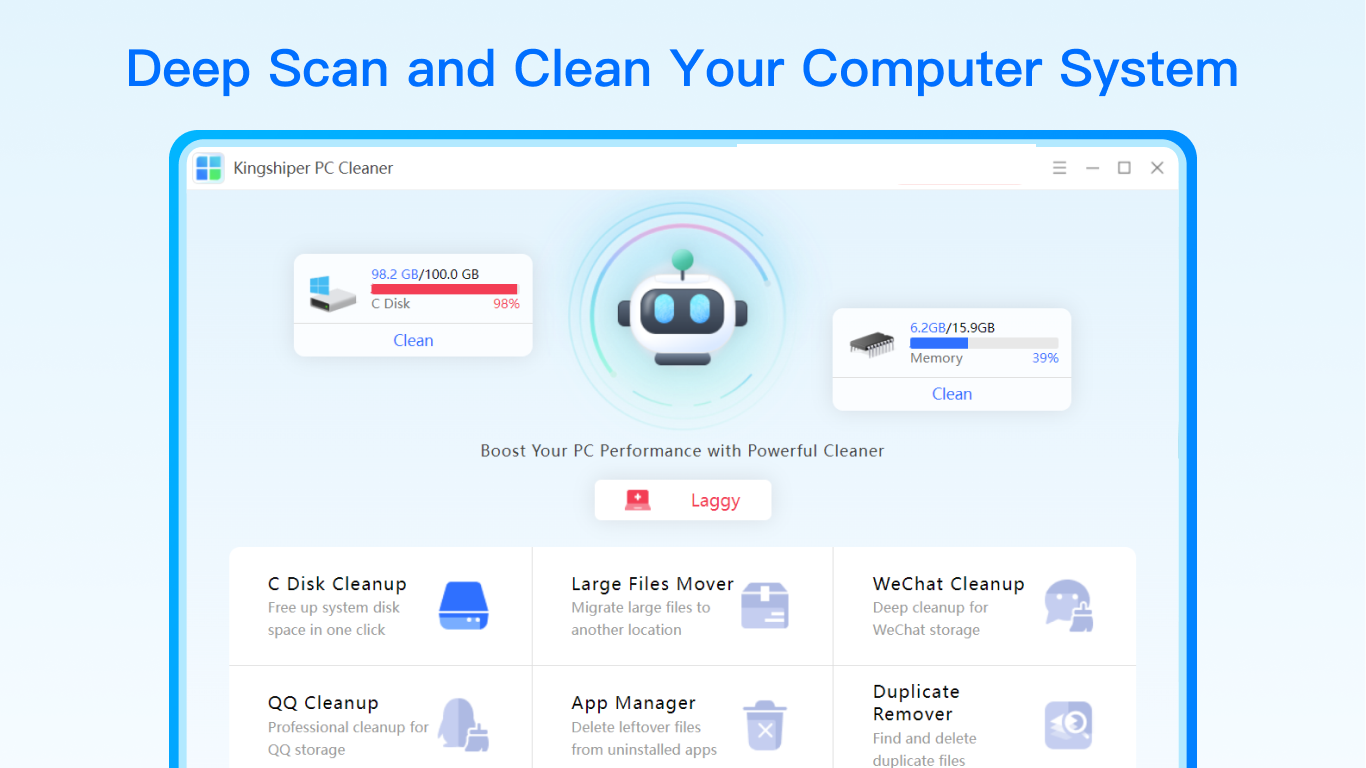
The application includes several specialized modules for comprehensive disk management:
- C Disk Cleanup: This tool identifies temporary files, system junk, and other unnecessary data residing on the primary partition to free up essential storage.
- Large Files Mover: It detects high-capacity files and allows users to relocate them to alternative drives, effectively reducing the storage load on the system disk.
- WeChat and QQ Cleanup: These modules scan messaging data, categorizing images, videos, and privacy files for efficient removal and cache clearing.
- App Manager: This feature facilitates the forced uninstallation of software and ensures the deletion of residual files and software leftovers that standard uninstallers often miss.
By automating the detection of system bloat and residual application data, Kingshiper PC Cleaner allows users to optimize their PC environment in minutes. The software is engineered to handle specific file categories that often go unnoticed, ensuring the operating system remains responsive and organized without the need for manual directory navigation.
Top 5 Reasons To Download Kingshiper PC Cleaner
1. Comprehensive C Disk Revitalization: Effortlessly reclaim massive amounts of storage space by purging deep-seated system junk and temporary files that slow down your operating system.
2. Intelligent Large File Management: Stop the manual hunt for storage hogs; identify and relocate massive files to secondary drives with surgical precision to keep your primary disk breathing easy.
3. Specialized Social Media Optimization: Dedicated cleaning modules for WeChat and QQ that categorize and remove redundant media and privacy-leaking caches without losing your important conversations.
4. Advanced App Lifecycle Management: Go beyond the basic Windows uninstaller with a powerful manager that force-removes stubborn software and wipes away every trace of leftover registry keys and folders.
5. Drastic Performance Gains with Minimal Effort: Experience a tangible boost in boot times and application responsiveness through a streamlined, user-friendly interface designed for both novices and power users.
If you have been using a Windows PC for more than a few months, you already know the frustration of the "Slowdown." It starts subtly—a slight delay when opening a folder, a spinning blue circle that lingers a second too long, or that dreaded notification that your C drive is running out of space. We have all been there. Your once-blazing-fast machine begins to feel like it is wading through digital molasses. The culprit is rarely your hardware; it is the accumulation of digital debris. This is exactly where Kingshiper PC Cleaner steps in, and why this giveaway is an absolute must-download for anyone looking to restore their computer to its former glory.
As a tech reviewer, I see hundreds of "optimization" tools. Many of them are "bloatware" in disguise, promising the world but delivering nothing but more background processes. However, Kingshiper stands out because it focuses on the fundamental bottlenecks of the Windows architecture. It does not just put a fresh coat of paint on your desktop; it goes under the hood and cleans the engine. Let’s dive deep into the five primary reasons why you need to grab this tool right now.
1. Comprehensive C Disk Revitalization
The C drive is the heart of your Windows experience. It is where your operating system lives, where your registry resides, and where your most critical applications are installed. Unfortunately, it is also the primary dumping ground for every temporary file, error log, and update fragment created by Windows. Over time, these files create a layer of digital "crust" that forces your hard drive to work harder and your processor to wait longer.
The C Disk Cleanup feature in Kingshiper PC Cleaner is a revelation. Unlike the built-in Windows Disk Cleanup tool, which often misses deeply nested folders and obscure system logs, Kingshiper uses an advanced scanning algorithm to identify unnecessary files that are safe to delete. We are talking about system temporary files, browser caches that have ballooned to gigabytes, and those pesky "Windows Update" leftovers that stay on your drive long after the update is finished.
By using this tool, you are not just deleting files; you are optimizing the way your system accesses data. When your C drive is nearing capacity, the file system becomes fragmented, and "swap file" performance takes a hit. By freeing up this space, you allow Windows to manage virtual memory more effectively, which translates directly into a snappier, more responsive user interface. It is the easiest way to give your PC a "new computer" feel without spending a dime on hardware upgrades.
2. Intelligent Large File Management and Relocation
We are all digital hoarders to some extent. Whether it is a 4K video project you finished last year, a massive installer for a game you no longer play, or a backup of a mobile device you haven't owned in years, large files are the silent killers of storage efficiency. Finding these files manually is a nightmare—navigating through layers of subdirectories in File Explorer is a chore that most users simply avoid until the drive turns red in the "This PC" view.
Kingshiper’s Large Files Mover is one of its most innovative features. It doesn't just find these files; it gives you the power to manage them intelligently. The software scans your entire drive and presents you with a clear, categorized list of the biggest space-wasters. From there, you have a choice. You can delete them if they are no longer needed, or—more importantly—you can move them.
Many users have a small, fast SSD for their C drive and a larger, slower HDD for secondary storage. The Large Files Mover allows you to shift those massive files to your secondary drive seamlessly. This optimizes your storage usage by keeping your fastest drive lean and focused on your OS and active apps, while your secondary drive handles the heavy lifting of long-term storage. It is a level of organization that usually takes hours of manual labor, condensed into a few simple clicks.
3. Specialized Social Media Optimization (WeChat and QQ)
In the modern era, social media and communication apps are some of the biggest storage hogs on any system. Apps like WeChat and QQ are notorious for caching every single image, video, and file sent or received in a chat. Even if you only viewed a video once three years ago, there is a high probability it is still sitting in a hidden folder on your hard drive, taking up space and potentially compromising your privacy.
The WeChat Cleanup and QQ Cleanup modules within Kingshiper PC Cleaner are surgical tools for these specific platforms. They don't just "clear the cache" in a generic way that might sign you out or delete important documents. Instead, they scan and automatically categorize files. You can see exactly how much space is being taken up by videos, images, and "privacy files."
This categorization allows you to make informed decisions. You can wipe out all those useless promotional videos and meme images while keeping your important work documents and family photos intact. It is a localized, intelligent approach to cleaning that respects the way we actually use our computers for communication. By clearing these massive caches, you not only save space but also speed up the apps themselves, as they no longer have to index tens of thousands of junk files every time they launch.
4. Advanced App Lifecycle Management
The standard "Add or Remove Programs" feature in Windows is, frankly, insufficient. When you uninstall a program through the default Windows method, it often leaves behind "ghost" files. These include empty folders in Program Files, configuration files in your AppData folder, and—most annoyingly—orphaned entries in the Windows Registry. Over years of installing and uninstalling software, these leftovers accumulate, bloating the registry and slowing down system calls.
The App Manager in Kingshiper PC Cleaner is designed to provide a "clean break." It features a robust Force Uninstall option for those stubborn applications that refuse to leave or have broken uninstallers. But the real magic happens after the uninstallation. Kingshiper performs a post-uninstall scan to find and clear software leftovers. It hunts down every last folder and registry key associated with the app, ensuring your system remains as pristine as it was before the software was ever installed.
Furthermore, the App Manager helps you identify problematic apps. It can help you see which programs are taking up the most space or which ones might be causing system instability. It is a total lifecycle management tool that gives you absolute control over what lives on your hard drive, ensuring that when you say goodbye to an app, it is gone for good.
5. Drastic Performance Gains with Minimal Effort
The final reason to download this giveaway is the most important one: results. A tech tool is only as good as the impact it has on the user's daily life. Kingshiper PC Cleaner is built on the philosophy that you shouldn't need a degree in computer science to maintain your PC. The interface is sleek, modern, and incredibly intuitive. You aren't faced with confusing jargon or dangerous "experimental" settings that could break your OS.
When you run the cleaning process, you see real-time progress. Within minutes, you can clear gigabytes of data. But the real "wow" factor comes afterward. You will notice that your PC boots faster because the file system is less cluttered. You will notice that applications launch with more "snap." You will find that you no longer have to micromanage your downloads because you suddenly have 20GB, 50GB, or even 100GB of extra space that was previously hidden under layers of junk.
This software bridges the gap between professional-grade system optimization and consumer-friendly ease of use. It automates the tedious tasks of maintenance, allowing you to focus on your work, your gaming, or your creativity. In an age where our digital lives are more cluttered than ever, having a "digital janitor" as efficient as Kingshiper is not just a luxury—it is a necessity.
In conclusion, Kingshiper PC Cleaner is more than just a utility; it is a performance insurance policy for your Windows machine. By combining deep C drive cleaning, intelligent file relocation, specialized chat app optimization, and a surgical uninstaller, it addresses the most common causes of PC degradation. This giveaway is your chance to reclaim your computer's speed and storage without any of the hassle usually associated with system maintenance. Don’t wait for the "Disk Full" error to ruin your day—download Kingshiper PC Cleaner now and experience your PC the way it was meant to be: fast, clean, and efficient.
The beauty of this tool lies in its transparency. It shows you exactly what it is doing and why. In the world of tech, we often talk about "frictionless" experiences, and that is exactly what Kingshiper provides. It removes the friction between you and your hardware. It removes the anxiety of a slowing system. It is, quite simply, the best and fastest way to ensure your Windows environment stays healthy for the long haul. Take advantage of this giveaway and give your PC the digital detox it deserves. You will feel the difference from the very first reboot.
Whether you are a power user with multiple drives and hundreds of apps, or a casual user who just wants to browse the web without lag, Kingshiper PC Cleaner has something for you. It simplifies the complex, cleans the hidden, and optimizes the essential. It is a five-star solution for a five-star computing experience. Get it today, run your first scan, and join the thousands of users who have already rediscovered the true speed of their PCs.
Final Reviewer Note: In my years of testing software, I have found that the best tools are the ones that do one thing perfectly. Kingshiper PC Cleaner focuses on the "clean and fast" promise and delivers on it with every single feature. The WeChat and QQ cleanup modules alone make it worth the download for many, but when you add in the C Drive revitalization and the Large File Mover, you have a powerhouse suite that outperforms almost every other competitor in its class. This is a "must-have" for your digital toolkit.

Reviews for Kingshiper PC Cleaner
Click Here to Read Reviews for Kingshiper PC Cleaner >> Click Here to Submit Reviews for Kingshiper PC Cleaner >>