What Does Exiland Backup Do?
Exiland Backup is a file-level backup utility designed for both home and office environments. The software automates the process of copying data to diverse destinations, including local disks, network shares, NAS devices, and remote FTP or SFTP servers. It supports four primary operation types: full, differential, incremental, and folder synchronization.
The application handles technical hurdles such as long file paths and Unicode characters without locking source files during execution. Users can configure the built-in scheduler to trigger tasks based on specific events, such as system startup, shutdown, or the connection of a USB device. Advanced filtering options allow for the precise inclusion or exclusion of data based on file attributes and masks.
Security and storage efficiency are managed through standard ZIP compression with support for Zip64 and AES 256-bit encryption. Large archives can be split into multiple volumes to accommodate storage constraints. For maintenance, the tool automatically purges outdated backups according to user-defined retention policies. It also provides comprehensive logging and three notification methods—email, screen alerts, and Net Send—to report the success or failure of backup tasks. Additionally, the software allows for the execution of third-party commands before or after a backup run.
Top 5 Reasons To Download Exiland Backup
- Versatile Backup Modes and Folder Synchronization: Whether you need a full snapshot of your system or a lightweight incremental update, Exiland Backup offers four distinct modes, including file synchronization, to keep your data current without wasting storage.
- Professional-Grade Security and Compression: Protect your sensitive information with industrial-strength AES-256 encryption and utilize Zip64 technology to compress massive datasets into manageable, password-protected archives.
- Intelligent Automation and Smart Scheduling: Move beyond manual "set it and forget it" tasks; this software can trigger backups based on specific events like PC startup, shutdown, or the moment you plug in a specific USB drive.
- Seamless Handling of "Problem" Files: Many backup tools fail when encountering long file paths, Unicode characters, or files currently in use by other programs. Exiland Backup handles these scenarios flawlessly without blocking source files.
- Robust Multi-Location Distribution: From local hard drives and network shares to remote FTP/SFTP servers and NAS devices, you can duplicate your backups to multiple destinations simultaneously for ultimate redundancy.
We live in a digital age where our most precious memories, critical business documents, and years of hard work are often stored on hardware that—let’s be honest—could fail at any moment. As a tech reviewer, I’ve seen it all: the dreaded "blue screen of death," the clicking sound of a dying hard drive, and the sheer panic of a user who realized their last backup was from three years ago. It is usually at this moment of crisis that people start looking for a solution. But the secret to digital survival isn't finding a solution after the disaster; it’s having a reliable, automated, and powerful tool already in place. That is exactly where Exiland Backup comes into the picture. This isn't just another utility; it is a comprehensive insurance policy for your digital life.
Exiland Backup strikes a rare balance that many developers fail to achieve: it is packed with enterprise-level features while remaining incredibly intuitive for the average home user. It doesn't matter if you are trying to save your family photos to a thumb drive or managing a complex network of office files across multiple servers; this software scales to your needs. In this article, I am going to break down exactly why you need to download this giveaway and how it can revolutionize your data management strategy.
1. Versatile Backup Modes and Folder Synchronization
One of the biggest complaints users have about backup software is that it is often "all or nothing." If you have 500GB of data, some programs want to copy that entire 500GB every single time you run a task. This is inefficient, slow, and eats up your disk space. Exiland Backup solves this by offering four distinct backup types: full, differential, incremental, and synchronization.
For those who want a complete copy every time, the Full Backup is there. However, the real magic happens with Incremental and Differential backups. These modes only look for the files that have changed since your last backup. This means if you have a massive library of 10,000 photos and you only add five new ones, the software will only back up those five files. This saves a massive amount of time and ensures that your backup process doesn't slow down your computer while you’re working. Furthermore, the Folder Synchronization feature is a game-changer. It ensures that two locations (like your local "Work" folder and a folder on your NAS) are identical. If you add a file in one place, it appears in the other. If you delete one, it’s removed. It is the ultimate tool for people who work across multiple workstations.
The flexibility here is unmatched. You aren't just limited to local files, either. You can pull data from local disks, network shares, or even remote FTP/SFTP servers. This level of versatility ensures that no matter where your data lives, Exiland Backup can reach it and secure it.
2. Professional-Grade Security and Compression
In today's world, simply copying a file isn't enough. If that file contains personal information, financial records, or proprietary business data, you need to ensure it doesn't fall into the wrong hands. Exiland Backup understands this, which is why it integrates AES-256 encryption. This is the same level of encryption used by banks and government agencies. When you password-protect your backups with this software, you can rest easy knowing that even if your backup drive is lost or stolen, your data remains unreadable to unauthorized users.
Beyond security, we have to talk about efficiency. Storage space—whether it's on a physical drive or in the cloud—is a finite resource. Exiland Backup uses standard ZIP compression to shrink your files down to size. But it goes a step further by supporting Zip64 technology. Older ZIP formats often struggled with files larger than 4GB, which is a major problem in an era of high-definition video and massive databases. With Zip64, those limits are gone. You can create massive archives without worrying about file size caps.
To make things even more convenient, the software allows you to split large ZIP archives into multiple volumes. This is incredibly helpful if you are trying to move your backups to smaller media or if you want to upload them to a service that has individual file size limits. It is these thoughtful, "power-user" touches that really set this software apart from the generic tools that come pre-installed on your OS.
3. Intelligent Automation and Smart Scheduling
The number one reason backups fail is human error—specifically, the human forgetting to run the backup. Exiland Backup eliminates this point of failure with its flexible built-in scheduler. But this isn't just a simple "run every Friday at 5 PM" timer (though it can certainly do that). This software is context-aware.
Imagine this: you walk into your office, plug in your dedicated backup USB drive, and without you clicking a single button, Exiland Backup detects the drive and immediately begins securing your files. That is the "on connect USB device" trigger, and it is brilliant. It turns a chore into a seamless background process. You can also set tasks to run specifically when your PC starts up or when you initiate a shutdown. This ensures that your work is backed up at the end of the day before the power cuts out, or that you start your morning with a fresh copy of your most important assets.
For the more technically inclined, the ability to run tasks from the Windows command line or to execute third-party programs before or after a backup is a massive advantage. You could, for example, set the software to run a script that cleans out temporary folders before the backup starts, or have it send a custom notification to a server once the backup is complete. It is "set it and forget it" taken to a whole new level of sophistication.
4. Advanced Filtering and Customization for Power Users
Not everything on your computer is worth backing up. Your "Downloads" folder might be full of temporary installers, and your browser cache is likely taking up gigabytes of space that don't need to be archived. A poor backup tool will blindly copy everything, wasting time and space. Exiland Backup, however, features powerful file filters.
You can set specific masks to include or exclude files based on their extension, attributes, or size. You can tell the software to ignore certain subfolders entirely. This ensures that your backups are "lean and mean," containing only the data that actually matters. This level of granularity is something I usually only see in high-end enterprise software, yet it is presented here in a way that is easy to configure.
Furthermore, the software provides detailed logging of every single operation. If a file couldn't be copied because it was corrupted on the source drive, you won't be left wondering. You can check the logs, see exactly what happened, and take action. To keep you updated in real-time, it offers three notification types: e-mail, Net Send, or on-screen messages. You can even set it to only email you if an error occurs, so you aren't cluttered with "success" messages every day, but you're immediately alerted the second something needs your attention. This proactive approach to data management is exactly what a professional-grade setup requires.
5. Flawless Handling of Complex File Systems and Locked Files
This is perhaps the most technical reason to download Exiland Backup, but it’s also one of the most practical. Windows users have long dealt with the "Long Path" limitation, where files nested deep within many folders become inaccessible to certain programs. Exiland Backup is built to handle long paths and Unicode characters without breaking a sweat. If you have files named in different languages or folders buried twenty layers deep, this software will find them and back them up correctly.
Another common headache is "locked files." Most backup programs will skip a file if it is currently open in another program (like an Excel sheet you're working on or a database file that's currently active). This creates "holes" in your backup. Exiland Backup is designed not to block source files during the operation. This means you can keep working while the backup runs in the background. It doesn't interfere with your workflow, and it doesn't fail just because you forgot to close a document.
Finally, the software's ability to duplicate backups to multiple locations simultaneously is the ultimate "fail-safe." Following the 3-2-1 backup rule (3 copies of your data, 2 different media, 1 offsite) is easy with this tool. You can save your files to your local secondary drive and have the software automatically upload a copy to a remote SFTP server at the same time. If your house burns down or your office is flooded, your data is still safe in a secondary location. This level of redundancy is what differentiates a "casual" backup from a "professional" one.
In conclusion, Exiland Backup is an absolute powerhouse of a tool. It takes the complex, often frustrating task of data preservation and turns it into a streamlined, automated process that anyone can master. Whether you are a home user looking to save family videos or a small business owner protecting customer records, this software provides the tools, the security, and the reliability you need. The fact that it offers a free version and a giveaway opportunity makes it a no-brainer. Don't wait for your hard drive to start making that "clicking" sound. Download this giveaway today, set up your first task, and experience the incredible peace of mind that comes with knowing your digital world is safe.
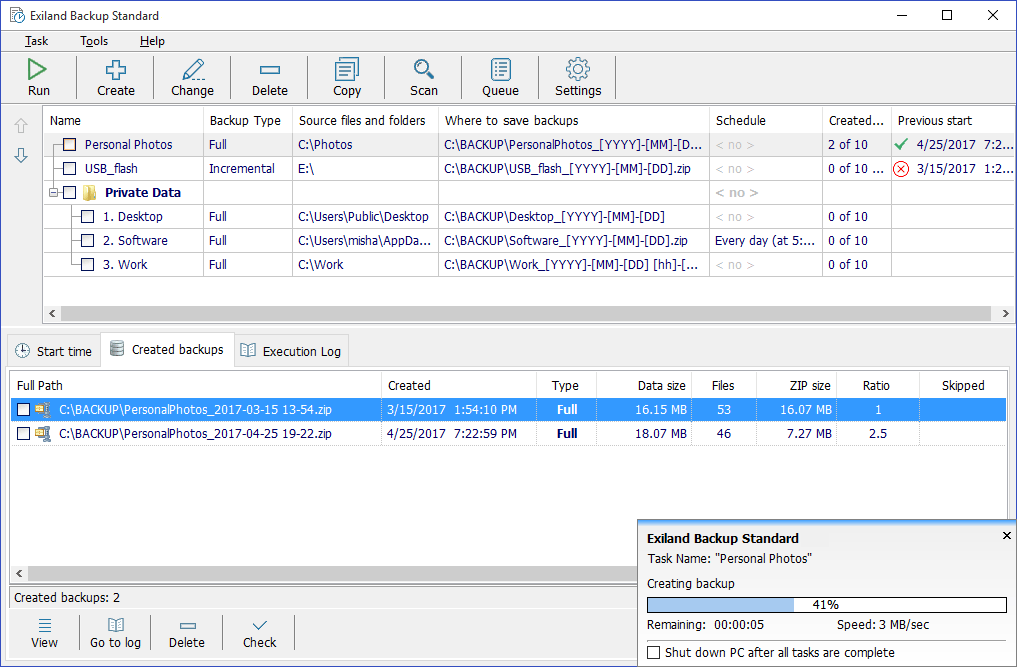
The interface is clean, the resource footprint is light, and the feature set is deep. It is rare to find a tool that handles the "boring" stuff like backups with such precision and flair. From the AES-256 encryption to the smart USB triggers and the no-lock file handling, every inch of this program is designed for performance. This is the backup solution you’ve been looking for, even if you didn't know it yet. Secure your data, automate your life, and download Exiland Backup now.

Reviews for Exiland Backup
Click Here to Read Reviews for Exiland Backup >> Click Here to Submit Reviews for Exiland Backup >>