What Does Simple Disable Key Do?
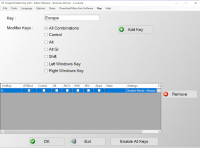
Simple Disable Key is a utility tool designed to provide granular control over keyboard input. The software allows users to deactivate specific keys, including the Windows key, Shift, and other standard or function keys. This functionality is primarily used to address hardware issues, such as malfunctioning or "stuck" keys, and to prevent accidental keystrokes during competitive gaming or intensive professional workflows.
The application features three distinct operating modes. Users can choose to disable keys permanently, on a set schedule, or only when specific applications are currently active. Furthermore, the tool includes automation features to set and lock the state of toggle keys, such as Num Lock, Caps Lock, Scroll Lock, and the Insert key, ensuring they remain in the desired position regardless of manual input or system restarts.
Beyond personal use, the software is applicable in educational or corporate environments to restrict certain computer actions by disabling system shortcuts and prohibiting specific commands. Simple Disable Key is designed for a global audience, featuring a multilingual interface translated into 39 different languages. The tool provides a straightforward technical solution for modifying hardware behavior without requiring physical repairs or complex system registry edits.
Top 5 Reasons To Download Simple Disable Key
- Unrivaled Control Over Your Hardware: The ability to disable any key, from the Windows key to specific function keys, giving you total command over your typing experience.
- Context-Aware Smart Disabling: Flexibility to disable keys only for specific applications, on a set schedule, or globally across the entire operating system.
- Automated Key State Locking: Permanent management of the Num Lock, Caps Lock, Scroll Lock, and Insert keys to prevent frustrating accidental toggles.
- Precision Performance for Gamers and Professionals: Eliminate "game-ending" accidental key presses and streamline professional workflows by removing mechanical distractions.
- Global Accessibility and Ease of Use: A lightweight, multilingual interface supporting 39 different languages, making it accessible to users regardless of their technical background or location.
We have all been there. You are in the middle of an intense gaming session, your team is counting on you, and you are seconds away from a glorious victory. Suddenly, your finger slips, you hit the Windows key, and your game minimizes to the desktop while your computer desperately tries to open the Start menu. By the time you click back into the window, you are looking at a "Game Over" screen. Or perhaps you are a professional writer or a coder, and a malfunctioning, over-sensitive Caps Lock key keeps turning your text into a shouted mess of uppercase letters, breaking your flow and forcing you to rewrite entire paragraphs. These are small annoyances that, over time, become massive hurdles to productivity and enjoyment. This is where Simple Disable Key comes into play.
As a tech reviewer, I see a lot of "utility" software that claims to make your life easier, but often they are bloated, complicated, or simply unnecessary. Simple Disable Key is the rare exception. It is a surgical tool designed to fix a very specific, very universal problem: the keyboard. Our keyboards are our primary interface with our digital lives, yet they are often rigid and unforgiving. This software flips the script, allowing the user to dictate exactly how their hardware behaves. If you have ever wished you could just "turn off" a part of your keyboard that was causing you grief, this giveaway is exactly what you have been looking for. Let’s dive deep into why this utility is an essential download for your digital toolkit.
1. Unrivaled Control Over Your Hardware
The primary reason to download Simple Disable Key is the sheer level of granular control it provides over your physical hardware. In the default Windows environment, your keyboard is mostly a "take it or leave it" affair. Aside from some very deep, very risky registry edits, you generally cannot tell your computer to simply ignore a specific key. This software changes that dynamic entirely. Whether it is the Windows key, the Shift key, the Alt key, or any alphanumeric character on the board, you have the power to shut it down.
Think about the physical reality of keyboards. Over time, keys wear out. You might have a "sticky" key that triggers twice when you press it once, or worse, a key that triggers randomly because of a hardware fault. Instead of throwing away a perfectly good mechanical keyboard or an expensive laptop because one key is acting up, you can simply use this software to disable that specific offender. It is an environmentally friendly and budget-friendly solution to hardware degradation. By disabling a malfunctioning key, you extend the life of your hardware and eliminate the frustration of "ghost typing." This isn't just a software utility; it is a hardware-saving intervention that gives you the final say in how your computer responds to your touch.
2. Context-Aware Smart Disabling
What sets Simple Disable Key apart from simple "remapping" tools is its incredible flexibility through context-aware settings. The developers understood that you might want a key disabled in one scenario but fully functional in another. This is the "Smart" part of the software that makes it a powerhouse for power users. You aren't just limited to a "permanent off" switch. You can configure the software to disable keys based on three distinct modes: Always, Specific Application, or Schedule.
The "Specific Application" mode is, in my opinion, the "killer feature" here. Imagine you are a video editor using a complex suite where a certain shortcut is dangerously close to a key that closes the program. You can set the software to disable that dangerous key only when your editing software is the active window. The moment you switch back to your web browser or email client, the key becomes active again. This level of automation means you don't have to manually toggle the software on and off. You set your rules, and the software executes them in the background. Furthermore, the "Schedule" mode is a dream for parents or IT administrators. You can disable certain keys during specific hours of the day, ensuring that a computer remains a tool for work or study during school hours, and a tool for play later on. This flexibility ensures that the software adapts to your lifestyle, rather than forcing you to adapt to its limitations.
3. Automated Key State Locking
We have all dealt with the "Lock" key nightmare. You start typing your password, only to realize halfway through that Num Lock was off, or Caps Lock was on. It is a minor friction point that happens dozens of times a week. Simple Disable Key offers a sophisticated solution by allowing you to set and lock the state of the Num Lock, Caps Lock, Scroll Lock, and Insert keys automatically. This is a feature that sounds simple but quickly becomes something you cannot live without once you’ve experienced it.
For accountants, data entry specialists, and anyone who relies heavily on the 10-key numeric pad, the Num Lock key is essential. Having the software ensure it is always on—regardless of whether you accidentally hit it or if a system reboot toggles it—is a massive quality-of-life improvement. The same goes for the Insert key, which is perhaps the most accidental and annoying key on the entire keyboard for writers. By locking these keys into your preferred state, you remove the guesswork from your typing. You can approach your keyboard with the confidence that it is exactly in the state you need it to be, every single time you sit down. It’s about creating a "zero-friction" environment where your tools work for you, not against you.
4. Precision Performance for Gamers and Professionals
In the world of high-stakes computing, whether it is competitive e-sports or high-pressure corporate environments, precision is everything. Simple Disable Key is a secret weapon for anyone who needs their computer to behave with absolute predictability. For gamers, the benefits are obvious. Disabling the Windows key or the Menu key is a standard practice for pros, but this software allows you to go even further. You can disable the Shift key or Control key if they interfere with your specific grip or playstyle, or disable those annoying F-keys that you never use but always seem to hit by mistake during a frantic firefight.
In the workplace, the utility is equally profound. In a school setting, IT managers can use this software to prohibit certain computer actions that might lead to students bypassing security or distracting others. By disabling specific key combinations that open command prompts or task managers, you can create a "kiosk mode" or a controlled environment without needing expensive enterprise-level management software. For the average professional, it’s about focus. If you know that hitting a certain key will trigger a distraction or a complex macro you don't need, just turn it off. This software allows you to "clean up" your keyboard, leaving only the tools you need to get the job done. It is the digital equivalent of clearing the clutter off your physical desk.
5. Global Accessibility and Ease of Use
One of the most impressive aspects of Simple Disable Key that often goes overlooked is its commitment to being a global tool. The software is translated into 39 different languages. This is a testament to the developers' desire to make this utility accessible to everyone, regardless of their native tongue. In a tech world that is often dominated by English-only utilities, seeing this level of localization is refreshing. It means that users in 39 different regions can navigate the settings, set their schedules, and manage their keys with total clarity and no language barrier.
Beyond the language support, the interface itself is a masterclass in simplicity. True to its name, Simple Disable Key doesn't bury its features under layers of confusing menus or cryptic icons. It is designed to be "plug and play." You open the app, select the key you want to modify, choose your parameters, and you are done. It is lightweight, meaning it won't hog your system resources or slow down your computer while it runs in the background. It is an "invisible" helper—always there when you need it, but never in your way. For a utility that is meant to reduce frustration, having a user interface that is itself frustration-free is essential. This is a tool designed for humans, not just for "techies."
Final Thoughts: Why You Need This Giveaway
In summary, Simple Disable Key is one of those rare utilities that addresses a problem most of us have just learned to "live with." We shouldn't have to live with a keyboard that doesn't work for us. We shouldn't have to deal with accidental minimizes, "sticky" key errors, or the constant toggling of Caps Lock. This software empowers you to take back control of your most important input device. It is a small download that yields massive results in terms of daily productivity and peace of mind.
Whether you are trying to squeeze more life out of an old keyboard, trying to reach the top of the leaderboards in your favorite game, or simply trying to create a more focused work environment, this software provides the solution. It is versatile, intelligent, and incredibly easy to use. The ability to set application-specific rules and schedules makes it much more than a simple "off" switch; it makes it a sophisticated management system for your interface. Don't miss out on this giveaway. Download Simple Disable Key today and experience the satisfaction of a keyboard that finally behaves exactly the way you want it to. Your fingers (and your sanity) will thank you.
The digital world is complicated enough—don't let your own keyboard be one of the things holding you back. This is a must-have utility for anyone who spends more than an hour a day on a computer. It is simple, it is effective, and it is exactly what you need to optimize your digital experience.


Reviews for Simple Disable Key
Click Here to Read Reviews for Simple Disable Key >> Click Here to Submit Reviews for Simple Disable Key >>