What Does PCMedik 7 Do?
PCMedik 7 is a Windows optimization utility designed to restore system performance and resolve common stability issues. The software targets the performance degradation that typically occurs as users accumulate applications and system updates over time. By identifying and fixing internal errors, the tool attempts to return a computer’s operating speed to its original state.
The application functions by making several permanent modifications to core Windows settings. Key technical features include:
- CPU Prioritization: It reconfigures how the processor handles background tasks versus active applications.
- Memory Management: The software optimizes how system memory is utilized when programs access the memory swap file.
- Disk I/O Optimization: It changes how files are read from and written to the hard drive to decrease program load times.
- Visual Adjustments: The utility disables performance-heavy animations that can degrade user interface responsiveness.
PCMedik 7 utilizes a diagnostic engine and a built-in system analyzer to locate problems automatically. The software is designed for efficiency, featuring a simplified interface that allows users to apply all optimizations and repairs with a single click. Once the diagnostic process is complete, a system reboot applies the permanent changes, resulting in faster Windows boot sequences and more responsive software execution.
Top 5 Reasons To Download PCMedik 7
- Instant Speed Restoration: Bring back that "out-of-the-box" performance with a single click.
- Permanent System Optimization: Unlike other tools, PCMedik makes lasting changes to Windows so you don't need to run it constantly in the background.
- Intelligent Diagnostic Engine: It automatically identifies and repairs common errors and stability issues that cause crashes.
- Advanced Hardware Prioritization: It optimizes how your CPU, RAM, and Hard Drive interact, ensuring your most important apps get the most power.
- Unrivaled Ease of Use: Designed for everyone from beginners to pros, requiring zero technical knowledge to achieve professional results.
We have all been there. You remember the day you brought your Windows PC home. You hit the power button, and it roared to life in seconds. Applications snapped open the moment you clicked them, and multitasking felt like a breeze. But as the months and years roll by, something inevitable happens. Your once-lightning-fast machine begins to feel like it is wading through molasses. You click an icon, and you are met with a spinning blue circle. You try to boot up, and you have enough time to go make a pot of coffee before the desktop even appears. This "performance decay" is one of the most frustrating aspects of modern computing, but it doesn't have to be your reality. Today, I am looking at a tool that promises to reverse the hands of time: PCMedik 7 for Windows. This isn't just another utility; it is a comprehensive restoration suite for your digital life.
As a tech reviewer, I see hundreds of "system boosters" every year. Most of them are nothing more than "snake oil"—they take up more memory than they save and provide little more than a placebo effect. PCMedik 7 is a completely different animal. It doesn't sit in your system tray hogging resources while pretending to work. Instead, it acts as a digital surgeon, going into the very core of the Windows operating system to realign settings, fix errors, and optimize the way your hardware communicates with your software. If you have been considering buying a new computer because yours has become too slow to use, stop right there. You might just need a dose of PCMedik. Let’s dive deep into the five reasons why this giveaway is an absolute must-download for any Windows user.
1. Instant Speed Restoration
The primary reason anyone looks for an optimization tool is speed, and PCMedik 7 delivers this in spades. The software is built around the philosophy that you shouldn't have to wait for your computer. When you install this application, you are gaining access to a highly sophisticated engine that is designed to identify exactly why your computer is lagging. Is it a bloated registry? Is it a series of unnecessary startup items? Or is it simply that Windows is trying to do too much at once?
PCMedik handles the heavy lifting by instantly increasing the speed of your computer. It focuses on the "snappiness" of the user interface. By fine-tuning the way Windows handles basic tasks, it makes the entire experience feel more fluid. When we talk about "instant" speed, we mean it. After the software performs its initial scan and optimization, a simple reboot is all it takes to see the difference. You will notice that the time it takes for Windows to load is significantly decreased. Your favorite programs—whether they are web browsers, office suites, or photo editors—will load and run much faster. This isn't just about saving a few seconds here and there; it’s about reclaiming your productivity and reducing the stress that comes with a lagging machine.
2. Permanent System Optimization
One of my biggest gripes with modern "performance" software is that it often requires the program to be running 24/7 to see any benefit. This is counterproductive; why would I want to speed up my PC by running a program that uses up 200MB of RAM and 5% of my CPU just to stay open? PCMedik 7 breaks this cycle. The changes it makes to your Windows environment are permanent. This is a game-changer.
When you run PCMedik, it makes several foundational changes to the Windows settings. For example, it instructs the operating system on how to prioritize background tasks and how to load files more efficiently from the hard drive. It also turns off several high-resource animations that look pretty but serve no functional purpose other than to degrade your performance. Because these changes are made at the system level, they persist even after you close the program. You can perform a single one-time tune-up and enjoy increased performance forever. This "set it and forget it" approach is exactly what a high-quality utility should offer. It treats the root cause of the slowdown rather than just masking the symptoms.
3. Intelligent Diagnostic Engine
A slow computer isn't just an annoyance; it is often a symptom of underlying instability. Common problems, such as DLL errors, registry conflicts, and file system hiccups, can lead to frustrating crashes and the dreaded Blue Screen of Death. PCMedik 7 features a built-in system analyzer and diagnostic engine that acts like a 24/7 technician for your PC. It doesn't just look for ways to make the computer faster; it looks for ways to make it better.
The diagnostic engine quickly locates common problems that plague most Windows installations over time. As you install and uninstall software, the operating system becomes cluttered with "ghost" files and incorrect settings that can confuse the CPU. PCMedik identifies these stability threats and repairs them instantly. By fixing these common errors, the software significantly improves the overall stability of your machine. You will find that applications crash less often and that the entire system feels more reliable. It is about creating a solid foundation so that your hardware can perform at its peak without being tripped up by software glitches.
4. Advanced Hardware Prioritization
Most users don't realize that their hardware is often capable of much more than Windows allows. Out of the box, Windows is configured for "general" use, which isn't always the most efficient way to handle specific tasks. PCMedik 7 optimizes how your computer's memory (RAM) operates and how applications are prioritized with the Central Processing Unit (CPU). It also optimizes how the disk drive performs, ensuring that data is read and written as quickly as possible.
Think of your CPU as a chef in a kitchen. If too many waiters are shouting orders at once, the chef gets overwhelmed, and the food comes out slowly. PCMedik acts as the head waiter, organizing the orders so the chef knows exactly what to prioritize. It changes the way memory is used when programs utilize the "memory swap file," which is a common bottleneck for computers with limited RAM. By intelligently managing these hardware resources, PCMedik ensures that the application you are currently using gets the lion's share of the power, while background processes stay out of the way. This level of hardware-level optimization is usually reserved for tech experts who know how to manually edit the registry, but PCMedik makes it available to everyone.
5. Extreme Ease of Use for Every Experience Level
Perhaps the most compelling reason to download PCMedik 7 is its sheer simplicity. In the world of tech, we often equate "powerful" with "complicated." We assume that if a program is going to make deep system changes, it must have hundreds of sliders, checkboxes, and confusing technical jargon. PCMedik 7 proves that this doesn't have to be the case. It is arguably one of the easiest-to-use PC optimization utilities on the market today.
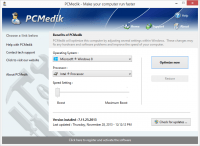
The developers designed the user interface to be intuitive and compliant with Windows UI guidelines. When you open the program, you aren't met with a wall of text or intimidating warnings. Instead, you get a clean, modern interface where you can simply click a single button to begin the optimization process. This makes it the perfect choice for novice computer users who might be afraid of "breaking" something. You don't need to know what a "memory swap file" is or how CPU cycles are allocated; the software’s intelligent engine handles all of that in the background. You just click, reboot, and enjoy a faster PC. Even for advanced users, this simplicity is a breath of fresh air, saving you the time and effort of manual optimization.
The "Car Tune-Up" Philosophy
To truly understand why you need PCMedik 7, it helps to use the analogy of a car. When you buy a brand-new car, it runs perfectly. The engine is clean, the oil is fresh, and the tires are balanced. However, as the miles add up, carbon builds up in the engine, the oil gets dirty, and the alignment gets knocked out of place. If you never take that car in for a tune-up, it will eventually lose power, use more fuel, and eventually break down entirely.
Your computer works in much the same way. Every time you browse the internet, install a new update, or download a file, you are adding "miles" to your system. Over time, "digital carbon" builds up in the form of fragmented files, unnecessary background processes, and incorrect system settings. PCMedik performs the digital equivalent of a full-service tune-up. It cleans out the junk, optimizes the "engine" (your CPU and RAM), and ensures everything is aligned for maximum performance. Just as you wouldn't throw away a car just because it needs an oil change, you shouldn't throw away a computer just because it has slowed down. PCMedik provides a cost-effective way to extend the life of your hardware.
Stop Wasting Time and Money
In today's fast-paced world, time is our most valuable resource. Every minute you spend waiting for a folder to open or a video to render is a minute you could have spent being productive or enjoying your hobbies. A slow computer isn't just a technical problem; it’s a drain on your quality of life. Furthermore, many people fall into the trap of thinking that the only solution to a slow PC is to buy a new one. This can cost hundreds or even thousands of dollars.
By downloading PCMedik 7, you are potentially saving yourself the cost of a new machine. It is an investment in your current hardware. It allows you to keep your existing files, settings, and programs exactly where they are, but makes them work better. The software even includes an internal update feature, meaning you can download and install improvements directly from within the application, ensuring your optimization techniques are always up to date with the latest Windows versions and security patches.
Final Thoughts: A Tech Reviewer’s Verdict
If you are looking for a way to breathe new life into your Windows machine, there is no reason not to give PCMedik 7 a try. It is rare to find a piece of software that balances such deep, powerful system changes with such an accessible and friendly user interface. It addresses the most common complaints of Windows users—slow boot times, application lag, and system instability—without requiring a degree in computer science to operate.
The fact that this is available as a giveaway makes it a no-brainer. You have nothing to lose and a significant amount of speed to gain. Whether you are a gamer looking for that extra edge in performance, a professional who needs their workstation to keep up with heavy workloads, or a casual user who just wants to browse the web without frustration, PCMedik 7 is designed for you. It simplifies the complex, stabilizes the erratic, and speeds up the sluggish. Do yourself and your computer a favor: download this giveaway, click that optimization button, and remember what it felt like to have a brand-new PC again.
Key Features at a Glance:
- One-Click Optimization: No complex menus; just one click and a reboot for instant results.
- Boot Speed Improvements: Drastically reduces the time it takes for Windows to reach the desktop.
- System Stability: Repairs the hidden errors that cause Windows to hang or crash.
- Permanent Changes: Optimizes Windows settings permanently, so you don't need the app running constantly.
- Modern Interface: A clean, intuitive design that anyone can navigate with ease.
- Internal Updates: Stay current with the latest optimization technology with built-in software updates.
Don't let a slow computer hold you back any longer. The solution is right here, and it is easier than you ever imagined. Experience the power of PCMedik 7 today and transform your Windows experience from frustrating to flawless.


Reviews for PCMedik 7
Click Here to Read Reviews for PCMedik 7 >> Click Here to Submit Reviews for PCMedik 7 >>