What Does Ashampoo Burning Studio 2027 Do?
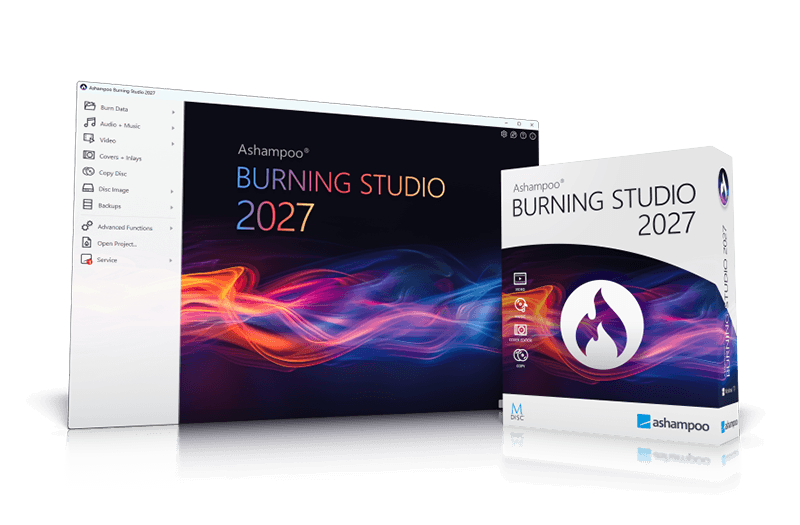
Ashampoo Burning Studio 2027 is a comprehensive utility designed for disc authoring, data backup, and media management. Compatible with all current Windows versions, the software enables users to write data, music, and video to various media types, including high-capacity Blu-ray and BDXL discs.
The application features a streamlined interface for copying physical media and ripping audio CDs. During the ripping process, the software automatically identifies tracks and generates playlists to preserve the intended playback order. For expansive data sets that exceed a single volume, a built-in disc spanning tool distributes files across multiple discs, facilitating the archival of large photo or document collections. Security features include scratch protection, which ensures data remains accessible even if the disc surface is physically damaged, and the ability to create secure backups.
Core capabilities of this software include:
- Media Creation: Burn files to single or multiple CDs, DVDs, and Blu-ray discs.
- Device Backup: Secure files from cellphones, tablets, and external drives with one-click functionality.
- Design Tools: Create and print custom covers and inlays for all disc formats.
- Disc Images: Create, browse, and preview image files such as ISO and CUE/BIN.
This version also supports reading CD-text data for improved metadata accuracy and provides a refreshed user interface optimized for modern workflows. Whether archiving mobile device data or creating scratch-protected physical backups, the software serves as a versatile tool for long-term data storage.
Top 5 Reasons To Download Ashampoo Burning Studio 2027
- Universal Optical Media Mastery with Smart Disc Spanning: Effortlessly burn CDs, DVDs, Blu-rays, and massive multi-layer BDXL discs, with automatic file splitting across multiple physical discs whenever your project exceeds standard storage limits.
- Next-Generation Scratch Protection and Hybrid Device Backups: Safeguard critical documents against physical wear with advanced data redundancy algorithms, while simultaneously backing up smartphones, tablets, and flash drives in a matter of clicks.
- High-Fidelity Audio Ripping with Automated Metadata and Playlist Generation: Transform your physical music collection into flawless digital files featuring automatic track naming, CD-Text recognition, and custom playlist preservation for seamless playback.
- Comprehensive Disc Image Engine with Direct File Browsing: Create, inspect, extract, and burn popular disc image formats including ISO and CUE/BIN without ever needing external mounting software or specialized virtual drives.
- Integrated Graphic Design Suite Wrapped in a Streamlined Interface: Personalize every project with custom-designed disc labels, jewel cases, and booklet inlays using an intuitive, modern interface built natively for current Windows operating systems.
Every seasoned computer enthusiast knows the golden rule of data management: if your data does not exist in at least three separate places, it does not truly exist. In an era where the tech industry endlessly pushes cloud subscriptions, recurring monthly fees, and remote server storage, users are quietly losing direct control over their digital archives. Cloud services can suffer sudden outages, alter their terms of service overnight, increase pricing tiers without warning, or inadvertently lock you out of your private family memories and critical business documents. This is precisely why optical media and local offline backups have staged a massive, well-deserved comeback.
Ashampoo Burning Studio 2027 represents the pinnacle of this offline data preservation movement. Far from being a relic of the past, modern optical storage remains one of the safest, most resilient, and most cost-effective methods for establishing true cold-storage backups. When you encounter a promotional giveaway for a premium, heavy-hitting utility suite like this, passing it up is a major tech oversight. Here is our comprehensive, deep-dive review exploring why Ashampoo Burning Studio 2027 deserves an immediate download and a permanent home in your software utility toolkit.
1. Universal Optical Media Mastery with Smart Disc Spanning
The core foundation of any burning suite is its mechanical reliability and format versatility. Nothing frustrates a user more than dealing with failed write operations, ruined discs, or ambiguous error codes halfway through a lengthy burning session. Ashampoo Burning Studio 2027 eradicates these legacy optical headaches completely by delivering a robust writing engine engineered to support every major format on the market, ranging from standard vintage 700 MB CD-R discs to standard 4.7 GB DVDs, dual-layer variations, and high-capacity Blu-ray formats including BDXL media capable of holding well over 100 gigabytes on a single disc.
Where the software truly separates itself from standard burning tools is its intelligent disc-spanning feature. Imagine attempting to back up a family photo archive or a raw video project that measures roughly 35 gigabytes. In traditional burning software, you would be forced to manually divide folders, calculate individual file sizes down to the exact megabyte, and meticulously assemble multiple compilation projects by hand. One calculation error, and your disc overflows, terminating the entire process.
Ashampoo Burning Studio 2027 automates this entire headache. You simply designate the master folder or compilation of files you wish to preserve, insert your media, and allow the software’s algorithms to split the dataset evenly across as many individual discs as necessary. The system tracks the sequence intelligently, ensuring that when the time comes to extract or restore those archives onto a new computer, the restoration wizard guides you seamlessly through the process disc by disc. Whether you are archiving vast video libraries, massive software codebases, or high-resolution photo archives, disc spanning provides enterprise-grade archival flexibility straight to your consumer desktop.
2. Next-Generation Scratch Protection and Hybrid Device Backups
One of the long-standing criticisms directed at optical media is physical vulnerability. An accidental scrape, a clumsy drop onto a dusty desk, or prolonged surface friction can generate surface scratches that render critical sectors completely unreadable by standard laser pickups. Ashampoo tackled this vulnerability head-on by engineering an intelligent scratch protection mode, and it is easily one of the most compelling reasons to grab this release.
When you enable scratch protection during the compilation setup, the software intelligently structures the disc layout by interleaving redundant data blocks alongside your actual files. If the physical surface of the disc suffers light gouges, abrasions, or minor structural degradation down the road, the built-in emergency recovery retrieval tool uses the redundant data sectors to reconstruct lost bits on the fly. This ensures that even if your disc suffers physical abuse over years of storage or rough transport, your vital documents, spreadsheets, and historical family archives remain fully readable and entirely recoverable.
Complementing this durability is the software’s hybrid backup center. Modern data lives scattered across multiple endpoints, most notably our personal smartphones, tablets, and portable USB pen drives. Rather than forcing you to jump through multiple third-party sync utilities, Ashampoo allows you to connect your mobile devices and external hardware directly to your Windows system and orchestrate full or incremental backups directly onto optical or external storage. With just a couple of clicks, you can siphon off full photo rolls, downloads, and device directories, securing your mobile life behind rock-solid physical archives immune to ransomware, account bans, or accidental cloud deletions.
3. High-Fidelity Audio Ripping with Automated Metadata and Playlist Generation
Music streaming services rent your favorite songs to you on a temporary monthly lease; they can alter track selections, remove favorite studio masters, or modify licensing catalogs at will. True music lovers know that maintaining an offline, locally owned music library is the only way to guarantee indefinite access to pristine master tracks. Ashampoo Burning Studio 2027 shines extraordinarily bright as an audio extraction and compilation powerhouse, bridging the gap between legacy analog physical media and modern digital audio workflows.
When you slip an original audio CD into your drive, the software bypasses cumbersome manual track entry by tapping into extensive metadata databases alongside native CD-Text processing. Instead of seeing generic labels like Track 01 and Unknown Artist, the software instantly identifies the album name, artist, individual song titles, release year, and genres accurately. It reads embedded CD-Text whenever present, applying exact naming conventions across your entire batch extraction without requiring tedious keyboard input.
Furthermore, the extraction engine allows audiophiles and casual listeners alike to select their preferred output formats, ripping music into pristine lossless files or compressed formats tailored for portable media devices. During the extraction process, the software automatically generates companion playlists that mirror the exact studio tracking of the original album. If you decide to burn custom mixes for your car audio system or home stereo, the software analyzes track volume levels, applies intelligent normalization to eliminate jarring audio spikes between songs, and preserves gapless playback transitions where songs naturally blend together.
4. Comprehensive Disc Image Engine with Direct File Browsing
Power users, system administrators, and digital archivists frequently deal with disc images. Whether downloading operating system installations, backing up legacy PC gaming CD-ROMs, or consolidating multi-track multimedia presentations into unified packages, disc image formats like ISO and CUE/BIN are the recognized universal standards across computing. However, many basic utilities treat disc images as black boxes: you can either burn them blindly onto a blank disc, or you are forced to download specialized virtual-drive emulation software just to peek inside.
Ashampoo Burning Studio 2027 eliminates these limitations by embedding an expansive disc image exploration environment directly into its core interface. Not only can you generate clean ISO, CUE/BIN, or proprietary ASHDISC images from existing physical discs with flawless 1:1 precision, but you can also create completely new virtual images from raw local folders on your hard drive. This is indispensable for virtual machine administration, retro computing, or clean distribution over internal networks.
Even more impressive is the integrated image browsing capability. If you possess an ISO file containing hundreds of files and you only need to extract two specific documents or an individual configuration file, you do not have to waste a physical disc or configure virtual mount points. You simply open the image directly within the Burning Studio file browser, navigate through the virtual folder hierarchy with full visual previews, and pull out the precise files you need directly to your desktop. It turns your disc image library into an accessible, instantly searchable virtual filing cabinet.
5. Integrated Graphic Design Suite Wrapped in a Streamlined Interface
A significant shortcoming of many utility programs is aesthetic negligence. Many burning tools on the web feature clunky interfaces that look like they were abandoned in the mid-1990s, cluttered with confusing drop-down menus, microscopic icons, and cryptic technical jargon that intimidates beginners and slows down experienced users. Ashampoo Burning Studio 2027 stands out immediately thanks to a modern, visually striking user interface designed with logical workflows and modern Windows compatibility at its core.
The dashboard presents a clean, tile-based navigation architecture where every primary task—data burning, backup routines, audio mastering, video disc creation, and disc imaging—is instantly accessible without digging through labyrinthine menus. High-contrast typography, clear status indicators, and responsive progress tracking ensure that you always know precisely what your hardware is doing at any given second. The software feels nimble, loads instantly, and runs completely free of the system-draining bloat that characterizes many rival commercial utility suites.
Beyond its exterior polish, the software houses an extraordinarily capable graphic design studio that elevates your projects from raw discs into professional physical products. Burning a home video disc or creating an audio compilation is only half the fun; giving it a finished, retail-quality presentation completes the experience. The built-in designer allows you to craft customized disc labels, jewel case covers, slimline inserts, and multi-page booklet inlays tailored precisely to your media cases. You can choose from dozens of pre-configured themes, import your own custom artwork, organize dynamic track listings automatically pulled from your audio burning sessions, and print pixel-perfect cutouts calibrated directly to your home printer paper. It transforms optical burning from a mundane chore into a truly creative endeavor.
The Final Verdict: Why You Should Act Immediately
Reliable software utilities that demand zero subscription fees, offer comprehensive features, and run smoothly across modern computing environments are increasingly rare. When a reputable developer like Ashampoo offers their battle-tested, flagship burning technology as a promotional giveaway, grabbing it is an absolute no-brainer for any pragmatic computer user.
Whether you need to preserve invaluable digital photos against physical disc wear using proprietary scratch protection, orchestrate reliable multi-disc backups using intelligent spanning, archive your beloved physical CD collection with automatic metadata tagging, or design professional packaging for custom media gifts, Ashampoo Burning Studio 2027 delivers an uncompromising, dependable experience. It bypasses the complexity of bloated freeware alternatives and replaces it with a fast, secure, and visually stunning toolkit that works right out of the box.
Do not wait until a sudden cloud outage, an accidental file deletion, or a drive failure catches you off guard. Download this software giveaway today, keep your local storage resilient, and take back complete, permanent ownership of your digital world.

Reviews for Ashampoo Burning Studio 2027
Click Here to Read Reviews for Ashampoo Burning Studio 2027 >> Click Here to Submit Reviews for Ashampoo Burning Studio 2027 >>