What Does PDF Anti-Copy Pro Do?
PDF Anti-Copy is a specialized security utility designed to prevent the unauthorized duplication and conversion of PDF documents. While standard protection methods typically rely on metadata restrictions or passwords that can often be bypassed by decryption software, this tool reprocesses the individual words and graphics on sensitive pages to secure the file at a fundamental level.
Once a document has been processed, the content remains fully viewable in standard PDF readers, but the underlying data is rendered uncopyable. This prevents users from selecting text or exporting the document into editable formats such as Microsoft Word, Excel, or plain text files. The software performs these modifications without altering the original visual layout, ensuring the document's formatting remains intact for the end user.
A primary advantage of this utility is its resilience against third-party cracking tools. Because PDF Anti-Copy modifies how the elements are structured on the page rather than just applying a permission flag, typical restriction-removing programs are ineffective at restoring copy-paste functionality. Key capabilities include:
- Prevention of text selection and manual copying.
- Protection against conversion to editable document formats.
- Retention of original PDF visual quality and formatting.
- Resistance to PDF unlocking and decryption software.
This utility provides a layer of security for sensitive reports, contracts, or proprietary documents where viewing is required but reproduction must be strictly prohibited.
Top 5 Reasons To Download PDF Anti-Copy Pro
In the digital age, information is the most valuable currency we have. Whether you are a creative professional protecting your latest manuscript, a legal expert sharing sensitive contracts, or a business owner distributing proprietary data, the safety of your documents is paramount. However, the standard Portable Document Format (PDF) is not as secure as many of us have been led to believe. Most people assume that setting a password or clicking a "restrict editing" box in their PDF editor is enough to keep their work safe. Unfortunately, the tech world is filled with decryption tools and "PDF unlockers" that can bypass these basic hurdles in seconds. This is where PDF Anti-Copy comes into play, offering a revolutionary approach to document security that goes far beyond the industry standard. This software doesn't just put a lock on the door; it fundamentally changes the structure of the document to ensure your content stays yours.
Before we dive into the deep analysis of why this utility is a must-have for your digital toolkit, here are the top five reasons you need to download PDF Anti-Copy today:
- Unbeatable Protection Against Content Theft: Unlike standard encryption, this tool reprocesses document elements to make text selection and copying impossible.
- Preservation of Original Formatting and Layout: Your documents remain visually identical to the originals, ensuring a professional presentation without the blurriness of traditional scanning.
- Immunity to Standard PDF Password Crackers: Because it modifies the internal structure of the PDF pages, even the most advanced "restriction removal" software cannot restore the copy-paste functionality.
- Prevention of Unauthorized File Conversion: It stops automated tools from converting your PDF into editable formats like Microsoft Word, Excel, or plain text files.
- Seamless User Experience and Lightweight Performance: The software is incredibly easy to use with a "one-click" philosophy and does not bog down your system resources.
1. Unbeatable Protection Against Content Theft
The primary reason anyone looks for a security utility is to prevent their hard work from being stolen or misused. In the world of PDFs, the "copy and paste" function is the greatest enemy of intellectual property. We have all been there: you spend hours, days, or weeks crafting the perfect report, only to find that someone has lifted entire paragraphs or data sets with a simple Ctrl+C and Ctrl+V. Traditional PDF security relies on a set of internal flags—essentially digital checkboxes—that tell a PDF reader whether or not to allow copying. The problem is that these flags are incredibly easy to ignore or strip away using free online tools.
PDF Anti-Copy takes a fundamentally different approach. Instead of just asking the PDF reader to "please don't allow copying," the software reprocesses every word and graphic on the pages you choose to protect. It essentially transforms the underlying data structure so that the text is no longer recognized as "selectable text" by the computer, even though it remains perfectly legible to the human eye. When a user tries to highlight the text, they will find that there is nothing to grab. This "Anti-Copy" technology ensures that your sensitive information stays on the page where it belongs, providing a level of security that standard permissions simply cannot match. It is the difference between locking a drawer and turning the document into a permanent, unchangeable engraving.
For researchers, authors, and corporate strategists, this feature is a lifesaver. You can share your findings or your creative output with the world, knowing that while people can read and learn from your work, they cannot easily plagiarize it or repurpose it without your consent. It puts the power of distribution back into the hands of the creator.
2. Preservation of Original Formatting and Layout
One of the biggest complaints users have with traditional "security" workarounds—like converting a PDF into a series of images—is the massive loss in quality. If you have ever tried to secure a document by printing it to a low-resolution TIFF or JPEG and then re-combining it into a PDF, you know the frustration. The text becomes jagged, the colors wash out, and the file size balloons to an unmanageable degree. It looks unprofessional and makes the document difficult to read, especially on high-resolution modern monitors or mobile devices.
PDF Anti-Copy solves this problem with surgical precision. The magic of this utility lies in its ability to reprocess the document without destroying the visual integrity of the original content. When you process a file through PDF Anti-Copy, the result looks exactly like the original. The fonts remain crisp, the vector graphics stay sharp, and the layout remains perfectly aligned. It achieves this by using a sophisticated reprocessing algorithm that targets the data layer rather than just taking a "screenshot" of the page. This means you can send out a high-stakes business proposal or a beautifully designed e-book and be confident that it will look stunning on any device.
This preservation of quality is essential for maintaining your professional reputation. If you send a client a document that is blurry or hard to navigate, it reflects poorly on your attention to detail. By using PDF Anti-Copy, you are choosing a solution that respects the aesthetic value of your work while providing top-tier security. You no longer have to sacrifice form for function; you can have the most secure document in the room and also the best-looking one.
3. Immunity to Standard PDF Password Crackers
The tech-savvy among us are well aware of the "arms race" between security software and cracking tools. For every new version of a popular PDF editor that claims to have "unbreakable" encryption, there are ten new websites and utilities designed to strip those passwords away. Most "protected" PDFs are only protected until someone spends thirty seconds on a search engine to find a removal tool. This creates a false sense of security that can be dangerous when dealing with truly sensitive information.
PDF Anti-Copy is a game-changer because it renders these cracking tools useless. Most PDF unlockers work by targeting the "Owner Password" or the metadata restrictions. They simply flip the "Allow Copy" bit from "False" to "True." However, because PDF Anti-Copy has reprocessed the words and graphics themselves, there is no "bit" to flip. The "selectable text" data simply doesn't exist in the same way anymore. Even if a cracker uses a program to remove the PDF's restrictions or passwords, they will still find themselves unable to select, copy, or extract the content because the fundamental structure of the document has been altered.
This is a massive advantage in the realm of document security. It moves your files out of the "easily crackable" category and into a state of permanent protection. It gives you peace of mind that even if your file falls into the hands of someone with malicious intent and a suite of hacking tools, your core content remains unreachable for extraction. This is true "pro-level" security that is now accessible to the average user through this simple giveaway.
4. Prevention of Unauthorized File Conversion
In many industries, the real threat isn't just someone copying a sentence; it’s someone converting the entire document into an editable format to modify the contents. Imagine a scenario where a signed contract is converted back into Word, a few clauses are changed, and it is re-saved as a PDF. Or consider a proprietary financial spreadsheet exported into Excel where your formulas and data structures are laid bare for a competitor to see. Standard PDF protection is often powerless against advanced "PDF to Word" converters that use Optical Character Recognition (OCR) and structural analysis to rebuild the file.
PDF Anti-Copy provides a robust defense against this type of unauthorized conversion. By reprocessing the pages, the software makes it incredibly difficult for automated conversion engines to recognize and reconstruct the flow of text and data. While a human can still read the document with ease, a machine looking for "text blocks" and "table structures" will see a much more complex and uncooperative data set. This effectively breaks the conversion process for most standard software, ensuring that your PDF remains a "Read-Only" document in the truest sense of the term.
This is particularly valuable for educational institutions distributing course materials or companies sharing technical manuals. You want your audience to be able to view and learn from the content, but you do not want them to be able to strip the branding, change the data, or resell the information as their own. PDF Anti-Copy acts as a high-tech seal of authenticity, ensuring that the document you sent is the only version that will ever exist.
5. Seamless User Experience and Lightweight Performance
We have all used security software that is so bloated and complicated that it actually hinders our productivity. Many "enterprise" document security suites require expensive subscriptions, complex server setups, and hours of training just to learn how to lock a single file. For the average professional or home user, this is a deal-breaker. You need a tool that works quickly, doesn't crash your computer, and doesn't require a Ph.D. in Computer Science to operate.
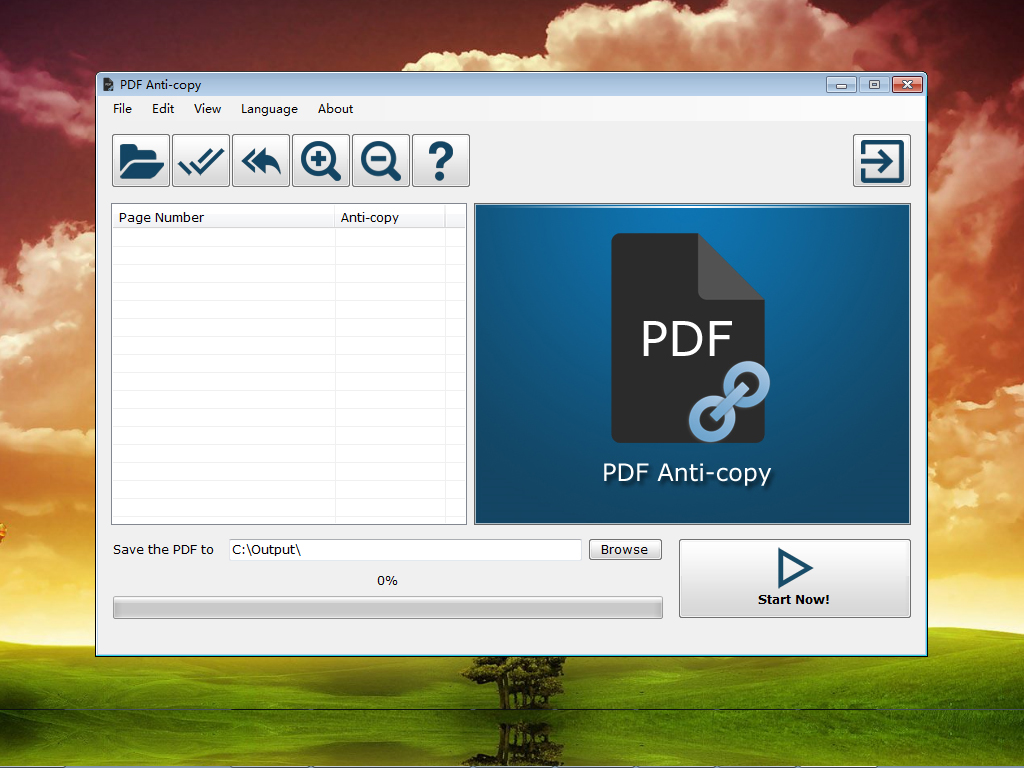
PDF Anti-Copy excels in its simplicity. The interface is clean, intuitive, and focused entirely on the task at hand. You simply drag and drop your PDF into the window, select the pages you want to protect (you can choose specific pages or the entire document), and hit the "Start" button. Within seconds, the software processes the file and generates a new, secured version. There is no steep learning curve and no confusing jargon. It is a "set it and forget it" solution that fits perfectly into any workflow.
Furthermore, the software is incredibly lightweight. It doesn't install dozens of background services that drain your battery or slow down your boot times. It is a specialized utility that does one thing—securing PDFs—and it does it better than anything else on the market. This efficiency is why many tech reviewers recommend it as a staple for any Windows user. It’s a tool that respects your time and your system resources while providing world-class protection.
Conclusion: Why You Need to Act Now
The digital world is becoming increasingly transparent, and while transparency is often a virtue, your private intellectual property deserves to be protected. The traditional methods of securing PDFs are no longer sufficient in an era where cracking tools are just a click away. PDF Anti-Copy offers a unique, structural solution that ensures your documents are viewed as you intended, but never stolen, copied, or converted.
Whether you are looking to protect your legal documents, your creative writing, your business data, or your educational materials, this software provides the most reliable defense available. It combines the strength of advanced data reprocessing with the simplicity of a modern app, all while maintaining the professional quality of your original files. By downloading this giveaway, you are not just getting another utility; you are getting a specialized security guard for your digital assets.
In conclusion, PDF Anti-Copy is the ultimate tool for anyone who takes their document security seriously. It bridges the gap between simple password protection and high-end enterprise security, offering a solution that is both "uncrackable" and incredibly easy to use. Don't wait until your content has already been copied and distributed across the web. Take control of your documents today and ensure that your work remains exactly where it belongs: with you. This is one download that every tech-conscious user needs to have in their arsenal.
Note: Always remember to keep your original, unprotected files in a safe, offline location, as the PDF Anti-Copy process is permanent for the newly generated file. Once you have secured your document with this tool, it is ready for safe distribution to the world!

Reviews for PDF Anti-Copy Pro
Click Here to Read Reviews for PDF Anti-Copy Pro >> Click Here to Submit Reviews for PDF Anti-Copy Pro >>