What Does EzPaste Do?
EzPaste is a dedicated productivity add-in for Microsoft Excel designed to automate the export of data visualizations and tables to external applications. Primarily functioning as a bridge between Excel and PowerPoint, the software streamlines the process of building presentations by eliminating repetitive manual copying tasks.
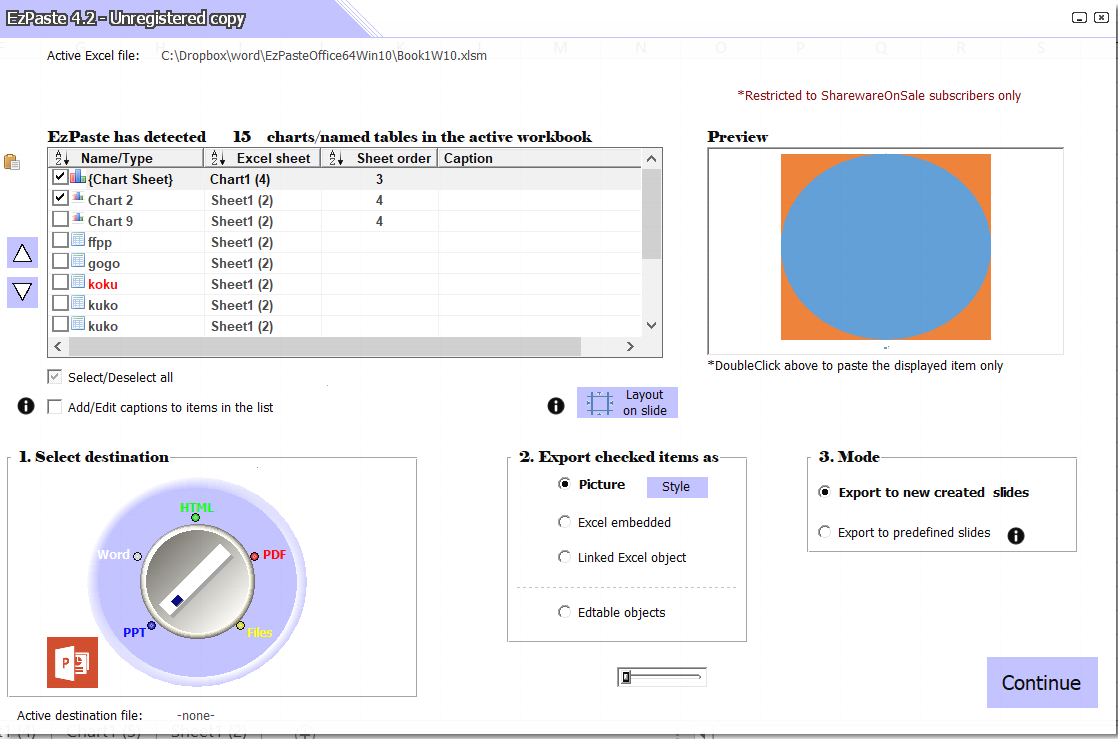
The core functionality of the utility allows users to batch-process objects. While the standard version handles hundreds of items, this specific giveaway version supports the simultaneous transfer of up to ten objects at once, with no cap on the total number of objects processed during a session. Beyond PowerPoint, the tool supports four additional export destinations: Microsoft Word, PDF, HTML, and various image file formats.
Key technical features include:
- One-Click Execution: Replaces the traditional multi-step copy-and-paste routine with a single-button interface for current selections.
- Format Versatility: Exports charts and data tables directly into document-ready or web-ready formats.
- Accessibility: Requires no knowledge of macros or complex scripting for installation or daily operation.
Referenced by Microsoft in official tutorials regarding Excel-to-PowerPoint workflows, EzPaste is utilized by various organizations globally to maintain consistency across reporting documents. It functions as a persistent desktop utility, integrating directly into the Excel environment to handle both isolated selections and batch exports efficiently.
Top 5 Reasons To Download EzPaste
If you have ever spent a grueling afternoon copying and pasting data from Excel into a presentation, you know that the "Ctrl+C, Ctrl+V" routine is far from efficient. Enter EzPaste (pronounced Easy-Paste), the productivity powerhouse that turns hours of tedious manual labor into a few seconds of automated bliss. This isn't just another utility; it is a professional-grade companion designed to bridge the gap between your data and your audience. Here are the top five reasons why you need to download this giveaway today:
- Revolutionary Bulk Exporting Efficiency: The ability to export up to ten objects simultaneously eliminates the repetitive grind of manual pasting.
- Unmatched Multi-Destination Versatility: EzPaste goes beyond PowerPoint, supporting Word, PDF, HTML, and various image formats for all your reporting needs.
- Streamlined One-Click Workflow: It replaces the standard 4-5 step manual paste process with a single, swift click, even for isolated selections.
- Industry-Leading Credibility: As a tool referenced by Microsoft and used by global corporations, it offers professional-grade reliability you can trust.
- Zero Learning Curve and No Macros: The software is incredibly easy to install and use, requiring no programming knowledge or risky macros to operate.
1. Revolutionary Bulk Exporting Efficiency
We have all been there. You have a massive Excel workbook filled with dozens of charts, pivot tables, and data ranges that need to be moved into a PowerPoint deck for a board meeting or a client presentation. Traditionally, this meant clicking the chart, copying it, switching windows, pasting it, resizing it, and then repeating the process fifty times. It is a soul-crushing exercise in redundancy that invites human error. EzPaste changes the fundamental nature of this workflow by introducing true bulk exporting.
In this special giveaway version, you gain the ability to copy TEN objects at once. While the full version handles hundreds, the ability to move ten distinct tables or charts in a single batch is a massive leap forward for anyone used to the one-at-a-time method. Think about the math: if you have fifty charts to move, you are reducing your workload from fifty individual cycles down to just five. This efficiency allows you to focus on the content of your presentation rather than the mechanics of building it.
Furthermore, this giveaway version has no limit on the total number of objects you can process. You can use it for thousands of objects over the life of the software; the "ten at once" limit simply refers to the batch size per click. For most users, this batch size is the perfect "sweet spot" for maintaining control over slide layouts while still moving at lightning speed. It transforms Excel from a static data silo into a dynamic content engine that feeds your presentations with unprecedented velocity.
2. Unmatched Multi-Destination Versatility
While PowerPoint is the most common destination for Excel data, the modern professional often needs to distribute information in various formats. A tech reviewer looks for tools that don't box the user into a single ecosystem, and EzPaste shines here. The newer versions of this utility have expanded their horizons to include four other critical destinations: Word, PDF, HTML, and image files.
Imagine you are writing a technical manual or a white paper in Microsoft Word. Instead of wrestling with Word's often-finicky table formatting, you can use EzPaste to port your Excel data directly into your document with precision. If you are a web developer or a digital marketer, the ability to export Excel selections directly to HTML or high-quality image files is a game-changer. It eliminates the need for "Print Screen" hacks or third-party image editors that often degrade the quality of your charts.
The PDF export feature is particularly useful for those who need to share snapshots of data without sending the entire underlying (and often sensitive) Excel workbook. By allowing you to choose your destination, EzPaste acts as a universal translator for your data. Whether you are building a slide deck, a formal report, a webpage, or a static graphic for social media, this tool ensures your Excel data arrives at its destination looking professional and polished. This level of versatility is usually reserved for expensive enterprise suites, making this giveaway an absolute steal for anyone who works with data.
3. Streamlined One-Click Workflow
One of the most overlooked frustrations in the life of an office worker is the "hidden" complexity of a simple paste. To properly move an Excel chart into another application, you usually have to select the object, copy it, navigate to the target app, select "Paste Special," choose the correct format (such as an enhanced metafile or a link), and then manually adjust the positioning. It is a 4-5 step process that we have simply accepted as "normal." EzPaste rejects this norm by replacing the entire sequence with a swift one-click button.
As a reviewer, I am always on the lookout for "micro-productivity" wins. These are the small improvements that save seconds, which eventually add up to hours over a month. EzPaste’s one-click functionality is the ultimate micro-productivity win. Even if you aren't doing bulk exports, the value of having a dedicated "Smart Paste" button on your desktop cannot be overstated. It handles the formatting logic for you, ensuring that the chart looks exactly how it did in Excel without the distorted text or blurry lines that often plague standard pasting.
This "one-click" philosophy extends to the entire user interface. The software sits as a companion to your workflow, staying out of the way until you need it. When it is time to move data, the interface is intuitive and requires no hunting through nested menus. It’s built for the "power user" who wants things done yesterday, but it’s simple enough for the casual user who just wants their homework to look better. By stripping away the friction of the copy-paste cycle, EzPaste makes the creative process of building a presentation feel seamless rather than fragmented.
4. Industry-Leading Credibility
In the world of software utilities, there are thousands of "junk" apps that promise the world but deliver bugs and security risks. That is why credibility is so important. EzPaste is not just some obscure tool; it is a professional utility referenced by Microsoft in its own official tutorials regarding the copying and pasting of objects from Excel to PowerPoint. When the creators of Excel point toward a specific tool to help users manage data transfer, you know you are dealing with a gold-standard application.
Beyond the Microsoft endorsement, EzPaste has become a standard in leading companies across the world. It is used by financial analysts at top-tier banks, consultants at "Big Four" firms, and researchers at major universities. These are environments where accuracy and efficiency are non-negotiable. If it is good enough for a Wall Street analyst building a multi-million dollar pitch deck, it is certainly powerful enough for your daily tasks.
When you download this giveaway, you are installing software that has been vetted by the most demanding users in the tech and finance industries. This isn't a "beta" project; it is a refined, mature piece of software that has been optimized for professional performance. Knowing that the tool is a recognized industry standard gives you the peace of mind that it will work reliably, preserve your data integrity, and integrate perfectly with your existing Office suite. It’s like getting a VIP pass to a tool that the pros have been using for years.
5. Zero Learning Curve and No Macros
Perhaps the biggest hurdle to adopting new productivity software is the time it takes to learn it. We are all busy, and no one wants to read a 100-page manual just to copy a table. EzPaste addresses this by being staggeringly easy to use. The installation process is straightforward, and the software integrates into your environment without requiring you to change how you work. There is no special knowledge required; if you know how to select a cell in Excel, you know how to use EzPaste.
A crucial technical advantage that I must highlight is that EzPaste does not require any macros. For the uninitiated, macros (VBA code) can be a significant headache. Many corporate IT departments block macro-enabled workbooks due to security concerns, and they can often "break" when moving between different versions of Excel. Because EzPaste operates as a standalone companion utility rather than a macro-heavy template, you don't have to worry about security warnings, "Enable Content" prompts, or the software failing because of a security update. It just works.
This macro-free approach also means your Excel workbooks remain "clean." You don't have to save your files in the .xlsm format, and you don't have to worry about passing along potentially "suspicious" code to your colleagues or clients. EzPaste handles the heavy lifting through its own optimized engine, providing a stable and secure bridge between applications. This makes it an ideal choice for government employees, healthcare professionals, and corporate workers who operate under strict IT guidelines. It offers all the power of advanced automation with none of the technical baggage.
Final Thoughts: Why You Need To Act Now
As a tech reviewer, I see hundreds of apps that claim to "change your life." Most of them are fluff. However, every once in a while, a tool comes along that targets a specific, universal pain point and solves it with surgical precision. EzPaste is that tool. The "Excel-to-PowerPoint" pipeline is one of the most common workflows in the professional world, and it is also one of the most inefficient—until now.
The giveaway version of EzPaste is a remarkable offer. Even with the ten-object batch limit, you are still getting a massive upgrade over the native Windows clipboard. You are gaining the ability to export to five different formats, the security of a macro-free environment, and the prestige of a tool recommended by Microsoft itself. You are essentially getting a professional productivity consultant that lives on your taskbar, ready to save you hours of work at a moment's notice.
Don't wait until you are staring at a deadline with fifty charts to copy. Download EzPaste now, get it installed, and be ready to impress your boss, your clients, or your professors with the speed and quality of your presentations. Once you experience the ease of Easy-Paste, you will wonder how you ever managed without it. It is time to stop being a slave to the clipboard and start being a master of your data. This is one download you definitely don't want to skip.
In summary, EzPaste is the ultimate Excel companion for anyone who values their time. It’s fast, versatile, professional, and incredibly simple. Whether you’re a student, a small business owner, or a corporate executive, the efficiency gains provided by this tool are undeniable. Grab this giveaway while you can and transform your workflow today.

Reviews for EzPaste
Click Here to Read Reviews for EzPaste >> Click Here to Submit Reviews for EzPaste >>