What Does AltrixSoft Hard Drive Inspector Professional Do?
Hard drives are among the most vulnerable components in a computer system due to their constantly rotating mechanical parts. Over time, physical wear and tear inevitably lead to hardware failure, which can result in the total loss of critical data, including documents, saved passwords, emails, and media files. Hard Drive Inspector is a utility designed to mitigate the risk of sudden data loss by providing continuous health monitoring for storage disks.
The software operates in the background, analyzing various technical parameters to assess the current state of a drive's reliability. By monitoring internal diagnostics, it can detect minor irregularities that often precede a complete mechanical breakdown. When the software identifies a potential risk, it issues a warning to the user, providing the opportunity to back up files before the hardware becomes inaccessible.
Key features of the application include:
- Real-time monitoring of internal disk health and performance metrics.
- Early warning alerts that notify users of impending hardware failure.
- Environmental tracking to ensure drives are operating within safe temperature ranges.
- Flexible reporting that offers detailed insights into the physical state of the storage media.
Hard Drive Inspector serves as a proactive defense mechanism, shifting the focus from expensive data recovery to failure prevention. It provides the necessary lead time to secure unique digital assets before a drive reaches its physical end of life.
Top 5 Reasons To Download AltrixSoft Hard Drive Inspector Professional
Before we dive deep into the mechanics of why your data is in jeopardy, let’s look at the primary reasons why Hard Drive Inspector is the most critical tool you will install on your workstation this year. If you value your digital life, these five points represent the line between a minor hardware upgrade and a total digital catastrophe.
- Proactive Failure Detection: Unlike standard operating system tools that only tell you when a drive has already died, this software uses advanced S.M.A.R.T. technology to predict failures before they happen.
- Protection of Irreplaceable Assets: Your photos, tax documents, and personal memories cannot be replaced. This tool acts as a constant sentinel over the years of life and work stored on your machine.
- User-Friendly Real-Time Alerts: You do not need to be a hardware engineer to understand your drive's health. The software provides clear, color-coded warnings and easy-to-read reports that keep you in the loop without the jargon.
- Mechanical Wear and Tear Monitoring: Hard drives are physical machines with moving parts that spin thousands of times per minute. Hard Drive Inspector tracks the literal "mileage" on these parts to let you know when the hardware is physically wearing out.
- Cost-Effective Prevention: A new hard drive is cheap, but professional data recovery can cost thousands of dollars with no guarantee of success. Downloading this giveaway is the ultimate "insurance policy" for your data.
Every single day, thousands of computer users around the world wake up to the same nightmare: the "Blue Screen of Death," a clicking sound coming from their computer case, or a message stating that no bootable device can be found. In an instant, years of work, thousands of family photos, entire music libraries, and critical financial records vanish into the ether. For most, this isn’t just a technical glitch; it is a profound personal loss. We live in a digital age where our physical lives are mirrored in the magnetic platters of our hard drives. If you haven't thought about the health of your storage media lately, you are essentially driving a car with a failing engine and no dashboard gauges. Hard Drive Inspector is that dashboard, and it is the only thing standing between you and a total data wipeout.
1. Proactive Failure Detection via S.M.A.R.T. Technology
The first and most compelling reason to download Hard Drive Inspector is its ability to see into the future. Most users rely on Windows or macOS to tell them if something is wrong. The problem is that by the time a standard operating system warns you about a disk error, the drive is usually already in its death throes. You might get a notification that "Windows detected a hard disk problem," but by then, the file system is likely corrupted, and your data is already being swallowed by bad sectors.
Hard Drive Inspector operates on a much deeper level by utilizing S.M.A.R.T. (Self-Monitoring, Analysis, and Reporting Technology). Every modern hard drive is equipped with this internal monitoring system, but very few programs actually know how to interpret the data correctly. This software doesn't just look for "pass" or "fail" flags; it monitors the subtle degradation of various parameters. It tracks spin-up time, seek error rates, and the number of reallocated sectors. By analyzing the trends of these data points, the software can identify a downward spiral weeks or even months before the hardware actually gives up the ghost. This gives you the one thing that is most valuable in a crisis: time. Time to back up your files, time to order a replacement drive, and time to migrate your system without the panic of a total crash.
2. Protection of Irreplaceable Assets
We often think of our computers as "machines," but they are actually archives. Think about what is on your drive right now. You likely have photos of children growing up, videos of deceased relatives, the first draft of that novel you’ve been writing, or years of tax returns and business contracts. These are not things you can simply go to the store and buy again. While a hard drive itself is just a mass-produced piece of aluminum and plastic worth less than a hundred dollars, the content on that drive is often priceless.
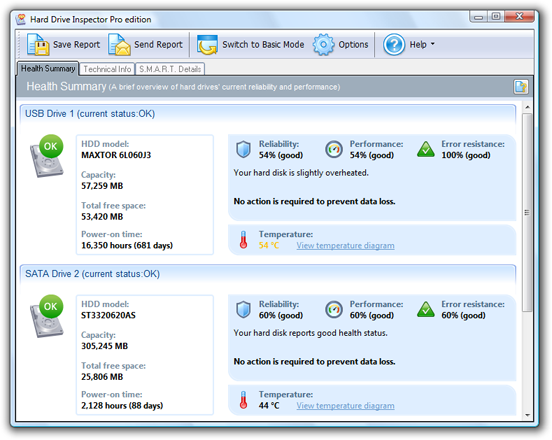
Using Hard Drive Inspector is an admission that your data has value. As a tech reviewer, I see people spend hundreds on fancy cases and RGB lighting, yet they ignore the $0.50 mechanical arm inside their hard drive that is responsible for every bit of their data. This software acts as a guardian for your memories. It understands that "prevention is better than cure." When the software alerts you that your "Health" or "Reliability" score has dropped from 90% to 60%, it is telling you that your digital legacy is at risk. Downloading this tool is a proactive step in ensuring that your "unique contents reflecting years of your life and work" remain safe and accessible.
3. User-Friendly Real-Time Alerts
One of the biggest barriers to entry for system utility software is complexity. Most users don't want to look at hexadecimal codes or complex graphs of "Seek Error Rates." They just want to know: "Is my computer okay?" Hard Drive Inspector excels here because it translates high-level engineering data into a format that anyone can understand. The interface is designed to be intuitive, using familiar visual cues like green, yellow, and red status indicators.
Once installed, the program lives in your system tray, quietly monitoring your hardware in the background. It uses a negligible amount of system resources, meaning it won't slow down your gaming or work. If everything is fine, it stays out of your way. However, the moment a threshold is crossed—perhaps the drive is running too hot or the "Raw Read Error Rate" spikes—the software will notify you immediately. This real-time aspect is crucial. Hard drive failure isn't always a slow decline; sometimes it happens in bursts. Having a software "inspector" that is always on duty means you don't have to remember to run a manual check. It watches the drive so you don't have to.
4. Mechanical Wear and Tear Monitoring
To understand why you need this software, you have to understand what is happening inside your computer. A traditional Hard Disk Drive (HDD) is a mechanical marvel. It contains platters spinning at 5,400 or 7,200 revolutions per minute. To put that in perspective, the outer edge of a platter is moving at about 60 to 80 miles per hour. A tiny read/write head hovers just nanometers above that spinning surface—a distance much smaller than a human hair or a speck of dust. If that head touches the platter, it's called a "head crash," and your data is physically scraped off the disk.
Because these are mechanical parts, they suffer from wear and tear. Friction creates heat, and heat is the enemy of electronics. Over time, bearings wear out, motors lose their precision, and the magnetic integrity of the platters fades. Hard Drive Inspector is specifically designed to monitor these mechanical markers. It tracks the temperature of your drive, which is one of the leading causes of premature failure. If your computer's cooling system is failing or dust has built up inside the case, the hard drive is often the first component to overheat. By alerting you to high temperatures, this software doesn't just tell you when a drive is dying—it helps you extend the life of the drive by prompting you to fix cooling issues before they cause permanent damage.
5. Cost-Effective Prevention vs. Expensive Recovery
Let’s talk about the bottom line. As a tech reviewer, I often have to give people the bad news about data recovery. If your hard drive suffers a mechanical failure and you haven't backed up your data, your only option is a professional data recovery lab. These labs require "clean rooms" where technicians take the drive apart by hand to recover the data bits. The starting price for these services is often in the range of $500 to $2,000, and there is never a 100% guarantee that they can get your files back. If the platters are scratched, that data is gone forever, regardless of how much money you throw at the problem.
In contrast, Hard Drive Inspector is a preventative tool that costs next to nothing compared to the price of recovery. By downloading this giveaway, you are essentially getting a multi-thousand-dollar insurance policy for free. It turns a "catastrophic failure" into a "managed replacement." If the software tells you your drive has a 20% health rating, you can go out and buy a new drive for $50, clone your old data onto it, and be back up and running in an hour. You save money, you save time, and most importantly, you save your sanity. The phrase "prevention is better and much cheaper than cure" has never been more applicable than it is with computer storage.
The Psychological Peace of Mind
Beyond the technical specifications and the cost savings, there is an intangible benefit to using Hard Drive Inspector: peace of mind. There is a specific kind of anxiety that comes with using an old computer and wondering if today is the day it finally gives up. We’ve all felt it—that slight hesitation when the computer takes an extra second to boot, or that strange hum that wasn't there yesterday. Is it just a software update, or is it the beginning of the end?
When you have this software installed, that "existential tech dread" disappears. You no longer have to guess. You can look at your system tray, see the green icon, and know with mathematical certainty that your drive's vital signs are within normal parameters. This allows you to focus on your work, your creativity, and your life without the "shocking surprise" of a crash hanging over your head. It transforms your relationship with your hardware from one of suspicion to one of informed confidence.
Why You Should Act Now
The prompt for this software mentions that "tomorrow may be too late," and while that sounds like marketing hyperbole, in the world of hardware, it is a literal truth. Hard drives do not follow a convenient schedule. They do not wait until you’ve finished your big project or until you’ve finally gotten around to buying that external backup drive. They fail when the physical components reach their breaking point, which can happen at any millisecond.
If you download Hard Drive Inspector today, you are performing a "health check" on your system that is long overdue. Think of it as a blood pressure monitor for your PC. You might feel fine, but the internal "vitals" might tell a different story. If you install the software and it tells you your drive is at 100% health, great! You can sleep better knowing your hardware is solid. But if you install it and find out your drive is at 35% health and running at 60 degrees Celsius, you have just saved yourself from a looming disaster.
Technical Deep Dive: What the Software Actually Sees
For the more tech-savvy readers, it's worth noting the specific S.M.A.R.T. attributes that Hard Drive Inspector monitors. While the average user sees a "Health" percentage, the engine underneath is looking at Critical Attributes. These include:
- Reallocated Sectors Count: When the drive finds a read/write/verification error, it marks this sector as "reallocated" and transfers data to a special reserved area. A rise in this count is a primary indicator of a drive that is physically "pitting" and will soon be unusable.
- Spin Retry Count: This tracks the number of times the drive tried to spin up to full speed before failing. If this number is anything other than zero, your drive's motor or bearings are likely failing.
- Current Pending Sector Count: These are "unstable" sectors that are waiting to be remapped. A high number here usually results in system "hangs" and sluggish performance.
- Throughput Performance: If the general efficiency of the drive’s data transfer is dropping, it often indicates internal hardware problems that haven't yet resulted in a full crash but are slowing down your entire computing experience.
By monitoring these and dozens of other attributes, Hard Drive Inspector provides a comprehensive look at the "hidden" health of your machine. It takes the guesswork out of maintenance.
Conclusion: Don't Wait For The Crash
As a reviewer, I test a lot of software. Much of it is "nice to have"—fancy image editors, productivity timers, or desktop organizers. But Hard Drive Inspector falls into the "must-have" category. It is a fundamental utility that addresses the most fragile part of the modern computing experience. Your hard drive is a mechanical device living in an electronic world, and it is governed by the laws of physics, which dictate that all moving parts will eventually fail.
Do not wait until you hear the "click of death." Do not wait until your files won't open and your operating system refuses to load. The "nightmare" described at the beginning of this article is entirely preventable. You have the power to see the danger coming and step out of the way. Hard Drive Inspector gives you the eyes to see that danger. Download this giveaway now, secure your data, and give yourself the peace of mind that comes from knowing your digital life is protected by a professional-grade monitoring solution. Tomorrow truly may be too late.

Reviews for AltrixSoft Hard Drive Inspector Professional
Click Here to Read Reviews for AltrixSoft Hard Drive Inspector Professional >> Click Here to Submit Reviews for AltrixSoft Hard Drive Inspector Professional >>