What Does FarStone DriveClone Workstation Do?
DriveClone is a disk imaging and migration utility designed to replicate the entire contents of a hard drive or solid-state drive (SSD) onto a new disk. The software automates the transfer of the Windows operating system, applications, registries, and system settings, ensuring the target drive remains bootable without requiring a manual OS installation. It is built to facilitate hardware upgrades, data migration, and system recovery.
The application supports a wide range of hardware configurations, including UEFI, BIOS, and RAID systems. It is compatible with various interfaces such as SATA, IDE, and SAS, and handles high-capacity drives exceeding 4TB. When migrating to a disk of a different size, DriveClone automatically adjusts partition dimensions to fit the destination hardware. It also retains GPT partition structures during the process.
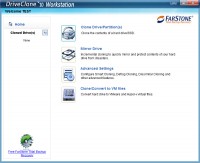
Beyond standard duplication, the software includes specialized features for maintenance and virtualization. Notable functionalities include:
- Mirror Drive: Facilitates incremental cloning and file versioning for data backups.
- Smart Cloning: Identifies and excludes Windows junk files to save storage space.
- Defrag Cloning: Optimizes data placement during the transfer to improve drive performance.
- Virtualization Support: Converts physical disk data directly into VMware or Hyper-V virtual machine formats.
DriveClone serves as a factual solution for users needing to move data between physical drives or into virtual environments while maintaining an identical, bootable system state.
Top 5 Reasons To Download FarStone DriveClone Workstation
- Seamless Hardware Migration and Instant Bootability: Transition from an old HDD to a lightning-fast SSD without ever reinstalling Windows or your applications.
- Intelligent "Smart Cloning" and Performance Optimization: Automatically strip away 10GB to 50GB of Windows junk files and defragment your data during the cloning process for a 20% speed boost.
- Robust Mirror Drive and Incremental Backups: Create a living, bootable mirror of your system that tracks file versions, ensuring you never lose data even if a primary drive fails.
- Universal Compatibility and Large Drive Support: Full support for UEFI, GPT, RAID, and massive drives over 4TB, making it compatible with almost any modern or legacy PC configuration.
- Advanced Virtualization and Dissimilar Hardware Cloning: Effortlessly convert your physical machine into a VMware or Hyper-V virtual machine, or migrate your entire OS to a completely different computer.
Introduction: Why Your Storage Strategy Needs an Upgrade
We have all been there. You click a shortcut, and instead of your application opening instantly, you hear the dreaded "click-clack" of a mechanical hard drive struggling to keep up. Or perhaps you have just purchased a brand-new, ultra-fast NVMe SSD, but the thought of spending twelve hours reinstalling Windows, downloading updates, hunting for software license keys, and reconfiguring your desktop settings makes you want to leave the new drive in its box. Hardware upgrades should be exciting, not a chore. This is exactly where DriveClone enters the frame, and frankly, if you value your time and your data, this is one giveaway you cannot afford to skip.
As a tech reviewer, I see a lot of "disk utility" software. Most of them are clunky, overpriced, or—worst of all—unreliable. When you are dealing with your entire digital life, "unreliable" is a dealbreaker. DriveClone, however, approaches the problem of data migration and system backup with a level of sophistication and user-friendliness that is rare in the industry. It isn't just a tool that moves files from Point A to Point B; it is a comprehensive solution for system cloning, performance tuning, and disaster recovery. Let’s dive deep into the five reasons why this software deserves a permanent spot in your digital toolkit.
1. Seamless Hardware Migration and Instant Bootability
The primary reason most users look for cloning software is to upgrade their hardware. Usually, this means moving from a traditional mechanical hard drive (HDD) to a Solid State Drive (SSD). The difference in speed is night and day, but the process of moving your operating system can be a nightmare. DriveClone eliminates this friction entirely. It doesn't just copy your files; it creates a perfect bit-for-bit twin of your environment.
What makes DriveClone stand out is its commitment to instant bootability. Many lower-tier cloning tools will move your data, but then you’re met with a "Boot Device Not Found" error because the software failed to copy the master boot record or the hidden system partitions. DriveClone copies everything—Windows, your registries, your browser favorites, your obscure system settings, and even your hidden recovery partitions. Once the process is finished, you simply swap the cables or change the boot order in your BIOS, and your computer starts up exactly as it was, only much faster. There is no need to re-verify your software licenses or re-download your Steam library. It is the closest thing to digital teleportation we have.
Furthermore, it handles the "big to small" problem flawlessly. If you are moving from a 1TB HDD that is only half full to a 500GB SSD, DriveClone will automatically resize your partitions to fit the new drive. You don't have to be a partition manager expert; the software does the heavy lifting, ensuring every megabyte is accounted for and optimized for the new hardware.
2. Intelligent "Smart Cloning" and Performance Optimization
Most cloning software is "dumb." It copies every single bit of data, including the garbage you don't need. If your current Windows installation is bloated with temporary files, browser caches, and redundant system logs, a standard clone will simply move that bloat to your new, expensive drive. DriveClone is different. It features a proprietary Smart Cloning technology that identifies and eliminates Windows junk files during the transfer process.
We are talking about a massive amount of space—typically between 10GB and 50GB of pure clutter that is stripped away. By excluding the hibernation file, page file, and temporary folders that Windows recreates anyway, DriveClone ensures your new drive starts with a clean slate. This isn't just about saving space; it's about efficiency. Writing 50GB less data to an SSD extends the lifespan of the drive and makes the cloning process significantly faster.
But the optimization doesn't stop at cleaning. DriveClone also performs what it calls Defrag Cloning. When data is copied to the new drive, it is organized contiguously. For traditional hard drives, this can lead to a performance boost of up to 20%. Even for SSDs, where fragmentation is less of a physical issue, having a clean, organized file structure improves the efficiency of the file system and ensures that your new drive is running at its absolute peak performance from the very first boot. It’s like getting a professional tune-up and a car wash at the same time you’re moving into a new garage.
3. Robust Mirror Drive and Incremental Backups
While migration is a one-time event, backup is a lifetime commitment. DriveClone doubles as a powerhouse backup utility through its Mirror Drive functionality. This isn't your standard "backup to a compressed file" system where you have to wait hours to "restore" your data if something goes wrong. A Mirror Drive is a functional, bootable clone of your system that stays updated.
Through Incremental Cloning, DriveClone can update your mirror drive by only copying the files that have changed since the last backup. This makes the process incredibly fast. If your primary drive suddenly dies on a Tuesday morning, you don't have to panic. You don't have to find a spare laptop and spend the day restoring from a backup archive. You simply boot from your Mirror Drive and you are back to work in minutes, with all your files exactly where you left them on Monday night.
Additionally, DriveClone offers a File Versioning system. This is a lifesaver for anyone who has ever accidentally saved over an important document or had a file corrupted by a software glitch. The software can keep records of historical versions of your files. This adds a layer of protection that goes beyond simple hardware failure; it protects you from your own mistakes and from the "silent" data corruption that can plague older systems. Having a bootable mirror that also acts as a time machine for your data is the ultimate peace of mind for any PC user.
4. Universal Compatibility and Large Drive Support
The tech world is currently in a transitional phase between old standards and new ones. We have BIOS vs. UEFI, MBR vs. GPT, and SATA vs. NVMe. Many cloning tools struggle with these transitions, especially when trying to move an "old" installation to "new" hardware. DriveClone is built to handle the complexity of modern hardware without breaking a sweat. It fully supports UEFI and GPT structures, which is essential for any modern Windows 10 or 11 system.
One of the biggest headaches for power users is the 2TB limit found in older cloning software. If you are a media professional or a gamer with a massive 4TB or 8TB drive, many utilities will simply fail or leave you with unallocated space that you can't use. DriveClone has Big Drive support, handling drives of 4TB and larger with ease. Whether you are using a standard Western Digital HDD, a Seagate FireCuda, or a high-end Samsung NVMe SSD, DriveClone treats them all with the same level of precision.
The software also supports complex configurations like RAID arrays. For server environments or high-end workstations running Windows 2012 Server or newer, this is a critical feature. Being able to clone a RAID array to a single large drive or to a different RAID configuration without losing data or bootability is a task that usually requires expensive enterprise software. DriveClone brings that enterprise-level reliability to the average user, ensuring that no matter how complex your hardware setup is, your data is always portable.
5. Advanced Virtualization and Dissimilar Hardware Cloning
This fifth reason is what truly separates the professionals from the amateurs. DriveClone includes tools for Virtualization and Dissimilar Cloning. Let’s talk about virtualization first. Have you ever wanted to upgrade your PC but had one specific piece of old software that only runs on your current setup? DriveClone can convert your physical hard drive into a virtual disk file (VMDK for VMware or VHD for Hyper-V). This allows you to run your entire old computer as a window inside your new computer. It is a perfect way to archive an old system while still having access to its applications and environment.
Then there is the "Holy Grail" of cloning: Dissimilar Cloning. Standard cloning works best when you are moving a drive from one slot to another in the same computer. If you try to take a clone of your old Dell computer and put it into a brand-new custom-built gaming rig, Windows will usually crash because the drivers for the motherboard, CPU, and chipset are all wrong. DriveClone’s dissimilar hardware support helps bridge this gap. It prepares the cloned OS to accept new drivers, making it possible to migrate your entire digital life across different brands and generations of hardware.
This feature alone is worth the download. It provides a level of freedom that most Windows users don't realize is possible. You are no longer "locked" to a specific machine. Your operating system, your settings, and your data become a portable entity that can move from a laptop to a desktop, or from an Intel-based system to an AMD-based system. For anyone who builds their own PCs or manages multiple systems, this flexibility is a game-changer.
Conclusion: A Must-Have Tool for Every PC Owner
In the world of software, we often distinguish between "wants" and "needs." You might want a new photo editor, but you need a reliable way to protect and move your data. DriveClone sits firmly in the "need" category. It is an insurance policy for your digital life, a professional-grade migration assistant, and a performance optimizer all rolled into one clean package.
Whether you are looking to breathe new life into an old laptop with an SSD upgrade, setting up a failsafe bootable mirror for your business workstation, or looking to virtualize your current setup before a major hardware overhaul, DriveClone provides the tools to do it with confidence. The combination of its Smart Cloning (to keep your drives lean), its Defrag capabilities (to keep them fast), and its Dissimilar Cloning (to keep you mobile) makes it a standout product in a crowded market.
As a tech reviewer, my final word is this: Don't wait for your hard drive to start making clicking noises before you think about cloning. Proactive data management is the hallmark of a savvy user. With its support for the latest hardware standards and its incredibly intuitive "simple clicks" interface, DriveClone removes every excuse for not having a perfect backup. Download this giveaway, run a clone of your system today, and experience the peace of mind that comes with knowing your entire digital world is safe, optimized, and ready to move whenever you are.
The stability of your system and the safety of your data are paramount. DriveClone is the bridge that carries your digital identity from the hardware of yesterday to the possibilities of tomorrow. Do not let this opportunity pass you by—get your copy and take control of your storage today.


Reviews for FarStone DriveClone Workstation
Click Here to Read Reviews for FarStone DriveClone Workstation >> Click Here to Submit Reviews for FarStone DriveClone Workstation >>