What Does Block Ransomware and Backup Do?
As ransomware continues to bypass traditional pattern-based antivirus software, Block Ransomware and Backup offers a localized defense strategy for data integrity. Rather than solely scanning for known signatures, the software implements a strict whitelist policy for file modifications. Users can designate specific directories—such as the Desktop or Documents folders—as protected zones where only authorized applications possess write permissions.
When an unregistered or unauthorized program attempts to modify a file within these secure folders, the software either restricts the access to read-only or blocks the execution entirely. This prevents malicious payloads from encrypting or deleting sensitive data. To supplement this proactive defense, the tool includes an automated backup engine. Every time a user creates or edits a file within a monitored source folder, the program automatically generates a copy in a dedicated backup directory.
Key features include:
- Granular control over specific folders or entire drives for ransomware prevention.
- Restricted file modification rights, granting access only to verified applications.
- Real-time user prompts when an unregistered application attempts a write operation.
- Automated background backups triggered by file creation or modification.
- Immutable backup storage that can be viewed in Windows Explorer but remains protected against deletion or modification by unauthorized software.
- Multilingual support for over ten languages, including English, Spanish, and German.
Top 5 Reasons To Download Block Ransomware and Backup
- Proactive "Zero-Trust" Folder Security: Unlike traditional antivirus that waits to recognize a virus, this software locks down your most important folders and only allows trusted applications to make changes.
- Real-Time Automatic Backup: The app instantly creates backup copies of your files the moment you modify or create them, ensuring you never lose a single draft or update.
- Bulletproof Anti-Tampering Protection: Backup folders are specially protected so that even if a virus gets onto your system, it cannot modify or delete your saved backups.
- Granular Application Whitelisting: You have total control over which programs—like MS Office or Photoshop—can edit your data, while all other suspicious processes are restricted to "read-only" access.
- Fail-Safe Termination Security: Even if the main program is closed or forced to stop, the security locks on your folders remain active, preventing unauthorized file deletions or modifications.
In the modern digital landscape, the question is no longer if you will encounter a security threat, but when. We have all seen the headlines: massive corporations held for ransom, local governments paralyzed by encrypted servers, and individuals losing decades of family photos or critical business documents to a single malicious click. Traditional antivirus software, while necessary, is increasingly falling behind. This is because hackers are constantly evolving their methods, using "zero-day" exploits and polymorphic code that changes its signature faster than security companies can update their databases. If you are relying solely on pattern-based detection, you are essentially driving a car with only a rearview mirror. You can see what hit you, but you can’t see what’s coming next.
This is where the Block Ransomware and Backup tool changes the game. It represents a fundamental shift in how we think about PC security. Instead of trying to identify every "bad" program in the world, it focuses on protecting your "good" data. It creates a digital fortress around your most sensitive files, ensuring that even if a virus manages to slip past your firewall, it can’t do any damage. As a tech reviewer who has seen hundreds of security suites, I can tell you that this specific combination of whitelisting and automated versioned backup is the "gold standard" for data integrity. Here is a deep dive into why this giveaway is an absolute must-download for anyone serious about their digital life.
1. Proactive "Zero-Trust" Folder Security
The biggest flaw in standard security software is its reactive nature. Most antivirus programs look for "signatures"—specific patterns of code known to belong to a virus. But what happens when a hacker creates a brand-new strain of ransomware? Your antivirus won't recognize it, and by the time the signature is updated, your files are already encrypted. Block Ransomware and Backup bypasses this problem entirely by implementing what we call a "Zero-Trust" architecture.
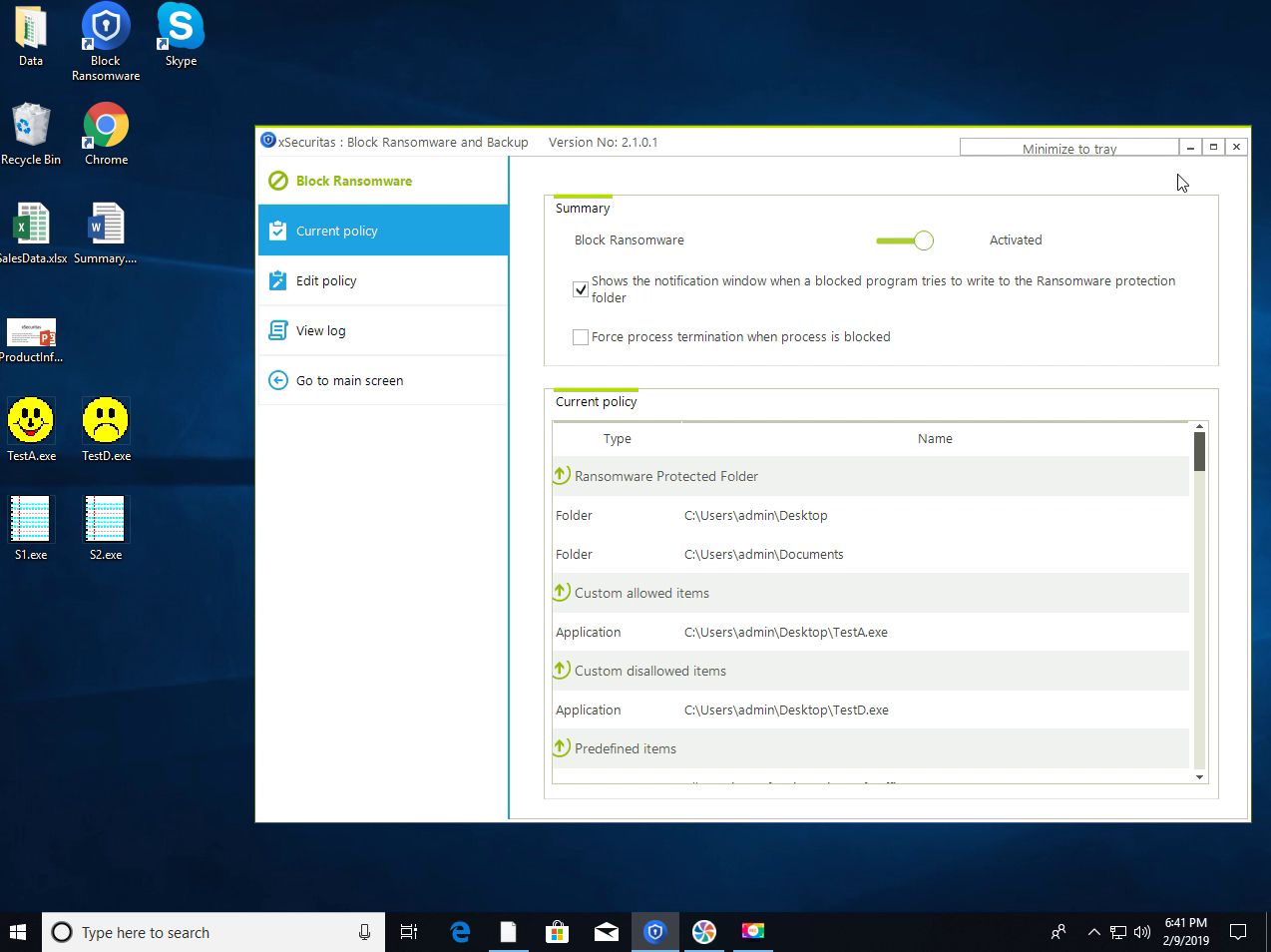
When you use this software, you specify your most important directories—such as your Desktop, Documents, or your creative project folders—as "Protected Folders." Once protected, the software flips the script on how Windows handles file access. Instead of allowing any program to edit a file by default, it blocks everything. It doesn’t matter if the malware is brand new or ten years old; if it isn't on your "Allowed" list, it cannot touch your data. This proactive stance means you are protected against the threats of tomorrow, not just the threats of yesterday. It effectively turns your most vulnerable folders into a digital vault that only you hold the key to.
Furthermore, this approach is incredibly lightweight. Because the software isn't constantly scanning your entire hard drive for millions of different virus signatures, it doesn't hog your CPU or slow down your system like traditional bloated security suites. It simply stands as a silent sentinel at the gates of your most important folders, checking the credentials of any program that tries to enter.
2. Real-Time Automatic Backup
We’ve all been there: you’re working on a massive report or a complex spreadsheet, and suddenly the power flickers, the app crashes, or you accidentally hit "Save" on a version you didn't mean to keep. While ransomware is a massive threat, simple human error and system instability cause just as much data loss. This software provides a brilliant solution by integrating a real-time, automatic backup engine that works in tandem with its security features.
The moment you create a new document or modify an existing one within a specified folder, the Block Ransomware and Backup tool kicks into gear. It automatically copies the modified file to a secure backup location. This isn't a scheduled backup that runs once a week or once a day; it is a continuous, live process. This "versioning" approach is vital for productivity. If you realize that the changes you made two hours ago actually ruined your document, you can simply go to your backup folder and retrieve the previous version.
This feature bridges the gap between security and utility. Most security tools are just about stopping things from happening. This tool, however, actively helps you manage your workflow by ensuring that every iteration of your work is preserved. It’s like having an "Undo" button that works across your entire operating system, spanning days or even weeks of work.
3. Bulletproof Anti-Tampering Protection
One of the most devious tactics used by modern ransomware is the targeting of backups. Sophisticated malware will often scour a computer for backup files (like .bak or .old files) and encrypt those first, before moving on to the main data. The goal is to leave the victim with no choice but to pay the ransom. Many users think they are safe because they have a backup drive plugged in, only to find that the ransomware has encrypted the backup drive as well.
The developers of Block Ransomware and Backup anticipated this move. The backup files created by this program are stored in a specialized, hardened folder. This folder is under a strict lock-and-key protocol. Even though you can view the files in Windows Explorer—allowing for easy recovery—the system prevents any unauthorized program from modifying or deleting these backups. Even the most aggressive ransomware will find itself hitting a brick wall when it tries to tamper with these files.
This creates a "failsafe" layer. Even in the absolute worst-case scenario where a sophisticated piece of malware manages to bypass your primary defenses, your backups remain untouched in their protected silo. For a tech reviewer, this is the most impressive part of the package. It’s the "backup for your backup," providing a level of redundancy that is usually only found in high-end enterprise server environments, now made available for your personal PC.
4. Granular Application Whitelisting
The fear with many "lockdown" style security programs is that they will be too intrusive, stopping you from doing your actual work. No one wants to use a computer where every single action requires a dozen clicks to approve. Block Ransomware and Backup solves this with an elegant and intuitive whitelisting system. You get to decide exactly which programs are "trusted."
For example, you can set MS Office, Adobe Creative Cloud, and your preferred coding IDE as allowed applications. These programs will function perfectly, saving and editing files in your protected folders without any interruptions. However, if a suspicious script, a hidden macro, or an unknown .exe file tries to modify a file in your "Documents" folder, the software will instantly block it.
What I find particularly helpful is the user-interaction model. If an unregistered application attempts to write to a secure folder, the software doesn't just silently kill the process—it asks you. This gives you the power to make real-time decisions. If you just downloaded a new photo editor and want to let it save files, you can allow it with one click. If a prompt pops up for a program you don't recognize, you can block it and potentially save your entire system from infection. This puts the user back in the driver’s seat, providing high-level security without sacrificing the flexibility of a modern PC environment.
5. Fail-Safe Security Architecture
A common trick used by malware is to identify the security software running on a machine and attempt to "kill" its process. Once the antivirus or firewall is shut down, the system is left wide open. Most software is vulnerable to this; if the program isn't running, the protection isn't active. Block Ransomware and Backup was engineered with a "Fail-Safe" mindset to combat this specific vulnerability.
The security architecture of this tool is designed so that the protection of your folders is tied to the state of the driver, not just the user interface. According to the software specifications, when the main program is terminated or if it's not currently running, the secure folders move into a "tightened" state where writing or deleting files is restricted. This is a critical feature. It means that even if a virus manages to crash the software's UI, it still won't be able to wreak havoc on your protected data.
This level of persistence is what separates "toys" from real "tools." It shows that the developers understand the "cat and mouse" game of cybersecurity. By ensuring that the default state of your protected folders is "Secure" even when the app is off, they have created a defense-in-depth strategy that is incredibly difficult for hackers to circumvent. For anyone who has ever worried about their computer being vulnerable during the boot-up sequence or after a system crash, this feature provides immense peace of mind.
Conclusion: Why You Need This Now
We live in an era where our data is often more valuable than our hardware. You can replace a laptop, but you cannot replace five years of business records, a half-finished novel, or your family's digital history. The Block Ransomware and Backup software provides a dual-layered shield that addresses both the external threat of malicious software and the internal threat of accidental loss.
With its support for multiple languages—including English, Spanish, Japanese, German, and many more—it is a global solution for a global problem. It offers a sophisticated, "Zero-Trust" approach that is remarkably easy to set up and use. The combination of folder locking, application whitelisting, and automated, tamper-proof backups creates a comprehensive safety net that every Windows user should have.
Giveaways like this don't come around often, especially for tools that offer this level of deep-system protection. Usually, you would have to pay a hefty annual subscription for this kind of "enterprise-grade" folder shielding and real-time versioning. By downloading this now, you are securing your digital future at no cost. You are getting a tool that doesn't just tell you that you've been infected, but actually prevents the infection from doing what it was designed to do: steal your data and your money.
Don't wait until you see the dreaded "Your files have been encrypted" message on your screen. Proactive security is the only security that matters in the age of ransomware. Download this tool, set up your protected folders, and breathe a sigh of relief knowing that your most valuable digital assets are under lock and key, backed up, and shielded from the chaos of the internet. It is, quite simply, the smartest move you can make for your PC today.

Reviews for Block Ransomware and Backup
Click Here to Read Reviews for Block Ransomware and Backup >> Click Here to Submit Reviews for Block Ransomware and Backup >>