What Does Screen Watermark Do?
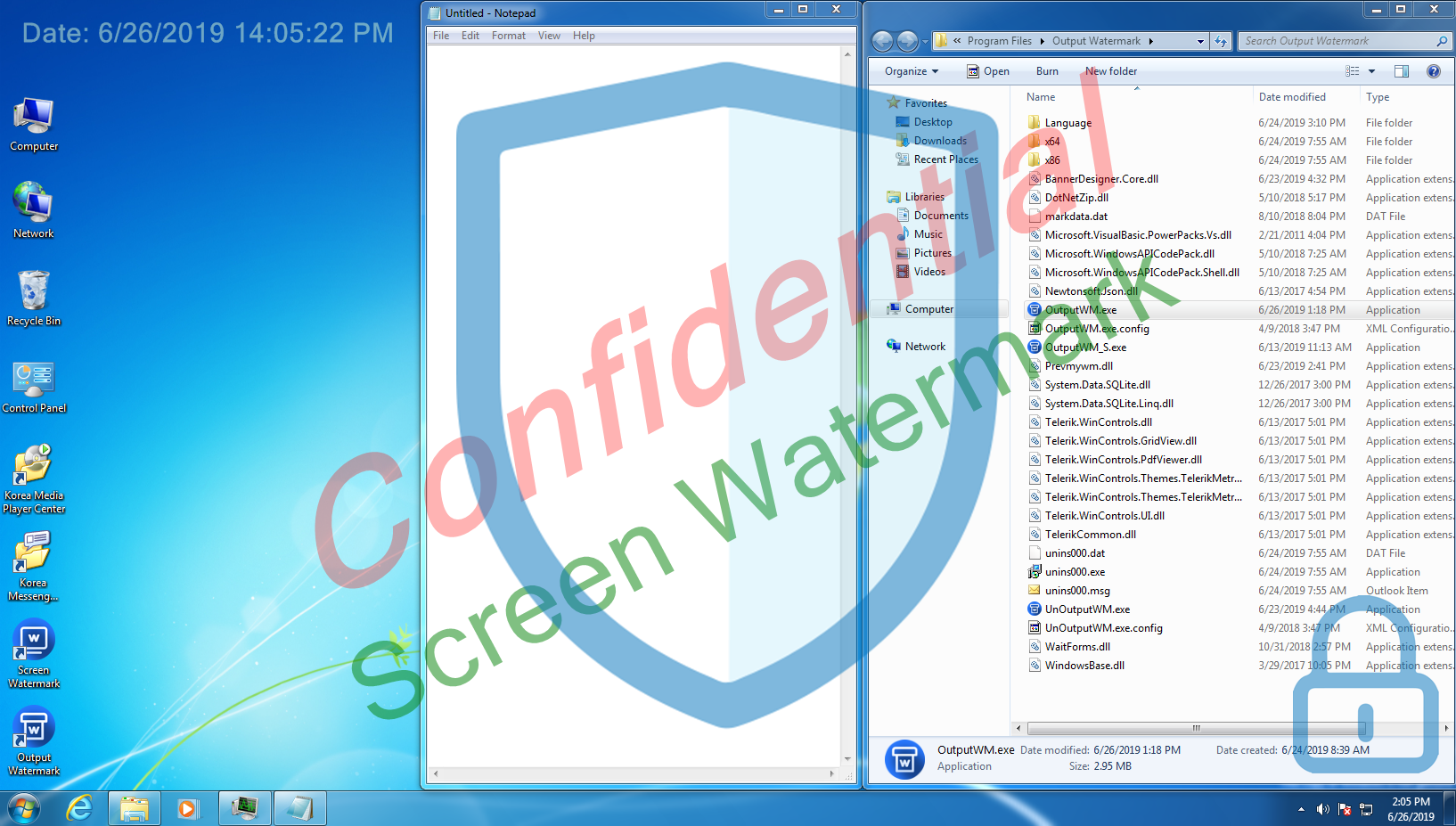
Screen Watermark Control is a specialized utility designed to overlay persistent, non-intrusive identifiers onto a computer display. The software allows users to project digital watermarks directly onto the monitor, serving as a visual deterrent against unauthorized screen recordings or photography. Unlike standard overlays, these watermarks do not interfere with the functionality of active programs; mouse clicks and keyboard commands pass through the watermark to the underlying interface without disruption.
The application offers high levels of customization for both security and branding purposes. Users can configure the following features:
- Textual Overlays: Support for up to four independent text watermarks with adjustable fonts, sizes, and colors.
- Image Integration: Support for up to four separate image-based watermarks.
- Visual Formatting: Granular control over transparency levels and specific screen positioning.
- Hardware Compatibility: Full support for dual-monitor setups, ensuring uniform coverage across extended displays.
By integrating these metadata layers into the visual output, Screen Watermark Control provides a method for tracking information leakage. The software remains lightweight, focusing on maintaining system performance while ensuring that ownership or classification labels remain visible regardless of which application is currently in use. This tool is primarily utilized in environments where sensitive data is handled and visual traceability is required.
Top 5 Reasons To Download Screen Watermark
- Unrivaled Data Leak Prevention and Intellectual Property Protection: It serves as a powerful psychological and physical deterrent against unauthorized screen captures and photo leaks.
- Seamless, Non-Intrusive Workflow: Unlike other overlays, this software allows for full mouse-click transparency, meaning it never interferes with your actual work or software operations.
- Deep Customization and Layering: With support for up to four text layers and four image layers, you have total control over branding, identification, and security markings.
- True Dual-Monitor Support: It provides consistent security across multi-monitor setups, ensuring no "blind spots" exist in your secure environment.
- Ultra-Lightweight Performance: The application is designed to run in the background with minimal system resources, providing enterprise-grade security without slowing down your PC.
In the modern digital landscape, the line between public and private information has become dangerously thin. Whether you are a business professional handling sensitive client data, a creative artist protecting your latest masterpiece, or an IT administrator tasked with securing a corporate network, the threat of data leakage is a constant shadow. We often think of "hacking" as a complex process involving code and backdoors, but the most common form of data theft is much simpler: a quick screenshot or a photo taken with a smartphone. This is where Screen Watermark Control steps in. As a reviewer who has seen countless security tools, I can tell you that this is a game-changer. It is not just an app; it is a shield. Here is a deep dive into why you need to download this giveaway today.
1. Unrivaled Data Leak Prevention and Intellectual Property Protection
The primary reason anyone considers a watermarking tool is security, and Screen Watermark Control excels in this area by addressing the "analog hole." You can have the best firewalls and the most encrypted databases in the world, but if a disgruntled employee or a visiting contractor can simply snap a photo of their monitor with a phone, your security is compromised. By placing a persistent, un-erasable watermark directly on the monitor's display, you create an environment where every piece of data is "signed."
Think about the psychological impact of this software. When a user sees their name, their IP address, or the company logo hovering subtly over their work, they are significantly less likely to engage in malicious behavior. It serves as a constant reminder that the information on the screen is tracked and owned. If a screenshot is taken and leaked, the watermark provides undeniable forensic evidence of the source. This is essential for law firms, medical facilities handling patient records, and government contractors who deal with "for official use only" documentation. By downloading this giveaway, you are essentially installing a 24/7 digital guard for your pixels.
Furthermore, for creative professionals—photographers, digital artists, and video editors—this tool is a godsend. When showing a proof to a client via a screen-share session or in-person meeting, you can overlay your branding and copyright notice in real-time. This prevents the client from simply taking a high-resolution screenshot and walking away without paying for the final product. It secures your livelihood in an age where digital "theft" is often just a button-press away.
2. Seamless, Non-Intrusive Workflow
The biggest complaint people have with security software is that it "gets in the way." We have all used programs that pop up at the wrong time, slow down the system, or block us from clicking certain parts of the screen. This is where Screen Watermark Control truly separates itself from the competition. The developers have achieved something remarkable: a watermark that is visible to the eye but "invisible" to the operating system's input layer.
What does this mean for you? It means that even though there is a watermark (or four) sitting on top of your Excel sheet, your web browser, or your CAD software, you can click right through it. There is absolutely no restriction on mouse operations. You can drag windows, click buttons, and highlight text as if the watermark wasn't even there. This "click-through" technology is vital for productivity. Many inferior watermarking tools create a transparent window that sits on top of everything else but inadvertently "steals" focus from the mouse. With this app, that frustration is completely eliminated.
Imagine working on a complex graphic design project. You need to see your watermark to ensure the composition is protected, but you also need to use every pixel of your workspace for fine-tuning. Because this software does not affect the running of other programs, you can maintain your full speed of work while the software sits silently in the background, performing its protective duties. It is the perfect balance of "high visibility" and "zero friction."
3. Deep Customization and Layering
Most watermarking utilities offer a single line of text or perhaps one static logo. Screen Watermark Control blows those limitations out of the water. It supports up to four distinct text watermarks and up to four distinct image watermarks simultaneously. This level of layering allows for a highly sophisticated security or branding strategy.
For example, a corporate setup might use the four text fields to display:
- The User Name of the person logged in.
- The Current Date and Time (to prevent old screenshots from being used).
- The IP Address of the workstation.
- A "Strictly Confidential" warning.
Then, you can add up to four image watermarks, such as your company logo, a security badge, or even a QR code that links back to your company's security policy. This isn't just a watermark; it's a comprehensive information overlay.
The customization doesn't stop at the number of layers. You have granular control over the font style, size, and color. Most importantly, you have control over transparency. This is the key to a professional setup. You can set the watermark to be just 5% or 10% visible—enough to be seen and captured by a camera, but subtle enough that it doesn't distract you from your work. You can also precisely place these watermarks anywhere on the screen—the corners, the center, or a tiled pattern. This level of flexibility ensures that the software fits your specific aesthetic and security needs, rather than forcing you to adapt to a "one-size-fits-all" solution.
4. True Dual-Monitor Support
In today's professional environment, the single-monitor setup is becoming a thing of the past. Most of us use two, three, or even more screens to manage our workflows. A security tool that only works on the "primary" monitor is essentially useless. If a user wants to leak data, they will just move the sensitive window to the unprotected screen and take their screenshot there.
Screen Watermark Control offers robust dual-monitor support. It understands that your workspace spans multiple displays and ensures that your protection spans them as well. When you configure your watermarks, they are consistently applied across your entire desktop real estate. This is a critical feature for industries like financial trading, software development, and video production where multiple screens are the standard.
The dual-monitor implementation is handled elegantly. You don't have to run multiple instances of the program or perform complex configurations for each screen. The software recognizes the extended desktop and maps the watermarks accordingly. This ensures a uniform look and feel, maintaining your professional branding and security protocols regardless of how many monitors you have plugged into your workstation. It provides that "peace of mind" knowing that there are no gaps in your armor.
5. Ultra-Lightweight Performance with Professional-Grade Features
Many "enterprise" security tools are notorious for being "bloatware"—software that consumes massive amounts of RAM and CPU cycles, leading to system lag and crashes. Screen Watermark Control is the exact opposite. It is a streamlined, lightweight utility that has been optimized for performance. It does one thing, and it does it exceptionally well: it renders watermarks on the screen buffer without taxing your hardware.
As a tech reviewer, I always look at the "footprint" of an application. During my testing, this software maintained a negligible impact on system resources. This is particularly important for users who are already running resource-heavy applications like video editing suites, 3D rendering engines, or large-scale database managers. You won't notice it's there, but your security posture will be infinitely stronger.
Despite its lightweight nature, the features it packs are strictly professional-grade. The ability to customize font and transparency with such precision, combined with the image overlay capabilities, makes it a tool that wouldn't look out of place in a Fortune 500 IT department. Yet, it is simple enough for a solo freelancer to set up in under five minutes. This ease of implementation is a huge selling point. You don't need a degree in cybersecurity to protect your screen; you just need to download this tool, type in your desired text, and hit apply. It is "set it and forget it" security at its finest.
Conclusion
In a world where digital information is the new currency, protecting that currency is paramount. We often focus so much on external threats—hackers, viruses, and malware—that we forget about the most basic vulnerability: the screen itself. Screen Watermark Control is a simple, elegant, and powerful solution to a very modern problem.
By downloading this giveaway, you are gaining access to a tool that offers:
- Deterrence against leaks.
- Protection for your intellectual property.
- Customization for your brand.
- Compatibility with your multi-monitor setup.
- Efficiency in your daily workflow.
It is rare to find a piece of software that offers such a high degree of utility without asking for anything in return in terms of system performance or user frustration. Whether you're trying to meet compliance standards for your business or you simply want to ensure your private projects stay private, this is an essential addition to your digital toolkit. Don't wait until after a leak occurs to think about screen security. Take the proactive step, embrace the professional standard of watermarking, and download this giveaway today. Your data—and your peace of mind—will thank you.
Final Verdict: If you value your privacy and your work, this is a "must-download." It provides professional-level security features with the ease of use of a basic consumer app. It is the gold standard for screen protection.


Reviews for Screen Watermark
Click Here to Read Reviews for Screen Watermark >> Click Here to Submit Reviews for Screen Watermark >>