What Does AFKSecurity Do?
AFKSecurity serves as a dedicated behavioral protection layer for Windows 10 and 11, designed to function alongside existing antivirus solutions. Rather than relying on traditional signature-based detection, the software utilizes proprietary technology to monitor system processes, network activity, and hardware load. By establishing a baseline of normal behavior during an initial learning phase, the tool identifies anomalies that traditional security scanners may overlook.
The application is particularly focused on protecting systems while the user is away from the keyboard. It monitors for indicators of ransomware, data exfiltration, and credential theft, employing decoy files and credential bait to identify intruders early. When suspicious activity is detected, AFKSecurity freezes the process in question to prevent potential damage. Because the software does not automatically delete files, users can review the event and decide whether to resume or terminate the action without the risk of permanent data loss.
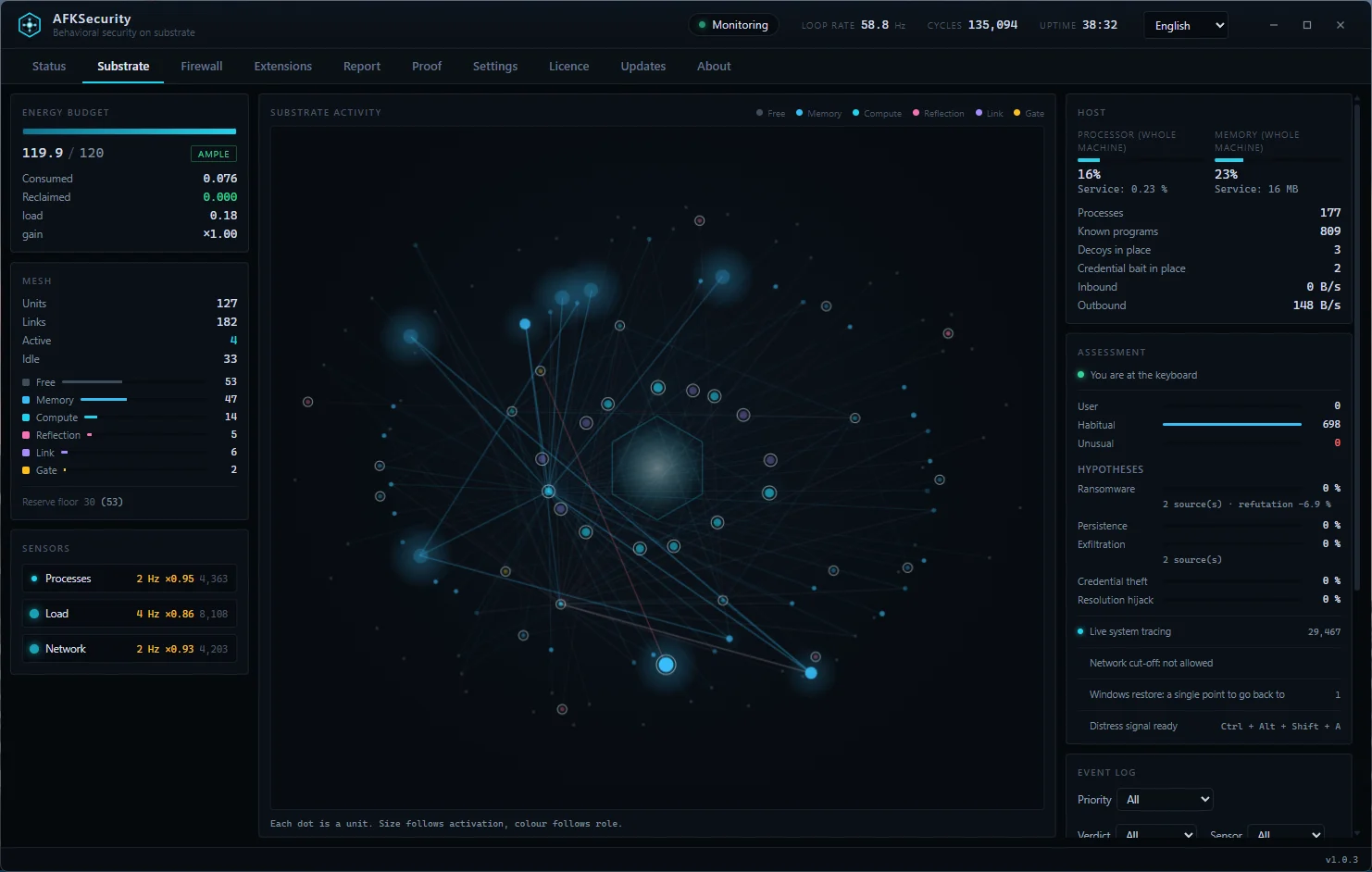
Privacy and system performance are prioritized through a localized architecture. AFKSecurity operates without cloud dependencies, telemetry, or account requirements, keeping all logs within a sealed local journal. The background service maintains a light footprint, typically utilizing less than 1% of CPU resources and 16 MB of RAM. Additional features include an optional firewall, an emergency hotkey for immediate intervention, and integrated Windows restore point functionality.
Top 5 Reasons To Download AFKSecurity
Every once in a while, a piece of security software crosses my review desk that completely flips traditional endpoint protection on its head. Today, we are looking at an exceptional giveaway opportunity: AFKSecurity, a companion security layer engineered specifically for 64-bit Windows 10 and Windows 11. If you are tired of bloated antivirus suites hogging system resources, spying on your web habits, or wiping out false positives without your consent, you are going to want to pay close attention. Below are the top five reasons why you need to grab this giveaway right now, followed by an in-depth breakdown of what makes this tool an essential addition to your desktop or laptop.
- Next-Generation Behavioral Defense Over Flawed Signature Matching: It acts as a smart, secondary layer alongside your existing antivirus, learning your machine's baseline habits to intercept zero-day exploits, ransomware, and stealthy attacks that traditional databases miss.
- Intelligent AFK (Away-From-Keyboard) Contextual Vigilance: Cybercriminals love striking when you step away from your desk; AFKSecurity recognizes when your machine is unattended and automatically tightens its behavioral tripwires.
- A "Freeze First, Ask Later" Philosophy: Unlike aggressive tools that instantly delete your personal files or mission-critical utilities on a whim, it safely suspends suspect processes without altering, corrupting, or deleting a single byte of your data.
- Uncompromising On-Device Privacy: Operating entirely offline with zero cloud connections, zero telemetry, and zero mandatory accounts, your digital footprint never leaves your local hard drive.
- Microscopic Resource Footprint Paired With Elite Power-User Tools: Running on less than 1% CPU and approximately 16 MB of RAM, it delivers rock-solid protection and packs an optional firewall, system restore integration, decoy tripwires, and an emergency hotkey into one ultra-light package.
Now that you have seen the snapshot, let us dive into the nitty-gritty of why AFKSecurity is one of the most compelling downloads you will claim this year.
1. Next-Generation Behavioral Defense Over Flawed Signature Matching
To understand why AFKSecurity is such a monumental upgrade for your machine, you first have to acknowledge the glaring blind spot in modern cybersecurity: the traditional antivirus model is fundamentally playing catch-up. Standard antivirus programs rely almost entirely on signatures—blacklists of known malicious code hashes compiled by vendors. The inherent flaw in that model is obvious. For a signature to exist, someone else has to get infected first. In an era dominated by polymorphic malware, custom ransomware scripts, and targeted zero-day vulnerabilities, waiting for a vendor to push a definition update is simply not good enough.
AFKSecurity does not replace your primary antivirus; instead, it supercharges your defense posture by serving as an intelligent, behavior-driven safety net. At the heart of the application is a proprietary substrate engine designed to observe and understand normal operating parameters. When you first install it, the software observes your typical routines: what background processes initiate at boot, how your CPU and memory loads fluctuate during daily tasks, and what regular network sockets your everyday software communicates through.
Once this quiet learning period establishes your system's baseline, AFKSecurity acts like an attentive sentry. It does not care whether a rogue script is brand new or twenty years old; it cares about intent. It specifically monitors for the telltale mechanics of contemporary breaches: rapid bulk-file modification (ransomware), covert persistence modifications in system registries, silent exfiltration of document archives over unusual network ports, credential memory dumps, and suspicious attempts to hijack local name resolution. By shifting focus from what a file looks like to what a file does, AFKSecurity neutralizes sophisticated threats that slip right past traditional antivirus scanners.
Even better, it deploys intelligent canary defenses—decoy files and credential bait scattered strategically across your file system. If a stealthy threat infiltrates your drive and begins sniffing for passwords or seeking documents to encrypt, the moment it touches one of these tripwires, the substrate engine immediately springs the trap. You gain enterprise-grade threat hunting without paying enterprise-level subscription fees.
2. Intelligent AFK (Away-From-Keyboard) Contextual Vigilance
Think about how you use your computer. When you are sitting in front of your monitors, you are constantly observing your environment. If a random command prompt pops up, your mouse cursor starts jittering, or your fans suddenly spin up to maximum velocity while you are typing an email, you notice. You open Task Manager, inspect what is happening, and take corrective action. Attackers and automated exploit kits know this. In fact, modern automated attack scripts frequently run background checks to verify whether a user is actively typing or moving the mouse before executing their most destructive routines. They deliberately wait until 3:00 AM, or until you leave your desk to grab lunch, to begin encrypting drives or staging mass data exfiltration.
This is precisely where AFKSecurity earns its name. It introduces the brilliant concept of context-aware vigilance. The engine monitors hardware input states to know whether you are physically seated at your keyboard. While you are actively using your PC, the software maintains a steady watch, balancing protection with everyday user flexibility. But the second you step away and the system detects an idle state, AFKSecurity throttles up its alertness.
While you are away from the keyboard, background processes have zero reason to suddenly initiate large-scale directory traversals, rewrite system binaries, or attempt to dump local credential caches. AFKSecurity recognizes this shift in context. In this heightened idle mode, behaviors that might normally be given a narrow margin of tolerance are immediately flagged and halted. You can finally walk away from your workstation, step out for a coffee, or head to sleep while leaving a heavy download running, fully confident that your operating system is guarded by a sentry that never blinks, never sleeps, and refuses to let background processes run wild when your back is turned.
3. A "Freeze First, Ask Later" Philosophy
If you are an active PC enthusiast, gamer, developer, or digital creator, you have inevitably suffered the wrath of an overzealous antivirus program. You compile a custom script, download an indie game modification, or fire up an open-source productivity utility, only for your standard security software to sound a terrifying alarm and aggressively delete the file before you can even react. Even worse, half the time the quarantined file is completely corrupted when you attempt to restore it, resulting in lost work, broken configurations, and immense frustration.
AFKSecurity fixes this backward workflow with a refreshing, user-first design: freeze, do not destroy. When the software's behavioral substrate catches an application acting inappropriately, it does not purge the executable or mangle your registry keys. Instead, it instantly suspends the offending process tree at the kernel level. Execution stops dead in its tracks. The suspected program can no longer write to your disk, ping an external command-and-control server, or compromise memory spaces.
Once the threat is rendered inert, AFKSecurity politely prompts you: Is this you?
This prompt places control back where it belongs: in your hands. If the trigger was tripped because you intentionally ran an exotic compilation script or fired up a complex administrative tool, you can simply authorize the action and continue working without having to dig through cryptic quarantine vaults or re-download deleted files. If the activity was completely unauthorized, you can terminate the process with absolute confidence. Nothing is destroyed prematurely, no important work files are shredded by accident, and your workflow remains smooth and predictable. It is the polite, respectful security model the Windows ecosystem has needed for decades.
4. Uncompromising On-Device Privacy
We live in a deeply frustrating era of software design. It seems that practically every desktop security tool released today wants to force you into creating an online user account, tie your installation to a cloud profile, and harvest an endless stream of background analytics. Many mainstream antivirus brands have effectively transformed into data-collection utilities that continuously upload your file metadata, browsing logs, and system details to offshore cloud servers under the guise of "telemetry" and "threat intelligence."
AFKSecurity stands as a proud, absolute rejection of this intrusive model. The software requires no user account, no cloud registration, and transmits zero telemetry. Everything it does begins, executes, and concludes entirely within the local boundaries of your PC hardware. There are no centralized vendor databases tracking your software usage, no remote servers logging your machine's process names, and no persistent internet pings eating up your bandwidth.
Because AFKSecurity relies on localized behavioral pattern learning rather than bloated cloud lookups, it does not need to phone home every twenty minutes to download a multi-gigabyte definition update. It operates autonomously. If you take your laptop on a cross-country flight or run your desktop in a completely air-gapped home laboratory without active internet access, AFKSecurity continues to safeguard your system with full efficiency. Furthermore, every single event, process freeze, and security decision is recorded into a sealed, tamper-resistant local journal stored securely on your drive. You can audit this log at any time to see exactly what transpired behind the scenes, without worrying that your activity logs are sitting on an unencrypted third-party cloud server waiting to be exposed in a corporate data breach.
5. Microscopic Resource Footprint Paired With Elite Power-User Tools
How many times have you uninstalled a security suite because it turned your high-performance PC into a sluggish mess? Modern antivirus suites have become monstrously bloated, frequently consuming several gigabytes of memory, spawning half a dozen secondary background processes, and monopolizing disk read-write speeds. For gamers trying to squeeze out every frame per second, or professionals running resource-intensive creative rendering pipelines, heavy security software is an unacceptable burden.
AFKSecurity was clearly engineered by developers who respect system performance. The core background service is stunningly lean, typically demanding less than 1% of your CPU and idling around an astonishing 16 megabytes of RAM. It is so lightweight that you will completely forget it is running until it steps in to protect you. There are no animated pop-up advertisements, no intrusive upsell banners begging you to upgrade to a "premium cleaning suite," and no background disk thrashing while you are trying to play games or edit video.
Despite this featherweight architecture, AFKSecurity comes packed with a suite of high-utility features tailored specifically for power users:
- Integrated Defensive Firewall: An intuitive, optional firewall layer that lets you clamp down on unwanted inbound and outbound traffic without wrestling through cumbersome Windows menus.
- Automated Windows Restore Points: Built-in hooks that allow you to establish known-good system restore snapshots before testing unfamiliar software, providing an instant safety harness against system instability.
- Emergency Security Hotkey: A dedicated panic button configuration that allows you to instantly lock down system activities if you suspect something is actively going wrong on your machine.
- Cryptographically Signed Binaries: The software is officially digitally signed, ensuring that the binaries running on your system are verified, authentic, and free from external tampering.
The Reviewer's Final Verdict: Do Not Let This Giveaway Pass You By
Finding genuine utility in the crowded Windows software market can feel like searching for a needle in a haystack. Most giveaways push software that is either bloated, outdated, or secretly designed to funnel you into an expensive recurring subscription. AFKSecurity is the exact opposite: an agile, highly focused, respectful security companion that targets the actual techniques modern cyber threats use to compromise systems.
It does not attempt to muscle out your primary antivirus; it simply covers its flanks. It catches zero-days through pure behavioral intelligence, watches over your hardware when you are AFK, halts threats without destroying your legitimate files, respects your privacy by remaining completely offline, and runs on a microscopic footprint that even budget laptops will never feel. If you care about privacy, value your system performance, and want real protection against cutting-edge ransomware and data theft, downloading this AFKSecurity giveaway is an absolute no-brainer. Secure your license, install it alongside your existing setup, and enjoy true peace of mind whether you are at your desk or away from it.

Reviews for AFKSecurity
Click Here to Read Reviews for AFKSecurity >> Click Here to Submit Reviews for AFKSecurity >>