What Does Heatsoft ADCS Do?
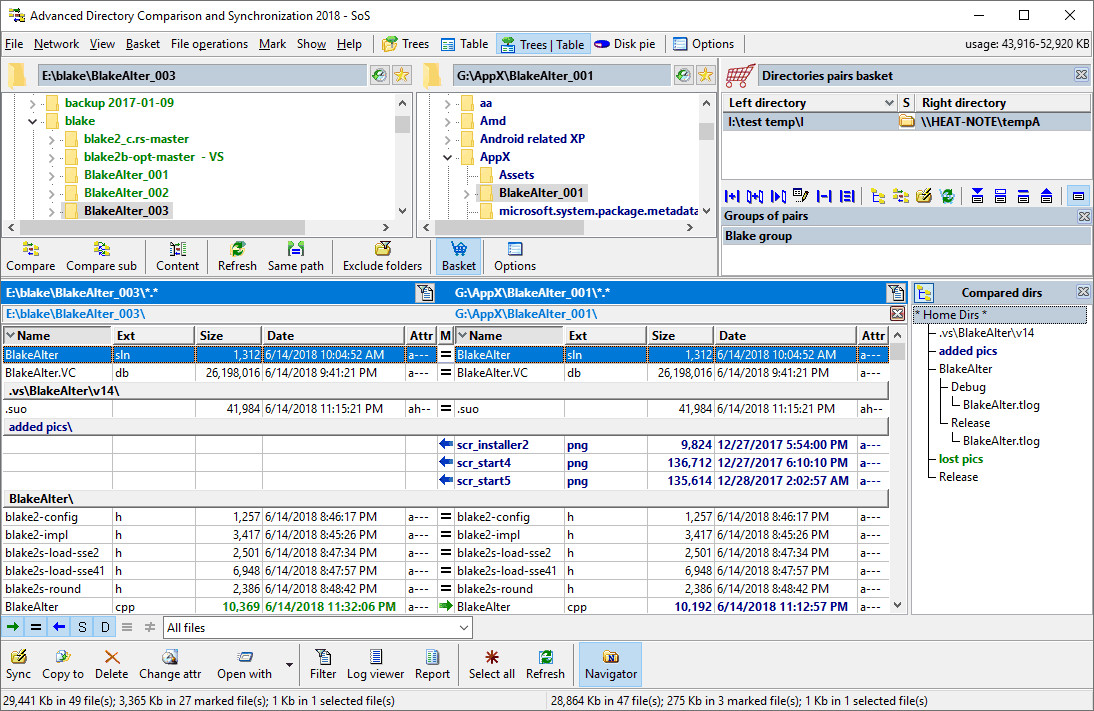
Heatsoft ADCS is a Windows utility designed for recursive folder comparison and synchronization. The software allows users to manage files across multiple drives, desktop-to-laptop setups, or network-attached storage. By providing a side-by-side view, the application highlights differences in file size, timestamps, and attributes using color-coded status indicators to mark the status of each file within a directory.
Users can execute synchronization tasks with a single mouse click or apply specific file filters to refine comparison results. Beyond basic mirroring, ADCS includes tools for generating comparison reports in CSV or HTML formats and an embedded utility for identifying and removing empty folders. To streamline repetitive workflows, the software supports bookmarking frequent synchronization tasks and maintains detailed activity logs for all file operations.
The interface utilizes an Explorer-type design for navigation, with a control panel accessible via the Windows system tray. Additional features include a disk space viewer, log viewer, and multi-language support. Whether used for backing up critical directories or verifying data integrity across network drives, ADCS provides a factual overview of directory changes to ensure data consistency across different storage environments.
Top 5 Reasons To Download Heatsoft ADCS
- Unrivaled Visual Precision with Side-by-Side Comparison: Heatsoft ADCS offers a recursive, color-coded comparison engine that makes identifying file discrepancies instantaneous and error-free.
- Seamless Multi-Device Synchronization: Whether you are bridging the gap between a desktop and a laptop or managing multiple external drives, this utility ensures your data is identical across your entire hardware ecosystem.
- High-Speed Backup for Critical Directories: Far faster than traditional copy-and-paste methods, ADCS provides a streamlined way to mirror your most important data, protecting you against drive failure or data loss.
- Advanced Reporting and Detailed Audit Trails: With the ability to generate CSV and HTML reports and maintain comprehensive logs, professional users can track every change and verify the integrity of their data transfers.
- Professional Power with an Intuitive Interface: Despite its advanced features like file filtering and directory recursion, the Explorer-style interface ensures that even casual users can navigate the software like a pro from day one.
Top 5 Reasons To Download Heatsoft ADCS
In the modern digital landscape, data management has become one of the most significant hurdles for both professionals and casual users alike. We live in an era where our work and personal lives are scattered across multiple devices—laptops for travel, desktops for heavy lifting, external drives for backups, and network-attached storage for shared family or office access. The result is often a chaotic mess of duplicate files, outdated versions of documents, and the constant, nagging fear that our most important data isn't actually backed up where we think it is. This is exactly where Heatsoft ADCS (Advanced Directory Comparison and Synchronization) enters the frame, and why you should be jumping at the chance to download this giveaway.
As a tech reviewer, I have seen dozens of synchronization tools. Some are overly complex, requiring a degree in computer science to configure, while others are so bare-bones that they lack the necessary safeguards to protect your data. Heatsoft ADCS strikes that perfect "Goldilocks" balance. It is a robust, industrial-strength utility designed for business users and software developers, yet it remains remarkably accessible for the average person who just wants to make sure their holiday photos are safely copied to their backup drive. Let’s dive deep into the five primary reasons why this software deserves a permanent spot on your hard drive.
1. Unrivaled Visual Precision with Side-by-Side Comparison
The core strength of Heatsoft ADCS lies in its ability to show you exactly what is happening within your folders. Most file managers give you a list of files, but they don’t tell you the story of those files. ADCS utilizes a recursive comparison engine that looks deep into your folder structures, comparing not just the filenames, but the metadata that actually matters: file size, time and date stamps, and specific file attributes.
The side-by-side interface is a revelation for anyone who has ever tried to manually compare two folders by opening two separate Windows Explorer windows. Instead of clicking back and forth and trying to remember which "Version 2" was the most recent, ADCS presents them in a unified view. The real magic, however, is the color-coded arrow system. These arrows clearly mark the status of each file. You can see at a glance which files are identical, which are newer on the left side, which are newer on the right side, and which files exist in one directory but are missing from the other. This visual feedback turns a tedious, error-prone chore into a task that takes seconds. When you can see the differences, you eliminate the risk of overwriting a newer file with an older one—a mistake that has cost many of us hours of lost work.
2. Seamless Multi-Device Synchronization
We no longer live in a world of a single computer. Most of us juggle at least two machines, and keeping them in sync is a logistical nightmare. Perhaps you’ve been working on a presentation on your desktop but need to take the latest version with you on your laptop for a meeting. Or maybe you are a developer who needs to ensure that the code on your local machine matches the staging environment on a network drive. Heatsoft ADCS is built specifically for these "cross-pollination" scenarios.
The software handles synchronization across any drive your PC can talk to. This includes internal hard drives, USB flash drives, external SSDs, and even network-mapped drives. If your Windows machine can assign it a drive letter or access it via a network path, ADCS can sync it. This makes it an indispensable tool for the remote worker or the digital nomad. You can set up your synchronization tasks and, with a single mouse click, ensure that your laptop has every updated file from your workstation before you head out the door. It bridges the gap between your devices, creating a unified digital environment where your files are always where you need them to be, in their most current form.
3. High-Speed Backup for Critical Directories
We all know we should backup our data, but the reason most people don't do it frequently enough is that it's usually a slow, cumbersome process. Traditional backup software often bundles files into proprietary formats that you can't easily browse, and simple copy-and-pasting in Windows is notoriously inefficient when dealing with thousands of small files.
Heatsoft ADCS changes the backup game by focusing on speed and transparency. Because it compares folders before it moves data, it only needs to transfer the files that have actually changed. This "differential" approach is a very fast method of backing up critical directories. Instead of copying 50GB of data every night, ADCS might only need to copy the 50MB of files you actually worked on today. This speed encourages more frequent backups, which is the best defense against hardware failure, ransomware, or accidental deletion. Furthermore, because the backup is a direct folder-to-folder synchronization, your backed-up files are immediately accessible in their native format. There’s no need to "restore" through a complex interface; your files are just there, exactly as they appeared on your primary drive.
4. Advanced Reporting and Detailed Audit Trails
For the professional user, "guessing" that a sync went well isn't good enough. Software developers, architects, and business administrators need proof of data integrity. Heatsoft ADCS provides this through a suite of advanced reporting tools that are rarely found in consumer-grade utilities. Every synchronization activity is meticulously stored in a log file, allowing you to review exactly what was moved, what was overwritten, and when the task was completed.
Beyond simple logs, the utility can generate formal comparison reports in both CSV and HTML formats. If you are working in a team environment, these reports are invaluable. You can send an HTML report to a colleague to show exactly which files were updated in a shared project directory. The CSV export allows for even deeper analysis, letting you pull folder data into Excel for auditing or project management purposes. Additionally, the inclusion of a disk space viewer helps you understand where your storage is going, making ADCS not just a sync tool, but a comprehensive directory management suite. These features ensure that you remain in total control of your data lifecycle, providing a level of accountability that is essential for business operations.
5. Professional Power with an Intuitive Interface
One of the biggest hurdles for powerful utility software is the learning curve. If a tool is too hard to use, it stays in the "Downloads" folder gathering digital dust. Heatsoft ADCS avoids this trap by employing a familiar, Explorer-type interface. If you know how to navigate folders in Windows, you already know how to use the basics of this program. The control panel is easily accessed from the Windows system tray, meaning it’s always there when you need it but out of the way when you don’t.
However, don't let the simplicity fool you; the "under the hood" features are incredibly deep. You can apply file spec filters to include or exclude specific file types (for example, syncing only .docx files while ignoring temporary .tmp files). It includes an embedded utility for removing empty folders, which helps keep your directory structures clean and organized. One of my favorite "pro" features is the support for bookmarking frequent tasks. If you find yourself syncing the same folders every Friday afternoon, you can bookmark that specific task. Instead of re-selecting the directories and setting up filters every time, you simply click your bookmark and let ADCS do the heavy lifting. It’s this combination of professional-grade features—like multi-language support and directory recursion—packaged in an easy-to-use, intuitive interface that makes Heatsoft ADCS a standout utility.
Conclusion: Why You Need This Now
In conclusion, Heatsoft ADCS is more than just a file copier; it is a precision instrument for data management. In a world where our digital files are our most valuable assets—representing years of work, thousands of memories, and critical business intelligence—relying on manual dragging-and-dropping is a risk you shouldn't take.
This giveaway offers you a chance to professionalize your workflow. You are getting a tool that provides the visual clarity to see differences, the connectivity to sync across networks and devices, the speed to perform daily backups without headaches, the documentation to satisfy professional requirements, and the simplicity to ensure you actually use the software regularly.
Whether you are a developer looking to verify that a CD has been copied correctly, a business owner keeping a laptop and desktop in harmony, or a home user trying to organize a massive collection of documents and programs, Heatsoft ADCS is designed for you. It makes the complex task of directory synchronization enjoyable rather than a chore. Download this utility today and take the first step toward a more organized, secure, and efficient digital life. This is one giveaway that pays dividends in peace of mind and saved time every single time you use it.

Reviews for Heatsoft ADCS
Click Here to Read Reviews for Heatsoft ADCS >> Click Here to Submit Reviews for Heatsoft ADCS >>