

Simple Data Backup is quite possibly the easiest backup solution out there! It is easy and efficient backup software that creates non-proprietary backups. It can back up folders/files from one drive to another anytime you want on-demand (including with an optional direct shortcut on your desktop to run the backup), on a schedule, or at logon. Back up to another hard drive, network drive, flash drive, the ‘cloud’ (Internet server) via FTP, SSH, or WebDav, DVD (if packet-writing software is installed) and more. It can create identical folder/file structures on the backup drive, or can compress the data as .ZIP or LZMA-compressed .7z files. It can back up “in use” files (including Outlook data), monitor and alert you to any errors including potentially by email/SMS or reporting status to the web, and it automatically handles the whole full/incremental backup thing that other programs make you deal with. Simple Data Backup is powerful, stable, and secure, but also simple – just pick the folders you want to be backed up and a few settings and you’re done!
Official Product Description
Overview
What Does Simple Data Backup Do?
Simple Data Backup is a utility designed to streamline file redundancy without the complexity often found in enterprise suites. The software facilitates on-demand, scheduled, or logon-based backups of specific folders and files. Users can initiate tasks manually through desktop shortcuts or automate them to occur at set intervals.
The application supports a variety of storage destinations, including secondary hard drives, network locations, flash media, and cloud servers via FTP, SSH, or WebDav protocols. Backups are stored in non-proprietary formats, either maintaining the original folder structure or utilizing ZIP and LZMA-compressed .7z files to save space.
Technical features of the software include:
- Shadow copy support for "in use" files, such as Microsoft Outlook databases.
- Automated management of full and incremental backup cycles.
- Error monitoring with notification options via email, SMS, or web reporting.
The setup process focuses on minimalism: users select the source directories and destination, configure basic parameters, and the software manages subsequent background processes. By prioritizing accessibility, the tool removes the need for manual file management while ensuring data remains accessible across various hardware and network configurations.
Top 5 Reasons To Download Simple Data Backup
- Unrivaled Simplicity and Ease of Use: Designed for users who want protection without a learning curve.
- Non-Proprietary Backup Formats: Your data remains yours, accessible through standard tools without needing the original software.
- Seamless "In-Use" File Handling: Automatically backs up active files, including complex Outlook databases, without interruption.
- Versatile Destination Support: From local flash drives to secure remote servers via FTP, SSH, and WebDav.
- Automated Intelligent Management: Handles the complexity of full and incremental backups and error reporting so you don't have to.
1. Unrivaled Simplicity and Ease of Use
In the world of modern software, we are often bombarded with "feature bloat." It seems like every developer wants to pack their application with every possible bell and whistle, often at the expense of the user experience. When it comes to your data, you don't need a cockpit full of confusing dials; you need a "set it and forget it" solution that works every single time. This is where Simple Data Backup truly shines. As a tech reviewer, I have seen dozens of backup suites that require a certification just to configure a basic scheduled task. This software throws that paradigm out the window.
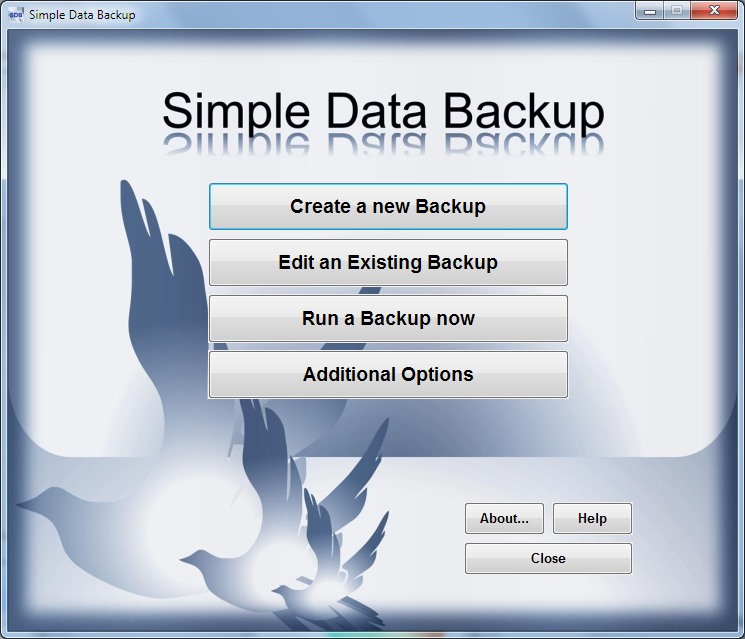
The core philosophy here is accessibility. From the moment you launch the application, it becomes clear that the developers prioritized the human element. You aren't greeted with complex jargon or hidden menus. Instead, the process is streamlined: you pick the folders you want to protect, choose where they should go, and decide when you want it to happen. That is it. For the average user who just wants to ensure their family photos and tax documents are safe, this simplicity is a breath of fresh air.
One of the standout features that highlights this user-centric design is the ability to create an optional direct shortcut on your desktop. Imagine finishing a big project and wanting that extra peace of mind before you shut down for the night. You don't have to open the program, navigate to your profile, and hit "start." You simply double-click a shortcut on your desktop, and the backup runs instantly. This "on-demand" functionality removes the friction that usually leads to people skipping their backups. It turns a chore into a one-second habit.
Furthermore, the software doesn't force you into a specific workflow. Whether you want your backups to trigger at logon, on a rigorous daily schedule, or only when you manually intervene, the power is in your hands. It is sophisticated enough for a power user but approachable enough for someone who barely knows how to navigate their file explorer. In an era where data loss is a "when" rather than an "if," having a tool that removes the barrier to entry is the best defense you can have.
2. Non-Proprietary Backup Formats
This is perhaps the most critical point for anyone who values long-term data integrity. Many "big name" backup solutions use what we call proprietary formats. They take your files and wrap them in a special, encrypted container that can only be opened by their specific software. While this might sound secure, it is actually a form of "vendor lock-in." If that company goes out of business, or if you find yourself on a computer that doesn't have that specific software installed, your data is essentially held hostage. You might have the backup file, but you have no way to get into it.
Simple Data Backup takes a much more honest and user-friendly approach by creating non-proprietary backups. This means you have choices. You can choose to have the software create an identical folder and file structure on your backup drive. If you go this route, your backup looks exactly like your source; you can browse through your folders and open your files using the standard Windows File Explorer. There is no "restoration process" required—you just copy and paste them back if you need them. This transparency is invaluable for quick recovery.
If you are looking to save space, the software offers compression through industry-standard formats like .ZIP or LZMA-compressed .7z files. Because these are standard formats, almost every computer on the planet can open them without needing to install Simple Data Backup. If you are in a crisis situation and need to access a file from a different machine, you can do so with total confidence. You are never tethered to the software itself; it is merely the engine that moves and organizes your data reliably.
By using non-proprietary formats, you are future-proofing your digital life. Ten years from now, even if technology has moved on, you will still be able to access those compressed archives or folder structures. It provides a level of freedom and security that "black box" backup solutions simply cannot match. It’s about giving the user total ownership of their information, which is exactly how software should be designed.
3. Seamless "In-Use" File Handling
We have all experienced that frustrating Windows error message: "The action can't be completed because the file is open in another program." Traditionally, this has been the bane of backup software. If you were working on a document or if your email client was running in the background, the backup software would simply skip those files, leaving you with an incomplete or outdated backup. This is particularly problematic for users who leave their computers on for days at a time with applications like Outlook constantly active.
Simple Data Backup solves this with advanced "in-use" file handling. It uses sophisticated technology to take a snapshot of your data even while it is being accessed by other applications. This is a game-changer for professionals. Consider your Outlook data (.PST files). These files are notoriously difficult to back up because Outlook "locks" them the moment the program starts. With this software, you don't have to close your email or interrupt your workflow. The backup happens silently in the background, capturing your latest emails and contacts without a hitch.
This level of stability is what separates "amateur" tools from "professional-grade" utilities. When you are relying on a backup, you need to know that 100% of your data has been copied, not just the files you remembered to close. This feature works behind the scenes, ensuring that your most frequently used (and therefore most important) files are always protected. It provides a "live" feel to the protection process that gives you immense peace of mind.
Furthermore, the software is built to be stable and secure during this process. It doesn't bog down your system resources or cause your other applications to crash while it captures those open files. It is a smooth, background operation that respects your computer's performance. You get the protection you need without the performance tax that usually comes with high-end data management tools. For anyone who works in a fast-paced environment where closing applications is not always an option, this feature alone makes the download worth it.
4. Versatile Destination Support
A backup is only as good as the place where it is stored. One of the biggest mistakes users make is backing up their data to a different partition on the same physical hard drive. If the drive fails, both the original data and the backup are gone. Simple Data Backup encourages best practices by making it incredibly easy to send your data to a wide variety of destinations. Whether you are looking for local redundancy or off-site security, this software has you covered.
For local backups, you can easily target another internal hard drive, an external USB drive, or a portable flash drive. But the software goes much further by supporting network drives. If you have a NAS (Network Attached Storage) or a shared folder on another computer in your house or office, you can point your backup there with just a few clicks. It even supports older but reliable methods like DVD backup, provided you have packet-writing software installed, giving you a physical, "cold storage" option that is immune to power surges or ransomware.
The real power, however, lies in its connectivity to the "cloud" and remote servers. Many modern users want their data stored off-site for maximum protection against physical disasters like fire or theft. Simple Data Backup allows you to back up via FTP (File Transfer Protocol), SSH (Secure Shell), or WebDav. This is a massive advantage over "closed" cloud services that charge you a monthly subscription fee. If you have your own server space or a website host, you can use that existing storage to host your backups for free. It turns any internet-connected server into your personal, private cloud.
This versatility ensures that your backup strategy can grow and evolve with your needs. Maybe today you only have a small thumb drive, but next year you might invest in a high-capacity NAS or a remote server. You won't need to switch software or learn a new system. Simple Data Backup is flexible enough to handle whatever hardware or network configuration you throw at it, making it a long-term solution for your data integrity.
5. Automated Intelligent Management
Perhaps the most daunting aspect of data management is understanding the difference between full and incremental backups. For the uninitiated, a full backup copies everything every time, which is slow and wastes space. An incremental backup only copies the files that have changed, which is efficient but can be complicated to manage when you actually need to restore something. Simple Data Backup takes the guesswork out of this by automatically handling the "full/incremental thing" for you.
The software is "smart." It monitors your files and determines the most efficient way to keep your backup up to date. You don't have to worry about managing multiple versions or figuring out which files are new; the software's logic handles the heavy lifting. This ensures that your backup remains lean and fast, only using the bandwidth and storage space necessary to keep your files current. It provides the efficiency of a high-end enterprise solution with the simplicity of a basic copy command.
Beyond the file management, the software includes robust monitoring and alert systems. A backup that fails without you knowing it is worse than having no backup at all, because it gives you a false sense of security. Simple Data Backup can be configured to alert you to any errors that occur during the process. These alerts can be sent directly to your email or even via SMS, ensuring that you are informed immediately if something goes wrong—like a drive being disconnected or a network error. You can even have it report its status to the web for remote monitoring.
This level of proactivity is what defines powerful, stable, and secure software. It doesn't just run a task; it watches over that task. It acts as a silent guardian for your digital life, working in the background to ensure that your data is safe and alerting you the moment your intervention is needed. When you combine this intelligent automation with the ease of use and the non-proprietary format support, you get a tool that is truly indispensable. If you value your data—and in this digital age, we all should—downloading this software is one of the smartest moves you can make for your digital security.
In conclusion, Simple Data Backup bridges the gap between complex professional tools and basic manual copying. it offers the security of SSH and FTP, the intelligence of incremental updates, and the peace of mind of non-proprietary formats, all wrapped in an interface that anyone can master in minutes. It is efficient, it is reliable, and most importantly, it is simple. Don't wait for a hardware failure to realize the value of your data. Take control now with a tool that makes protection effortless.
Reviews for Simple Data Backup
Click Here to Read Reviews for Simple Data Backup >> Click Here to Submit Reviews for Simple Data Backup >>