What Does DesignCap Do?
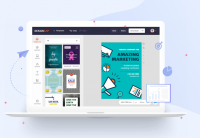
DesignCap is a web-based graphic design application engineered to streamline the creation of visual content without requiring local software installation. The platform targets both professional designers and beginners, providing a suite of tools for producing marketing assets, social media graphics, and print materials such as flyers, posters, and business cards.
Users have access to an extensive library of professionally designed templates. These include specialized formats for Facebook, Instagram, YouTube, and Twitter, as well as layouts for infographics, logos, and restaurant menus. The resource database features thousands of stock photos, icons, shapes, and diverse font styles to assist in the construction of unique designs.
The application offers a comprehensive range of customization and management features:
- Design Tools: Users can crop images, apply visual effects, and utilize handy text editing tools for adjusting font size, color, and style.
- Layer Management: The interface supports moving, resizing, and rotating elements with auto-snap functionality and undo/redo capabilities for precise editing.
- Resource Integration: Images can be uploaded from a local computer or imported directly from social media platforms.
- Export Options: Projects can be saved online for future revision, downloaded in JPG, PNG, or PDF formats, or shared directly via social media and email.
By centralizing these resources into a single browser-based interface, DesignCap provides a factual alternative to complex desktop publishing software.
Top 5 Reasons To Download DesignCap
- Unrivaled Simplicity for Professional Results: DesignCap eliminates the steep learning curve typically associated with professional design software, allowing anyone to create high-quality graphics in minutes.
- A Massive Library of Industry-Standard Templates: With thousands of professionally crafted templates for everything from social media to marketing materials, you never have to start from a blank canvas.
- High-Octane Performance with Zero Installation: As a powerful web-based application, it offers a fast, fluid experience without the need to clog up your hard drive or worry about system compatibility.
- Full Creative Freedom and Asset Integration: From an extensive stock photo library to advanced text effects and layer management, you have all the tools necessary to personalize every detail of your project.
- Versatile Exporting and Seamless Sharing: Whether you need a high-resolution PDF for printing or a quick PNG for Facebook, DesignCap provides flexible output options to get your work where it needs to go.
If you have ever felt the crushing weight of a looming deadline and realized you do not have the design skills—or the expensive software—to meet it, then listen up. As someone who spends all day testing the latest and greatest in tech, I have seen my fair share of "easy" design tools. Most of them are either too simple to be useful or so complicated that you need a Ph.D. in digital arts just to change a font color. That is why I am so excited to talk to you about DesignCap. This platform is a total game-changer for the modern content creator, business owner, and social media enthusiast. It manages to strike that elusive balance between professional-grade power and absolute user-friendliness. If you are looking for a way to revolutionize your workflow, this is the giveaway you cannot afford to miss. Let’s dive deep into why DesignCap belongs in your professional arsenal.
1. Unrivaled Simplicity for Professional Results
Let’s be honest: Adobe Photoshop is terrifying for most people. The moment you open a blank canvas in a high-end editor, you are met with hundreds of icons, nested menus, and a layer system that feels like it requires an engineering degree. DesignCap takes all of that anxiety and throws it out the window. The primary reason you need to get your hands on this software is its exceptional ease of use. It is designed with a "logic-first" interface. This means that everything is exactly where you expect it to be.
Whether you are a professional designer looking for a way to speed up your workflow or an amateur who just needs a flyer for a local bake sale, the experience is seamless. The drag-and-drop functionality is butter-smooth. You don’t have to worry about "anchoring points" or "vector paths" unless you want to. Instead, you focus on the visual. Want to move a logo? Just grab it. Want to resize a text box? Just pull the corner. This simplicity does not mean it is underpowered; rather, it means the power is focused on the user’s intent rather than the technical hurdles. For many of us, the goal isn't to become a master of software; the goal is to create something beautiful that works. DesignCap allows you to do exactly that without the headache.
Furthermore, the intuitive layout ensures that you spend less time searching for tools and more time actually designing. Elements like "auto-snap" help you align your objects perfectly, ensuring that your final product looks polished and professional rather than lopsided and amateur. It’s like having a professional designer standing over your shoulder, gently nudging your elements into the perfect position. This "smart" assistance is a hallmark of great modern tech, and it is executed perfectly here.
2. A Massive Library of Industry-Standard Templates
The hardest part of any creative project is the beginning. That "blank page syndrome" can paralyze even the most creative minds. DesignCap solves this by providing thousands of professionally designed templates. We aren't talking about generic, cheesy clip-art layouts from 1998. These are modern, sleek, and highly relevant designs that reflect current aesthetic trends.
If you are a YouTuber, you know how important channel art and banners are for branding. DesignCap has an entire section dedicated to YouTube Channel Art that looks like it was made by a high-end marketing agency. If you are a small business owner, the restaurant menu templates and business card layouts are ready to use immediately. The range is staggering: Facebook Covers, Instagram Posts, Twitter Headers, Pinterest Graphics, Email Headers, and even specialized formats like Infographics and Flyers.
The beauty of these templates is their flexibility. They aren't rigid boxes that you are stuck with. You can take a Facebook Post template, change the background, swap the icons, and suddenly you have a unique graphic that looks like it took hours to build from scratch. For those who need to produce high volumes of content—like social media managers—this library is a goldmine. It allows you to maintain a consistent, high-quality brand image across multiple platforms without having to reinvent the wheel every single morning. You simply pick a theme, tweak the details, and you are ready to post.
3. High-Octane Performance with Zero Installation
In the world of tech, "convenience is king." One of the most significant advantages of DesignCap is that it is a web-based application. This means there is no bulky software to download, no "minimum system requirements" to worry about, and no constant updates that interrupt your work. You can access your projects from any computer with an internet connection. This is a massive win for people who jump between a desktop at work and a laptop at home.
Many people assume that web-based apps are slower or less capable than desktop software, but DesignCap proves them wrong. The application is incredibly fast. Moving elements, applying filters, and rendering previews happens almost instantaneously. This speed is crucial when you are in the "flow state" of creation. There is nothing worse than waiting for a progress bar to finish just because you wanted to see how a different shade of blue looks on your logo.
By removing the hassle of installation, DesignCap also saves your computer's resources. Professional design suites can take up gigabytes of space and hog your RAM, making your entire system crawl. DesignCap runs in your browser, leaving your computer’s memory free for other tasks. This makes it the perfect solution for users with older hardware or those who prefer to keep their machines lean and clean. It’s design-on-demand, available whenever and wherever you need it.
4. Full Creative Freedom and Asset Integration
While the templates provide a great starting point, the real magic of DesignCap lies in its personalization features. This isn't just a "fill in the blanks" tool; it is a comprehensive design suite. You have access to an abundant library of resources, including stock photos, shapes, icons, and preset text styles. If you can imagine it, you can probably build it using the elements provided within the app.
One of my favorite features is the ability to add photos from multiple sources. You aren't limited to what is in their library. You can upload images directly from your computer, or even import them from Facebook and other online photo stocks. Once your images are in the editor, the customization options are vast. You can crop them to the exact dimensions you need, apply popular photo effects to give them a specific "vibe," and adjust the transparency to layer them creatively.
The text editing tools are equally impressive. You aren't just stuck with "Arial" or "Times New Roman." You have access to a wide variety of professional fonts and preset text styles that help your message pop. You can adjust the size, color, and alignment, and even apply effects like shadows or glows. The layer management system allows you to stack elements, move them to the front or back, and lock them in place. This level of control is what separates a simple "app" from a true "design tool." It gives you the freedom to be as simple or as complex as you want to be.
5. Versatile Exporting and Seamless Sharing
A great design is useless if you can't get it to the right people in the right format. DesignCap excels in the final stage of the creative process: the output. Once you have finished your masterpiece, you have several high-quality options for what to do with it next. You can download your creation as a JPG or PNG for digital use, or as a PDF for high-quality printing. The PDF option is particularly important for things like flyers, menus, and business cards, where you need crisp lines and professional color reproduction.
Beyond just downloading, DesignCap understands the social nature of modern design. You can directly share your work to platforms like Facebook, Twitter, and Tumblr. If you are working with a team or showing a draft to a client, you can use the share link to let others see your work without having to send a heavy file attachment. This streamlined workflow—from initial concept to final social media post—is incredibly efficient.
And let’s not forget the "Save Online" feature. Your projects are stored in the cloud, meaning you can come back to them a week, a month, or a year later and make quick edits. Imagine you designed a beautiful menu for your restaurant, and then you need to change one price. Instead of starting over, you just log in, change the number, and hit print. This ability to archive and re-edit your work turns DesignCap from a one-time tool into a long-term business asset. It’s about more than just making one graphic; it’s about building a library of assets that grow with your brand.
Final Verdict: Why You Need This Now
In the digital age, visual communication is everything. Whether you are trying to grow a brand, promote an event, or just make your social media feed look more polished, the quality of your graphics says a lot about you. DesignCap is the rare tool that makes high-end design accessible to everyone. It removes the barriers of cost, technical complexity, and hardware requirements, leaving you with nothing but your own creativity.
When you look at the combination of abundant templates, powerful editing tools, and effortless sharing, it becomes clear why this is a must-download giveaway. You are getting more than just an app; you are getting a shortcut to professional branding. You are getting the ability to produce content that stands out in a crowded digital world. You are getting your time back.
We have all been in that position where we needed a graphic "yesterday," and we ended up settling for something "good enough." With DesignCap, you never have to settle again. You can produce "stunning" instead of "okay," and you can do it in the time it takes to finish a cup of coffee. Don't let this opportunity pass you by. Download this giveaway, sign up, and start exploring. Whether you are creating a logo for a new startup, a flyer for a community event, or an infographic for your next blog post, you will find that DesignCap is the partner you’ve been looking for. It is fast, it is powerful, and it is going to revolutionize the way you work. Get it now and start creating something amazing today.


Reviews for DesignCap
Click Here to Read Reviews for DesignCap >> Click Here to Submit Reviews for DesignCap >>