What Does Portrait Painter Do?
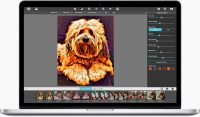
Portrait Painter is a specialized digital application designed to transform standard photographs into simulated hand-painted gallery-style portraits. Utilizing a complex algorithm, the software analyzes image components to distinguish between backgrounds and intricate subjects such as hair or skin. It then applies millions of individual brush strokes to emulate the appearance of oil or acrylic paint on fine linen or canvas textures.
The tool provides two primary professional styles: a classic color palette for traditional results and a modern, vibrant option for more contemporary aesthetics. For precision work, the software includes an ellipse Detail Tool. This allows users to define specific areas, such as the eyes or face, where the engine renders smaller, more refined brush strokes. Users can also utilize the "smooth skin" feature to minimize the appearance of freckles and wrinkles, or use the randomize color palette function to replace natural tones with abstract color schemes.
Key technical capabilities of Portrait Painter include:
- Manual control over brush size, stroke length, and bristle strength.
- Choice between canvas and linen surface textures.
- A fully editable Bright & Colorful palette for custom color placement.
- Access to 40 one-touch presets for rapid image processing.
- Support for multiple detail ellipses to prioritize focus on hands, eyes, or other objects.
This software caters to photographers and hobbyists seeking to convert digital files into fine-art simulations with granular control over the final stroke output.
Top 5 Reasons To Download Portrait Painter
- Unrivaled Algorithmic Precision: Unlike standard filters, Portrait Painter uses a complex engine to distinguish between textures like hair and skin, applying millions of individual strokes for a realistic finish.
- The Revolutionary Ellipse Detail Tool: This feature allows users to maintain fine detail in crucial areas like the eyes and lips while keeping the rest of the portrait broad and painterly.
- Dual Professional Paint Styles: Whether you want a timeless museum look or a vibrant, modern pop of color, the software offers both Classic and Bright & Colorful palettes.
- Authentic Canvas and Linen Textures: The software doesn't just change the colors; it simulates the physical medium of a gallery-style portrait with adjustable bristle strength and surface textures.
- Streamlined Workflow for All Skill Levels: With 40 one-touch settings and an intuitive interface, it bridges the gap between professional photographers and casual hobbyists.
In the world of digital photography, we are often overwhelmed by "filters." We see them every day on social media—quick, one-click overlays that wash out colors or add a bit of grain. But every once in a while, a piece of software comes along that defies the "filter" label and earns the title of a true creative tool. Portrait Painter is exactly that. It is a sophisticated, algorithmically-driven application designed to transform a standard digital photograph into a breathtaking work of fine art. If you have ever looked at a high-end gallery portrait and wondered how to achieve that level of texture and depth without spending decades mastering the oil brush, this is the giveaway you have been waiting for.
As a reviewer who has tested hundreds of imaging apps, I can tell you that the "magic" usually happens in the details. Most apps treat every pixel the same. Portrait Painter does the opposite. It looks at your image, understands the subject, and applies a level of craftsmanship that feels almost human. It is about more than just making a photo look like a painting; it is about immortalizing a moment in a way that feels timeless. Let’s dive deep into the five reasons why this software belongs in your permanent toolkit.
1. Unrivaled Algorithmic Precision
The core of Portrait Painter is its revolutionary algorithm. When we talk about "simulating" a painting, most software simply smudges the pixels or applies a uniform texture map. This often results in a "mushy" look where the subject's nose blends into their cheek, or their hair looks like a solid block of color. This software takes a radically different approach. It identifies every aspect of the image, performing a digital "triage" of the composition. It discerns the difference between the background and the fine details of the subject, such as the wisps of hair, the curve of an eyelid, or the texture of a piece of clothing.
Once the algorithm understands the geometry and the lighting of the photo, it begins the process of applying millions of strokes. These are not random. The strokes follow the contours of the face and body, mimicking the way a real painter would move their hand to define form. This level of precision ensures that the final result isn't just a blurred version of your photo, but a reconstructed masterpiece. The strokes have direction, weight, and "intelligence." This is what gives the output that "gallery-style" look. When you zoom in on a portrait created with this tool, you can see the individual bristles and the way the "paint" interacts with the digital canvas. It provides a level of sophistication that is usually reserved for professional digital artists who spend hours painting by hand with a tablet. Having this power automated through a high-level algorithm is a massive advantage for anyone looking to produce high-quality art quickly.
2. The Revolutionary Ellipse Detail Tool
One of the biggest challenges in digital painting is maintaining the "soul" of the portrait, which almost always resides in the eyes. In traditional painting, an artist will use a large brush for the background and clothing but switch to a tiny, fine-tipped brush for the facial features. Most automated software fails here because it applies the same brush size to the entire image, leaving the eyes looking blurry or unrecognizable. Portrait Painter solves this elegantly with its ellipse Detail Tool.
This tool is a game-changer for anyone who values the likeness of their subject. It allows you to place an adjustable ellipse over the most important parts of the image—typically the face. Inside this area, the software renders smaller, more delicate brush strokes, while keeping the larger, more expressive strokes for the rest of the canvas. You aren't limited to just one, either. You can use multiple ellipses to ensure that the eyes, hands, or even specific jewelry or objects retain their sharp, recognizable details. This creates a beautiful contrast between the "loose" style of the background and the "tight" style of the focal point. It draws the viewer’s eye exactly where it needs to go, mimicking the focus techniques used by master portraitists for centuries. It gives you the control of a professional artist with the ease of a simple drag-and-drop interface.
3. Dual Professional Paint Styles: Classic vs. Modern
Art is subjective, and a tool is only as good as its versatility. Portrait Painter understands this by offering two distinct, professional-grade paint styles. First, you have the Classic style. This is for the traditionalists. It utilizes a sophisticated color palette that feels like it belongs in a heavy gold frame in a dimly lit museum. It emphasizes natural skin tones, deep shadows, and the rich, somber moods often associated with historical portraiture. If you are working on a family legacy photo or a formal portrait, the Classic style provides a level of dignity and "weight" that is hard to replicate.
On the other hand, for those who want something a bit more avant-garde, there is the Bright & Colorful style. This is where the software gets to show off its "modern" side. This palette is vibrant, punchy, and full of life. It’s perfect for contemporary portraits, pet photography, or artistic projects where you want the colors to "pop" off the screen. Furthermore, the software includes a randomize color palette feature. This is incredibly fun to use. It allows you to replace the natural colors of the painting with unexpected, artistic hues. You might find a portrait suddenly bathed in teals and magentas, transforming a standard headshot into a piece of pop art. Because this palette is fully editable, you can tweak the colors until they perfectly match your vision. Having these two extremes—classic and modern—at your fingertips makes the software useful for an incredibly wide range of projects.
4. Authentic Canvas and Linen Textures
A painting isn't just about the paint; it's about the surface it sits on. One of the most common complaints about digital art is that it looks too "smooth" or "plastic." Portrait Painter addresses this by integrating high-fidelity textures directly into the rendering process. You have the option to choose between canvas and linen textures, which provides that tactile, physical feel of a real-world object. These aren't just flat overlays; the algorithm calculates how the brush strokes should interact with the weave of the fabric.
Beyond the surface texture, you have granular control over the physics of the paint itself. You can adjust the brush size, stroke length, and bristle strength. If you want a very "thick" look where the paint seems to stand up off the canvas (known in the art world as impasto), you can crank up the bristle strength. If you want a smoother, more blended look, you can increase the stroke length. Additionally, the smooth skin feature is a lifesaver for portraitists. We all know that high-resolution digital cameras can be "too" honest, highlighting every wrinkle, freckle, and blemish. This feature allows you to beautify the subject by softening these elements within the painting, resulting in a flattering, "fine art" version of the person that maintains their character while enhancing their aesthetic appeal. It’s like having a digital makeup artist and a master painter working in tandem.
5. Streamlined Workflow for All Skill Levels
Perhaps the most compelling reason to download Portrait Painter is how it respects your time. We live in an era where we want professional results without a steep learning curve. This software is designed to be accessible to everyone, from the professional photographer who needs to offer "painted" upgrades to their clients, to the hobbyist who just wants to make a beautiful gift for a family member. The inclusion of 40 one-touch settings means that you can start seeing incredible results the second you open the app. These presets act as fantastic jumping-off points, allowing you to see the potential of your image before you start fine-tuning the sliders.
For the pros, the workflow efficiency is unmatched. Manually painting a portrait in a program like Photoshop could take eight to ten hours of meticulous work. Portrait Painter does the heavy lifting in seconds, leaving you with the creative task of "directing" the art rather than laboring over every individual stroke. For the hobbyists, it’s simply a joy to use. There is something genuinely magical about watching a photo of a child, a pet, or a grandparent transcend from a simple digital file into something that looks like it was commissioned from a professional studio. It "immortalizes" the subject, as the creators say, and that emotional impact is what makes this software so valuable. It turns your hard drive full of photos into a gallery of potential masterpieces.
In conclusion, Portrait Painter isn't just another app to clutter your hard drive. It is a specialized, high-performance tool that bridges the gap between photography and fine art. By combining a "smart" brush engine with intuitive user controls and professional-grade textures, it allows anyone to produce stunning, gallery-ready portraits. Whether you are looking to create a unique gift, enhance your professional portfolio, or simply explore your creative side, this software provides all the tools you need to succeed. Do not miss the chance to download this giveaway; it is a rare opportunity to own a piece of software that truly changes the way you look at your digital images. It’s time to stop just taking pictures and start creating art.
The beauty of this software lies in its ability to handle the "boring" parts of artistry—the repetitive strokes and the technical shading—leaving you to handle the "vision." You decide the mood, you decide the focus, and you decide the color story. In a world where everything is temporary and digital, Portrait Painter gives your images a sense of permanence and "fine art" gravitas. It’s an essential download for anyone who loves the aesthetic of the masters but lives in the digital age. Get it, experiment with the Detail Tool, try out the Bright & Colorful palette, and watch your subjects come to life in a whole new way.
By downloading this software today, you are giving yourself the gift of time and creativity. You are moving beyond the limitations of the camera lens and entering the world of the painter's brush. With its classic and modern styles, its intelligent detail retention, and its gorgeous textures, Portrait Painter is the ultimate tool for turning the everyday into the extraordinary. Take advantage of this giveaway now and start your journey into the world of digital fine art.


Reviews for Portrait Painter
Click Here to Read Reviews for Portrait Painter >> Click Here to Submit Reviews for Portrait Painter >>