What Does Network Alarmer Do?
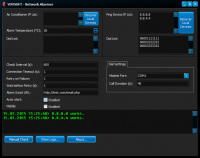
Network Alarmer is a lightweight utility designed to monitor the status and availability of various network devices and environmental hardware. Developed by Vovsoft, the application allows users to populate a PING Hostname List with multiple IP addresses to be tracked simultaneously. The software verifies the connectivity status of these entries at regular intervals, providing real-time results and timestamped logs within the interface to track uptime or connectivity drops.
Beyond standard network pinging, the application includes specialized functionality for monitoring air conditioning units via user-defined IP addresses. This feature supports multiple devices and allows for the configuration of maximum temperature thresholds. If a monitored device becomes unreachable or if the environmental temperature exceeds the pre-set limit, the software initiates automated alerts. Users can configure these notifications to be delivered through email messages or automated phone calls, ensuring immediate awareness of hardware failures.
The software is built for low-resource environments and aims to simplify server room oversight. It provides a centralized point for tracking network stability and environmental conditions without the overhead often associated with larger enterprise-level monitoring suites. This makes it a practical tool for administrators needing reliable, automated status checks for their local or remote hardware infrastructure.
Top 5 Reasons To Download Network Alarmer
- Unrivaled Proactive Alerting via Phone and Email: Unlike basic monitors that only provide desktop notifications, this tool ensures you stay informed via direct communication channels even when you are away from your desk.
- Dedicated HVAC and Air Conditioning Monitoring: A rare feature for network utilities, allowing you to track environmental conditions and temperature thresholds for critical hardware rooms.
- Minimalist, High-Efficiency Resource Footprint: The software follows a "no-bloat" philosophy, ensuring that your monitoring solution doesn't become a burden on the very system it is trying to protect.
- Streamlined IP and Hostname Management: An intuitive interface allows for the rapid addition of multiple devices, providing a real-time, timestamped log of your entire network’s health.
- Comprehensive Peace of Mind for Sysadmins and Home Labbers: It bridges the gap between expensive enterprise monitoring suites and free, unreliable tools, offering professional-grade reliability at no cost during this giveaway.
In the fast-paced world of digital infrastructure, downtime is the ultimate enemy. Whether you are managing a small office network, a complex home lab, or a dedicated server room, the moment a device goes offline, the clock starts ticking on lost productivity, data corruption, or hardware damage. We have all seen the various tools on the market that claim to monitor your "uptime," but many of them are either too complex for the average user or too resource-heavy to run on older hardware. This is where Network Alarmer by Vovsoft enters the fray, and quite frankly, it is a tool that every proactive tech enthusiast should have in their utility belt. If you are looking for a reason to jump on this giveaway, I have compiled an in-depth look at why this software is a must-download.
1. Unrivaled Proactive Alerting via Phone and Email
The biggest flaw with most network monitoring applications is where the notification ends up. If a server goes down at 2:00 AM and the software simply puts a red "X" on a dashboard or sends a silent desktop notification, you aren’t going to know about it until you walk into the office the next morning. By then, the damage is done. Network Alarmer elevates the concept of monitoring by integrating automated phone calls and email messages into its core functionality.
When you configure this software, you aren't just setting up a ping loop; you are setting up a digital sentry. The ability to receive an automatic phone call the moment a critical IP address stops responding is a game-changer for anyone who values their uptime. This feature ensures that you are alerted in a way that is impossible to ignore. For those who prefer a documented trail, the email notification system provides instant context, allowing you to see exactly which device failed and when. This dual-layered approach to alerting means that whether you are in a deep sleep, in a meeting, or commuting, you will be the first to know when something goes off course. In the world of IT, being the first to know is half the battle won.
2. Dedicated HVAC and Air Conditioning Monitoring
Perhaps the most unique and compelling reason to download Network Alarmer is its specialized support for air conditioning machines. Most tech reviewers and sysadmins know that the greatest threat to a server isn't just a software crash—it's heat. A failed cooling system in a server closet can lead to thousands of dollars in melted silicon within a matter of hours. This software recognizes that physical environment monitoring is just as important as digital connectivity.
The application allows you to define a specific IP for your air conditioning units and, more importantly, set a maximum temperature level. If the sensors detect that the room is getting too hot, the software triggers the same robust alert system used for network outages. This functionality is usually reserved for incredibly expensive industrial monitoring systems. Finding this level of environmental oversight in a lightweight utility is a rarity. It allows you to monitor not just the "heartbeat" of your servers via PING, but the "health" of the atmosphere they live in. If you are running high-performance hardware, this feature alone makes the software an essential download.
3. Minimalist, High-Efficiency Resource Footprint
In an era where software developers seem to care less and less about RAM usage, Vovsoft remains a breath of fresh air. Network Alarmer is built with a minimalist philosophy. It is incredibly lightweight, meaning it can run on an old "junk" PC or a low-powered Windows tablet acting as a dedicated monitoring station without breaking a sweat. You don't need a multi-core processor or gigabytes of available memory to keep this tool running in the background.
As a reviewer, I am often frustrated by "helper" utilities that consume more resources than the primary applications they are supposed to be assisting. This software avoids that trap entirely. It sits quietly in the system tray, performing its checks at the intervals you define, and only makes its presence known when there is a legitimate issue to report. This efficiency makes it perfect for "set it and forget it" deployments. You can install it on a secondary machine, configure your hostnames, and trust that it will perform its duties for months at a time without needing a reboot or causing system lag.
4. Streamlined IP and Hostname Management
User experience is often overlooked in networking tools, which are frequently cluttered with confusing jargon and buried menus. Network Alarmer keeps things refreshingly simple. The "PING Hostname List" is the star of the show here. You can quickly add various IP addresses—be they routers, switches, servers, or smart devices—and the utility immediately begins its verification process. There is no need to write complex scripts or navigate through nested configuration screens.
The interface provides a clear, timestamped notice in the lower part of the window, giving you a running log of every check performed. This logging is vital for troubleshooting intermittent issues. Sometimes a device doesn't "die," it just "flickers." By reviewing the timestamped results, you can identify patterns—perhaps a router is rebooting every day at noon, or a specific switch is struggling under heavy load at certain hours. Having this data presented in a simple, readable format allows you to move from "reactive" fixes to "proactive" maintenance. It simplifies the life of the user by providing only the data that matters, exactly when it matters.
5. Comprehensive Peace of Mind for Sysadmins and Home Labbers
Ultimately, the reason you download a tool like this is for the peace of mind it provides. There is a specific kind of anxiety that comes with managing a network—the constant wonder of "is everything okay right now?" Network Alarmer cures that anxiety. It acts as an insurance policy for your digital life. Because it supports multiple devices at once, you can create a comprehensive map of your critical infrastructure and know that it is being watched over by a tireless digital eye.
For home users, this might mean monitoring your NAS (Network Attached Storage) to ensure your family photos are always accessible. For small business owners, it might mean ensuring the credit card terminal is always online so you never miss a sale. For sysadmins, it means the difference between a controlled fix and a chaotic disaster recovery. This giveaway represents an opportunity to professionalize your monitoring setup without any financial risk. When you consider the cost of the hardware you are protecting, the "price" of Network Alarmer—especially during this giveaway—is an absolute steal. It is a reliable, focused, and effective tool that does exactly what it says on the tin, and in today's software landscape, that is something to be celebrated.
In conclusion, Network Alarmer isn't just another networking utility; it's a dedicated guardian for your hardware and connectivity. Its combination of aggressive alerting, environmental monitoring, and lightweight design puts it in a class of its own. If you have any devices on your network that you can't afford to lose, do yourself a favor and download this giveaway today. You’ll sleep a lot better knowing that if something goes wrong, you’ll be the first person to get the call.


Reviews for Network Alarmer
Click Here to Read Reviews for Network Alarmer >> Click Here to Submit Reviews for Network Alarmer >>