What Does Microsoft Power Automate Desktop Do?
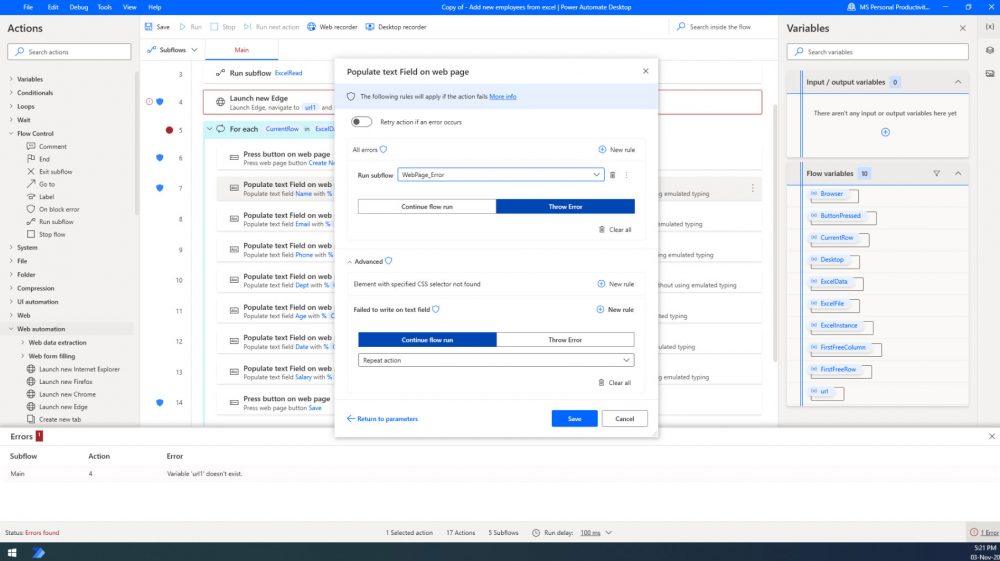
Power Automate Desktop expands robotic process automation (RPA) capabilities by allowing users to automate repetitive, rule-based tasks on their workstations. The software features an intuitive designer that utilizes a drag-and-drop interface with prebuilt actions, alongside a recorder for capturing live desktop flows. It is designed to bridge the gap between legacy systems and modern web or desktop applications.
Users can leverage the platform to interact with common productivity tools like Microsoft Excel and email. Key functionalities include:
- Organizing documents using dedicated file and folder actions.
- Extracting data from websites and storing the results directly in Excel files.
- Automating data entry within ERP systems or terminal emulators.
- Navigating applications using UI elements, image recognition, or specific coordinates.
The software caters to a broad demographic, including home users, small businesses, and large enterprises. Whether the task involves a self-employed individual extracting information from vendor invoices or a home user gathering data from weather websites, Power Automate Desktop provides a framework for automation. By supporting both modern software and legacy infrastructure, the tool allows users to put complex manual processes on autopilot across various desktop environments.
Top 5 Reasons To Download Microsoft Power Automate Desktop
- Universal Accessibility for All Skill Levels: Whether you are a home user tracking weather or an enterprise employee managing an ERP, the intuitive design makes automation accessible to everyone.
- The Ultimate Bridge Between Legacy and Modern Systems: It seamlessly connects old-school terminal emulators with modern web applications, ensuring no software is left behind.
- Effortless Design via Drag-and-Drop and Recording: You can build complex workflows without writing a single line of code by using the visual designer or simply recording your manual actions.
- Deep Integration with Essential Productivity Tools: It features native, powerful actions for Excel, Email, and file management, turning hours of manual data entry into seconds of background processing.
- High-Precision Web Scraping and Data Extraction: Easily pull data from any website and organize it into structured formats, putting your research and reporting on complete autopilot.
If you have ever felt the soul-crushing weight of repetitive digital tasks, you know exactly why the tech world is currently obsessed with Robotic Process Automation, or RPA. We have all been there: spending hours copying data from an email into an Excel spreadsheet, or clicking through the same five menus in a legacy accounting program just to generate a report. It is tedious, it is prone to human error, and frankly, it is a waste of your cognitive potential. This is where Power Automate Desktop steps in, and why this particular giveaway is something you cannot afford to ignore. As a reviewer who has seen countless "productivity" apps come and go, I can tell you that this is not just another utility; it is a fundamental shift in how you interact with your computer.
Power Automate Desktop represents the democratization of automation. In the past, if you wanted to automate a complex workflow across different software programs, you either needed to be a seasoned programmer or have a massive IT budget to hire consultants. Those days are officially over. This software brings industrial-grade automation power to the desktop of every home user, small business owner, and corporate professional. It is designed to take the "robotic" out of your workday, leaving you free to focus on the tasks that actually require human creativity and judgment. Let us dive deep into the five primary reasons why you need to download this tool and integrate it into your daily routine immediately.
1. Universal Accessibility for All Skill Levels
The most impressive feat Power Automate Desktop achieves is its sheer versatility. Often, software is built for a specific niche—either it is too simple for pros or too complex for casual users. This tool manages to break that mold entirely. It is addressed to essentially everyone who performs rule-based tasks on their workstations. Whether you are a stay-at-home parent trying to organize a massive library of digital photos and documents, or a self-employed contractor extracting data from vendor invoices, the software scales to meet your specific needs.
For the home user, imagine wanting to check the weather forecast every morning and having that data automatically sent to your phone or saved in a log. Usually, this would require checking a website manually. With Power Automate Desktop, you can set up a "flow" that does this for you in the background while you pour your first cup of coffee. On the other end of the spectrum, enterprise employees can use the same software to automate data entry into massive ERP systems. The beauty lies in the fact that the underlying logic remains the same: if this happens, then do that. By providing a platform that caters to both the "weather-checker" and the "ERP-manager," Microsoft has created a tool that grows with you. You don't need a computer science degree to get started, but the ceiling for what you can achieve is incredibly high.
2. The Ultimate Bridge Between Legacy and Modern Systems
One of the biggest headaches in the modern workplace is the "software gap." Most businesses use a mix of cutting-edge web applications and "legacy" systems—those old, clunky programs that haven't been updated in a decade but are still vital to operations. Usually, these two worlds do not talk to each other. You end up being the human bridge, manually moving data from a modern web browser into a 20-year-old terminal emulator. It is inefficient and exhausting.
Power Automate Desktop is the solution to this fragmentation. It is uniquely designed to interact with both modern web applications and legacy software. It doesn't care if the program you are using was built yesterday or in 1995. Through its advanced UI automation capabilities, it can "see" buttons, text fields, and menus in almost any environment. It can interact with terminal emulators, virtual desktops, and complex web interfaces with the same level of precision. By downloading this tool, you are effectively giving your computer the ability to navigate your entire software ecosystem as if it were a single, unified platform. This ability to put your work on "autopilot" across disparate systems is a game-changer for anyone dealing with older corporate infrastructure.
3. Effortless Design via Drag-and-Drop and Recording
The "fear factor" of automation usually stems from the idea of coding. Many people assume they need to learn Python or some other language to make their computer do their bidding. Power Automate Desktop removes this barrier with its intuitive designer. The interface is built around a drag-and-drop philosophy. You have a library of prebuilt actions—hundreds of them—and you simply pull them onto your canvas to create a sequence. Want to open a folder? Drag the action. Want to find a specific file? Drag the action. It is visual, logical, and surprisingly fun to use.
But the real "magic" for many users will be the Desktop Recorder. If you can perform a task manually, you can automate it. You simply turn on the recorder, perform your task one last time, and the software watches what you do. It tracks your mouse clicks, your keystrokes, and the windows you open. Once you are finished, it converts those actions into a flow that you can run whenever you want. This "record and playback" functionality is perfect for those complex, multi-step processes that are hard to describe but easy to demonstrate. It turns the software into a digital apprentice that learns by watching you work. This is the quickest and easiest way to start reclaiming your time, and it makes the learning curve virtually non-existent.
4. Deep Integration with Essential Productivity Tools
Most of our digital lives revolve around a few key pillars: Email, Excel, and File Management. These are the tools where the bulk of repetitive work happens. Power Automate Desktop treats these tools as first-class citizens. The integration here is deep and incredibly powerful. For instance, the Excel automation capabilities go far beyond simple data entry. You can command the software to launch Excel, read specific cells, run macros, add worksheets, and even perform complex data filtering—all without you ever touching the mouse.
Think about the implications for your daily workflow. You could set up a flow that monitors your email inbox for specific attachments. When an invoice arrives, the software can automatically save it to a specific folder, extract the total amount due, and log that data into a master Excel spreadsheet. This isn't science fiction; it is what this software does best. By automating the interaction between your everyday tools, you eliminate the "busy work" that takes up the first two hours of every morning. The software handles the tedious organization of documents and folders, ensuring that everything is exactly where it needs to be, accurately and consistently. For anyone who lives in "Excel Hell," this feature alone is worth the download.
5. High-Precision Web Scraping and Data Extraction
We live in the age of data, but often that data is trapped on websites in a way that is hard to use. Manual web scraping—the process of copying information from a site into a document—is one of the most tedious tasks imaginable. Power Automate Desktop features robust Web Automation tools that turn this process into a breeze. It can navigate to a URL, wait for the page to load, find specific data points (like prices, names, or dates), and extract them with pinpoint accuracy.
The potential applications here are endless. A small business owner could use this to monitor competitor pricing every day. A researcher could use it to pull the latest headlines or statistics from various portals. Because the software can interact with UI elements, images, or even specific coordinates, it is remarkably resilient. Even if a website has a complex layout, Power Automate Desktop can be trained to find the information you need. Once the data is extracted, it can be seamlessly stored in Excel or sent via email. This puts your research and data gathering on complete autopilot, providing you with a constant stream of information without any manual effort. It is like having a personal research assistant working for you 24/7.
In conclusion, Power Automate Desktop is more than just a utility; it is a productivity powerhouse that bridges the gap between human intent and computer execution. By offering a platform that is accessible to home users yet powerful enough for the enterprise, Microsoft has created a tool that truly empowers everyone. The ability to record your actions, interact with legacy systems, and deeply integrate with Excel and web data makes this one of the most compelling downloads available today. We are moving toward a world where "manual" is a choice, not a requirement. By downloading this giveaway, you are taking the first step into that future. Stop wasting your time on tasks a machine can do better, and start focusing on the work that actually matters. This is your chance to put your digital life on autopilot—don't let it pass you by.
The software described in this article provides a comprehensive suite of tools for anyone looking to streamline their workflow. From simple file organization to complex cross-platform data entry, the intuitive design ensures that you spend less time clicking and more time thinking. Whether you are managing personal finances or enterprise-level logistics, the power of automation is now at your fingertips.
Make sure to take advantage of this opportunity to enhance your workstation with these professional-grade RPA capabilities. The transition to an automated workflow is easier than you think, and the rewards in terms of time saved and errors reduced are immeasurable. Download it, explore the designer, and watch as your most tedious tasks disappear into the background.

Reviews for Microsoft Power Automate Desktop
Click Here to Read Reviews for Microsoft Power Automate Desktop >> Click Here to Submit Reviews for Microsoft Power Automate Desktop >>