What Does Directory Monitor Do?
Directory Monitor is a specialized surveillance utility designed to track activity within local folders and network shares. The software provides real-time detection of file-level events, including new file creations, deletions, and modifications. By monitoring these directories, the tool identifies changes initiated by both human users and automated system processes.
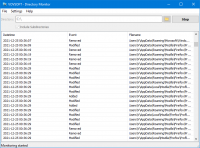
The application features a simplified workflow intended for immediate deployment. Users begin by launching the utility and selecting the specific directory or network path they wish to oversee. Once active, the software records all detected alterations in a centralized log window. To facilitate long-term data management, these logs can be exported as TXT or CSV files, allowing for offline analysis or administrative auditing.
Key functional capabilities include:
- Real-time surveillance of selected directory paths.
- Detection of file modifications, additions, and removals.
- Compatibility with both local storage and network-mapped shares.
- Log exportation for archiving and reporting purposes.
This utility is built for users requiring a transparent view of file system activity without complex configuration requirements. Its straightforward approach allows for the monitoring of sensitive directories to ensure data integrity and track unauthorized access or unexpected software behavior.
Top 5 Reasons To Download Directory Monitor
- Instant Real-Time Detection: Capture every file creation, modification, and deletion the very millisecond it happens.
- Comprehensive Network Share Support: Monitor not just local folders, but remote directories and network drives with ease.
- High-Fidelity Logging and Exporting: Generate detailed TXT and CSV reports to maintain a permanent audit trail of all system activity.
- Streamlined, Intuitive User Interface: Skip the steep learning curve with a "set it and forget it" workflow designed for both pros and novices.
- Ultra-Lightweight Resource Footprint: Keep your system running at peak performance while the software works silently in the background.
In the fast-paced world of digital file management, knowing exactly what is happening within your system is not just a luxury—it is a necessity. Whether you are a professional IT administrator managing a complex network, a creative professional tracking versions of a project, or a casual user trying to figure out which application is cluttering your hard drive, having eyes on your folders is paramount. This is where Directory Monitor steps in. It is a robust, reliable, and incredibly efficient tool that transforms the way you interact with your file system. If you have ever felt like your folders were a "black box" where files mysteriously appeared or vanished, this giveaway is the solution you have been waiting for. Let us dive deep into why this specific utility deserves a permanent spot on your workstation.
1. Instant Real-Time Detection
The core strength of any monitoring tool lies in its speed. In a modern computing environment, processes happen in the blink of an eye. A script might run, a background update might trigger, or a user might accidentally drag a folder into another directory. If your monitoring software only checks for changes every five or ten minutes, you are already too late. You have missed the window of intervention. Directory Monitor excels here by offering true real-time surveillance. It hooks into the file system notifications to ensure that as soon as a bit changes on the disk, you are notified.
Imagine you are troubleshooting a piece of software that keeps crashing. You suspect it is deleting a temporary configuration file upon exit. By setting this tool to watch the application's data folder, you can see the exact moment that file disappears. This level of granular, immediate feedback is invaluable. It removes the guesswork from system maintenance. You are no longer reacting to problems hours after they occur; you are witnessing the evolution of your directory structure as it happens. For anyone who values precision, the real-time aspect of this software is a game-changer.
Furthermore, this real-time detection extends to all types of file events. It isn't just about new files appearing. It tracks modifications—those subtle changes to document metadata or content that could signify a successful save or a malicious unauthorized access. It tracks renames, which are often the culprit behind "lost" files in a shared environment. By capturing these events instantly, the software provides a live heartbeat of your data’s health and movement.
2. Comprehensive Network Share Support
In today's interconnected world, very few of us work strictly on a local hard drive. We use Network Attached Storage (NAS), shared office servers, and mapped drives to collaborate with others. Monitoring a local "My Documents" folder is one thing, but monitoring a high-traffic network share used by twenty different employees is a much more difficult task. Many basic folder watchers fail when it comes to network protocols, often losing connection or failing to report changes made by other users on the network. Directory Monitor is specifically built to handle these challenges.
This software allows you to point its watchful eye at network shares just as easily as a local C: drive. This makes it an essential tool for project managers and IT staff. If you are waiting for a colleague in another department to drop a heavy video asset into a shared folder, you don't have to keep hitting "refresh" in Windows Explorer. The monitor will alert you the moment the file transfer begins or completes. It bridges the gap between your local workstation and the broader network infrastructure.
The ability to monitor remote directories also serves as a fantastic security layer. If you have a sensitive folder on a server that should only be accessed during business hours, you can keep the monitor running on your machine to see if any unexpected modifications occur late at night. It provides a window into the activity of the entire office network, ensuring that collaborative spaces remain organized and that you are always aware of how data is flowing across the organization.
3. High-Fidelity Logging and Exporting
Observing a change in real-time is great for immediate action, but what happens when you need to look back at what happened over the weekend? Or what if you need to provide proof that a certain file was deleted by a specific process at 3:00 AM? This is where the logging capabilities of Directory Monitor become your best friend. The software doesn't just show you a flashing notification; it meticulously records every event into a structured log.
The beauty of these logs lies in their portability and depth. You can export your directory change history into TXT or CSV files. For those who aren't familiar with data analysis, a CSV file is essentially a spreadsheet's best friend. You can pull that data into Excel or Google Sheets and sort it, filter it, and create reports. You can filter by "Action Type" to see only deletions, or sort by "Timestamp" to reconstruct a timeline of events leading up to a system error. This turns raw data into actionable intelligence.
From a compliance standpoint, this is a massive win. Many industries require a strict audit trail of who accessed or changed what data. While enterprise-level auditing software can cost thousands of dollars and require a team of experts to maintain, this utility offers a lightweight, accessible way to maintain your own logs. Whether you are keeping a record for personal peace of mind or for professional accountability, the export feature ensures that your data is never trapped inside the app. It belongs to you, ready to be analyzed, archived, or presented as evidence.
4. Streamlined, Intuitive User Interface
As a tech reviewer, I see far too many tools that are powerful but completely unusable because of a cluttered, confusing interface. Some developers seem to think that "advanced" means "difficult." Vovsoft takes the opposite approach with this directory monitor. The workflow is refreshingly simple: launch the application, select your target folder, and hit start. That is it. There are no convoluted menus to navigate or cryptic configuration files to edit before you can get to work.
This "set it and forget it" philosophy is what makes the software so compelling. You don't need a degree in computer science to understand the output. The events are listed clearly, telling you exactly what happened (Created, Deleted, Modified) and exactly when it happened. This accessibility means that the tool can be used by anyone. A photographer can use it to track when their photo-importing software has finished moving files; a writer can use it to ensure their auto-save backups are actually being generated; and a parent can use it to see if files are being moved around on a family computer.
Despite its simplicity, it doesn't feel "cheap" or "basic." The design is clean and functional, focusing on the data rather than unnecessary eye candy. It respects the user's time by getting straight to the point. In an era of "bloatware" where every app tries to do a hundred things poorly, it is wonderful to use a tool that does one thing—folder monitoring—perfectly. The intuitive nature of the app ensures that you will actually use it, rather than letting it sit idle on your hard drive because you can't remember how to configure it.
5. Ultra-Lightweight Resource Footprint
The biggest fear users have when installing a "monitoring" or "surveillance" tool is that it will slow down their computer. We have all experienced that one antivirus or system utility that hogs 40% of the CPU and makes the mouse cursor stutter. A directory monitor needs to be running constantly to be effective, which means it must be light. It needs to be a silent observer, not a resource hog. Directory Monitor is optimized to stay out of your way.
During my testing, the RAM and CPU usage were negligible. It sits quietly in the system tray, watching the file system hooks without interfering with your foreground applications. Whether you are rendering a 4K video, playing a high-end video game, or running complex simulations, you won't even notice this software is there. This is critical for a tool that is meant to be an "always-on" utility. You can add it to your startup items and rest easy knowing your system's performance remains uncompromised.
Efficiency also relates to stability. Because the software is focused and lightweight, it isn't prone to the crashes or "hangs" that plague more complex, multi-featured suites. It does its job reliably, day in and day out. For a tool designed to provide "surveillance" and "reliability," this stability is the ultimate feature. You can trust that if a file change occurs, the software will be awake and ready to catch it, without ever making your fans spin up or your battery drain faster. It is the definition of "efficient utility software."
Final Thoughts: Why You Need To Download This Today
We often take our file systems for granted until something goes wrong. We assume that when we save a file, it stays saved. We assume that when we share a folder, our colleagues are using it responsibly. But assumptions are the enemy of good data management. By downloading Directory Monitor, you are moving from a state of passive hope to a state of active awareness. You are taking control of your digital environment.
The combination of real-time alerts, network compatibility, and detailed logging makes this an indispensable tool for anyone who spends more than an hour a day on a computer. It is rare to find a utility that manages to be this powerful while remaining this simple. It solves the very real problem of "file drift" and accidental data loss by providing the one thing every user needs: visibility.
Don't wait until you are searching for a missing document or trying to figure out why your server's storage is suddenly full. Install this monitor now, set up your most important folders, and enjoy the peace of mind that comes with knowing exactly what is happening under the hood of your PC. This giveaway is a fantastic opportunity to upgrade your toolkit with a professional-grade utility that usually comes with a price tag. It is fast, it is light, and it is incredibly effective. Get it today and stop wondering what’s happening in your folders—start knowing.
In conclusion, if you value your time and your data, this is an absolute "must-have." The ability to export logs to CSV alone makes it worth the download, as it empowers you to perform long-term audits that would otherwise be impossible. Combined with the ease of monitoring network shares, it becomes a versatile powerhouse that fits into any workflow. Whether you’re a tech enthusiast or a casual user, Directory Monitor provides a layer of insight that Windows simply doesn't offer out of the box. Grab this giveaway and take the first step toward a more transparent and organized digital life.


Reviews for Directory Monitor
Click Here to Read Reviews for Directory Monitor >> Click Here to Submit Reviews for Directory Monitor >>