What Does Databit Password Manager Do?
Databit Password Manager is a desktop-based utility designed to store passwords, identities, and credit card information locally using AES-256 bit encryption. Unlike many browser-integrated or cloud-dependent solutions, this software utilizes an offline database architecture, which reduces exposure to large-scale web-based data breaches. Users can manage their stored credentials and initiate account logins directly from the system tray area.
The application includes Random Pattern Input (R.P.I.) technology, a security feature engineered to thwart key-loggers and clipboard monitors during the login process. Because the system requires no browser integration, user data remains disconnected from the internet by default. However, users maintain the option to synchronize their encrypted databases across multiple computers via local networks, flash drives, or specific cloud directories if they choose to manage those connections manually.
For ease of configuration, Databit provides several automated tools, including a Popular Website Wizard with pre-configured settings for over 100 platforms and an Internet Registration Wizard. The software also supports desktop application logins and offers three-layer encrypted automatic backups for data redundancy. While the core database remains offline, the application provides direct access to a library of instructional videos to assist with initial setup and advanced security configuration.
Top 5 Reasons To Download Databit Password Manager
- Uncompromising Offline Security: Unlike cloud-based competitors, your data stays on your machine, protected by military-grade AES-256 encryption.
- Advanced Keylogger Protection: The Random Pattern Input (R.P.I.) system ensures your credentials are never exposed to malicious software monitoring your keystrokes or clipboard.
- Freedom from Browser Vulnerabilities: By avoiding browser integration, Databit eliminates a massive attack vector that most modern password managers ignore.
- Exceptional Ease of Use: Specialized wizards and built-in help videos transform the traditionally complex process of managing offline databases into a simple, streamlined experience.
- Total Control Over Your Data: With three-layer encrypted backups and flexible synchronization options, you own your data and decide exactly how and where it is stored.
In the modern digital landscape, the average user is juggling dozens, if not hundreds, of different accounts. We are told to use unique, complex passwords for every single service, from our primary banking accounts to that one random forum we joined five years ago. This has led to a phenomenon known as "password fatigue." To combat this, most people turn to password managers. However, the current market is dominated by services that prioritize convenience over actual security, often storing your most sensitive data on remote servers in the "cloud" or integrating directly into your web browser. This creates a massive single point of failure. If the service provider is breached, or if your browser is compromised, your entire digital life is up for grabs.
Enter the Databit Password Manager. This software is a breath of fresh air for those of us who take cybersecurity seriously but don't want to spend hours configuring complex command-line tools. It strikes a perfect balance between high-level encryption and user-friendly design. In this article, I am going to break down exactly why you need to take advantage of this giveaway and why Databit should be your new home for digital security. This isn't just another utility; it is a fortress for your digital identity.
1. Uncompromising Offline Security with AES-256 Encryption
The first and most important reason to download Databit Password Manager is its fundamental architecture. Most modern password managers operate on a "cloud-first" model. While this makes syncing across devices easy, it also means your encrypted database is sitting on someone else’s computer. History has shown us that even the biggest names in the industry are not immune to data breaches. When you use an offline database manager like Databit, you are removing yourself from that global target list. Your passwords are stored locally on your hard drive, meaning a hacker would need physical access to your machine or a very specific, targeted remote exploit to even see your encrypted file.
But local storage is only half the battle; the encryption itself needs to be impenetrable. Databit utilizes AES-256 bit encryption. To put this into perspective, AES-256 is the standard used by governments, military organizations, and financial institutions worldwide. It is currently considered "computationally infeasible" to crack. Even with the world’s most powerful supercomputers, it would take billions of years to brute-force an AES-256 key. When you store your passwords, credit card information, and identities within Databit, you are wrapping them in a digital vault that is essentially unbreakable by today’s standards.
The beauty of this offline approach is that you are the master of your own security domain. You aren't trusting a third-party corporation to keep their servers patched or their employees vetted. You are trusting the math of AES-256 and your own ability to keep your computer secure. For the privacy-conscious user, this is the gold standard of password management.
2. Advanced Keylogger Protection: The Power of R.P.I.
One of the most overlooked threats in cybersecurity is the keylogger. You could have the longest, most complex password in the world, but if a piece of malware is recording every single key you press, that password is useless the moment you type it in. Many password managers try to solve this by using "copy and paste" or "auto-fill" features, but even these are vulnerable. Clipboard loggers can see everything you copy, and auto-fill can sometimes be tricked by hidden fields on a malicious website.
Databit Password Manager solves this problem with its Random Pattern Input (R.P.I.) technology. This is a game-changer for anyone worried about stealthy malware. Instead of simply pushing your password into a text box in a way that can be intercepted, R.P.I. uses a non-linear method to input your credentials. By breaking the pattern of how data is entered, it makes it incredibly difficult for keyloggers to reconstruct what was actually sent to the login field. Similarly, it protects your clipboard, ensuring that your sensitive data isn't just sitting there for any application to read.
This feature demonstrates a deep understanding of how modern cyberattacks work. It isn't enough to just store a password; you have to be able to *use* it safely. The R.P.I. system gives you the confidence to log into your sensitive accounts even if you are worried about the integrity of the environment you are working in. It’s an extra layer of "Active Defense" that most other password managers simply don't offer.
3. Freedom from Browser Vulnerabilities
We spend most of our digital lives inside a web browser—Chrome, Firefox, Edge, or Safari. Because of this, browser-integrated password managers have become very popular. They are convenient, popping up a "Save Password?" box every time you log in. However, from a security standpoint, this is a nightmare. Browsers are massive, complex pieces of software with huge "attack surfaces." They are constantly being targeted by exploits, and because they are always connected to the internet, they are the most likely entry point for an attacker.
Databit Password Manager takes a different, much safer approach: No browser integration required. By keeping your data disconnected from your browser, you are effectively "air-gapping" your credentials from the most vulnerable part of your operating system. If a malicious website manages to exploit a bug in your browser, it won't automatically have access to your password database because the database doesn't live inside the browser.
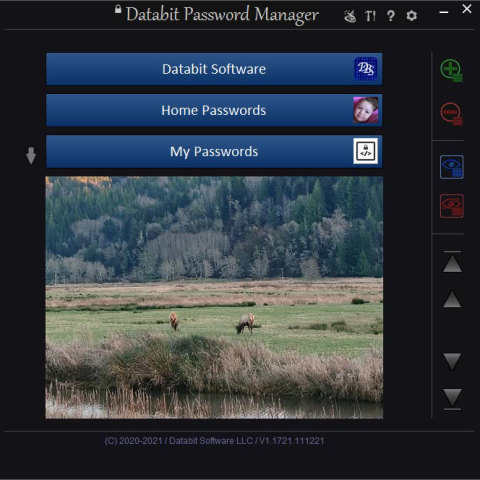
Instead, Databit allows you to manage everything from the System Tray. This keeps the application tucked away in your notification area, ready to be called upon when needed, but completely separate from the web content you are viewing. You get the convenience of quick access without the inherent risks of browser plugins. It’s a cleaner, more secure way to operate that avoids the "all eggs in one basket" mistake that so many users make when they rely on their browser to store their digital lives.
4. Exceptional Ease of Use: Wizards and Help Videos
There is a common misconception that "secure" software must be "difficult" software. Many people stick with insecure methods because they’ve tried offline password managers in the past and found them to be clunky, confusing, and frustrating to set up. Databit has clearly put a massive amount of effort into debunking this myth. They have designed the interface to be as intuitive as possible, ensuring that even a novice user can get up and running in minutes.
The standout feature here is the Password Account Wizard. Instead of forcing you to manually fill out dozens of fields, the wizard guides you through the process step-by-step. Even more impressive is the Popular Website Wizard. This tool includes pre-configured settings for over 100 of the most popular websites on the internet. You don't have to guess at the login URL or the specific requirements for a site; you just select it from the list, and Databit handles the rest. They even have an Internet Registration Wizard to help you sign up for new accounts securely from the start.
Furthermore, Databit understands that sometimes you just need a little bit of guidance. Built directly into the application are Help Videos. If you ever find yourself stuck or wondering how a specific feature works, you don't have to go hunting through a 200-page PDF manual. You can watch a quick video that shows you exactly what to do. This commitment to user experience is rare in the world of high-security software. It makes the transition from a less secure system to Databit completely painless.
5. Total Control Over Your Data: Backups and Synchronization
In the tech world, there is a saying: "Data that doesn't exist in three places doesn't exist at all." One of the biggest fears people have with offline password managers is: "What happens if my computer dies?" With a cloud service, you just log in on a new machine. With an offline manager, you need a solid backup strategy. Databit has anticipated this and provided a system that is actually *better* than the cloud because it gives you total control.
Databit features three-layer encrypted automatic backups. This means that even your backups are protected with the same high-level security as your primary database. But the real clincher is the flexibility. You aren't forced to use a specific backup service. You can choose to back up your data to a local network drive, a secure flash drive, or even your own personal cloud storage like OneDrive or Dropbox if you choose to. The difference is that *you* are the one making that choice, and the data is encrypted *before* it ever leaves your machine.
The synchronization capabilities are equally impressive. If you use multiple computers—perhaps a desktop at home and a laptop for travel—you can easily synchronize your password group databases. You can do this over a local network or via portable media. This ensures that you always have your most up-to-date credentials wherever you are, without ever having to surrender your privacy to a third-party server. Databit also supports Desktop Application Logins, meaning it isn't just for websites. You can manage access to your specialized work software, gaming platforms, and local utilities all from one secure hub. This level of versatility and control is why Databit stands head and shoulders above the competition.
Conclusion
In an era where our digital identities are constantly under fire, choosing the right password manager is one of the most important decisions you can make. You need something that is secure enough to withstand modern threats, but simple enough that you will actually use it. Databit Password Manager is that solution. It takes the unbeatable security of AES-256 offline storage and combines it with an interface that is genuinely a "breeze" to use.
By downloading this giveaway, you are moving away from the "convenience-at-all-costs" model of browser and cloud-based managers and moving toward a model of true digital sovereignty. You get the protection of R.P.I. technology to thwart keyloggers, the convenience of the System Tray for quick logins, and the guidance of specialized wizards to keep your database organized. Don't leave your security to chance or to the whims of cloud providers. Take control of your data, simplify your digital life, and give yourself the peace of mind that comes with knowing your passwords are truly secure. This is one download that your future self will thank you for.

Reviews for Databit Password Manager
Click Here to Read Reviews for Databit Password Manager >> Click Here to Submit Reviews for Databit Password Manager >>