What Does Flash Drive Recovery Do?
SoftOrbits Flash Drive Recovery is a specialized data restoration utility designed to retrieve lost information from solid-state storage media. The software addresses data loss resulting from formatting, physical damage, or file system corruption. It supports a broad range of hardware, including USB flash drives and standard memory card formats such as SD, SDHC, SDXC, Compact Flash, and Sony Memory Stick, as well as legacy formats like xD and MMC.
The application is capable of recovering various file types, including documents, MP3s, and digital images. It features a built-in visual pre-recovery preview that allows users to inspect the contents of recoverable files—including RAW images from digital cameras—without requiring third-party software. This tool also permits direct recovery from digital cameras and audio players, provided the device is recognized by the PC as a mounted drive letter.
The recovery process is fully automated. Users select the target drive from a list of available devices, and the software performs the scan and restoration logic independently. SoftOrbits Flash Drive Recovery is compatible with Microsoft Windows versions ranging from Windows 2000 and XP through Windows 8.
Main Benefits
- Restores all file types from flash-based media and USB drives.
- Supports major memory card formats and select digital cameras/audio players.
- Includes a standalone visual preview for images and documents.
- Facilitates recovery of RAW image formats such as CR2, NEF, and RAF.
- Automated interface requires no manual configuration for scanning.
- Compatible with Windows 2000, XP, Vista, 7, 8, and Server editions.
Top 5 Reasons To Download Flash Drive Recovery
Before we dive into the nitty-gritty of why this software is an absolute essential for your digital life, let’s look at the core benefits. If you have ever felt the heart-stopping panic of a "Drive Not Formatted" error message, you know that time is of the essence. Here are the top five reasons why SoftOrbits Flash Drive Recovery is the tool you need in your arsenal today:
- Universal Compatibility with Flash-Based Media: It supports everything from modern SDXC cards to "obsolete" formats like xD and MMC.
- Instant Visual Pre-recovery Preview: You can actually see your photos and documents before you commit to the recovery process.
- Full Automation and Ease of Use: No complex configurations; the software handles the heavy lifting with a few simple clicks.
- Comprehensive File Type Support: It doesn't just recover photos; it handles documents, MP3s, and even professional RAW camera files.
- Direct Recovery from Devices: It can pull data straight from digital cameras and audio players connected via USB.
1. Universal Compatibility with Flash-Based Media
In the modern world, our data is scattered across a dozen different tiny plastic squares. We have SD cards in our DSLRs, microSD cards in our drones and smartphones, and a drawer full of USB thumb drives containing years of "temporary" backups. The problem with this fragmentation is that different devices use different file systems and controller chips. When a drive fails, most generic recovery software struggles to communicate with the specific hardware architecture of a flash-based device.
SoftOrbits Flash Drive Recovery is a dedicated tool. It is not a general hard drive recovery program that happens to work on flash drives; it is built from the ground up to understand the nuances of solid-state storage. Whether you are dealing with a standard USB 2.0 stick, a high-speed USB 3.1 drive, or various memory card formats like SD, SDHC, SDXC, and Compact Flash, this software has the drivers and the logic to interface with them. It even supports Sony Memory Sticks, which are notorious for their proprietary quirks.
What really impressed me as a reviewer is the inclusion of support for older, "obsolete" formats like xD-Picture Cards and MultiMediaCards (MMC). If you have an old digital camera from the early 2000s sitting in your attic with family photos trapped inside, this software might be the only thing capable of reading those cards on a modern Windows machine. It bridges the gap between modern operating systems and legacy storage hardware, making it a versatile tool for both modern pros and digital archivists.
2. Instant Visual Pre-recovery Preview
We have all tried those free recovery tools that give us a list of 5,000 files named "File0001.chk" or "Recovered_Image_42.jpg." It is a nightmare. You end up wasting hours recovering gigabytes of data only to find out that the specific photo you wanted is the only one that was actually corrupted beyond repair. SoftOrbits solves this with one of my favorite features: the built-in visual pre-recovery preview.
This isn't just a simple list of filenames. The software generates a thumbnail and a full-size preview of the recoverable files directly within the interface. You can browse through your lost photos as if you were looking at them in a standard file explorer. This is a massive time-saver. Imagine you are trying to recover a specific version of a business contract. Instead of recovering every "Draft_Contract" file on the drive, you can simply click on them in the preview window, read the text to ensure it’s the correct version, and then select only that file for recovery.
The best part? This preview engine is completely stand-alone. It doesn't require you to have Microsoft Word installed to preview a .doc file, nor does it need a professional photo editor to show you a RAW image. It is built directly into the core of the application. Even in the evaluation version, you can see these previews, giving you absolute certainty that your data is recoverable before you even think about the full version. It eliminates the guesswork and the "hope for the best" strategy that usually accompanies data loss.
3. Full Automation and Ease of Use
I talk to a lot of people who are terrified of data recovery. They think it involves opening a command prompt, typing in hexadecimal strings, and navigating the dark corners of their operating system. The reality is that most people who lose data are just regular users—parents who lost baby photos or students who lost a thesis. They don't have the time or the technical inclination to learn the science of data forensics.
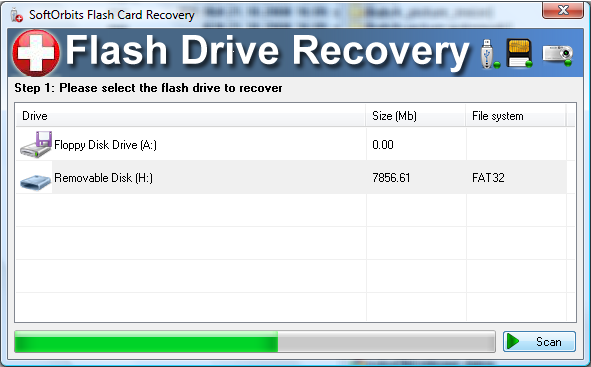
SoftOrbits Flash Drive Recovery is designed for exactly these users. The interface is clean, intuitive, and, most importantly, fully automated. When you launch the program, it presents you with a simple list of available drives. You don't have to tell the software what kind of file system it is (FAT32, exFAT, etc.); it detects it automatically. You don't have to specify the cluster size or the sector offset. You simply select the drive and hit the scan button.
The software then performs a deep scan of the flash media, looking for "footprints" of files that have been deleted or lost due to formatting. As a reviewer, I appreciate software that stays out of its own way. There are no confusing pop-ups asking for technical parameters. It is a "point-and-click" solution to a very complex problem. If you can navigate a basic website, you can use this software to save your data. This level of accessibility is why I recommend it to my non-tech friends and family.
4. Comprehensive File Type Support
A lot of flash recovery tools are "image only." They are designed specifically for photographers and often ignore everything else. While SoftOrbits is arguably the best-in-class for images, it doesn't stop there. It treats your data as a whole, supporting all types of files including documents, MP3s, videos, and archives.
For the photographers out there, the support for RAW files is a game-changer. When a professional memory card gets corrupted, losing the JPEGs is bad, but losing the RAW files (CRW, CR2, NEF, PEF, etc.) is a catastrophe. These files contain the uncompressed data from the camera's sensor and are essential for high-end editing. SoftOrbits recognizes these complex file structures and can reconstruct them even when the file directory has been wiped clean. It also handles all the standard formats like JPEG, JPG, TIFF, BMP, PNG, GIF, and TGA.
But think about the other uses for a flash drive. Maybe you have your entire music collection on a USB stick for your car. Or perhaps you use a flash drive to move important Excel spreadsheets and PDFs between your home and office. If that drive fails, you need a tool that doesn't discriminate based on file extension. This software’s ability to "scavenge" the drive for any recognizable file signature ensures that whether it's a home movie or a tax return, you have the best possible chance of getting it back.
5. Direct Recovery from Devices
This is a feature that many people overlook until they desperately need it. Sometimes, the problem isn't the memory card itself, but the connection or the device it is housed in. SoftOrbits Flash Drive Recovery allows for direct recovery from digital cameras and audio players (like MP3 players) that are connected to your computer via a USB cord. As long as the device mounts as a "drive letter" in Windows, the software can scan its internal memory or the card inside it just like a standard USB stick.
Why is this important? Because sometimes taking the card out of the camera is what causes the corruption in the first place, or perhaps the device uses internal storage that isn't removable. I’ve seen cases where a camera’s pins were bent, making it impossible to read the card in an external reader, but the camera could still "see" the card. By connecting the camera directly to the PC, SoftOrbits can bypass the external reader issues and communicate with the storage through the device's own firmware. It adds an extra layer of versatility that simple "card-only" recovery tools just can't match.
Furthermore, the software is compatible with a massive range of Windows versions. Whether you are running an old PC with Windows 2000 or XP, or a modern rig with Windows 8 or 10, the software remains stable and functional. This backward compatibility is essential because often the older devices we are trying to recover data from are only compatible with older operating systems. SoftOrbits has ensured that no matter how old your setup is, you have a fighting chance at recovery.
The Reviewer’s Verdict: Why You Need This Now
If you are reading this, you might not have a data emergency right now. But in the world of technology, it is not a matter of "if" your flash media will fail, but "when." Flash memory has a limited number of write cycles, and the file systems used on these drives are notoriously fragile. A simple mistake—like pulling the drive out of the port while it’s still writing—can lead to a "raw" drive that Windows refuses to open.
The reason I am so adamant about downloading this giveaway is that preparation is the best defense. When you lose data, your first instinct is to panic. In that state of panic, many people download untrustworthy "free" software that might actually overwrite their lost data or infect their computer with malware. By downloading and installing SoftOrbits Flash Drive Recovery now, you are putting a professional-grade safety net in place. You are giving yourself the peace of mind that if your wedding photos, your graduation thesis, or your favorite music collection disappears tomorrow, you have the exact tool needed to bring them back.
The brilliance of this software lies in its focus. By specializing in flash-based media, SoftOrbits has created a highly optimized engine that performs better on USB sticks and SD cards than expensive, bloated "all-in-one" recovery suites. It is lean, fast, and incredibly effective. The visual preview alone makes it worth its weight in gold, as it saves you from the frustration of "blind recovery."
In conclusion, SoftOrbits Flash Drive Recovery is a must-have utility. It combines professional-level data reconstruction algorithms with a user interface that anyone can understand. It supports a dizzying array of formats and devices, ensuring that your digital memories and professional documents are never truly gone, even if the drive they live on seems to have given up the ghost. Don't wait until the "Drive Not Formatted" error appears on your screen. Get this tool, keep it in your digital toolkit, and sleep a little easier knowing your data is protected by one of the best in the business.
Final thought: Data recovery services can cost hundreds, if not thousands, of dollars. They often use tools very similar to this one. By downloading this software, you are essentially putting a professional data recovery lab right on your desktop. It is a no-brainer for anyone who uses a camera, a smartphone, or a USB drive. Download it, run a scan on that "broken" drive you've been keeping in your desk drawer, and prepare to be amazed at what you can recover.

Reviews for Flash Drive Recovery
Click Here to Read Reviews for Flash Drive Recovery >> Click Here to Submit Reviews for Flash Drive Recovery >>