What Does OCR Reader Do?
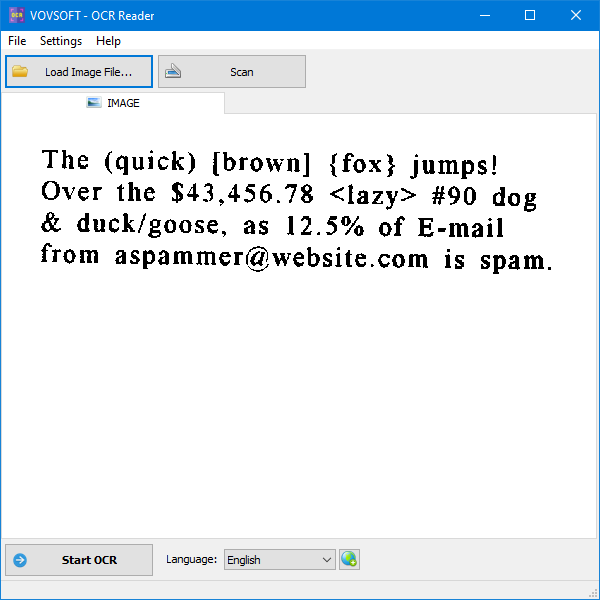
OCR Reader is a desktop application designed to extract text from various image formats and PDF files, including PNG, WEBP, JPEG, TIFF, GIF, and BMP. Operating entirely offline, the software ensures data privacy by processing all files locally without transmitting information to external servers. It is built upon the Tesseract OCR engine and utilizes Long Short-Term Memory (LSTM) neural networks for character and line recognition.
The utility features batch processing capabilities for multi-page documents and supports TWAIN and WIA protocols for direct scanning from hardware. To improve conversion precision, users can manually define specific recognition areas by dragging a selection box over the source material. The software offers three primary operation modes:
- Read One Text Block: Processes the image as a single, uniform section.
- Find Scattered Text: Identifies lines of text placed randomly throughout the image.
- Auto-Detect Layout and Orientation: Automatically determines text columns and orientation.
With support for more than 100 languages, including Arabic, Chinese, French, German, and Japanese, the tool handles diverse document types. A Multilingual detection option is also available for files containing multiple languages simultaneously. The software remains a lightweight solution for digitizing scanned documents while maintaining user control over sensitive data.
Top 5 Reasons To Download OCR Reader
Every single week, dozens of promotional software giveaways flood the internet, but let us be completely honest with each other: the vast majority of them end up being uninspiring utilities you will forget you ever installed. Every once in a while, however, a genuine gem comes along that solves a persistent, irritating digital problem with such elegance and efficiency that you wonder how you ever managed your daily workflow without it. Today, that standout tool is OCR Reader.
Whether you are a student trying to pull quotes out of scanned research papers, a legal professional wading through mountains of flattened PDF discovery documents, an accountant cataloging paper receipts, or just an everyday power user tired of retyping text locked inside images, an Optical Character Recognition tool is essential. While the internet is teeming with free online converters, almost all of them come with unacceptable compromises: privacy risks, page limits, mandatory subscriptions, or aggressive advertising. OCR Reader takes a drastically different approach by delivering a clean, lightweight, and completely localized desktop environment that turns static pixels into editable, searchable text in seconds.
Before we dive into the deep technical breakdown of why this utility deserves a permanent spot on your local drive, here is the quick executive summary of why you need to download this giveaway immediately.
- Uncompromising Offline Privacy: All image processing and text extraction occur strictly on your local machine, ensuring confidential files never touch an external cloud server.
- Neural Network Engine Powered by Tesseract: Driven by advanced LSTM neural networks, the software delivers exceptional line recognition and character accuracy across varied font types and noisy scans.
- Broad File Compatibility and Multipage Batch Processing: Effortlessly ingest PDFs, PNGs, JPEGs, TIFFs, GIFs, BMPs, and modern WEBP files, complete with bulk processing for multipage documents and direct hardware scanner support.
- Granular Layout Control and Custom Area Selection: Switch seamlessly between dedicated reading modes or draw manual bounding boxes to extract only the precise data blocks you need.
- World-Class Multilingual Recognition: Out-of-the-box support for over one hundred global languages, complete with a specialized multilingual mode that can transcribe documents containing multiple alphabets simultaneously.
Now that you have seen the highlights, let us examine why each of these capabilities makes this particular giveaway a must-have utility for your desktop toolkit.
1. Uncompromising Offline Privacy and Data Sovereignty
In the modern software ecosystem, almost every vendor tries to force your workflow into the cloud. When you search online for a way to convert an image or a flattened PDF into editable text, the top search results are inevitably software-as-a-service web portals. These sites tempt you with a quick drag-and-drop interface, but have you ever stopped to read their data retention policies? The moment you upload a bank statement, an intellectual property draft, an internal corporate invoice, a medical record, or an employee contract to a cloud-based converter, you have forfeited total control of that data. That document travels through unknown proxies, sits on remote staging servers, and may even be utilized to train proprietary machine learning algorithms.
OCR Reader completely eliminates this vulnerability. The single most compelling reason to install this software is that all character recognition is executed completely offline. Your processor and your system memory do all the heavy lifting. The program does not ping an external server to decipher glyphs, nor does it require a constant internet handshake to keep operating. You remain the sole controller and custodian of your private information from start to finish.
For corporate environments, remote workers handling proprietary data, freelance contractors bound by non-disclosure agreements, and security-conscious individuals, this offline architecture is not just a perk; it is a hard prerequisite. Beyond the obvious security benefits, offline functionality means you are never at the mercy of poor airport Wi-Fi, spotty mobile hotspots, or server outages. When you need to extract notes from a photographed whiteboard while on an airplane or transcribe an archival document deep in a library basement without an internet connection, OCR Reader performs flawlessly.
2. High-Accuracy AI Recognition Powered by Tesseract and LSTM
Any OCR software is only as good as its underlying engine. In the past, desktop optical character recognition relied on brittle pattern-matching rules. If a font had unusual kerning, if the scan was slightly crooked, or if the paper had minor background artifacts, traditional software would output unreadable gibberish. You would end up spending more time manually fixing typographical errors than it would have taken to simply retype the document from scratch.
OCR Reader bypasses these legacy shortcomings by harnessing the world-renowned Tesseract OCR engine, augmented with a modern Long Short-Term Memory (LSTM) neural network. For those unfamiliar with machine learning architectures, an LSTM network is a form of recurrent neural network that excels at processing sequences of data. Rather than evaluating characters in isolation, the engine analyzes entire lines of text dynamically, taking contextual letter sequences into account. This drastically improves recognition accuracy for complex typography, subtle ligatures, and uneven character spacing.
What this means for you in real-world usage is sheer reliability. Whether you feed it a crisp, high-resolution screenshot or a slightly faded legacy scan with degraded contrast, the neural network identifies character shapes and word boundaries with remarkable fidelity. It dramatically reduces common transcription errors, such as misinterpreting the letter l for the number 1, or confusing uppercase O with the digit 0. Getting this caliber of neural engine in a clean, responsive, and lightweight desktop shell without a recurring monthly subscription fee makes this giveaway an exceptional value proposition.
3. Broad Format Compatibility, Batch Capabilities, and Hardware Integration
A major friction point with many specialized utilities is poor file format interoperability. You find a program that converts images, only to discover it balks at multipage PDFs. Or you find a tool designed for PDFs that refuses to open an uncompressed TIFF or a modern web image. OCR Reader successfully sidesteps these annoyances by functioning as a versatile Swiss Army knife for document capture.
The program supports virtually every graphic standard you are likely to encounter in modern computing. You can load standard JPEG photographs, lossless PNG captures, older BMP files, animated or static GIF assets, high-resolution TIFF archives, and next-generation WEBP graphics. More importantly, it natively handles PDF files, which represent the universal standard for business and administrative documentation.
Where the tool truly shines is its multipage batch processing. Converting a single screenshot is simple, but converting a sixty-page scanned contract or an entire thesis chapter by hand is an exhausting chore. OCR Reader allows you to feed in multipage PDF documents and batch-process the entire payload in one go, extracting the raw text sequentially without requiring you to split the file into individual sheets. Furthermore, if you are working directly with physical paper, the software interfaces directly with hardware scanners using industry-standard TWAIN and WIA protocols. You can load a stack of paper into your desktop scanner, trigger the digitization process right from the software, and pull text directly from the physical page into your clipboard in a single fluid operation.
4. Precision Cropping and Intelligent Layout Detection Modes
Not every document is a neatly typed, full-page letter. Real-world documents are messy. They feature multiple newspaper columns, sidebar advertisements, fragmented receipts, footers, headers, watermarks, and scattered notes. When typical OCR utilities attempt to parse a complex page, they frequently mix up column orders, reading straight across a page and merging completely unrelated sentences together into a chaotic mess.
OCR Reader provides two distinct levels of control to combat this problem: structural layout algorithms and intuitive manual cropping.
First, the software comes equipped with specialized OCR processing modes tailored to different structural layouts:
- Read One Text Block: Ideal for books, articles, reports, and uniform documents where the text flows continuously in a single standard layout. This mode speeds up conversion significantly by skipping complex column calculations.
- Find Scattered Text: A lifesaver when dealing with messy receipts, handwritten forms with spatial gaps, fragmented mind maps, or packaging labels where words are placed unpredictably across the canvas.
- Auto-Detect Layout and Orientation: The ultimate hands-off setting. The software automatically diagnoses the orientation of the text, corrects for skewed angles, and segregates distinct columns so that multi-column layouts maintain their intended reading flow.
Second, if you only need a specific piece of information from an otherwise crowded page, you do not have to process the entire image. OCR Reader allows you to simply click and drag a selection rectangle over any portion of the document. By creating this custom bounding box, the software crops and scans exclusively the targeted zone. This not only yields instantaneous recognition speeds, but it also prevents unwanted headers, margins, or background noise from contaminating your final text output.
5. Massive Global Polyglot and Multilingual Support
We live and work in an interconnected global digital economy. It is increasingly common to encounter documentation containing foreign quotes, multinational legal disclaimers, or dual-language user manuals. Many entry-level transcription programs fall flat the moment they encounter an accent mark, a non-Latin character, or a right-to-left writing system. OCR Reader stands out as a genuine international powerhouse.
Because it leverages Tesseract's comprehensive language repositories, the software supports more than 100 languages worldwide. The trained language models cover an astonishing breadth of human writing systems, including:
- European and Slavic Alphabets: English, French, German, Spanish, Italian, Portuguese, Dutch, Czech, Polish, Slovak, Slovenian, Romanian, Hungarian, Bulgarian, Russian, Ukrainian, Danish, Finnish, Norwegian, Swedish, Faroese, and Greek.
- East Asian and Character-Based Scripts: Chinese (Simplified), Chinese (Traditional), Japanese, and Korean.
- Middle Eastern and Right-to-Left Scripts: Arabic, Persian, Hebrew, and Urdu.
- South and Southeast Asian Languages: Hindi, Bengali, Punjabi, Tamil, Telugu, Thai, Lao, and Vietnamese.
- Additional Regional Tongues: Turkish, Latvian, and dozens of other localized linguistic datasets.
Even more impressive is the integrated Multilingual detection mode. While standard software forces you to pick one language and produces corrupted output if another language appears on the same page, OCR Reader can evaluate multiple linguistic datasets simultaneously. If you have an academic paper with English analytical commentary wrapped around ancient Greek or German citations, or a technical diagram labeled in both Japanese and English, the software smoothly identifies and transcribes both scripts accurately in a single sweep.
The Tech Reviewer Verdict: Why You Should Claim This Today
When reviewing desktop utilities, my highest praise is always reserved for programs that follow the classic Unix philosophy: do one specific job, do it extraordinarily well, keep the footprint light, and respect the user. OCR Reader represents this philosophy in action. In an industry dominated by bloated, subscription-hungry document suites that consume gigabytes of system memory just to perform basic file conversions, this lightweight, focused desktop tool is a breath of fresh air.
It demands very little in the way of hardware resources, boots up instantly, contains zero telemetry bloatware, and does not hold your personal files hostage behind an internet connection. Whether you need it right now to rescue unsearchable documents or want to stash it away in your digital toolbox for the inevitable moment you need to extract text from a locked graphic, this giveaway delivers undeniable utility. Secure, powerful, intelligent, and versatile, OCR Reader is a definitive must-download for any organized computer user.

Reviews for OCR Reader
Click Here to Read Reviews for OCR Reader >> Click Here to Submit Reviews for OCR Reader >>