What Does YouTube Music Converter Do?
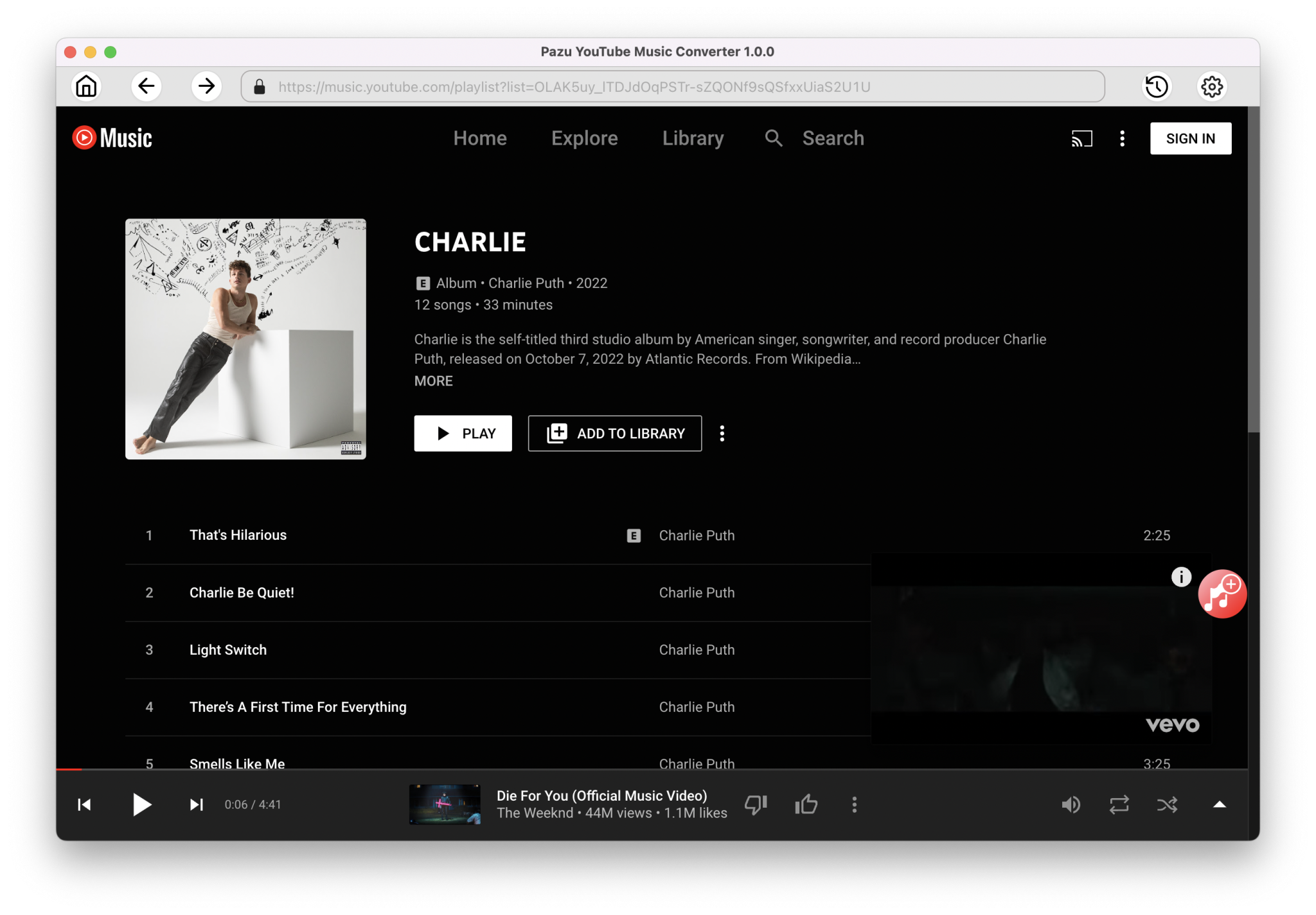
Pazu YouTube Music Converter is a utility designed to bridge the gap between streaming services and local file management. The software allows users to extract audio from YouTube Music into several high-fidelity and standard formats, including MP3, M4A, AAC, FLAC, WAV, and AIFF. Unlike basic recording tools, Pazu integrates a built-in YouTube Music web player, enabling users to browse and select content directly within the application interface.
The converter is compatible with both ad-supported free accounts and YouTube Music Premium subscriptions. Key features include:
- Bulk Downloading: Convert entire albums or playlists in a single session.
- Metadata Preservation: Automatically retains ID3 tags, including cover art, artist names, and album titles.
- Selective Extraction: Download songs from artist pages or bypass specific tracks within a playlist.
- Offline Accessibility: Transfer files to any device for playback without an internet connection.
By converting streaming content into standalone audio files, the software facilitates cross-platform compatibility. This allows users to maintain their music libraries on various hardware, from dedicated MP3 players to mobile devices, without requiring the native YouTube Music application or an active data plan. The tool is designed to provide a factual 1:1 conversion of the source audio while ensuring that all relevant track information remains embedded in the final file.
Top 5 Reasons To Download YouTube Music Converter
- Complete Freedom from Subscriptions and Data Constraints: Download your favorite tracks and listen offline on any device without needing a YouTube Music Premium account or an active internet connection.
- High-Fidelity Audio Quality and Format Versatility: Convert music into multiple high-quality formats including MP3, M4A, AAC, and lossless options like FLAC, WAV, and AIFF to suit any hardware.
- Built-in Browser Integration for Seamless Downloads: Forget the hassle of copying and pasting links; the integrated web player allows you to browse and select songs directly within the software.
- Professional-Grade Metadata and ID3 Tag Retention: Automatically preserve all essential information, including album art, artist names, and track titles, keeping your library perfectly organized.
- Effortless Batch Conversion and Artist-Level Control: Save hours of time by downloading entire albums, curated playlists, or every track from a specific artist page with a single click.
In the modern era of digital streaming, we have become accustomed to the idea of "renting" our music. We pay a monthly fee, and in exchange, we get access to a massive library of songs. But the moment that subscription ends, or the moment you step onto a plane without Wi-Fi, that music vanishes. As a tech reviewer who has seen dozens of tools claiming to "bridge the gap" between streaming and ownership, I can tell you that most fall short. They are either clunky, filled with malware, or produce audio that sounds like it was recorded in a tin can. Then comes the Pazu YouTube Music Converter. This isn't just another utility; it is a specialized powerhouse designed to give the power back to the listener. If you have been looking for a way to truly own your digital library, this giveaway is the golden ticket you have been waiting for. Let’s dive deep into why this software is an absolute essential for your toolkit.
1. Complete Freedom from Subscriptions and Data Constraints
The most significant hurdle with modern music streaming is the "walled garden" effect. YouTube Music is a fantastic platform with an incredible algorithm, but it wants to keep you locked inside its app. If you are a free user, you are bombarded with ads and restricted from downloading songs for offline use. Even if you are a Premium subscriber, those "downloads" are encrypted files that only work within the YouTube Music app. You can’t put them on a generic MP3 player, you can’t burn them to a CD for an older car, and you certainly can’t move them to a non-supported device.
This is where the Pazu YouTube Music Converter changes the game. By downloading this software, you are effectively breaking down those walls. It allows both ad-supported listeners and Premium members to extract audio and save it as a local file. Imagine going on a long hike, a cross-country flight, or a road trip through a cellular dead zone. With this tool, you don't have to worry about buffering or data overage charges. You have your files, sitting right on your hard drive or SD card, ready to play on any media player imaginable. This isn't just about convenience; it’s about digital sovereignty. You are no longer at the mercy of a subscription service's terms of use. Once you download the file via Pazu, it is yours to keep, forever.
Furthermore, for those who are conscious of their mobile data usage, this software is a lifesaver. Streaming high-quality audio on the go can eat through a data plan in a matter of days. By using Pazu to download your playlists over your home Wi-Fi and then transferring them to your phone, you can keep your data usage at zero while still enjoying your favorite tunes at the highest possible quality.
2. High-Fidelity Audio Quality and Format Versatility
As a reviewer, I am often asked: "Why not just use one of those free online websites that rips audio from a video link?" My answer is always the same: Quality. Those free sites often use terrible compression algorithms that strip the life out of the music. They produce muddy bass, screechy highs, and a narrow soundstage. Pazu is a professional-grade tool, and it treats audio with the respect it deserves.
The software supports a wide range of output formats, which is a dream for both casual listeners and audiophiles. If you need maximum compatibility for an old iPod or a smart TV, you can opt for MP3 or M4A. If you are an Apple user, AAC is the industry standard for high-efficiency coding. But where Pazu truly shines is its support for lossless formats like FLAC, WAV, and AIFF. For the purists who have invested in high-end headphones or a dedicated home theater system, being able to download music in a lossless format from the YouTube Music library is a massive advantage. You get to hear the music exactly as it was intended, with all the nuance and detail preserved.
The flexibility here cannot be overstated. You aren't forced into a one-size-fits-all solution. You can choose the bitrate and the format that fits your specific needs. Whether you are trying to save space on a small device or maximize fidelity for a high-end setup, Pazu gives you the knobs and dials to customize your experience. It’s professional-level conversion software made accessible for everyone.
3. Built-in Browser Integration for Seamless Downloads
One of the biggest pain points with older music downloaders was the "copy-paste dance." You had to have your browser open, find the song, copy the URL, switch to the downloader, paste the link, and hope the software could parse the data. It was slow, tedious, and prone to errors. Pazu YouTube Music Converter does away with this entire workflow by integrating a built-in YouTube Music web player directly into the application.
When you open Pazu, you are presented with a familiar interface. It looks and feels just like the YouTube Music web player you already know. You log in, browse your personalized recommendations, search for new artists, or access your saved playlists exactly as you would in a standard browser. When you find something you want to keep, you don’t need to copy a single link. You simply click the "Add" button, and the software intelligently identifies the tracks on the page.
This integration makes the software incredibly intuitive. There is virtually no learning curve. If you know how to use YouTube Music, you know how to use Pazu. It also makes the process much faster. You can browse and queue up dozens of songs in seconds. This user-centric design is what separates a "utility" from a "product." Pazu feels like a premium extension of your music-listening habit rather than a clunky third-party add-on.
4. Professional-Grade Metadata and ID3 Tag Retention
Anyone who has ever managed a large digital music library knows the nightmare of "Unknown Artist" and "Track 01." Having a folder full of files is useless if you can’t tell what they are or if your media player can’t organize them into albums. Many low-end converters strip away all the metadata, leaving you with a disorganized mess that requires hours of manual tagging.
Pazu handles this with surgical precision. When it converts a track, it doesn't just grab the audio; it harvests all the associated ID3 tags. This includes the song title, the artist name, the album title, the year of release, and even the high-resolution cover art. When you import these files into iTunes, VLC, Windows Media Player, or your mobile device, they appear perfectly organized. You get the beautiful album covers on your screen, and your library remains searchable by genre, artist, or year.
This attention to detail is what makes Pazu a "professional" tool. It understands that for music lovers, the presentation and organization of a library are just as important as the audio itself. It saves you the immense labor of manual organization, ensuring that your transition from streaming to local storage is as smooth and aesthetically pleasing as possible. Your digital shelf will look just as good as a physical record collection.
5. Effortless Batch Conversion and Artist-Level Control
We live in an age of abundance. We don't just want one song; we want the entire discography. We want every track from our "Summer 2024" playlist or every song an artist has ever released. Manually downloading these one by one would be an exercise in frustration. Pazu is built for scale, offering robust batch conversion capabilities that are truly impressive.
With Pazu, you can navigate to an artist's page and, with a few clicks, select their entire catalog for download. You can open a playlist containing hundreds of songs and tell the software to "convert all." The software then goes to work in the background, processing the files with incredible speed. It even gives you the option to bypass specific songs you don't want, giving you granular control over what ends up on your hard drive.
This efficiency is a game-changer for anyone looking to build a massive library quickly. Whether you are archiving your favorite tracks for posterity or preparing a massive library for an offline device, Pazu handles the heavy lifting. It’s reliable, it’s fast, and it doesn't crash under the weight of a 500-song queue. In the world of tech tools, reliability at scale is the ultimate mark of quality, and Pazu delivers it in spades.
In conclusion, the Pazu YouTube Music Converter is not just a tool for "ripping" music. It is a comprehensive solution for anyone who values their time, their audio quality, and their freedom. It turns the ephemeral world of streaming into a permanent, high-quality collection that you control. Whether you are an audiophile looking for lossless FLAC files, a traveler needing offline access without Premium, or a collector who wants their metadata to be perfect, this software is the answer. This giveaway is a rare opportunity to grab a professional-grade piece of software that will fundamentally change how you interact with your music. Do not let this pass you by. Download it, convert your favorite tracks, and start listening to your music on your own terms today.

Reviews for YouTube Music Converter
Click Here to Read Reviews for YouTube Music Converter >> Click Here to Submit Reviews for YouTube Music Converter >>